
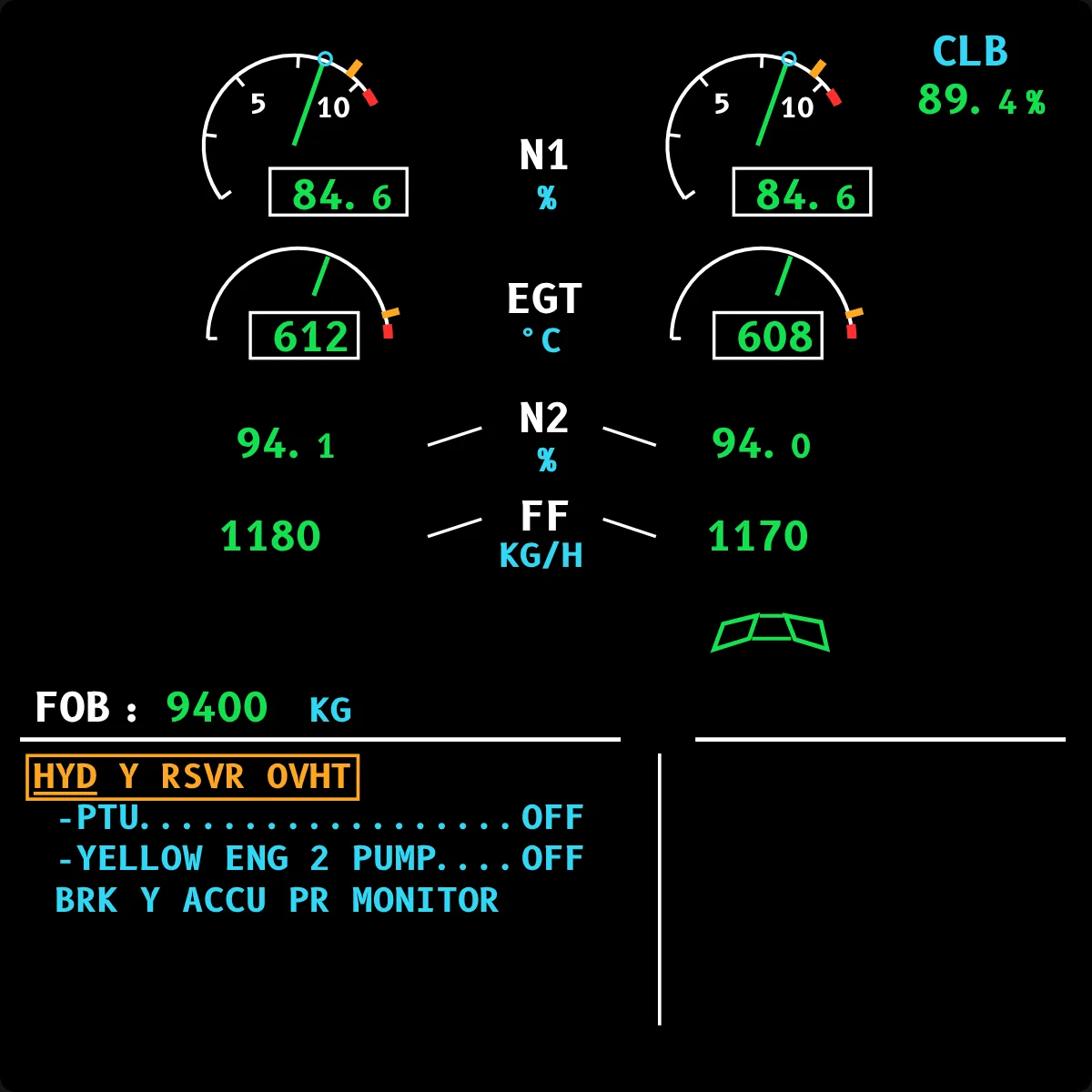
HYD Y RSVR OVHT
Yellow's reservoir overheat has three switches to it, the PTU first. Here is why the FCTM wants the PTU off, what the live aircraft does if it does not, why the crew then watches the yellow brake accumulator, and what yellow takes with it.
Written and checked by current A320 pilotschecked against the FCOM on Our editorial policy
What HYD Y RSVR OVHT means
HYD Y RSVR OVHT is an amber caution: the fluid returning to the yellow reservoir is too hot: 93 °C or more in one version of the triggering conditions, for some aircraft, and 98 °C or more in another, for others.
The ECAM has the crew switch yellow off in a set order: the PTU first, which the FCTM says should go off without delay, then the yellow engine pump and the yellow electric pump. Yellow is then lost, Y SYS LO PR follows, and the crew monitors the yellow brake accumulator. If the overheat goes out, STATUS has the engine pump back on.
Sources FCOM PRO-ABN-HYD HYD / FCOM PRO-ABN-HYD HYD Y RSVR OVHT / FCOM DSC-29-20 ECAM HYD PAGE / FCTM PR-AEP-HYD HYDRAULIC GENERATION PARTICULARITIES
At a glance
- Level
- Amber caution, level 2: single chime and a steady amber MASTER CAUT light
- Sets it off
- Yellow fluid at 93 °C or more in one version of the triggering conditions, for some aircraft, 98 °C or more in another, for others
- Lights
- FAULT in the YELLOW ENG 2 PUMP, YELLOW ELEC PUMP and PTU pushbuttons; OVHT by the yellow reservoir on the HYD page
- The lines
- PTU, YELLOW ENG 2 PUMP and YELLOW ELEC PUMP off, then BRK Y ACCU PR MONITOR
- Then
- Y SYS LO PR, with *F/CTL as a secondary failure
- Landing
- STATUS: the yellow engine pump back on if the overheat goes out; if not, the landing distance procedure
Sources FCOM DSC-31-10 WARNING/CAUTION CLASSIFICATION / FCOM DSC-31-30 ATTENTION GETTERS / FCOM PRO-ABN-HYD HYD / FCOM PRO-ABN-HYD HYD Y RSVR OVHT / FCOM DSC-29-20 OVERHEAD PANEL / FCOM DSC-29-20 ECAM HYD PAGE
What sets it off, and does the type matter?
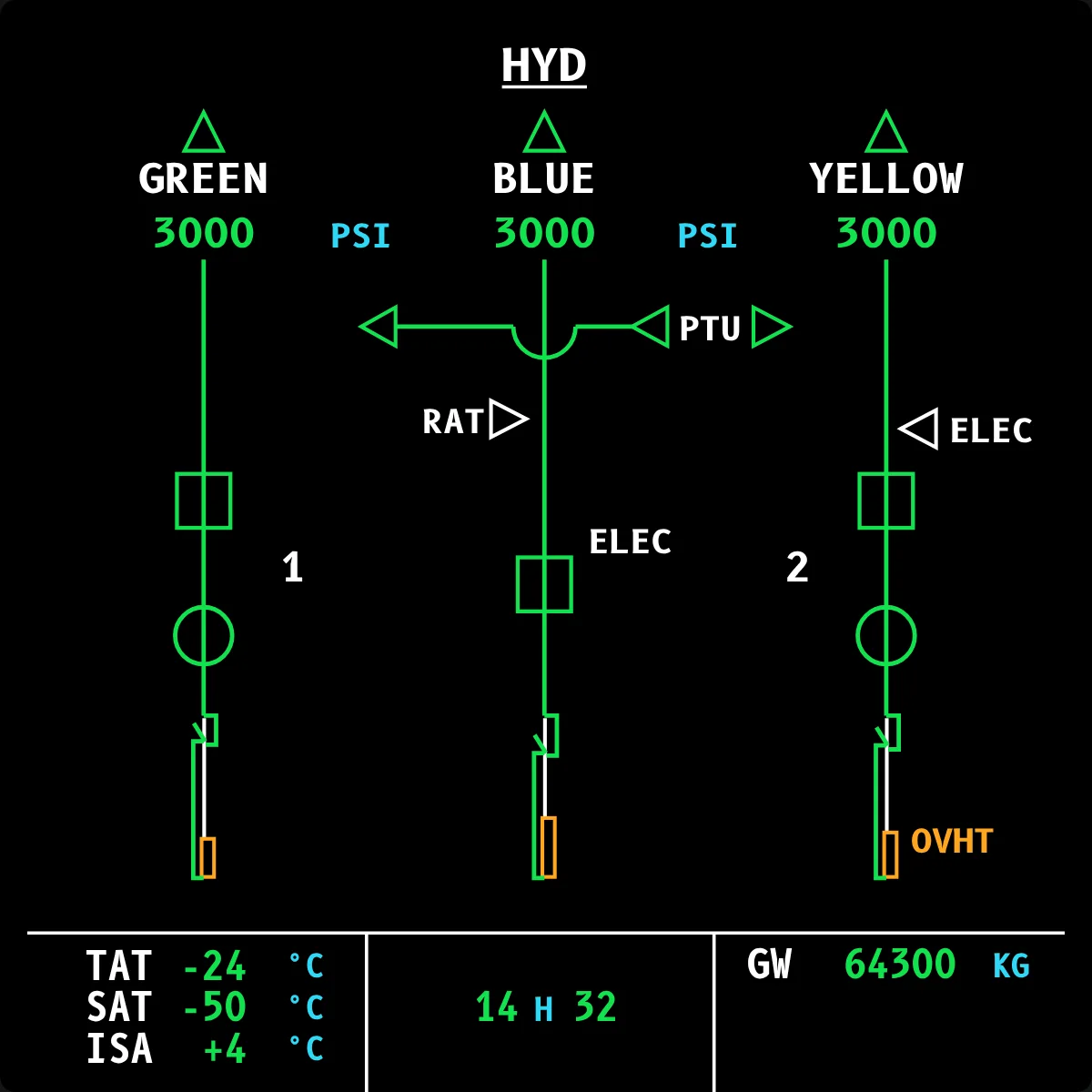
The HYD page's OVHT under the yellow reservoir comes up in amber, with the caution, when the returning fluid at the reservoir's inlet is above normal. The threshold differs between two versions of the triggering conditions, each for some aircraft: in one the caution triggers at 93 °C or more and resets at 88 °C or less; in the other at 98 °C or more, resetting at 93 °C or less.
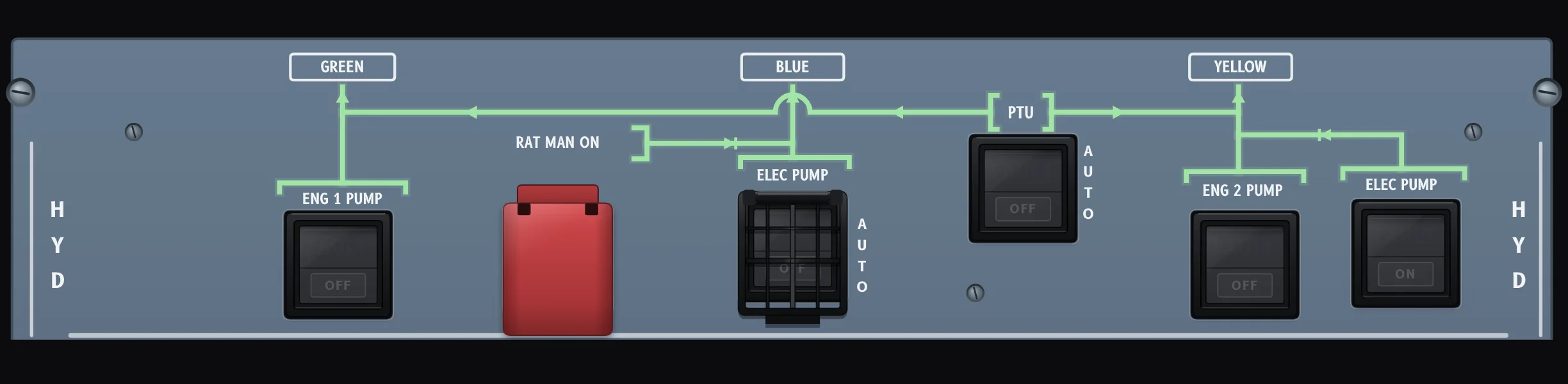
Three pushbuttons react on the HYD panel. The FAULT lights of the YELLOW ENG 2 PUMP and the YELLOW ELEC PUMP both cover a reservoir overheat, and so does the PTU's, for a green or a yellow reservoir. Each goes out when the crew selects OFF, except during an overheat: then it stays on as long as the overheat lasts.
Sources FCOM DSC-29-20 ECAM HYD PAGE / FCOM PRO-ABN-HYD HYD / FCOM PRO-ABN-HYD HYD Y RSVR OVHT / FCOM DSC-29-20 OVERHEAD PANEL
One overheat, three FAULT lights
What does the crew see and hear?
A level 2 amber caution: a single chime, MASTER CAUT steady amber, the message in amber on the E/WD and the SD normally calling up the relevant system page. The crew should be aware of it without immediate action, and, time and situation permitting, consider it without delay to prevent any further degradation of the system.
Sources FCOM DSC-31-10 WARNING/CAUTION CLASSIFICATION / FCOM DSC-31-30 ATTENTION GETTERS
The moment the caution comes on
A healthy aircraft in the cruise, all three systems normal. Press the button to overheat the yellow reservoir, then look at the E/WD, the HYD page and the HYD panel.
The alert Overheat the yellow reservoir
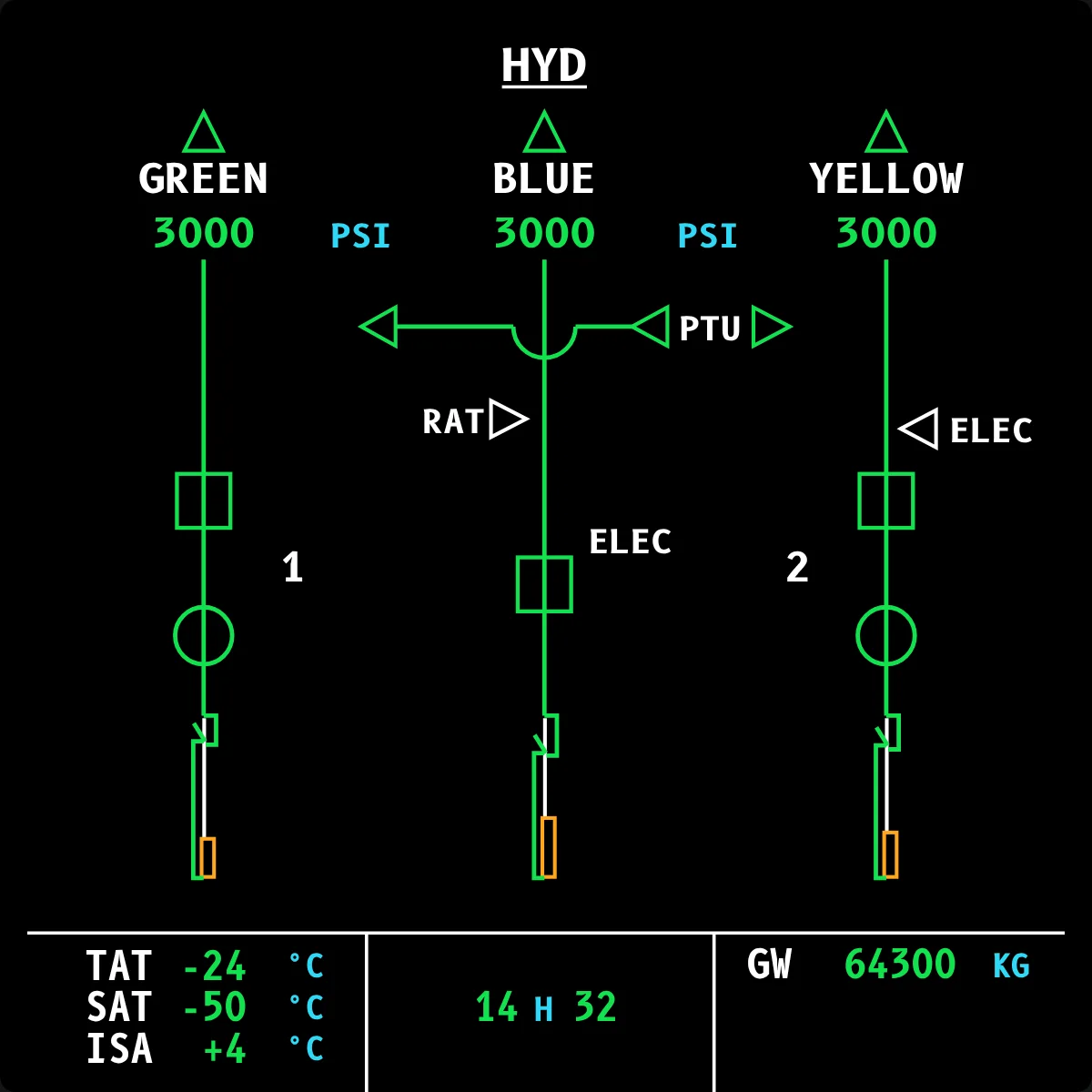
The E/WD shows HYD Y RSVR OVHT in amber with PTU OFF, YELLOW ENG 2 PUMP OFF and BRK Y ACCU PR MONITOR. The HYD page shows OVHT in amber by the yellow reservoir, and the HYD panel shows FAULT in the PTU and in both yellow pump pushbuttons.
The FCOM's procedure also has YELLOW ELEC PUMP, OFF; the live E/WD leaves that line out, as the live aircraft's yellow electric pump is already off. Yellow is still at 3 000 psi from its engine pump. Working the lines is what the ECAM Trainer does with you.
Sources FCOM PRO-ABN-HYD HYD / FCOM DSC-29-20 ECAM HYD PAGE / FCOM DSC-29-20 OVERHEAD PANEL
Why does the PTU go off without delay?
The FCTM answers directly. After a reservoir low level, a reservoir overheat or a reservoir low air pressure, the PTU must be switched off as the ECAM asks, to avoid a PTU overheat that may occur two minutes later, and "a PTU overheat may lead to the loss of the second hydraulic circuit." For HYD Y RSVR OVHT it says the PTU should go off without delay.
Set to OFF, the PTU pushbutton closes both the green and the yellow PTU electrohydraulic valves, and power transfer stops. In AUTO, by contrast, the PTU runs by itself when green and yellow differ by more than 500 psi, though it is inhibited during the first engine start; in flight, the FCTM says, this covers the loss of one engine or one engine driven pump.
Sources FCTM PR-AEP-HYD HYDRAULIC GENERATION PARTICULARITIES / FCOM DSC-29-20 OVERHEAD PANEL / FCOM DSC-29-10-20 POWER TRANSFER UNIT (PTU)
What the PTU would do
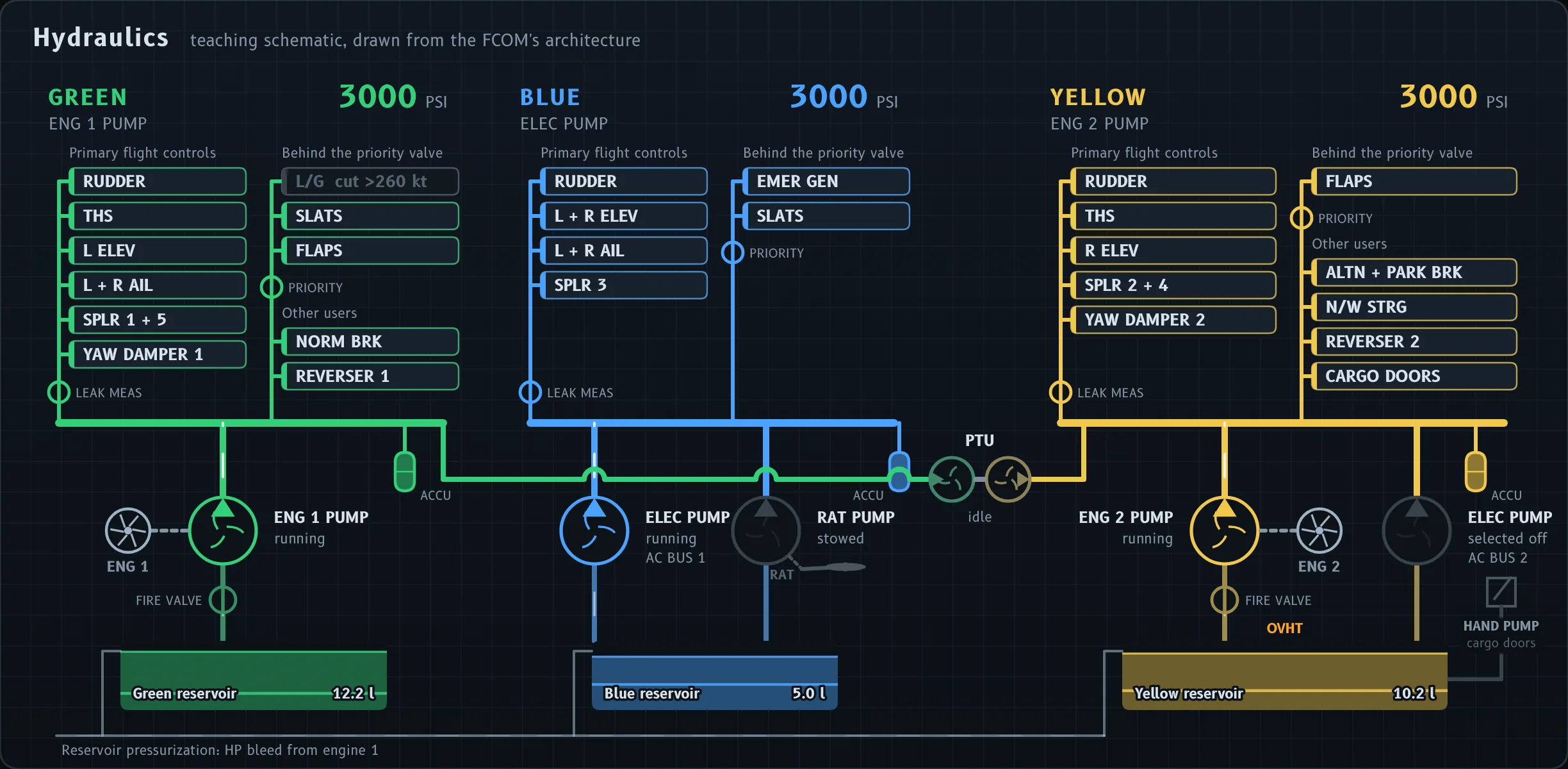
Yellow's reservoir is overheating. Here, out of the ECAM's order on purpose, switch the yellow engine pump off with the PTU still in AUTO, then switch the PTU off, and watch the schematic.
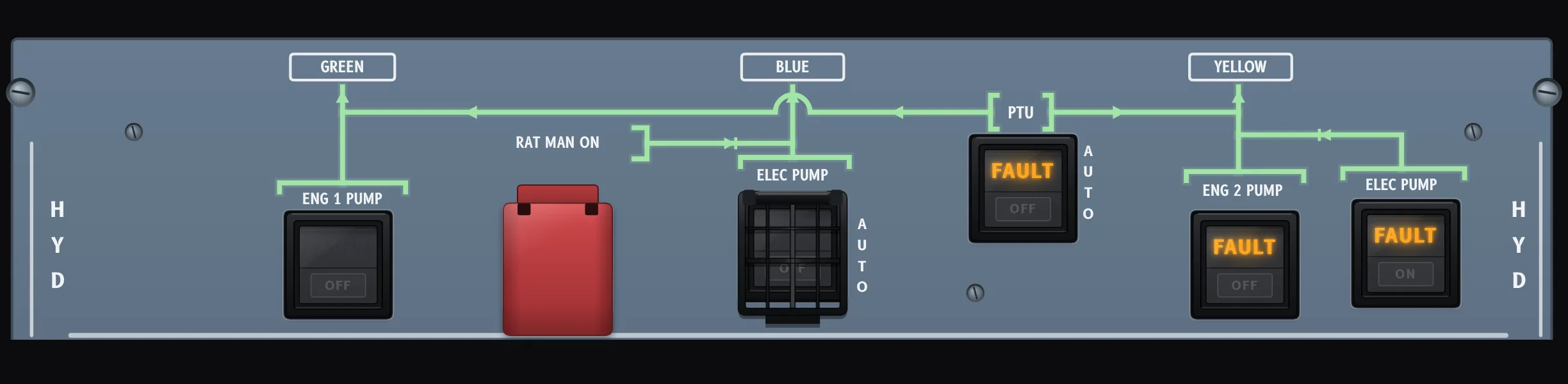
-
Predict With the PTU still in AUTO, what keeps yellow pressurised once its engine pump is off?
Try it Switch YELLOW ENG 2 PUMP off, leaving the PTU in AUTO.
Yellow's pressure drops, green is now more than 500 psi above it, and the PTU starts by itself, pressurising yellow from green. In AUTO it needs no one to tell it.
This is the unit the FCTM wants off without delay in a reservoir overheat, and the ECAM puts it before either pump.
Sources FCOM DSC-29-10-20 POWER TRANSFER UNIT (PTU) / FCOM DSC-29-20 OVERHEAD PANEL / FCOM PRO-ABN-HYD HYD / FCTM PR-AEP-HYD HYDRAULIC GENERATION PARTICULARITIES
-
Predict Now the PTU goes off. What happens to yellow?
Try it Switch the PTU off.
Both PTU valves close and power transfer stops; with its engine pump off and its electric pump off, yellow has no pump left pressurising it. Green, on its engine 1 pump, is untouched. In this model, the ECAM's own order ends here too, without the PTU ever running for yellow.
Sources FCOM DSC-29-20 OVERHEAD PANEL / FCOM DSC-29-10-20 YELLOW SYSTEM PUMPS / FCOM PRO-ABN-HYD HYD
Why watch the yellow brake accumulator?
After the three switches, the procedure has BRK Y ACCU PR MONITOR. The FCOM explains it: the check is recommended to cover a pipe rupture, which could empty the hydraulic system and the accumulator together, and if that happens, the accumulator's loss should show on its indicator within 10 minutes.
In that case the only braking left is the normal brakes, on green pressure. The parking brake is not available and should not be used, and the chocks should be in place before engine 1 is shut down.
Sources FCOM PRO-ABN-HYD HYD
What does the aircraft lose with yellow?
Once the engine pump is off, Y SYS LO PR follows: the procedure lists it with FUEL CONSUMPT INCRSD and FMS PRED UNRELIABLE as associated procedures, and *F/CTL as the secondary failure. STATUS then lists what goes: YELLOW HYD, SPLR 2 + 4, CAT 3 DUAL, N/W STRG, REVERSER 2, YAW DAMPER 2 and, where fitted, STEEP APPR. Its information lines include FLAPS SLOW and CAT 3 SINGLE.
Yellow's share of the surfaces it shares with other systems, the rudder, the stabiliser and the right elevator, goes with it. The cargo doors are on yellow too; its hand pump can operate them when no electrical power is available.
Sources FCOM PRO-ABN-HYD HYD / FCOM DSC-29-10-30 DISTRIBUTION / FCOM DSC-29-10-20 YELLOW SYSTEM PUMPS
What goes with yellow
What is lost afterwards?
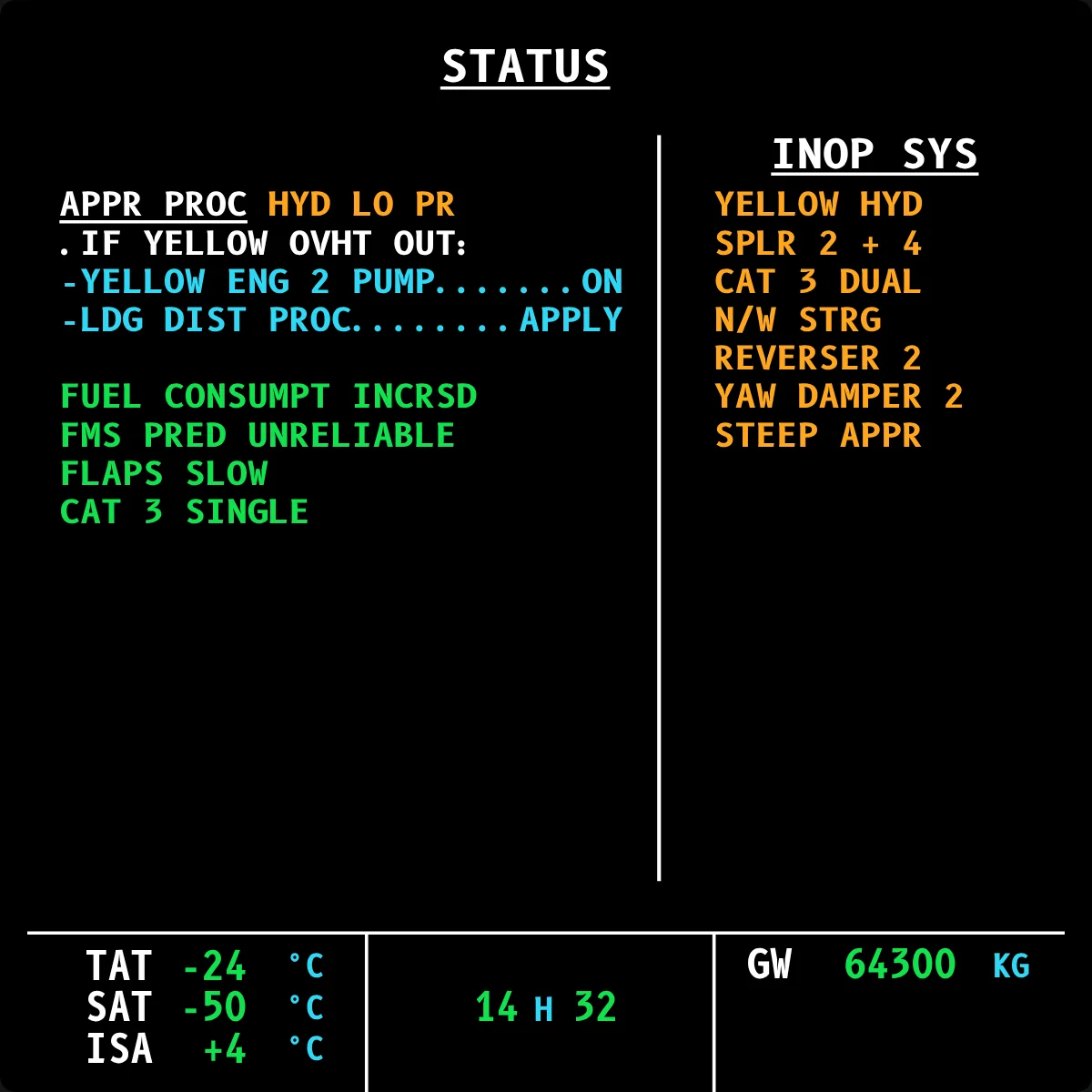
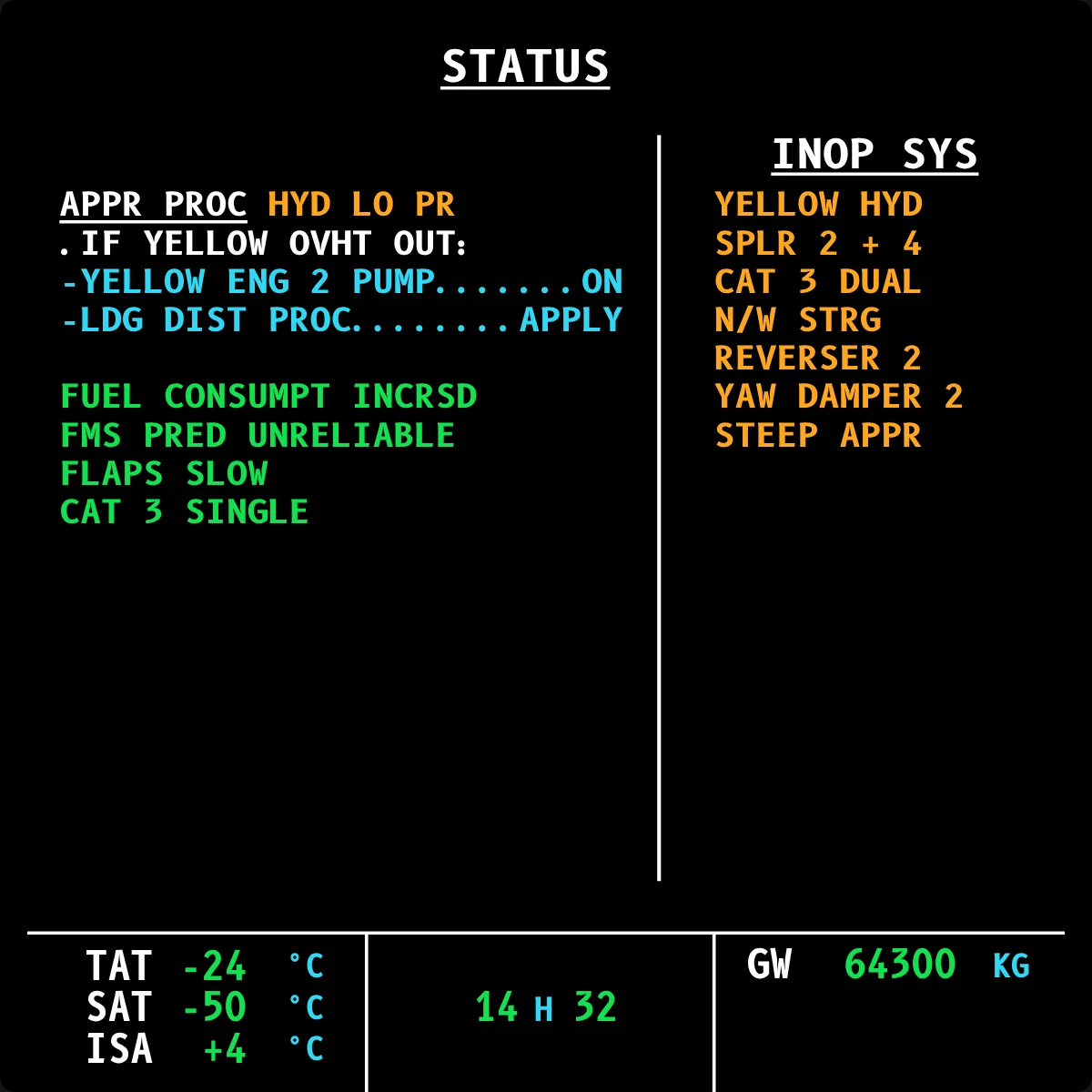
STATUS is the SD's operational summary of the aircraft's state. Under APPR PROC, HYD LO PR, the way back is the engine pump: if the yellow overheat goes out, YELLOW ENG 2 PUMP goes back ON. If yellow is not recovered, the landing distance procedure applies.
Its information lines, in green, are FUEL CONSUMPT INCRSD, FMS PRED UNRELIABLE, FLAPS SLOW and CAT 3 SINGLE. The INOP SYS list in amber names what went with yellow.
Which version applies depends on your aircraft: check your own FCOM.
Sources FCOM PRO-ABN-HYD HYD / FCOM DSC-31-20 STATUS PAGE
A319ceo, A320ceo, A320neo, A321neo: what differs?
| A319ceo, A320ceo | A320neo, A321neo | |
|---|---|---|
| Alert threshold | Not given by type: one version triggers at 93 °C or more and resets at 88 °C or less; the other at 98 °C or more, resetting at 93 °C or less | Not given by type: one version triggers at 93 °C or more and resets at 88 °C or less; the other at 98 °C or more, resetting at 93 °C or less |
| The procedure | The same in every version | The same in every version |
| STATUS | Not given by type: as drawn, from the version without a footnote | Not given by type: the other version footnotes YAW DAMPER 2 for when both engines are running |
The FCOM prints the STATUS in two versions, each for a list of aircraft rather than a type. One of them adds a footnote to YAW DAMPER 2, for when both engines are running; in the cruise with both engines running, both versions read the same.
Sources FCOM PRO-ABN-HYD HYD / FCOM PRO-ABN-HYD HYD Y RSVR OVHT

Work HYD Y RSVR OVHT as a crew
Read and do each line against the FCOM, with the E/WD, the SD page and the overhead following your hands, the PF and PM calls, and a debrief that says what you missed.
Work this failure in the ECAM TrainerGo further
Written in our own words from the FCOM and the FCTM; each part names the units it rests on. The E/WD, the STATUS and the live aircraft are the platform's own ECAM and systems model, the same the ECAM Trainer and the flight deck run. This page explains the procedure; it is not the procedure. Aircraft differ by type, engine and options: your aircraft's FCOM, your QRH and your operator's procedures always come first. How we write and check these pages.
Every ECAM procedure, line by line, against the FCOM.
The ECAM Trainer works 108 scenarios with the E/WD, the SD page and the overhead following your hands. Start free today, or open everything with A320 Knowledge+.
For study and revision only. Always follow your operator's approved documentation and procedures. A320 Knowledge is independent and not affiliated with Airbus.
Related
- HYD B+Y SYS LO PRA red warning: blue and yellow are lost and green is left alone, still in normal law.
- HYD B ELEC PUMP LO PRAn amber caution that costs a whole system.
- HYD B RSVR LO LVLAn amber caution: the blue system is losing its fluid.
- HYD B RSVR OVHTAn amber caution with one line, and the FCOM's own worked example of the ECAM.
- A320 hydraulic systemThe system guide, with the live aircraft
- Every ECAM procedureThe alerts the ECAM Trainer works, grouped by system