
HYD G RSVR OVHT
An amber caution set off by the green fluid's temperature, not by a loss of pressure, after which the crew switches green off. Here is what the overheat detection watches, why the PTU goes off first, in the FCTM's words, and what green's loss leaves for the landing, with the live aircraft at the moment the caution comes on.
Written and checked by current A320 pilotschecked against the FCOM on Our editorial policy
What HYD G RSVR OVHT means
HYD G RSVR OVHT is an amber caution: the green hydraulic fluid returning to its reservoir is too hot: at or above 93 °C in one version of the triggering conditions, for some aircraft, and 98 °C in another, for others.
The ECAM has the crew switch the PTU off first, then the green engine pump, and green is lost. The FCTM gives the reason for the PTU: it goes off to avoid a PTU overheat, which may occur two minutes later and may cost the second system. STATUS keeps a way back, the pump ON if the overheat goes out, and otherwise plans a gravity gear extension.
Sources FCOM PRO-ABN-HYD HYD G RSVR OVHT / FCOM PRO-ABN-HYD HYD / FCOM DSC-29-20 ECAM HYD PAGE / FCOM PRO-ABN-HYD ABNORMAL AND EMERGENCY PROCEDURES / FCTM PR-AEP-HYD HYDRAULIC GENERATION PARTICULARITIES
At a glance
- Level
- Amber caution, level 2: single chime, MASTER CAUT and the HYD page on the SD
- Sets it off
- Green fluid temperature at or above 93 °C in one version of the triggering conditions, for some aircraft, 98 °C in another, for others
- Lights
- FAULT in ENG 1 PUMP and in PTU on the overhead HYD panel; OVHT in amber under the green reservoir on the HYD page
- Procedure
- PTU OFF, then GREEN ENG 1 PUMP OFF; G SYS LO PR follows, with *WHEEL and *F/CTL
- The FAULT lights
- Stay on with OFF selected for as long as the overheat lasts
- STATUS
- IF GREEN OVHT OUT, the pump back ON; if not recovered, the gear down by gravity and the landing distance procedure
Sources FCOM PRO-ABN-HYD HYD G RSVR OVHT / FCOM PRO-ABN-HYD HYD / FCOM DSC-31-10 WARNING/CAUTION CLASSIFICATION / FCOM DSC-31-20 SYSTEM PAGES / FCOM DSC-29-20 OVERHEAD PANEL / FCOM DSC-29-20 ECAM HYD PAGE / FCOM PRO-ABN-HYD ABNORMAL AND EMERGENCY PROCEDURES
What sets the caution off?
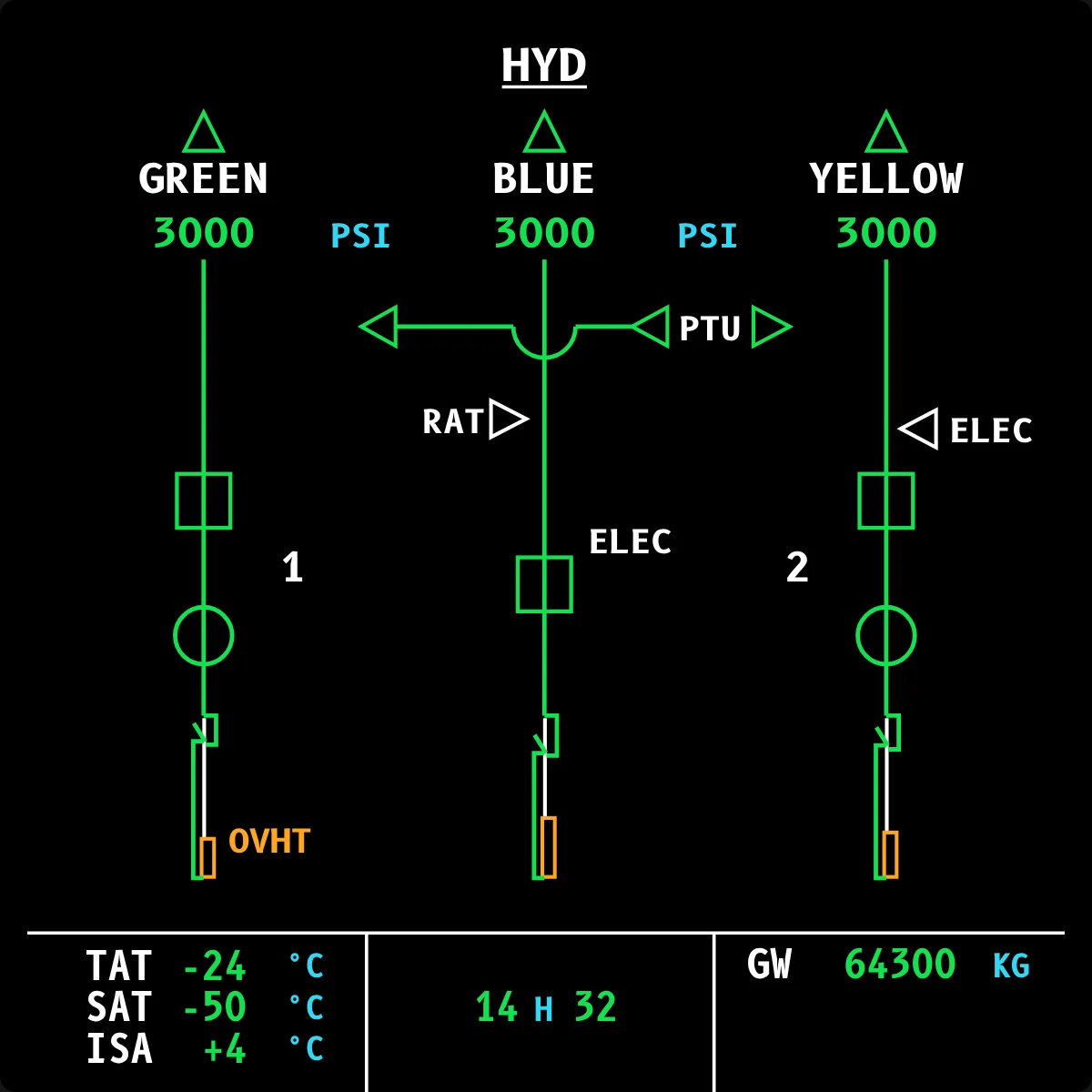
The temperature of the fluid coming back to the green reservoir. On the HYD page, OVHT appears in amber under the reservoir when the returning fluid's temperature at the reservoir inlet is above normal.
The threshold differs between two versions of the triggering conditions, each for some aircraft. In one the caution triggers at 93 °C and resets at 88 °C or below; in the other it triggers at 98 °C and resets at 93 °C or below.
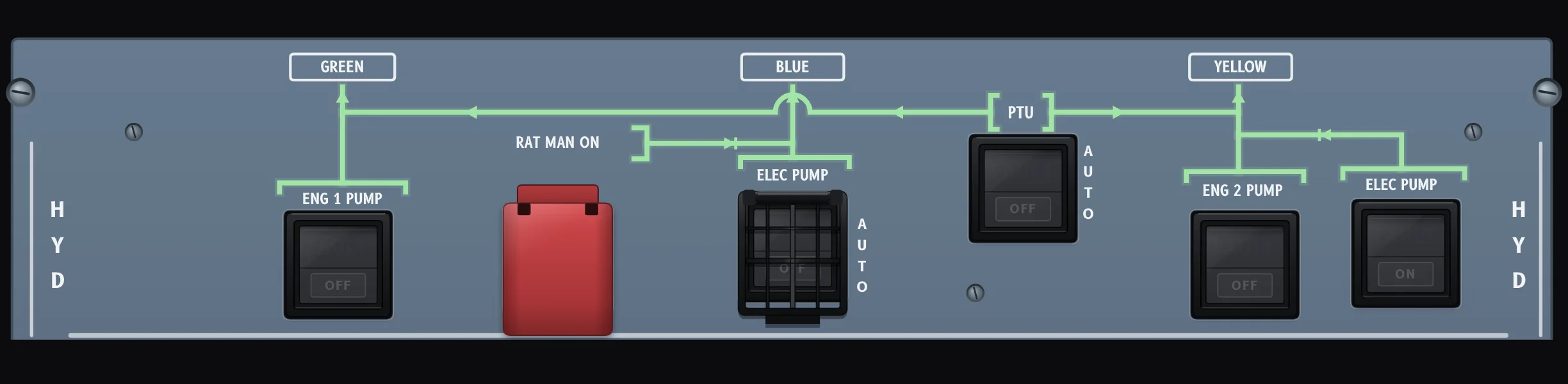
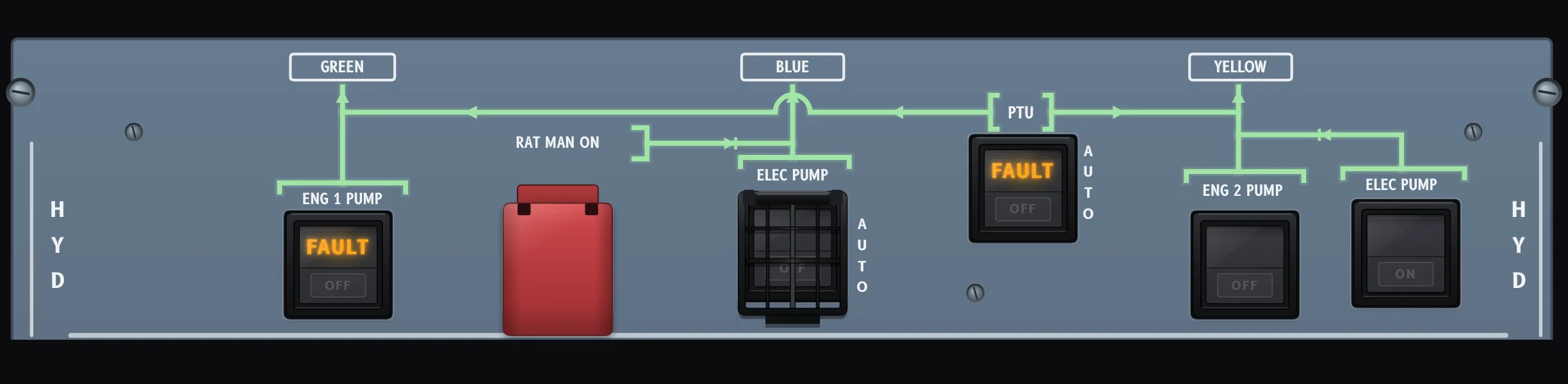
The overheat lights FAULT in two pushbuttons: ENG 1 PUMP, whose light covers its own reservoir, and PTU, whose light covers a green or a yellow reservoir overheat.
Sources FCOM DSC-29-20 ECAM HYD PAGE / FCOM PRO-ABN-HYD HYD G RSVR OVHT / FCOM PRO-ABN-HYD HYD / FCOM DSC-29-20 OVERHEAD PANEL
One overheat, two FAULT lights
What does the crew see and hear?
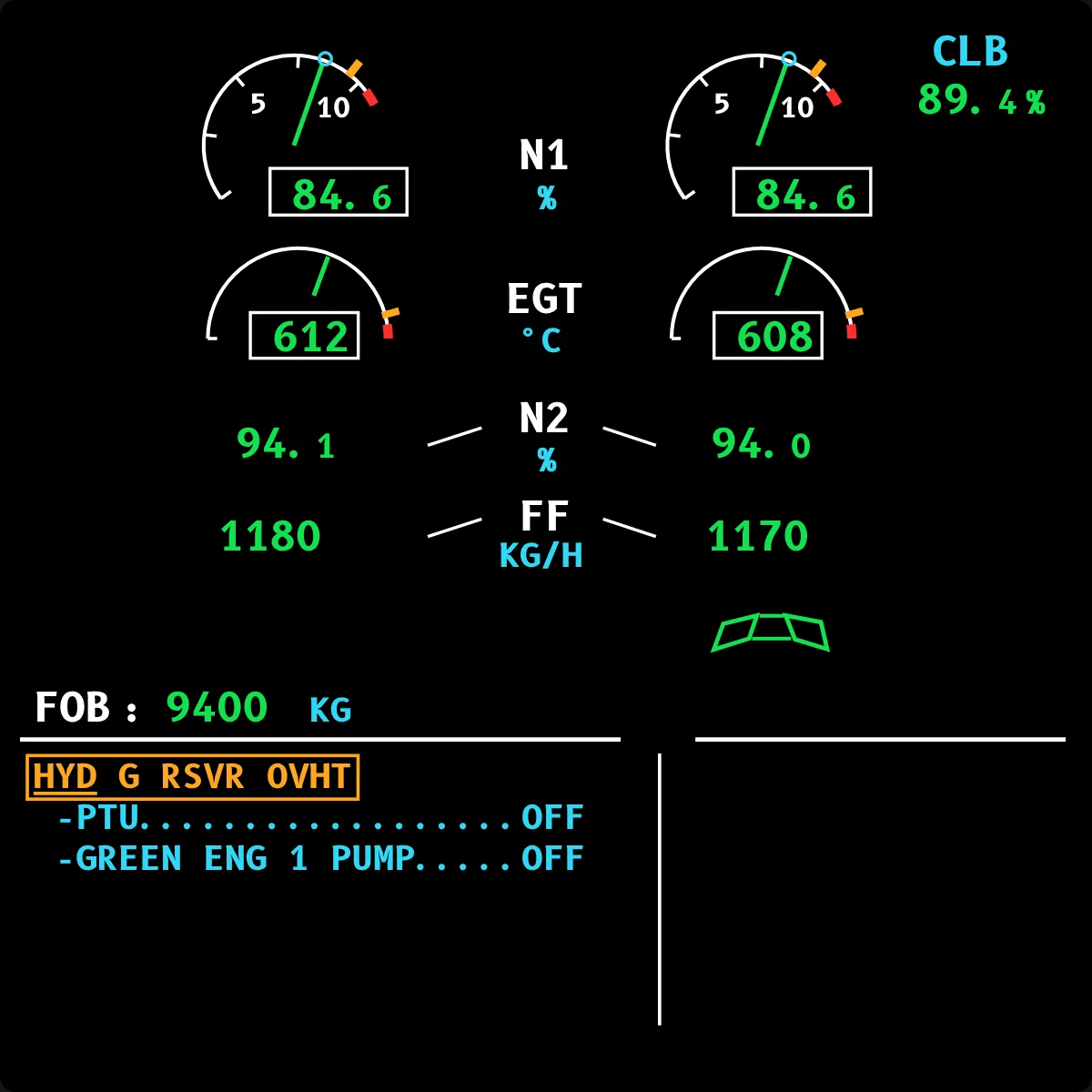
A level 2 caution: a single chime, MASTER CAUT steady amber, the caution in amber on the E/WD with its two action lines, PTU OFF and GREEN ENG 1 PUMP OFF, and the HYD page on the SD.
The trigger is the fluid's temperature, not green's pressure. The procedure lists two secondary failures, *WHEEL and *F/CTL: the ECAM's star marks a system affected by the primary failure.
Sources FCOM DSC-31-10 WARNING/CAUTION CLASSIFICATION / FCOM DSC-31-20 SYSTEM PAGES / FCOM PRO-ABN-HYD ABNORMAL AND EMERGENCY PROCEDURES / FCOM DSC-31-15 PRIMARY AND SECONDARY FAILURE
The moment the caution comes on
The cruise, all three systems normal. Press the button to overheat the green reservoir, then look at the E/WD, the HYD page, the panel and the schematic.
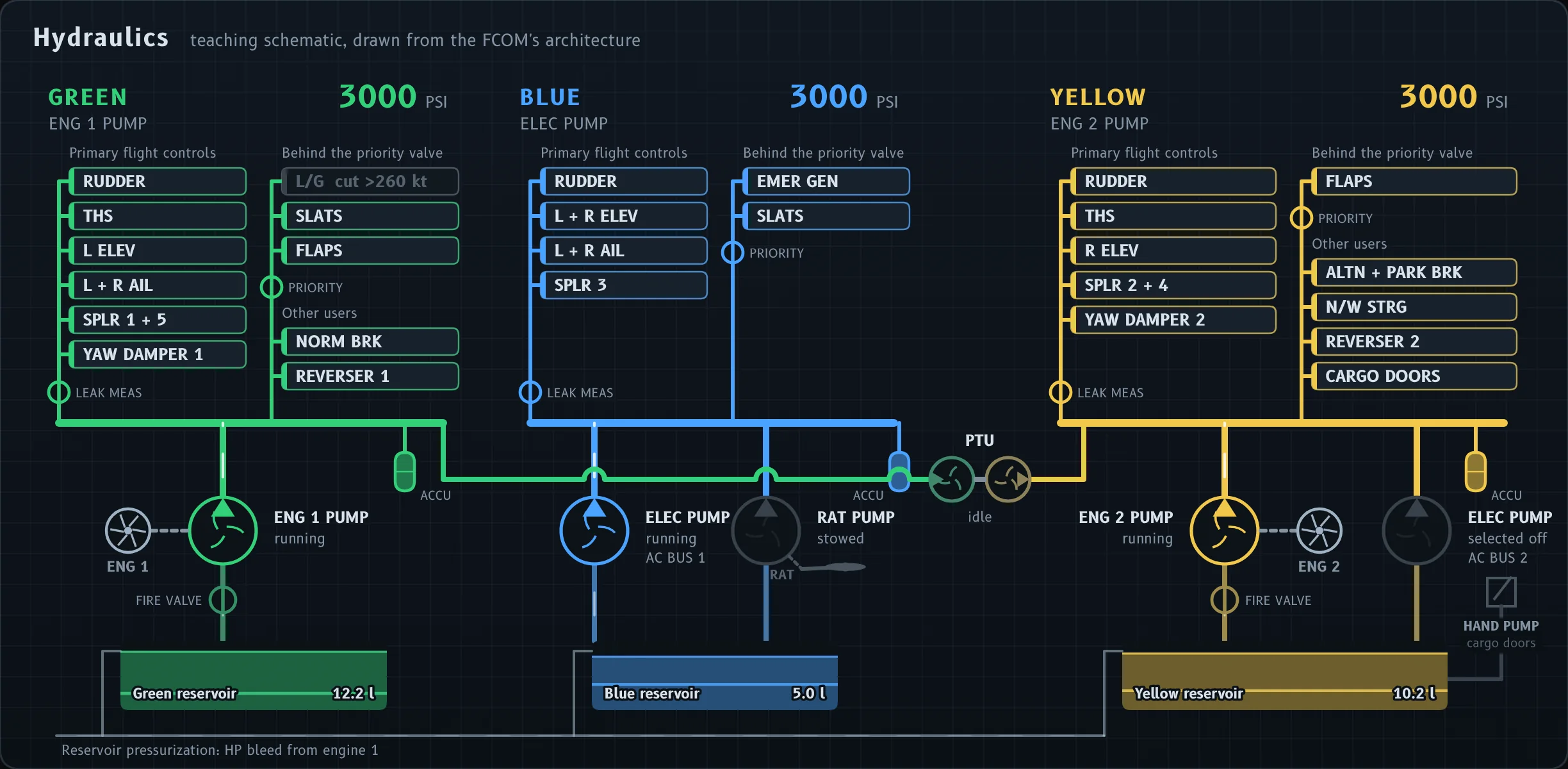
The alert Overheat the green reservoir
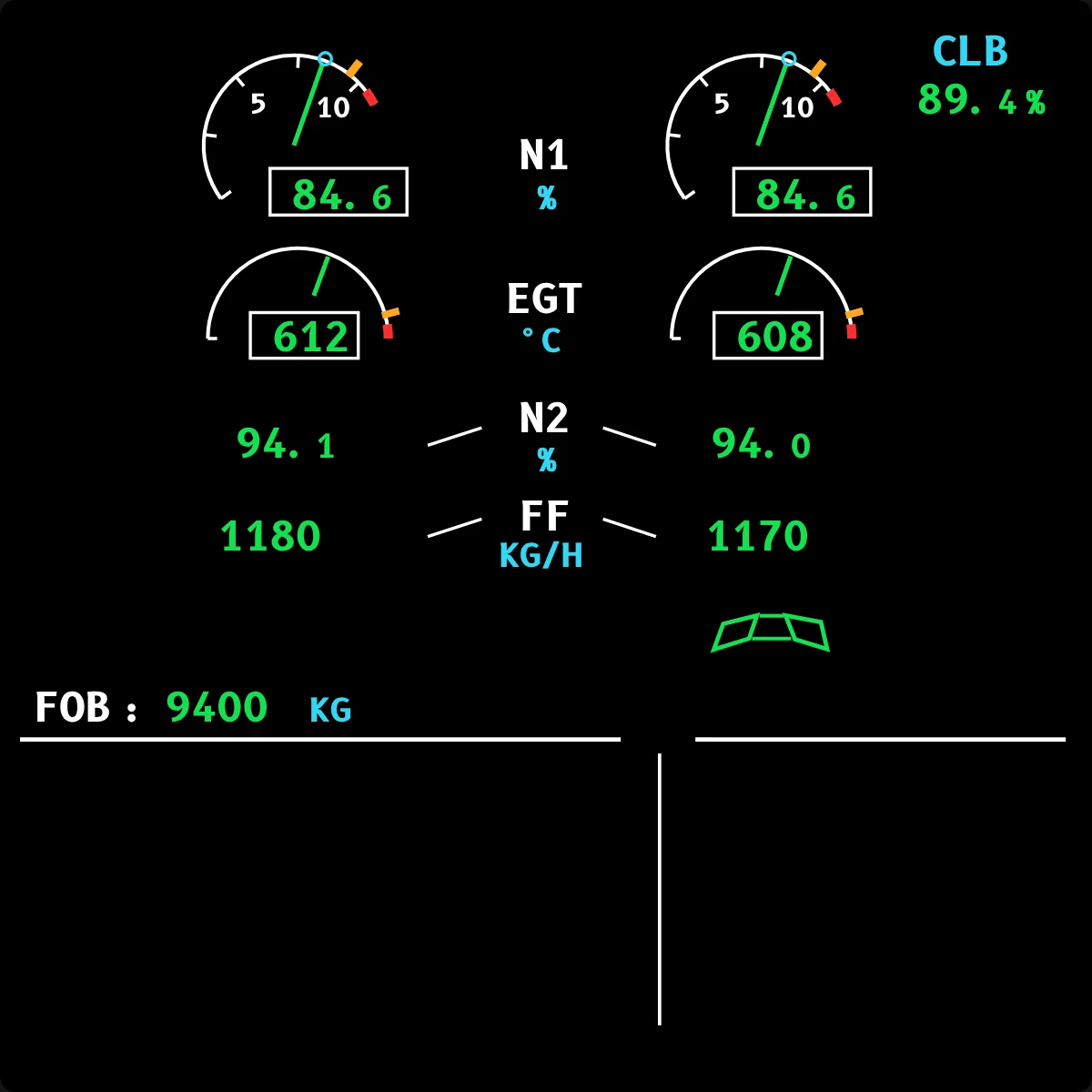
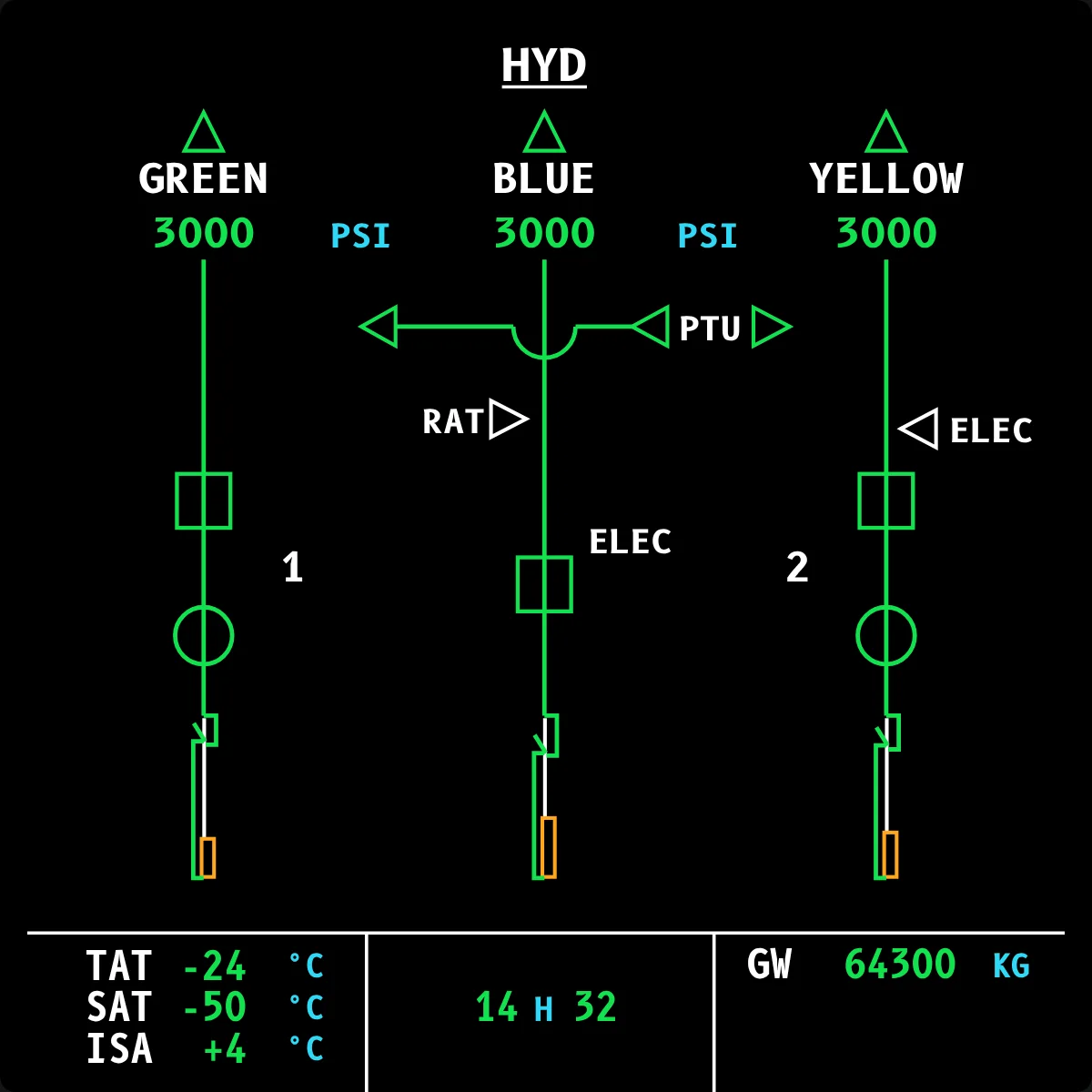
The E/WD shows the caution with PTU OFF and GREEN ENG 1 PUMP OFF. On the HYD page, OVHT shows under the green reservoir, and on the panel FAULT lights in ENG 1 PUMP and in PTU.
Green still reads its normal pressure, from its own pump, and the PTU is idle at AUTO, since green and yellow are not 500 psi apart. Working the lines is what the ECAM Trainer does with you.
Sources FCOM PRO-ABN-HYD ABNORMAL AND EMERGENCY PROCEDURES / FCOM DSC-29-20 OVERHEAD PANEL / FCOM DSC-29-20 ECAM HYD PAGE / FCOM DSC-29-10-20 POWER TRANSFER UNIT (PTU)
Why switch the PTU off first?
The FCTM answers it directly. After a reservoir low level, overheat or low air pressure, the PTU must be switched off as the ECAM asks, "to avoid a PTU overheat which may occur two minutes later." And a PTU overheat "may lead to the loss of the second hydraulic circuit."
The FCTM lists HYD G(Y) RSVR OVHT among the cautions where the PTU goes off without delay. PTU OFF closes both its electrohydraulic valves and power transfer stops: yellow is cut off from green and keeps its own pressure.
Sources FCTM PR-AEP-HYD HYDRAULIC GENERATION PARTICULARITIES / FCOM DSC-29-20 OVERHEAD PANEL
The PTU off, then the pump
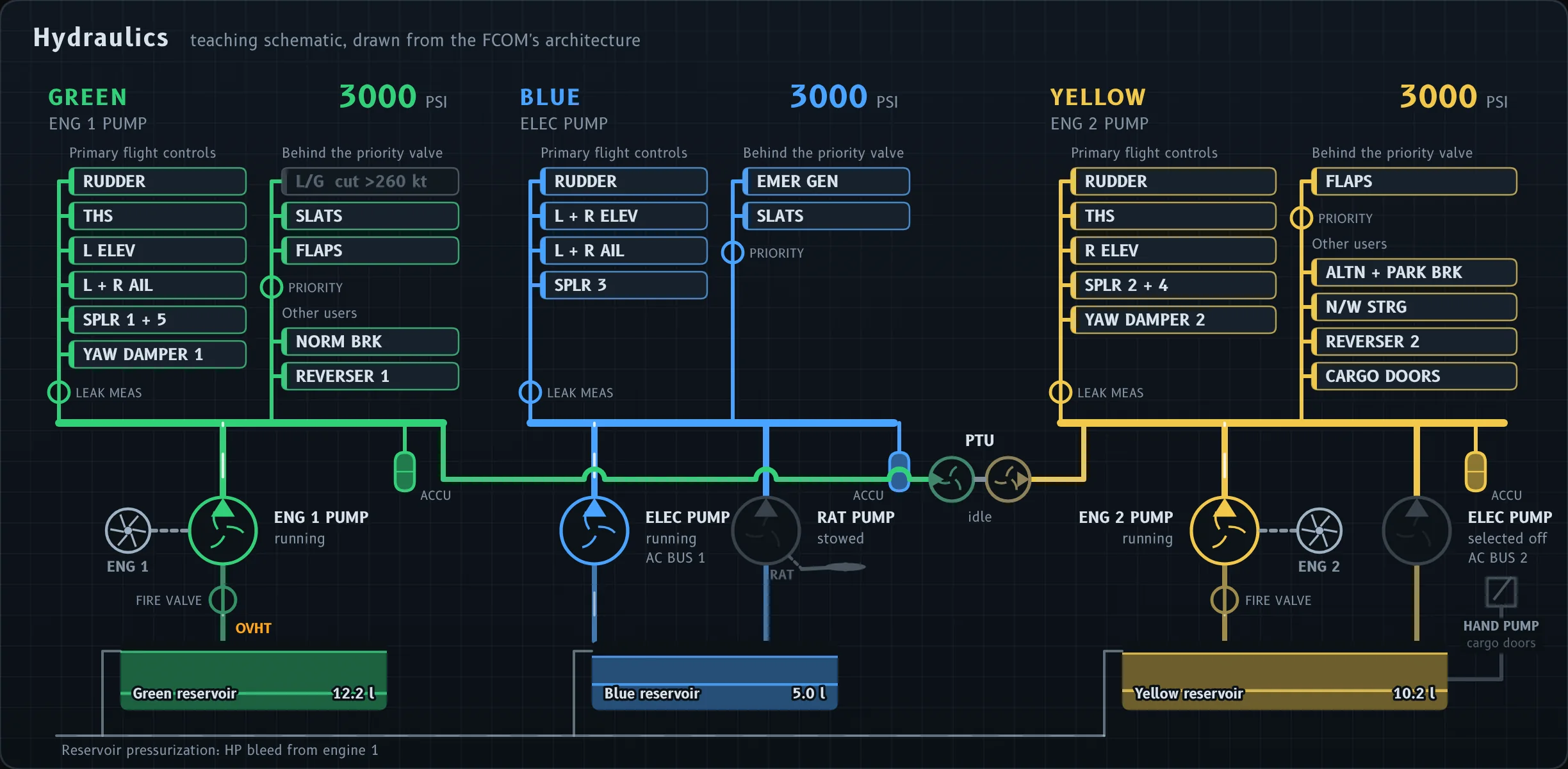
The green reservoir is overheating; green and yellow are both at their normal pressure. Predict first, then press, and watch green on the schematic.
-
Predict You switch the PTU off. Does green lose its pressure?
Try it Switch the PTU off.
Both PTU valves close and power transfer stops. Green carries on from its engine pump. The PTU's FAULT light stays on: with an overheat, it does not go out at OFF.
Sources FCOM DSC-29-20 OVERHEAD PANEL
-
Predict Now the green engine pump goes off. What is left to pressurise green?
Try it Switch ENG 1 PUMP off.
OFF depressurises the pump and the generation of hydraulic power stops. With the PTU off, green has no source and its pressure goes: G SYS LO PR follows. Yellow is untouched.
Sources FCOM DSC-29-20 OVERHEAD PANEL / FCOM PRO-ABN-HYD ABNORMAL AND EMERGENCY PROCEDURES
Why switch the green pump off?
The FCOM does not say. It gives the line, GREEN ENG 1 PUMP OFF, and the way back on STATUS: IF GREEN OVHT OUT, GREEN ENG 1 PUMP ON. As printed, the pump goes back ON only if the overheat goes out.
The panel helps the crew follow it. The FAULT lights in ENG 1 PUMP and PTU go out at OFF for any other cause, but stay on as long as the overheat lasts. When they go out with OFF still selected, the overheat is over.
If green does not come back, STATUS plans the rest: IF HYD NOT RECOVERED, the gear down by gravity and the landing distance procedure.
Sources FCOM PRO-ABN-HYD ABNORMAL AND EMERGENCY PROCEDURES / FCOM PRO-ABN-HYD HYD / FCOM DSC-29-20 OVERHEAD PANEL
What does the aircraft lose with green?
STATUS lists it. Inoperative: the green system, spoilers 1 and 5, CAT 3 DUAL, the autobrake, normal braking, gear retraction, reverser 1 and yaw damper 1. It also shows alternate yellow braking with anti-skid, slats and flaps slow and CAT 3 SINGLE ONLY.
Green actuates all the gear and doors, and if green is not recovered this STATUS asks for the gear down by gravity. The FCTM's summary of a single hydraulic failure applies: very little effect on the handling, the landing capability down to CAT 3 SINGLE.
Sources FCOM PRO-ABN-HYD HYD / FCOM DSC-32-10-10 LANDING GEARS AND DOORS OPERATION / FCTM PR-AEP-HYD DUAL HYDRAULIC FAILURES
What goes with green
What is lost afterwards?
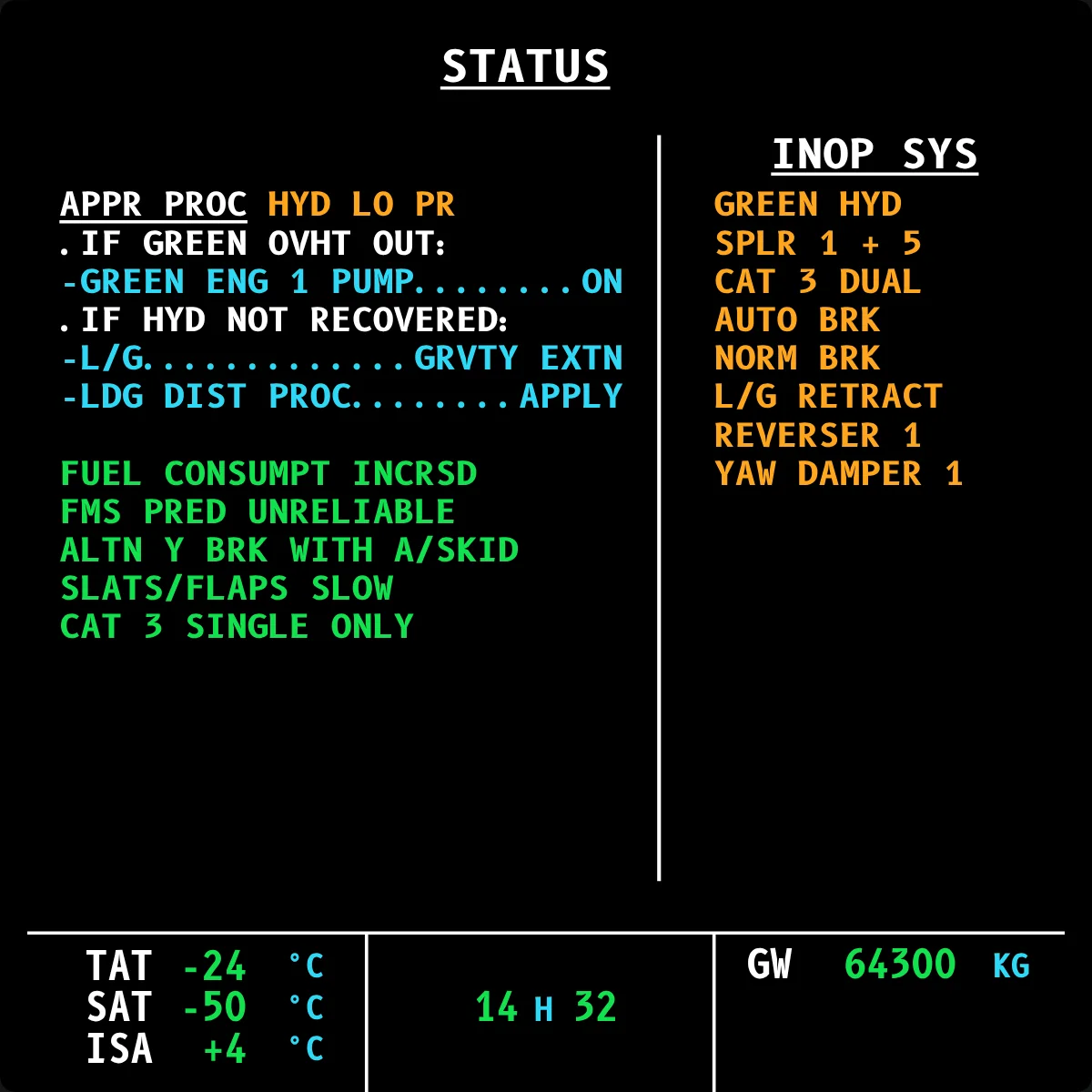
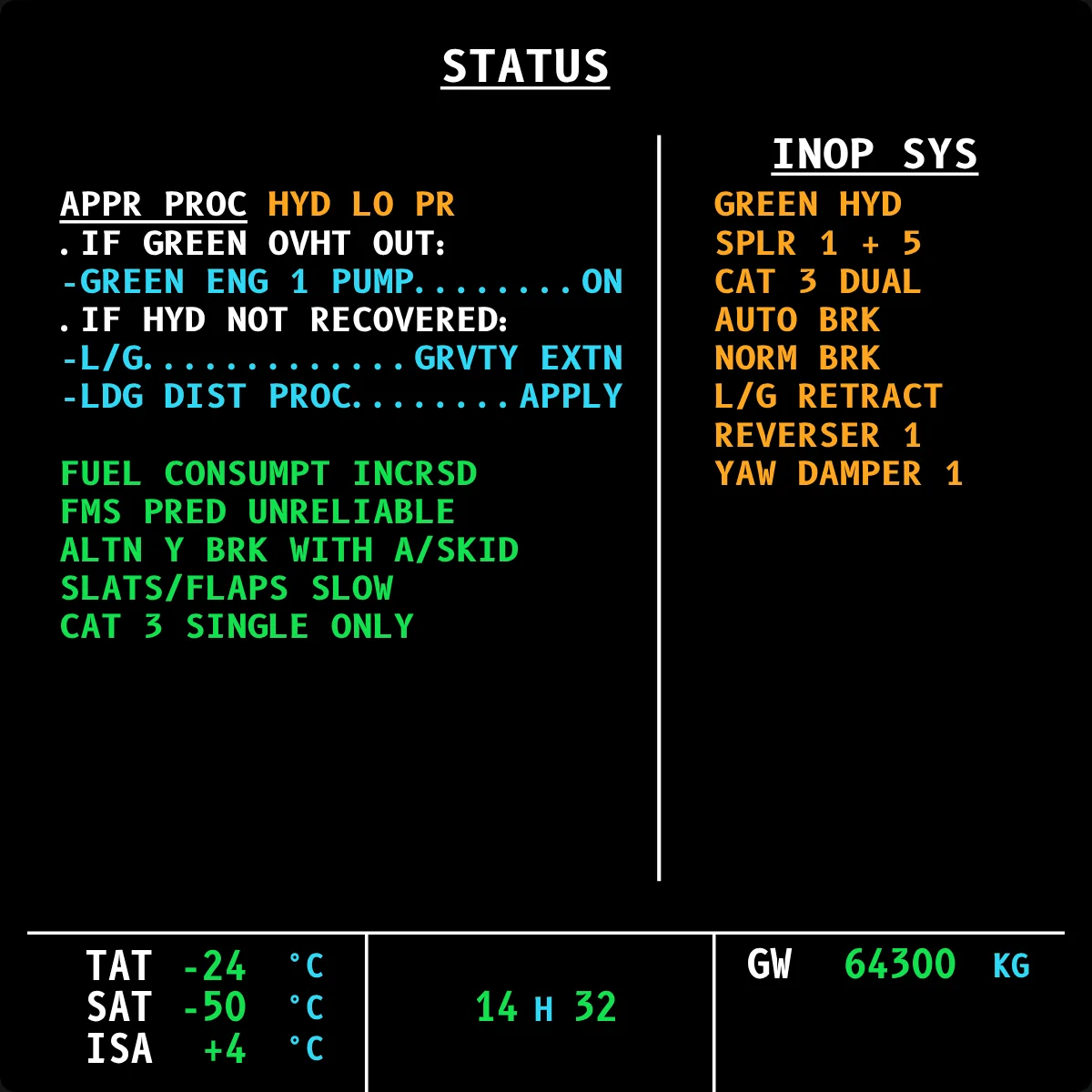
STATUS opens with the approach procedure HYD LO PR, then IF GREEN OVHT OUT: GREEN ENG 1 PUMP ON, and IF HYD NOT RECOVERED: the gravity gear extension and LDG DIST PROC APPLY. FUEL CONSUMPT INCRSD and FMS PRED UNRELIABLE follow.
The FCOM prints this STATUS in two versions, for different aircraft. Their lines are the same; the second marks AUTO BRK and YAW DAMPER 1 with a footnote, "When both engines are running". The pictures show both engines running, where the two agree.
Which version applies depends on your aircraft: check your own FCOM.
Sources FCOM PRO-ABN-HYD HYD / FCOM DSC-31-20 STATUS PAGE
A319ceo, A320ceo, A320neo, A321neo: what differs?
| A319ceo, A320ceo | A320neo, A321neo | |
|---|---|---|
| Trigger | Not given by type: one version triggers at or above 93 °C and resets at or below 88 °C; the other at or above 98 °C, resetting at or below 93 °C | Not given by type: one version triggers at or above 93 °C and resets at or below 88 °C; the other at or above 98 °C, resetting at or below 93 °C |
| Procedure and STATUS lines | The same in every version | The same in every version |
Sources FCOM PRO-ABN-HYD HYD G RSVR OVHT / FCOM PRO-ABN-HYD HYD / FCOM PRO-ABN-HYD ABNORMAL AND EMERGENCY PROCEDURES

Work HYD G RSVR OVHT as a crew
Read and do each line against the FCOM, with the E/WD, the SD page and the overhead following your hands, the PF and PM calls, and a debrief that says what you missed.
Work this failure in the ECAM TrainerGo further
Written in our own words from the FCOM and the FCTM; each part names the units it rests on. The E/WD, the STATUS and the live aircraft are the platform's own ECAM and systems model, the same the ECAM Trainer and the flight deck run. This page explains the procedure; it is not the procedure. Aircraft differ by type, engine and options: your aircraft's FCOM, your QRH and your operator's procedures always come first. How we write and check these pages.
Every ECAM procedure, line by line, against the FCOM.
The ECAM Trainer works 108 scenarios with the E/WD, the SD page and the overhead following your hands. Start free today, or open everything with A320 Knowledge+.
For study and revision only. Always follow your operator's approved documentation and procedures. A320 Knowledge is independent and not affiliated with Airbus.
Related
- HYD B+Y SYS LO PRA red warning: blue and yellow are lost and green is left alone, still in normal law.
- HYD B ELEC PUMP LO PRAn amber caution that costs a whole system.
- HYD B RSVR LO LVLAn amber caution: the blue system is losing its fluid.
- HYD B RSVR OVHTAn amber caution with one line, and the FCOM's own worked example of the ECAM.
- A320 hydraulic systemThe system guide, with the live aircraft
- Every ECAM procedureThe alerts the ECAM Trainer works, grouped by system