
F/CTL SEC 1 FAULT
An amber caution for one of the three spoiler elevator computers. Here is what SEC 1 drives, which spoilers go with it, why the ECAM forbids the speed brakes when it is SEC 1, and what STATUS leaves for the landing, with the live aircraft at the moment the caution comes on.
Written and checked by current A320 pilotschecked against the FCOM on Our editorial policy
What F/CTL SEC 1 FAULT means
F/CTL SEC 1 FAULT is an amber caution: one spoiler elevator computer, SEC 1, has failed. SEC 1 controls spoilers 3 and 4 on each wing, and when a SEC fails the spoilers it controls retract automatically. It also holds standby pitch functions behind the ELACs.
The ECAM asks for a reset, SEC 1 OFF then ON, and if that is unsuccessful, SEC 1 OFF: its spoilers are lost. Because it is SEC 1, the speed brakes are then not used, as VLS would not be corrected if speed brake 2 extends. STATUS adds the landing distance procedure.
Sources FCOM PRO-ABN-F_CTL F/CTL SEC 1(2)(3) FAULT / FCOM DSC-27-10-10 COMPUTERS / FCOM DSC-27-10-20 / FCOM DSC-27-20-30 OVERHEAD PANEL / FCOM PRO-ABN-F_CTL F/CTL
At a glance
- Level
- Amber caution, level 2: single chime, MASTER CAUT steady amber and, normally, the F/CTL page on the SD
- Sets it off
- A failure of one SEC; here SEC 1
- Lights
- FAULT in amber in the SEC 1 pushbutton on the overhead; SEC 1 in amber on the F/CTL page
- Lost
- Spoilers 3 and 4 on each wing, retracted automatically; the procedure's comment: the associated spoilers are lost
- Speed brakes
- Not to be used with SEC 1 affected: VLS would not be corrected if speed brakes 2 extend
- Landing
- LDG DIST PROC APPLY on STATUS; STEEP APPR inoperative where fitted, in two of the three STATUS versions
Sources FCOM DSC-31-10 WARNING/CAUTION CLASSIFICATION / FCOM DSC-31-30 ATTENTION GETTERS / FCOM DSC-31-20 SYSTEM PAGES / FCOM PRO-ABN-F_CTL F/CTL SEC 1(2)(3) FAULT / FCOM DSC-27-20-30 OVERHEAD PANEL / FCOM DSC-27-20-30 ECAM F/CTL PAGE / FCOM DSC-27-10-20 / FCOM PRO-ABN-F_CTL F/CTL
What does SEC 1 drive?
Seven computers process the pilots' and the autopilot's inputs: two ELACs, three SECs (spoiler elevator computers) and two FACs. The SECs give spoiler control, and standby elevator and stabiliser control.
Each SEC, while ON, performs normal roll through the spoilers, the speed brakes and ground spoilers, direct roll and the abnormal attitude law. Alternate and direct pitch belong to SEC 1 and SEC 2 only: if neither ELAC is available, pitch passes to SEC 1 or SEC 2.
The spoilers are split between them: SEC 3 controls spoiler 2, SEC 1 spoilers 3 and 4, and SEC 2 spoiler 5. Each spoiler has one servojack on one hydraulic system; from the wing tip in, spoiler 5 is green, 4 yellow, 3 blue, 2 yellow and 1 green.
If a SEC fails, the spoilers it controls retract automatically, and the system retracts any spoiler to zero when it detects a fault or loses electrical control. When a spoiler fails on one wing, the symmetric one on the other wing is inhibited.
Spoilers 3 and 4 are busy surfaces. Spoilers 2 to 5 help the ailerons in roll, the speed brakes are spoilers 2, 3 and 4, and the ground spoiler function uses all of them.
Sources FCOM DSC-27-10-10 COMPUTERS / FCOM DSC-27-20-30 OVERHEAD PANEL / FCOM DSC-27-10-20 / FCOM DSC-27-10-20 GENERAL ARCHITECTURE / FCOM DSC-27-10-20 ROLL CONTROL / FCOM DSC-27-10-20 SPEED BRAKES AND GROUND SPOILERS
Which SEC drives which spoiler
What does the crew see and hear?
A level 2 caution: a single chime, the MASTER CAUT light steady amber and the caution in amber on the E/WD, and the SD normally calls up the relevant system page by itself, here the F/CTL page.
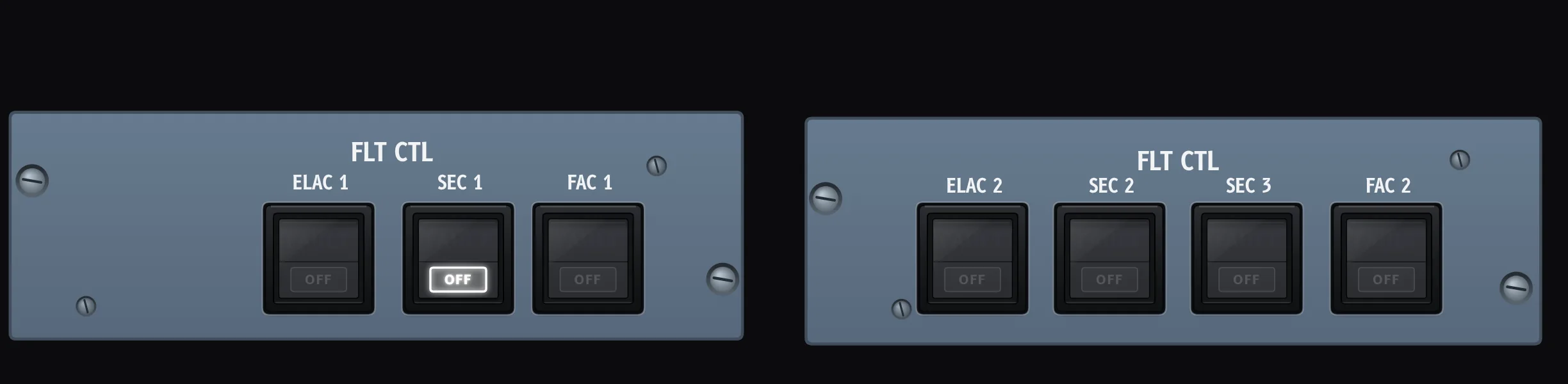
On the overhead FLT CTL panel, FAULT comes on amber in the SEC 1 pushbutton when a failure is detected.
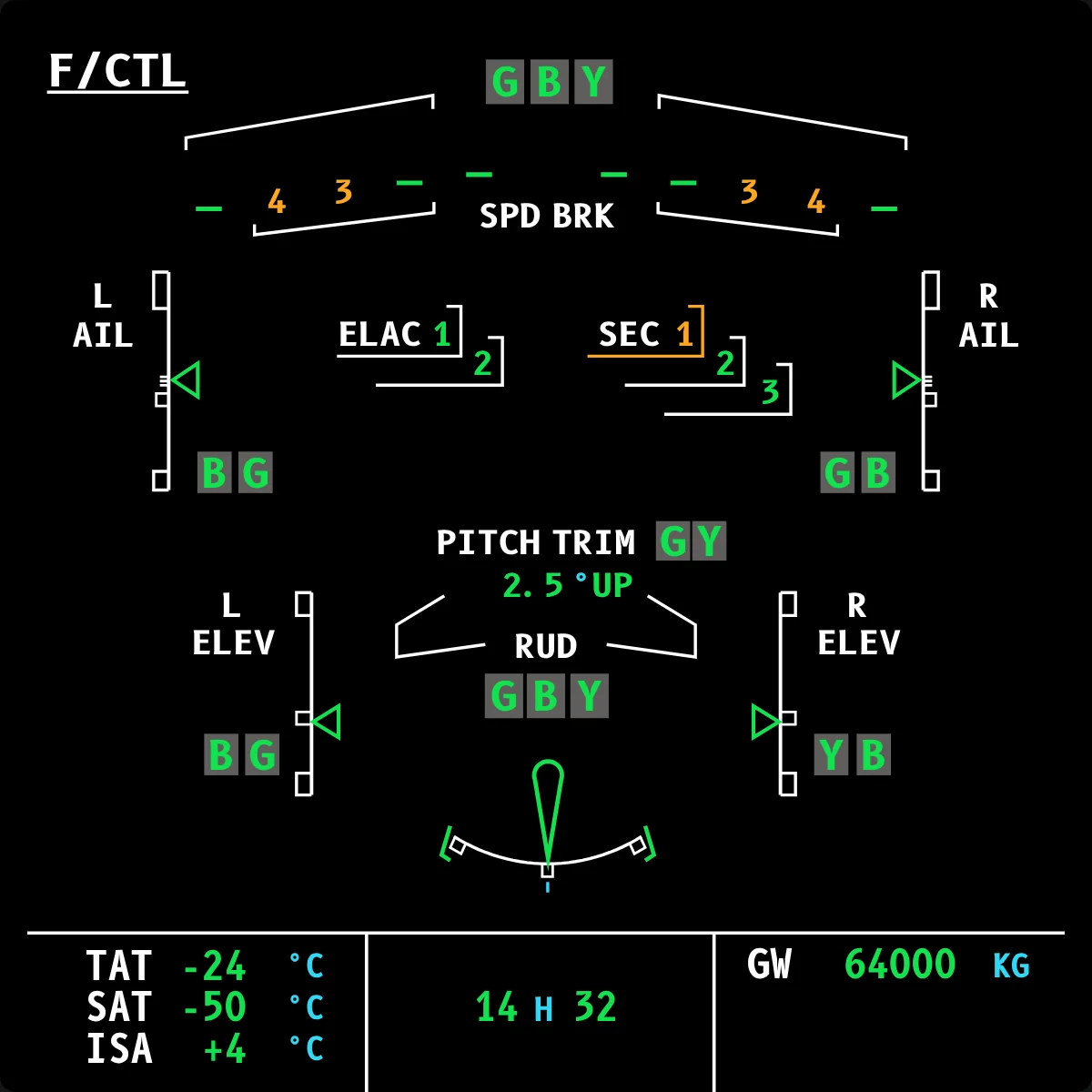
On the F/CTL page SEC 1's number turns amber. Its spoilers retract, and the page's symbol for a spoiler failed retracted is its number in amber: the live drawing below shows spoilers 3 and 4 that way on both wings.
Sources FCOM DSC-31-10 WARNING/CAUTION CLASSIFICATION / FCOM DSC-31-30 ATTENTION GETTERS / FCOM DSC-31-20 SYSTEM PAGES / FCOM DSC-27-20-30 OVERHEAD PANEL / FCOM DSC-27-20-30 ECAM F/CTL PAGE / FCOM DSC-27-10-20
The moment the caution comes on
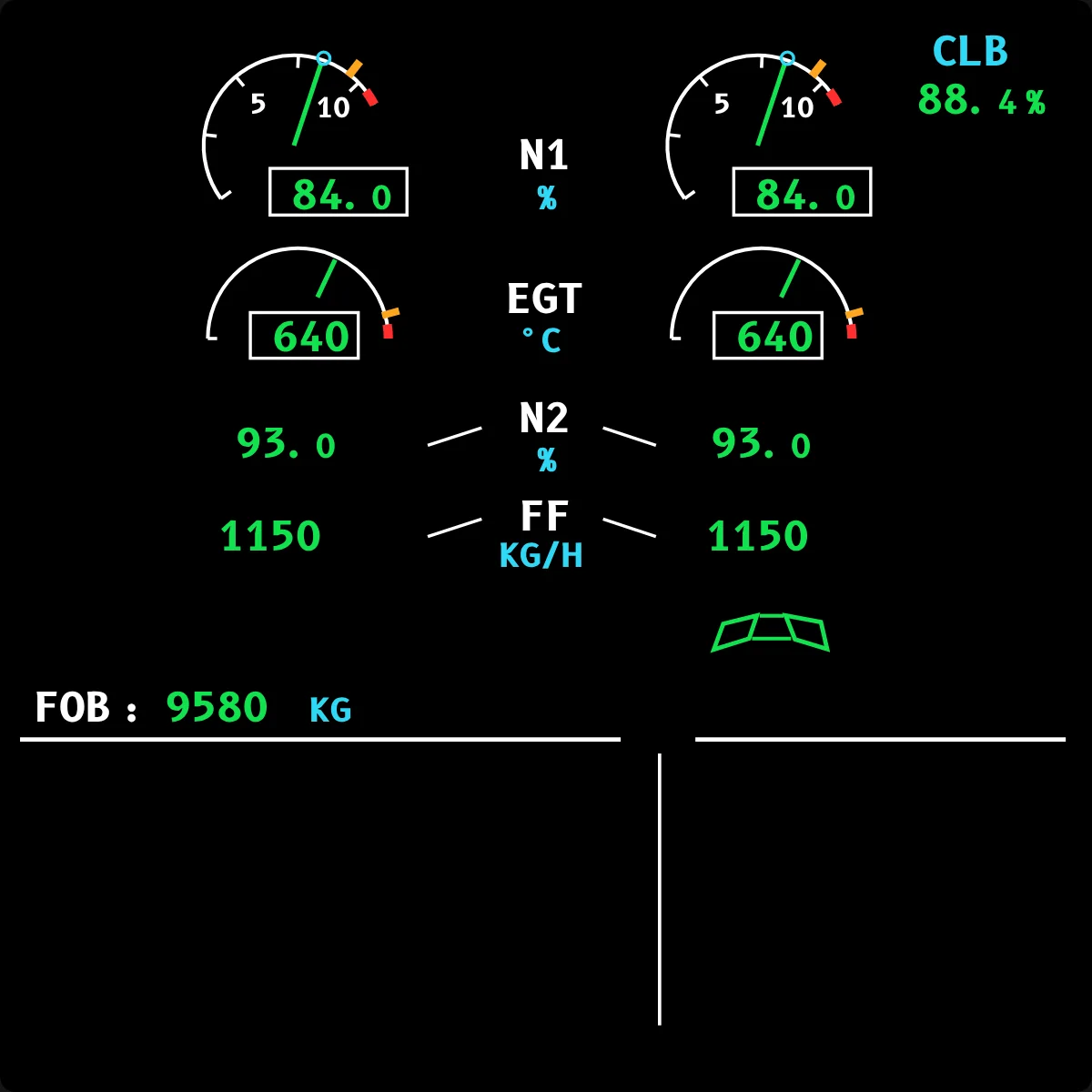
A healthy aircraft in flight, every flight control computer on. Press the button to fail SEC 1, then look at the E/WD, the F/CTL page and the FLT CTL panel.
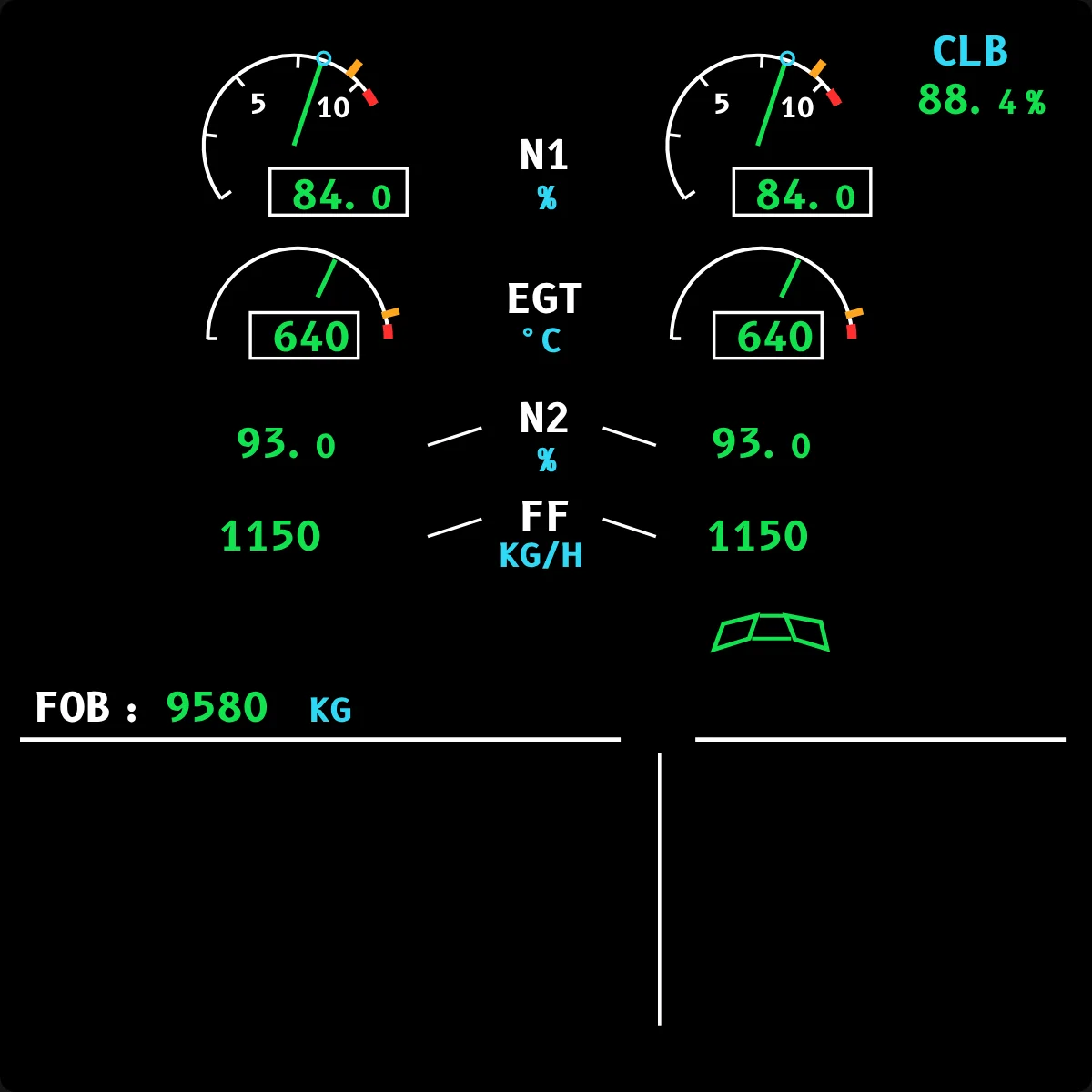
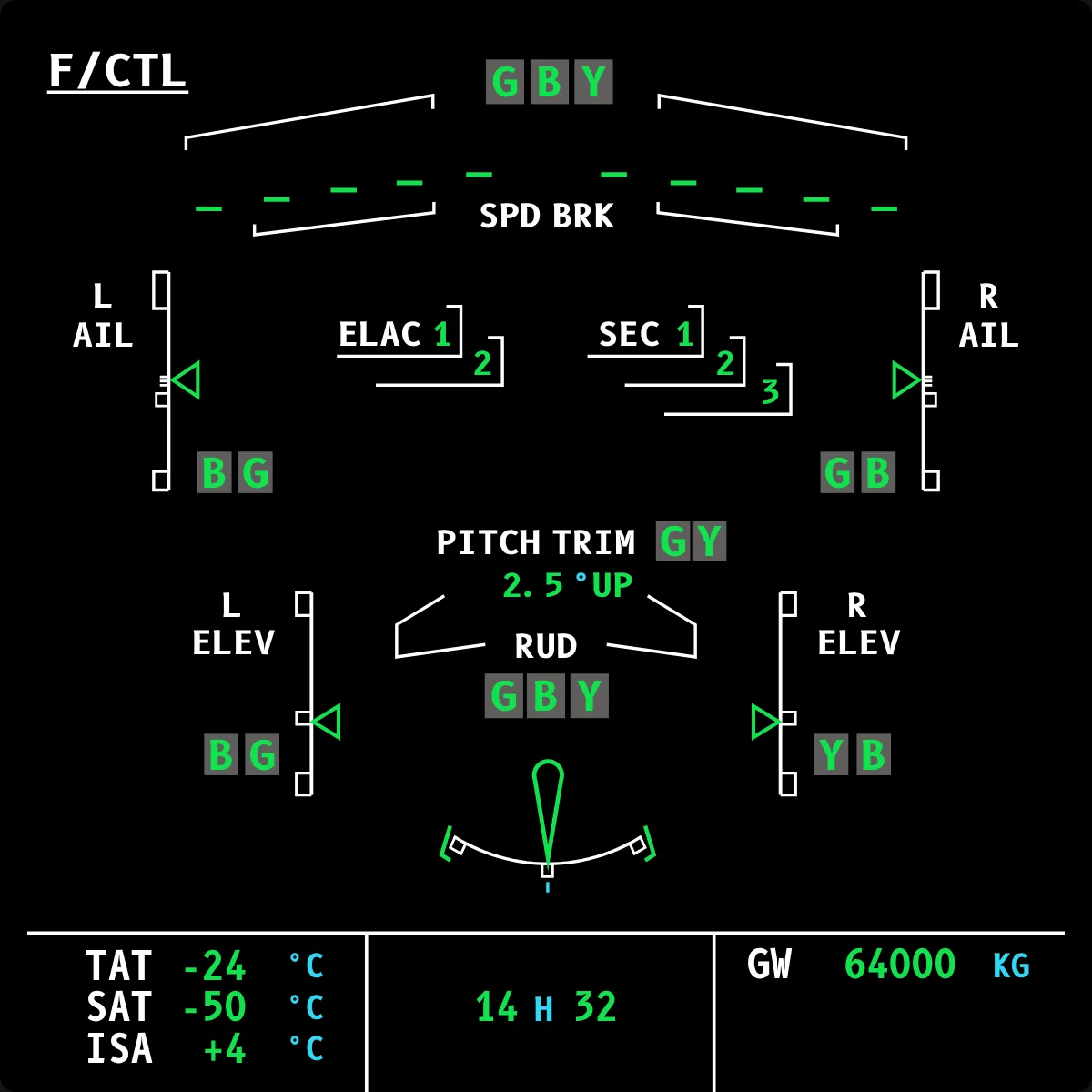
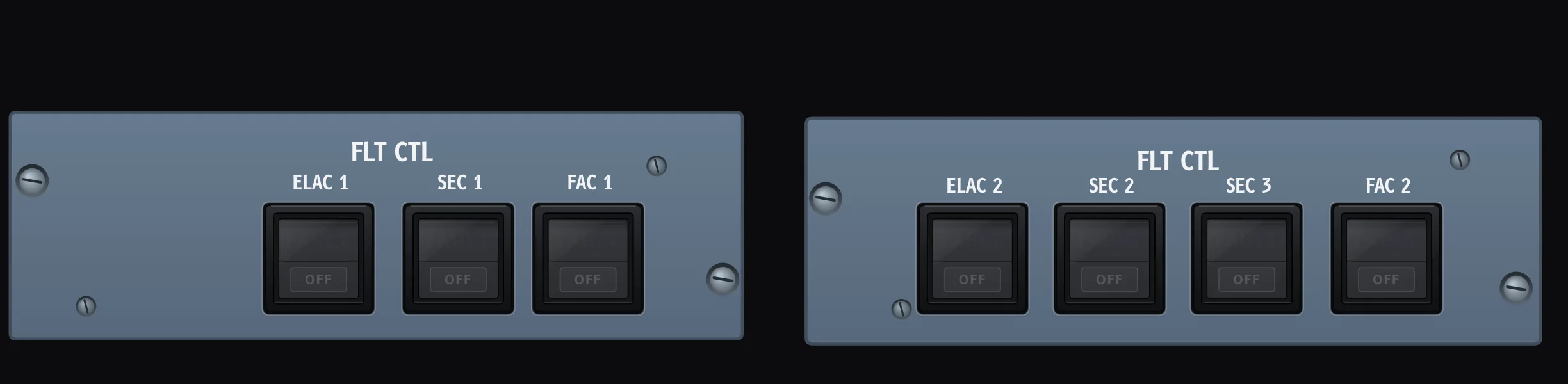
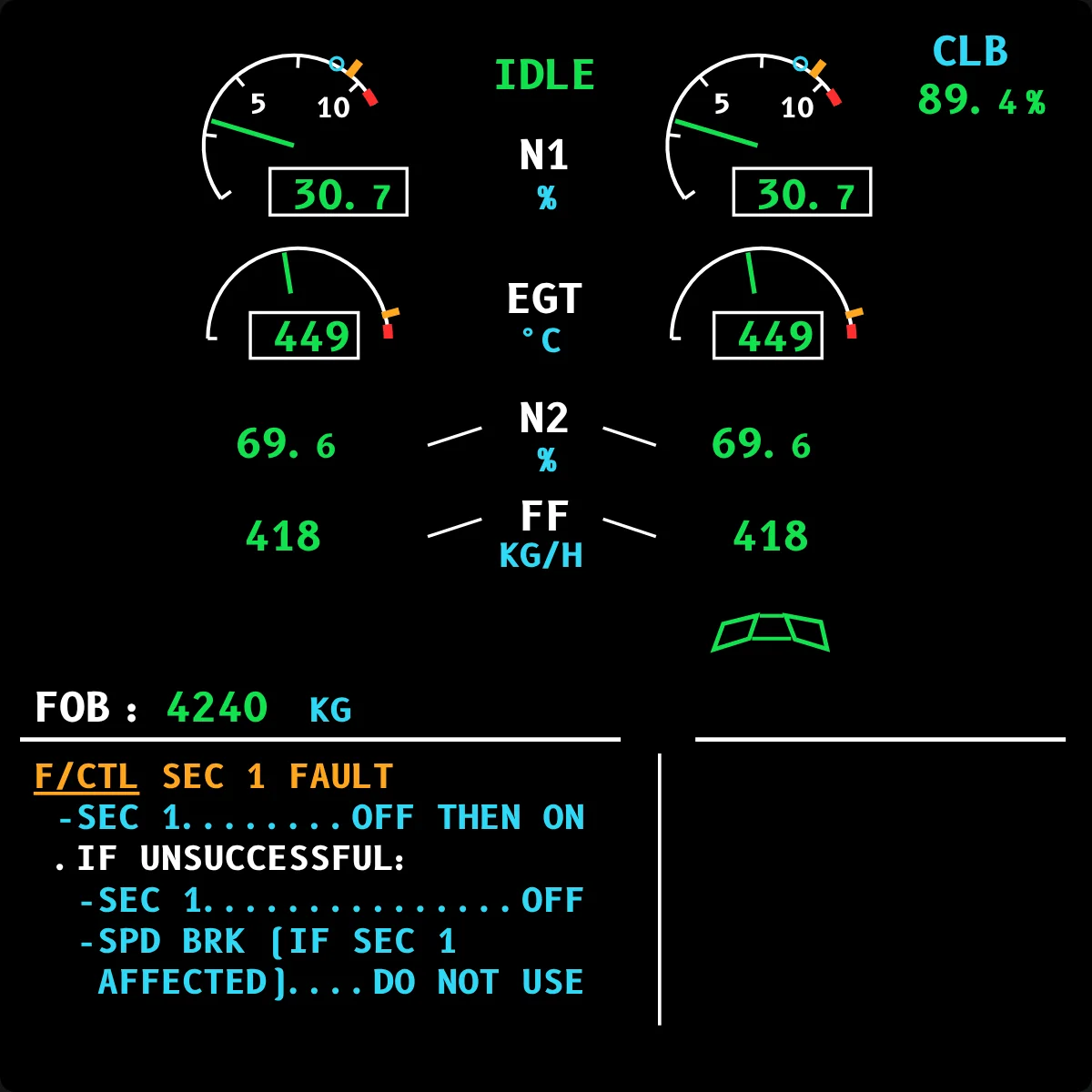
The alert Fail SEC 1
The E/WD shows F/CTL SEC 1 FAULT in amber with SEC 1 OFF THEN ON, then under IF UNSUCCESSFUL, SEC 1 OFF and SPD BRK (IF SEC 1 AFFECTED) DO NOT USE. FAULT is lit in the SEC 1 pushbutton.
On the F/CTL page, SEC 1 and spoilers 3 and 4 on both wings are amber: their computer is lost. Working the lines is what the ECAM Trainer does with you.
Sources FCOM PRO-ABN-F_CTL F/CTL / FCOM DSC-27-20-30 OVERHEAD PANEL / FCOM DSC-27-10-20 / FCOM DSC-27-20-30 ECAM F/CTL PAGE
What does the SEC 1 pushbutton do, and what follows a second loss?
The SEC pushbutton has two positions. At OFF the computer is not active, and switching it OFF then ON resets it. Its FAULT light goes off when the pilot selects OFF.
That is the procedure's first line, SEC 1 OFF THEN ON. If the reset is unsuccessful, SEC 1 goes OFF, and the FCOM's comment is that the associated spoilers are lost. If all three SECs fail, all the spoilers are inoperative, and roll direct law and pitch alternate law become active.
On the overhead, the PM points to the panel and the control and announces the system, the control or reset, and the action: the PF is kept informed, and the risk of operating the wrong control is reduced. After the action, the PM checks the SD page to confirm it was done.
In the block below, SEC 1 is already off after an unsuccessful reset. Add a second failure, and compare what the drawing shows with what the FCOM says.
Sources FCOM DSC-27-20-30 OVERHEAD PANEL / FCOM PRO-ABN-F_CTL F/CTL / FCTM AOP-30-20 HANDLING OVERHEAD PANEL CONTROL
SEC 1 off, then a second failure
SEC 1 has failed, its reset did not work, and it is OFF: spoilers 3 and 4 are amber on both wings. Press one failure at a time: the first draws its caution and the spoilers on the F/CTL page; the second has no E/WD of its own, and gives what the FCOM says.
The alert Then lose yellow
The E/WD shows the yellow reservoir caution. On the F/CTL page every Y turns amber. The drawing also shows spoiler 2, on yellow, as failed retracted beside 3 and 4 on both wings: that is the drawing's own reading.
The FCOM says a spoiler that loses hydraulic pressure keeps the deflection it had, or less if aerodynamic forces push it down. Spoilers 2, 3 and 4 are the speed brakes; with SEC 1 off, spoiler 2 is the one left, and the SEC 1 caution already reads SPD BRK (IF SEC 1 AFFECTED) DO NOT USE.
Sources FCOM PRO-ABN-HYD HYD Y RSVR LO LVL / FCOM DSC-27-10-20 GENERAL ARCHITECTURE / FCOM DSC-27-20-30 ECAM F/CTL PAGE / FCOM DSC-27-10-20 / FCOM DSC-27-10-20 SPEED BRAKES AND GROUND SPOILERS / FCOM PRO-ABN-F_CTL F/CTL
Failure Then SEC 3 fails too
No E/WD is drawn for this one. What follows is the FCOM's answer, not the drawing's.
SEC 3 controls spoiler 2, and the FCOM's architecture drawing puts spoiler 1 under SEC 3 as well: with SEC 1 off too, SEC 2's spoiler 5 is the one left on each wing.
The FCOM inhibits speed brake extension when SEC 1 and SEC 3 are both faulty, and its STATUS footnotes add that with at least two SECs failed the autobrake is inoperative, and with SEC 1 and SEC 3 failed reverser 2 is not available for landing.
Sources FCOM DSC-27-10-20 / FCOM DSC-27-10-20 GENERAL ARCHITECTURE / FCOM DSC-27-10-20 SPEED BRAKES AND GROUND SPOILERS / FCOM PRO-ABN-F_CTL F/CTL
Why no speed brakes once SEC 1 is lost?
The procedure gives the reason with the line SPD BRK (IF SEC 1 AFFECTED) DO NOT USE: "VLS would not be corrected, if speed brakes 2 extend (no speed brake position sent to FACs)."
The FACs compute the minimum and maximum speeds shown on the PFD speed scale, VLS among them. With spoilers 3 and 4 retracted, spoiler 2, on SEC 3, is the speed brake surface left.
The line carries its own condition, IF SEC 1 AFFECTED: with SEC 2 or SEC 3 failed instead, it does not apply. It comes back on STATUS, SPD BRK DO NOT USE under the condition that SEC 1 is affected.
Sources FCOM PRO-ABN-F_CTL F/CTL / FCOM DSC-22_40-10 GENERAL / FCOM DSC-22_40-30 PFD SPEED SCALE MANAGEMENT / FCOM DSC-27-10-20 / FCOM DSC-27-10-20 SPEED BRAKES AND GROUND SPOILERS
What is lost, and what does the landing need?
With SEC 1 off, spoilers 3 and 4 are lost on both wings. Roll keeps the ailerons and spoilers 2 and 5, the speed brakes are not used, and SEC 2 still holds the standby pitch functions behind the ELACs.
STATUS adds LDG DIST PROC APPLY, aligned with the conditions and not under the three SECs failed, so it applies with one SEC failed. The FCOM gives no reason for it.
The approach lines on that STATUS, flap 3, a higher approach speed, alternate law and direct law with the gear down, sit under the condition of all three SECs failed, and are not shown for one.
The STATUS footnotes say what a second SEC would cost: with SEC 1 and SEC 2 failed, reverser 1 is not available for landing, and with SEC 1 and SEC 3, reverser 2; with at least two SECs failed, the autobrake is inoperative.
Sources FCOM DSC-27-10-20 / FCOM DSC-27-10-20 ROLL CONTROL / FCOM DSC-27-20-30 OVERHEAD PANEL / FCOM PRO-ABN-F_CTL F/CTL / FCOM PRO-ABN-ABN-00 INTRODUCTION
What is lost afterwards?
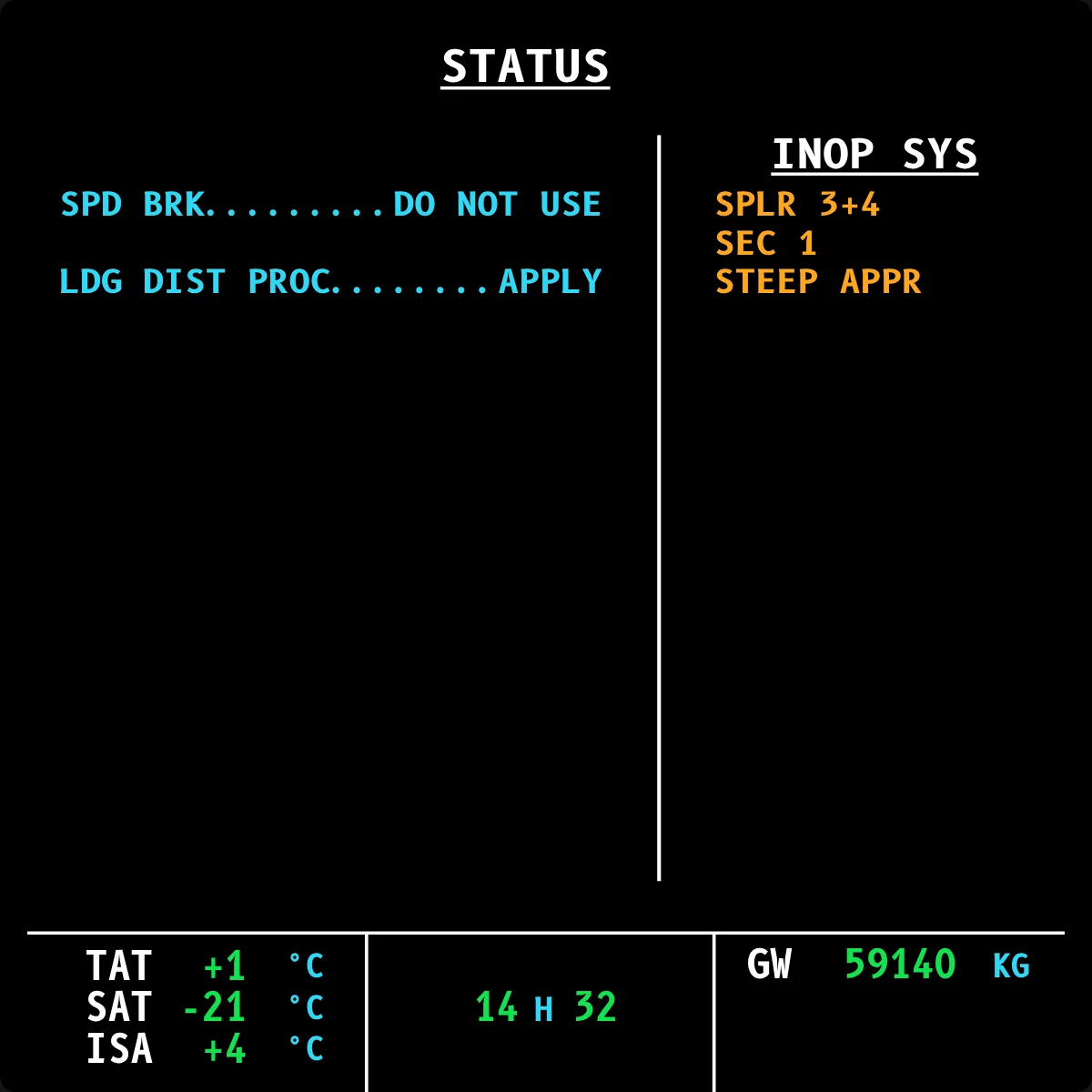
STATUS is the aircraft's operational summary. With one SEC failed, the version drawn reads SPD BRK DO NOT USE, as SEC 1 is affected, and LDG DIST PROC APPLY, both in blue.
INOP SYS, in amber, lists the associated spoilers, the affected SEC and STEEP APPR, where fitted, if F/CTL SEC 1 FAULT; our picture names them SPLR 3+4 and SEC 1.
The FCOM prints three versions of this STATUS. For one SEC failed, two carry the same lines; the third has no STEEP APPR.
Which version applies depends on your aircraft: check your own FCOM.
Sources FCOM DSC-31-20 STATUS PAGE / FCOM PRO-ABN-F_CTL F/CTL / FCOM DSC-27-10-20
A319ceo, A320ceo, A320neo, A321neo: what differs?
| A319ceo, A320ceo | A320neo, A321neo | |
|---|---|---|
| The caution and its trigger | The same in every version | The same in every version |
| Procedure: load alleviation | Not given by type: one version adds that if SEC 1 or 2 fails the load alleviation function is degraded, for some aircraft with that function only; the other does not mention it | Not given by type: one version adds that if SEC 1 or 2 fails the load alleviation function is degraded, for some aircraft with that function only; the other does not mention it |
| STATUS: STEEP APPR | Not given by type: inoperative where fitted in two versions, if SEC 1 fails; not listed in the third | Not given by type: inoperative where fitted in two versions, if SEC 1 fails; not listed in the third |
| STATUS with all three SECs failed | Not given by type: VREF +10 KT in one version, VREF + 15 KT in the two others; USE FLAP 3 in two, FLAP LVR 3 in one | Not given by type: VREF +10 KT in one version, VREF + 15 KT in the two others; USE FLAP 3 in two, FLAP LVR 3 in one |
Sources FCOM PRO-ABN-F_CTL F/CTL SEC 1(2)(3) FAULT / FCOM PRO-ABN-F_CTL F/CTL

Work F/CTL SEC 1 FAULT as a crew
Read and do each line against the FCOM, with the E/WD, the SD page and the overhead following your hands, the PF and PM calls, and a debrief that says what you missed.
Work this failure in the ECAM TrainerGo further
Written in our own words from the FCOM and the FCTM; each part names the units it rests on. The E/WD, the STATUS and the live aircraft are the platform's own ECAM and systems model, the same the ECAM Trainer and the flight deck run. This page explains the procedure; it is not the procedure. Aircraft differ by type, engine and options: your aircraft's FCOM, your QRH and your operator's procedures always come first. How we write and check these pages.
Every ECAM procedure, line by line, against the FCOM.
The ECAM Trainer works 108 scenarios with the E/WD, the SD page and the overhead following your hands. Start free today, or open everything with A320 Knowledge+.
For study and revision only. Always follow your operator's approved documentation and procedures. A320 Knowledge is independent and not affiliated with Airbus.
Related
- F/CTL ELAC 1 FAULTAn amber caution for one of the two elevator aileron computers.
- F/CTL ELAC 2 FAULTAn amber caution for one of the two elevator aileron computers.
- F/CTL FLAPS FAULTAn amber caution for flaps that have lost both of their control channels.
- F/CTL FLAPS LOCKEDAn amber caution for flaps that the wingtip brakes have stopped.
- A320 flight controlsThe system guide, with the live aircraft
- Every ECAM procedureThe alerts the ECAM Trainer works, grouped by system