
F/CTL FLAPS FAULT
An amber caution for flaps that have lost both of their control channels. Here is what the two SFCCs and the PCU do, what the lever recycle asks, what goes with the flaps, from the autopilot to approach idle, and what STATUS sets up for the landing, with the live aircraft at the moment the caution comes on.
Written and checked by current A320 pilotschecked against the FCOM on Our editorial policy
What F/CTL FLAPS FAULT means
F/CTL FLAPS FAULT is an amber caution: both flap channels have failed. Each of the two SFCCs contains one flap channel, so none is left. The flaps are not locked, so the procedure asks for one thing first: FLAPS LEVER RECYCLE.
If that is unsuccessful, the crew refers to the QRH's procedure for jammed slats or flaps. STATUS sets up a landing in flap 3, or CONF FULL kept, and lists AP 1+2, A/THR and CAT 2 as inoperative, both flight directors lost and both engines at approach idle only.
Sources FCOM PRO-ABN-F_CTL F/CTL FLAPS FAULT/LOCKED / FCOM PRO-ABN-F_CTL F/CTL / FCOM DSC-27-30-10 MAIN COMPONENTS
At a glance
- Level
- Amber caution, level 2: single chime and MASTER CAUT steady amber
- Sets it off
- Both flap channels have failed; each SFCC contains one
- On the E/WD
- F and the flap box amber; the F LOCKED legend belongs to the wingtip brakes or a flap non-alignment
- First line
- FLAPS LEVER RECYCLE: the previous selection, then back to the desired position
- Lost with it
- AP 1+2, A/THR and CAT 2, with both flight directors; both engines at approach idle only
- STATUS
- Flap 3 for landing, or CONF FULL kept beyond 3, the approach speed from the FCOM's table and the landing distance procedure
Sources FCOM DSC-31-10 WARNING/CAUTION CLASSIFICATION / FCOM DSC-31-30 ATTENTION GETTERS / FCOM PRO-ABN-F_CTL F/CTL FLAPS FAULT/LOCKED / FCOM DSC-27-30-10 MAIN COMPONENTS / FCOM DSC-27-30-20 ECAM UPPER DISPLAY / FCOM PRO-ABN-F_CTL F/CTL
What has failed?
Each wing has two flap surfaces and five slats, electrically controlled and hydraulically operated, and one FLAPS lever on the centre pedestal moves both.
Two slat flap control computers, the SFCCs, each contain one slat channel and one flap channel. The flaps are driven by a power control unit, the PCU: two independent hydraulic motors, on yellow and green, coupled by a differential gearbox. The architecture drawing pairs the yellow motor with SFCC 2 and the green motor with SFCC 1.
Pressure-off brakes lock the transmission when the flaps reach the selected position, or if hydraulic power fails. With one SFCC inoperative, or one hydraulic system, the flaps still move, at half speed.
One flap channel lost is a caution of its own, F/CTL FLAP SYS 1(2) FAULT, with FLAPS SLOW on its STATUS. This caution triggers when both flap channels fail.
It is not the wingtip brakes. Those come on for an asymmetry, a mechanism overspeed, a symmetrical runaway or an uncommanded movement, and give the same procedure's other title, F/CTL FLAPS LOCKED.
Sources FCOM DSC-27-30-10 GENERAL / FCOM DSC-27-30-10 MAIN COMPONENTS / FCOM DSC-27-10-20 GENERAL ARCHITECTURE / FCOM PRO-ABN-F_CTL F/CTL FLAP SYS 1(2) FAULT / FCOM PRO-ABN-F_CTL F/CTL / FCOM PRO-ABN-F_CTL F/CTL FLAPS FAULT/LOCKED
Two computers, one flap channel each
What does the crew see and hear?
A level 2 caution: a single chime, the MASTER CAUT light steady amber and the caution in amber on the E/WD.
The slats and flaps indication is on the upper ECAM display. Its boxes show the actual position of the surfaces, and F and the flap box turn amber when the wingtip brakes are on, when there is a flaps fault, or when both relevant hydraulic systems fail, unless on the ground with both engines stopped. The F LOCKED legend comes with the wingtip brakes or a non-alignment between two flaps; the FCOM does not tie it to a channel fault.
The FCOM prints FLAPS LEVER RECYCLE in blue, an action, and the remarks FUEL CONSUMPT INCRSD and FMS PRED UNRELIABLE in blue under the condition that the flaps are extended.
Sources FCOM DSC-31-10 WARNING/CAUTION CLASSIFICATION / FCOM DSC-31-30 ATTENTION GETTERS / FCOM DSC-27-30-20 ECAM UPPER DISPLAY / FCOM PRO-ABN-F_CTL F/CTL / FCOM DSC-31-10 COLOR CODE
The moment the caution comes on
An approach with flaps 2 selected and everything working. Press the button to fail both flap channels, then look at the E/WD and at the FLAPS lever on the pedestal.
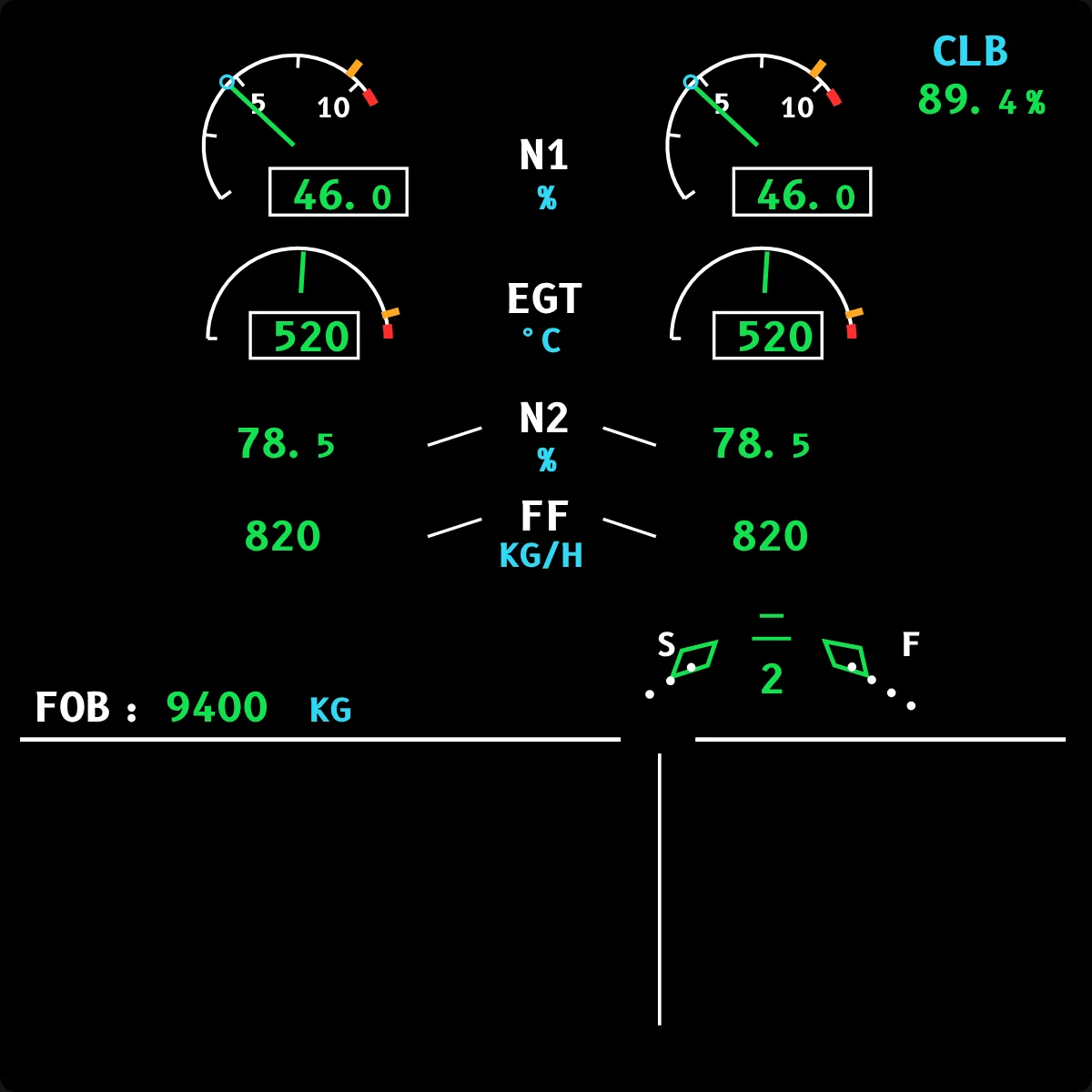

The alert Fail both flap channels
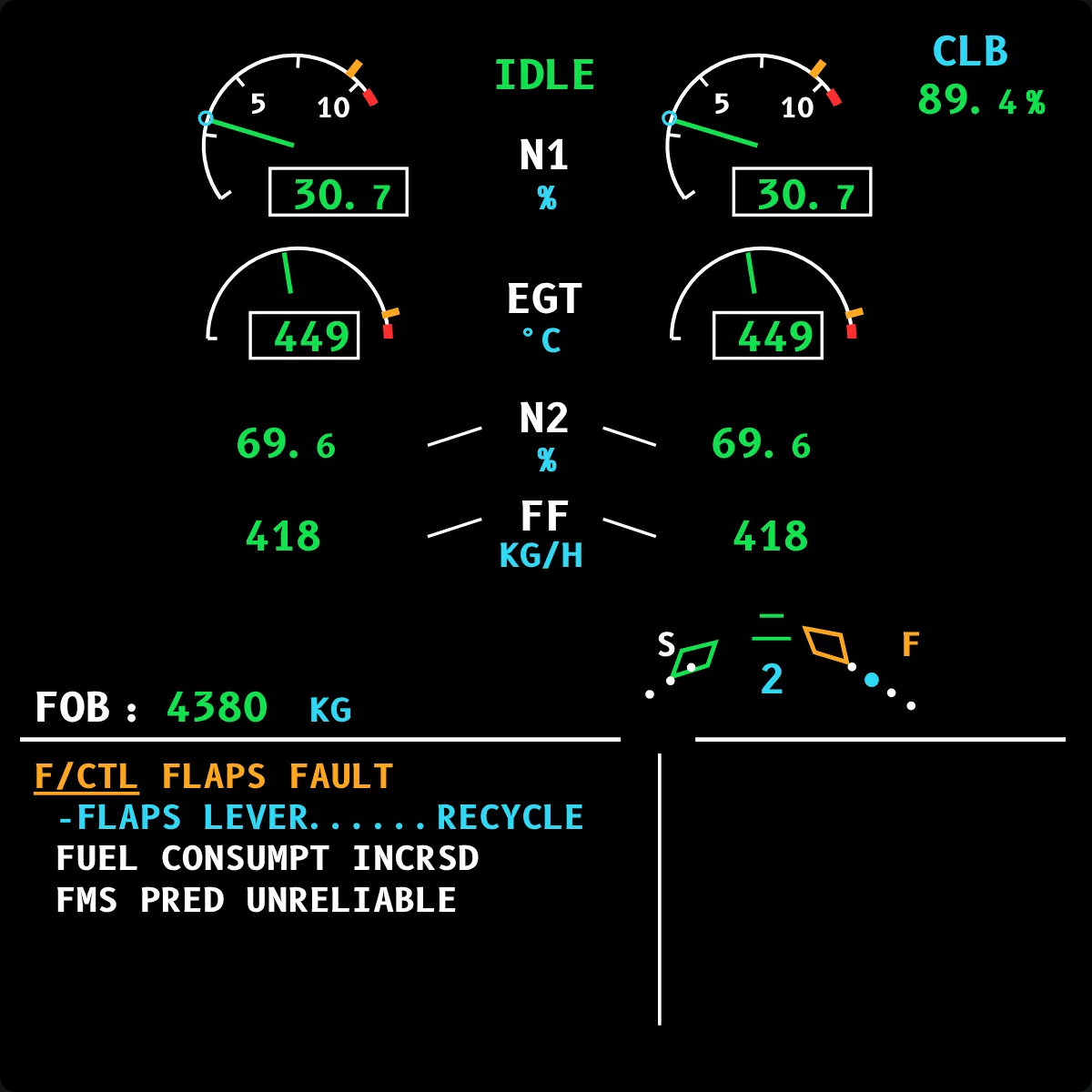
The E/WD shows F/CTL FLAPS FAULT in amber with FLAPS LEVER RECYCLE, FUEL CONSUMPT INCRSD and FMS PRED UNRELIABLE. Under the wing the drawing has the slats at 2 and the flap box stopped at 1, amber, with F in amber and no LOCKED legend. The FLAPS lever stays at 2.
Our picture draws the remarks in white, where the FCOM prints them in blue. Working the recycle and what follows is what the ECAM Trainer does with you.
Sources FCOM PRO-ABN-F_CTL F/CTL / FCOM DSC-27-30-20 ECAM UPPER DISPLAY / FCOM DSC-31-10 COLOR CODE
What does the recycle ask, and what if it fails?
The FCOM procedure, printed once for all aircraft, has two branches. If the flaps are locked: WING TIP BRK ON or ALIGNMENT FAULT and a maximum speed. If they are not locked: FLAPS LEVER RECYCLE, with the comment: return to the previous selection, then back to the desired position. This caution takes the second branch.
The FCOM gives no reason for the recycle. On the flight deck it is a pedestal action: the FLAPS lever is pulled out of its detent to move, and it has no intermediate positions.
If the recycle is unsuccessful, the procedure refers to the QRH's LANDING WITH SLATS OR FLAPS JAMMED. The FCTM gives the aim of its speed selection: to let the crew configure the aircraft for landing while controlling the speed safely. Its steps and tables are not on this page.
On the approach, the FCTM asks the crew to pull the speed knob for selected speed, to avoid further deceleration, to delay the approach to complete the ECAM procedure, to refer to that QRH procedure and to update the arrival briefing.
With the flaps extended, two remarks follow. FUEL CONSUMPT INCRSD is triggered when a failure affects the aircraft's nominal aerodynamic characteristics; under FMS PRED UNRELIABLE the crew disregards the FMS fuel predictions and finds the applicable fuel penalty factor in the QRH.
Sources FCOM PRO-ABN-F_CTL F/CTL / FCOM DSC-27-30-20 PEDESTAL / FCTM PR-AEP-F_CTL ABNORMAL FLAPS/SLATS CONFIGURATION
Why do the autopilot and the autothrust go with it?
The FCOM gives no reason. What it prints is the list: STATUS gives AP 1+2, A/THR and CAT 2 as inoperative, each with the footnote if both flap channels fault, and both flight directors as lost.
The procedure, printed once for both titles, still says under its IF UNSUCCESSFUL that the autopilot may be used down to 500 ft AGL, not being tuned for abnormal configurations, and must be monitored. With this caution, STATUS lists the autopilot as inoperative.
STATUS also prints ENG 1 APPR IDLE ONLY and ENG 2 APPR IDLE ONLY in green, only in case of FLAPS FAULT. The FCOM gives no reason for these lines either.
What approach idle is, from the engine description: an idle that allows the engine to accelerate rapidly from idle to go-around thrust. On the A319ceo and A320ceo the FADEC selects it in flight with the flaps extended; on the A320neo and A321neo, in CONF 3 or FULL, or with the landing gear down.
Sources FCOM PRO-ABN-F_CTL F/CTL / FCOM DSC-70-20 IDLE CONTROL
What goes with both flap channels
What does STATUS set up for the landing?
STATUS's approach procedure, in one version: FOR LDG USE FLAP 3 if the flaps are at 3 or less, replaced by FOR LDG: USE FLAP 3 as a reminder once CONF 3 is selected; FLAPS KEEP CONF FULL if they are beyond 3; GPWS FLAP MODE OFF below 3, GPWS LDG FLAP 3 ON at 3 or more; APPR SPD as a reference to the FCOM's tables by slat and flap position; LDG DIST PROC APPLY.
The GPWS lines have their reason in the system description. FLAP MODE off inhibits the TOO LOW FLAPS mode, to avoid a nuisance warning when landing with a reduced flap setting; LDG FLAP 3 on inhibits it with CONF 3 selected, for a landing in CONF 3.
Two other versions, for other aircraft, start the approach procedure with S/F JAMMED PROC APPLY; one of them words the landing line FOR LDG FLAP LVR 3 and lists FD 1+2 as not displayed on the ECAM.
The FCTM's consequences of abnormal flaps and slats operation: the control laws may change, the selected speed must be used, an early stabilised approach should be preferred, the approach attitudes change, approach speeds and landing distances increase, and the go-around procedure may have to be modified.
Sources FCOM PRO-ABN-F_CTL F/CTL / FCOM PRO-ABN-F_CTL F/CTL FLAPS/SLATS FAULT/LOCKED / FCOM DSC-34-SURV-40-40 OVERHEAD PANEL / FCTM PR-AEP-F_CTL ABNORMAL FLAPS/SLATS CONFIGURATION
What is lost afterwards?
STATUS is the aircraft's operational summary. No STATUS picture is drawn here: the ECAM Trainer's picture writes the approach speed as a figure, where the FCOM prints APPR SPD as a reference to its speed tables.
In the version the trainer follows, the approach procedure is in blue: FOR LDG USE FLAP 3, GPWS FLAP MODE OFF, APPR SPD and LDG DIST PROC APPLY. ENG 1 and ENG 2 APPR IDLE ONLY, FUEL CONSUMPT INCRSD and FMS PRED UNRELIABLE are in green, information. Under INOP SYS, in amber: FLAPS, AP 1+2, A/THR, CAT 2, GLS AUTOLAND and STEEP APPR, the last two where fitted, with a note that both flight directors are lost.
Sources FCOM DSC-31-20 STATUS PAGE / FCOM PRO-ABN-F_CTL F/CTL
A319ceo, A320ceo, A320neo, A321neo: what differs?
| A319ceo, A320ceo | A320neo, A321neo | |
|---|---|---|
| The caution and its procedure | The same in every version | The same in every version |
| STATUS | Not given by type: three versions, two of them starting with S/F JAMMED PROC APPLY | Not given by type: three versions, two of them starting with S/F JAMMED PROC APPLY |
| Approach idle, selected in flight | With the flaps extended, the FLAPS lever not at zero | In CONF 3 or FULL, or with the landing gear down |
| The flap surfaces | Two flap surfaces per wing | Two per wing; double-slotted on the A321neo |
The FCOM prints its slats and flaps speed tables in versions, for different aircraft.
Sources FCOM PRO-ABN-F_CTL F/CTL FLAPS FAULT/LOCKED / FCOM PRO-ABN-F_CTL F/CTL / FCOM DSC-70-20 IDLE CONTROL / FCOM DSC-27-30-10 GENERAL / FCOM DSC-27-30-10 MAIN COMPONENTS / FCOM PRO-ABN-F_CTL F/CTL FLAPS/SLATS FAULT/LOCKED

Work F/CTL FLAPS FAULT as a crew
Read and do each line against the FCOM, with the E/WD, the SD page and the overhead following your hands, the PF and PM calls, and a debrief that says what you missed.
Work this failure in the ECAM TrainerGo further
Written in our own words from the FCOM and the FCTM; each part names the units it rests on. The E/WD, the STATUS and the live aircraft are the platform's own ECAM and systems model, the same the ECAM Trainer and the flight deck run. This page explains the procedure; it is not the procedure. Aircraft differ by type, engine and options: your aircraft's FCOM, your QRH and your operator's procedures always come first. How we write and check these pages.
Every ECAM procedure, line by line, against the FCOM.
The ECAM Trainer works 108 scenarios with the E/WD, the SD page and the overhead following your hands. Start free today, or open everything with A320 Knowledge+.
For study and revision only. Always follow your operator's approved documentation and procedures. A320 Knowledge is independent and not affiliated with Airbus.
Related
- F/CTL ELAC 1 FAULTAn amber caution for one of the two elevator aileron computers.
- F/CTL ELAC 2 FAULTAn amber caution for one of the two elevator aileron computers.
- F/CTL FLAPS LOCKEDAn amber caution for flaps that the wingtip brakes have stopped.
- F/CTL L AIL FAULTAn amber caution for one aileron, not for a computer: both of its servojacks are lost.
- A320 flight controlsThe system guide, with the live aircraft
- Every ECAM procedureThe alerts the ECAM Trainer works, grouped by system