
AIR PACK 1 OVHT
An amber caution with a line that waits. Here is what a pack compressor overheat is, what the aircraft does about it, what switching the pack off changes and what it does not, with the live aircraft at the moment the caution comes on.
Written and checked by current A320 pilotschecked against the FCOM on Our editorial policy
What AIR PACK 1 OVHT means
AIR PACK 1 OVHT is an amber caution: the air leaving pack 1's compressor is hotter than 260 °C. The FAULT light comes on in the PACK 1 pushbutton, and the procedure has the crew switch pack 1 off. With pack 1 off, high flow is selected automatically on pack 2, which carries on alone.
The FAULT light stays on until the overheat disappears. Once the overheat is out, the procedure brings pack 1 back on; STATUS gives that line too, with PACK 1 inoperative if the pack is not recovered.
Sources FCOM PRO-ABN-AIR AIR PACK 1(2) OVHT / FCOM DSC-21-10-50 CONTROLS ON OVERHEAD PANEL / FCOM PRO-ABN-AIR AIR
At a glance
- Level
- Amber caution, level 2: single chime, MASTER CAUT and the relevant system page on the SD
- Sets it off
- Pack 1's compressor outlet temperature above 260 °C
- Lights
- FAULT in the PACK 1 pushbutton; on the BLEED page the compressor outlet figure in amber
- Procedure
- PACK 1 OFF; when the overheat is out, PACK 1 back ON
- What follows
- High flow is selected automatically on pack 2, the remaining pack
- STATUS
- WHEN PACK OVHT OUT: PACK 1 ON; PACK 1 inoperative if the pack is not recovered
Sources FCOM DSC-31-10 WARNING/CAUTION CLASSIFICATION / FCOM DSC-31-20 SYSTEM PAGES / FCOM PRO-ABN-AIR AIR PACK 1(2) OVHT / FCOM DSC-21-10-50 CONTROLS ON OVERHEAD PANEL / FCOM DSC-21-10-50 ECAM BLEED PAGE / FCOM PRO-ABN-AIR AIR
What sets the caution off?
Bleed air enters each pack through its pack flow control valve and is cooled in the primary heat exchanger. The compressor of the air cycle machine then squeezes it to a higher pressure and temperature, before the main heat exchanger cools it again and the turbine expands it.
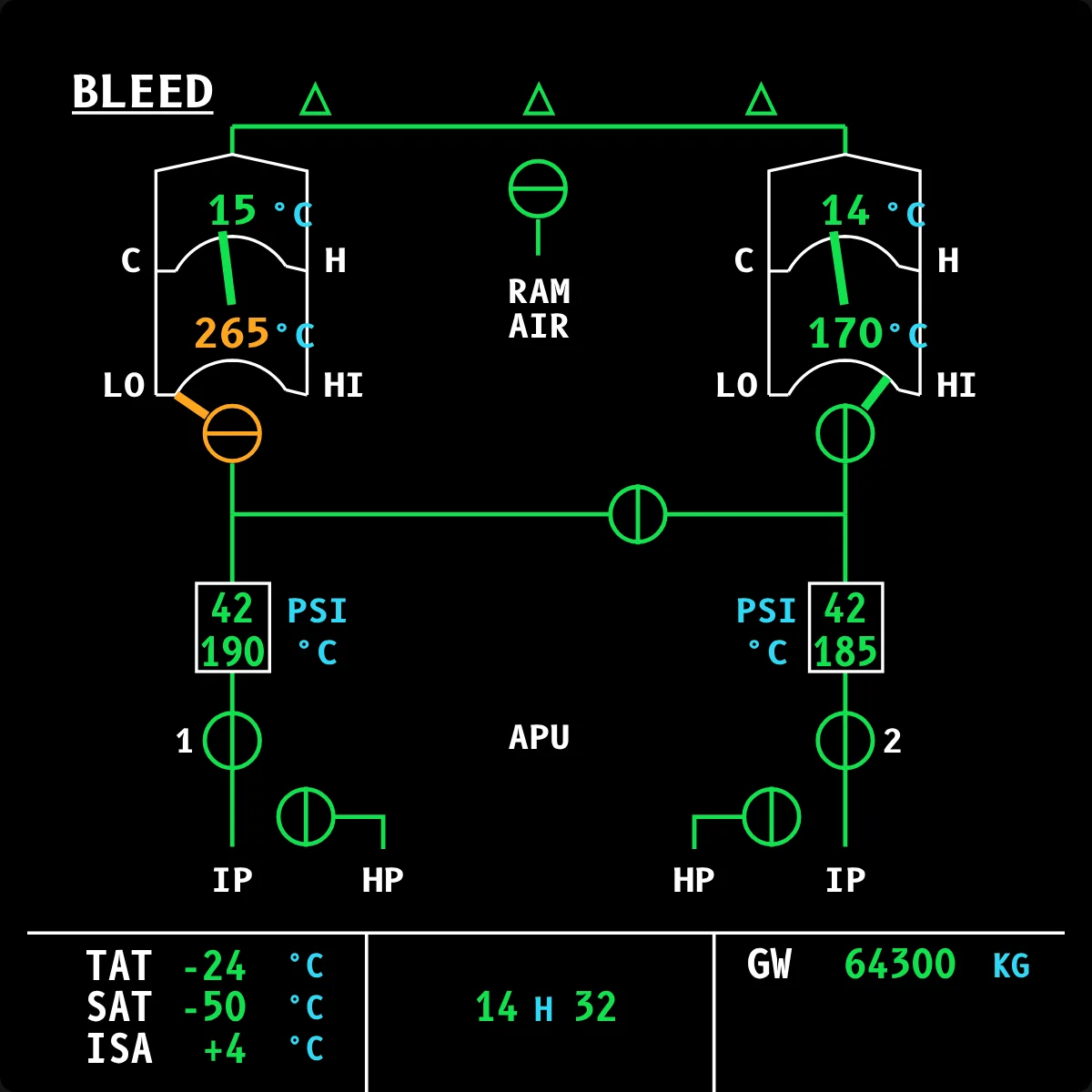
The caution watches the compressor outlet: it triggers when pack 1's compressor outlet temperature rises above 260 °C. The BLEED page shows that temperature for each pack, in green, and in amber above 260 °C.
The PACK 1 pushbutton's FAULT light comes on amber, with an ECAM caution, for a compressor outlet overheat. The same light also covers a pack outlet overheat and a flow control valve that disagrees with its selected position.
The FCOM describes what the valve does in two places. The PACK pushbutton lists a compressor outlet overheat, with no flight phase, among the cases in which the pack flow control valve does not open. The valve's own description gives its automatic closure for a pack overheat on the ground only.
Sources FCOM DSC-21-10-20 AIR CONDITIONING PACK / FCOM PRO-ABN-AIR AIR PACK 1(2) OVHT / FCOM DSC-21-10-50 ECAM BLEED PAGE / FCOM DSC-21-10-50 CONTROLS ON OVERHEAD PANEL / FCOM DSC-21-10-20 PACK FLOW CONTROL VALVE
From hot bleed air to the caution
What does the crew see and hear?
A level 2 caution: a single chime, the MASTER CAUT light steady amber, the caution in amber on the E/WD, and the SD normally calls up the relevant system page. The pack temperatures, flows and flow control valves are on the BLEED page.
On the BLEED page a flow control valve drawn crossline is fully closed: green when that agrees with its control position, amber when it does not. A pack's flow figure turns amber when its flow control valve is closed.
Sources FCOM DSC-31-10 WARNING/CAUTION CLASSIFICATION / FCOM DSC-31-20 SYSTEM PAGES / FCOM DSC-21-10-50 ECAM BLEED PAGE
The moment the caution comes on
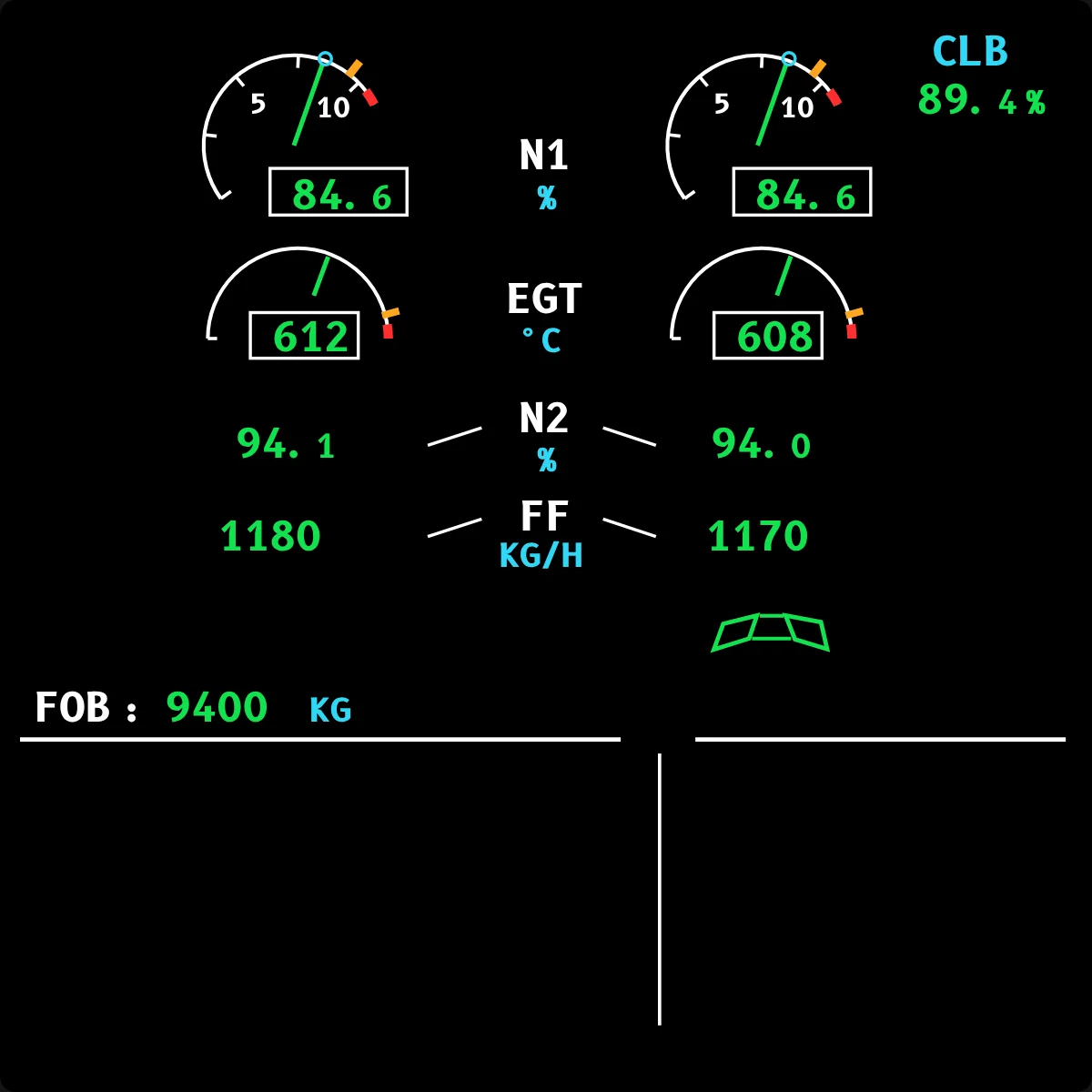
In the cruise, both packs running at NORM flow. Press the button to overheat pack 1, then look at the E/WD, the BLEED page, the AIR COND panel and the schematic.
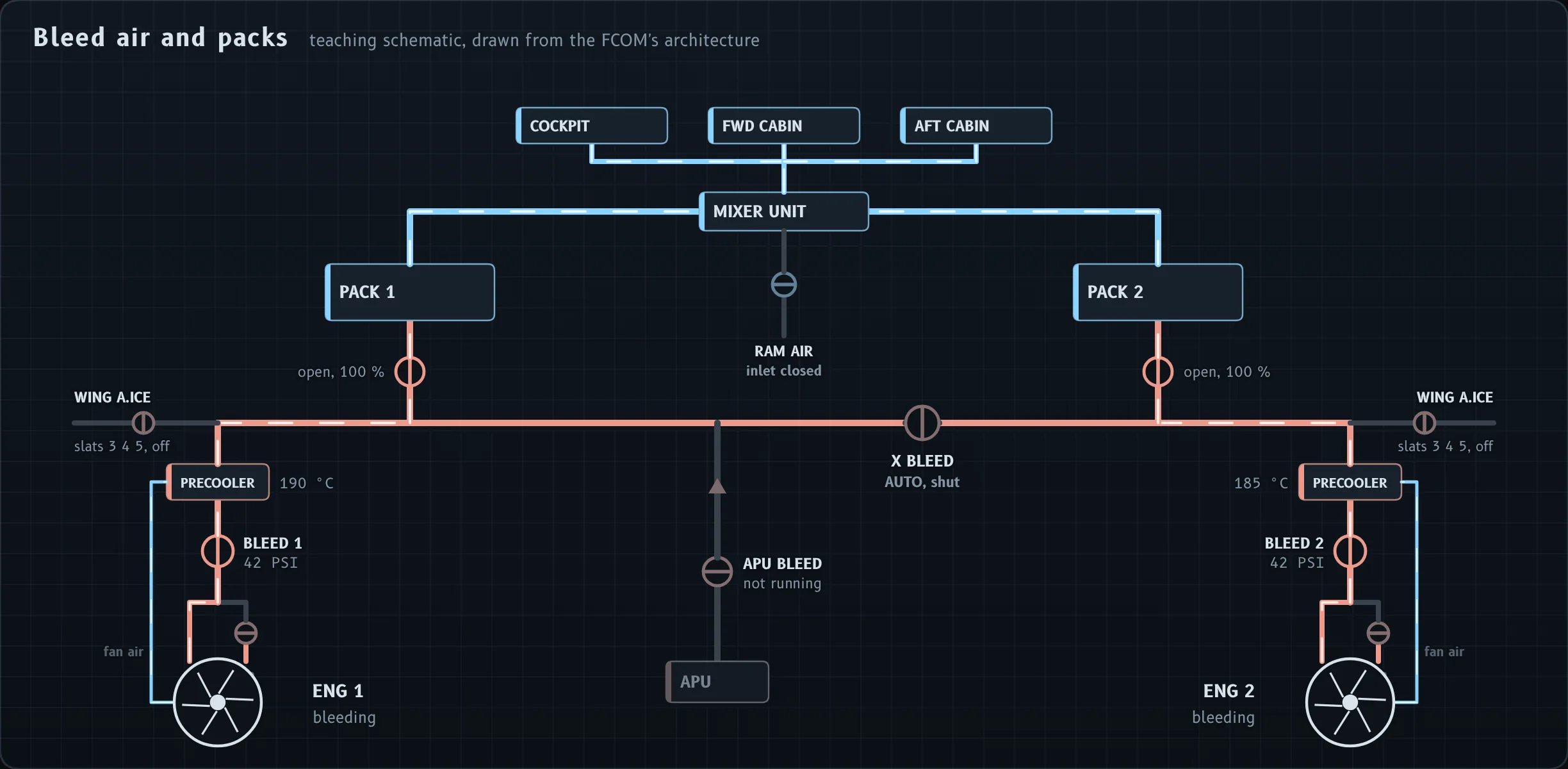
The alert Overheat pack 1
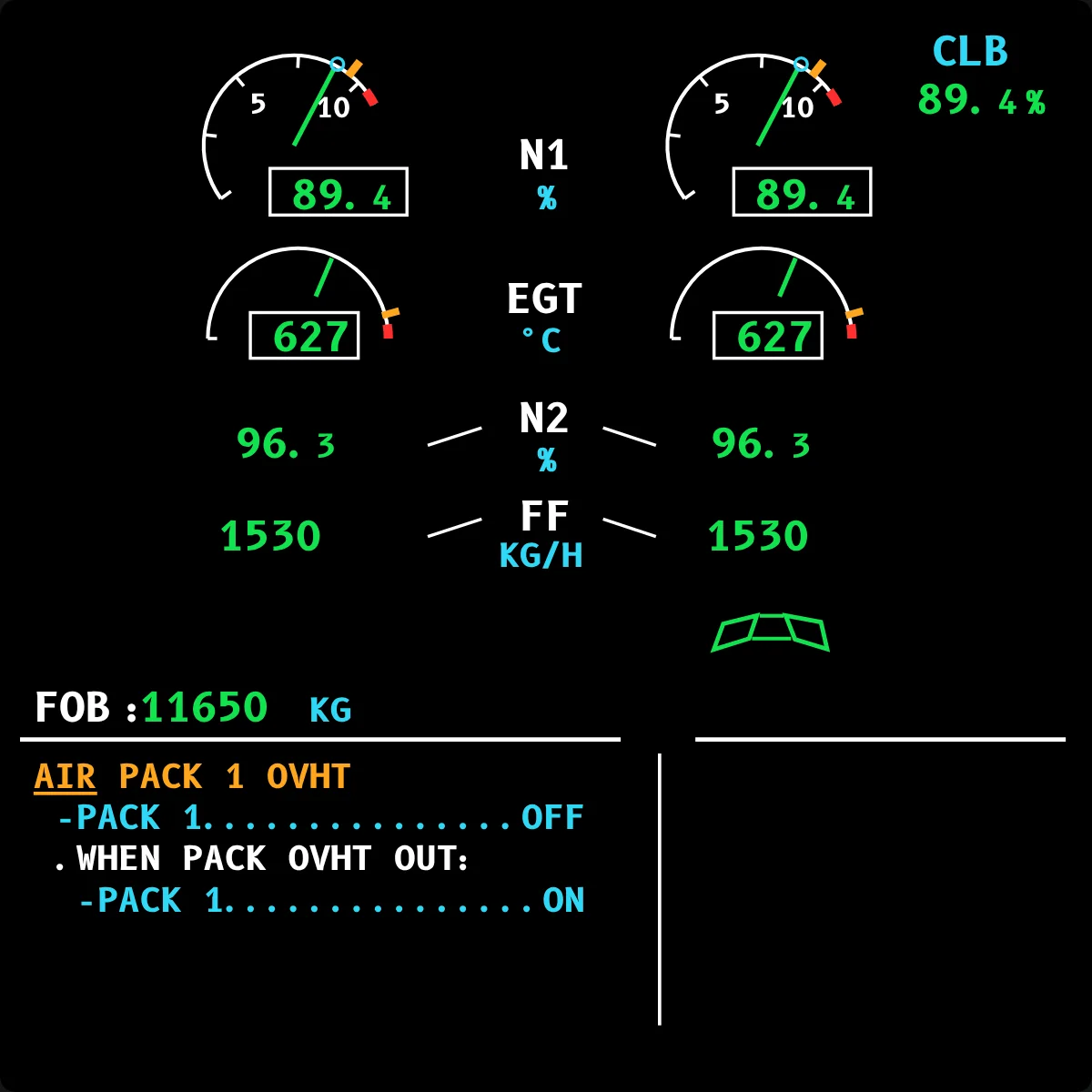
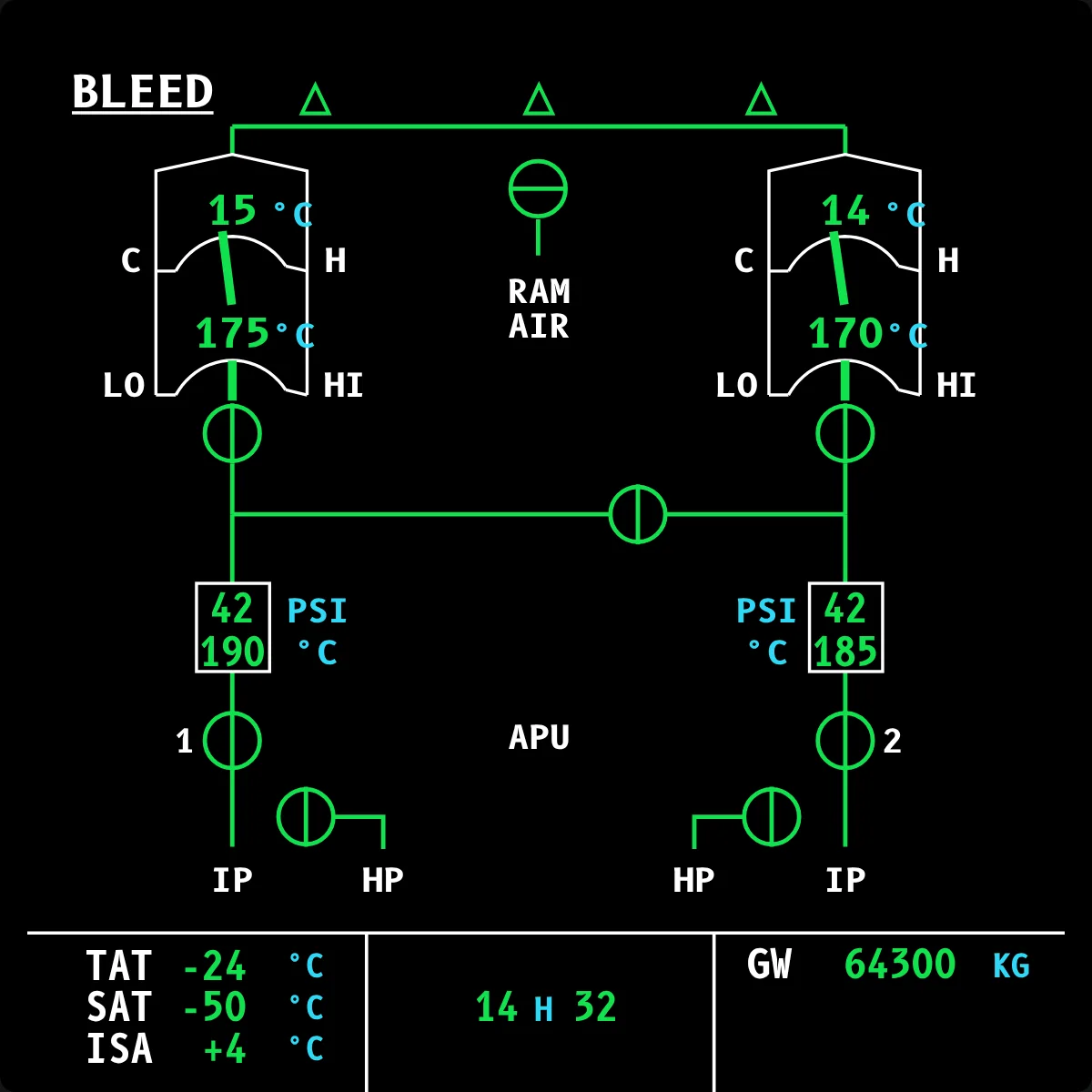
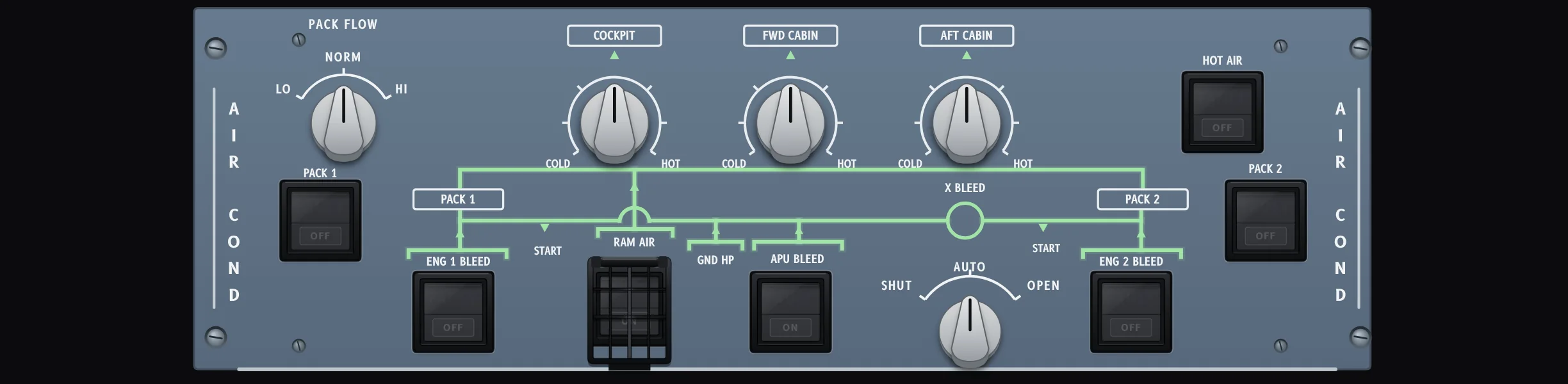
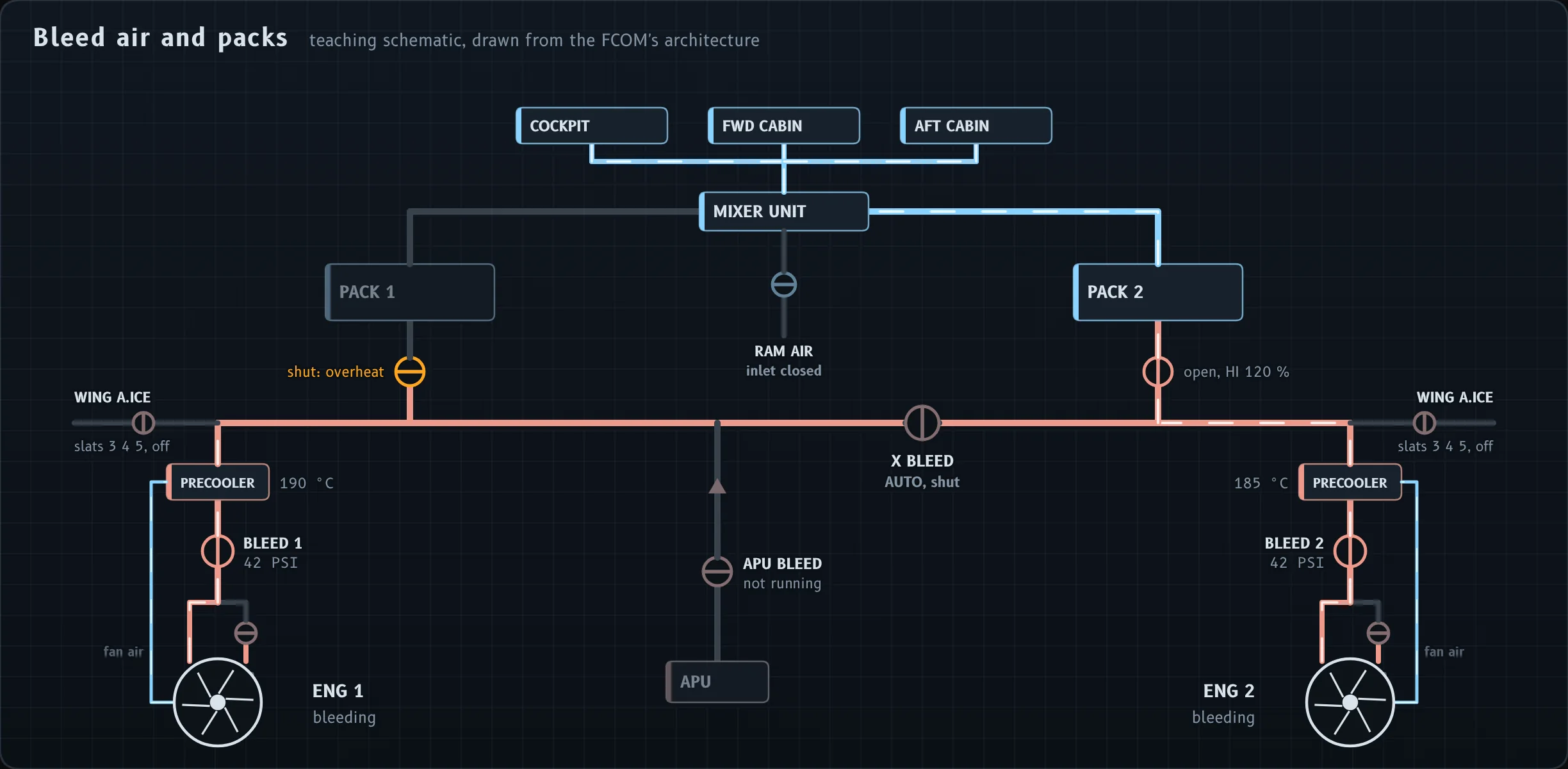
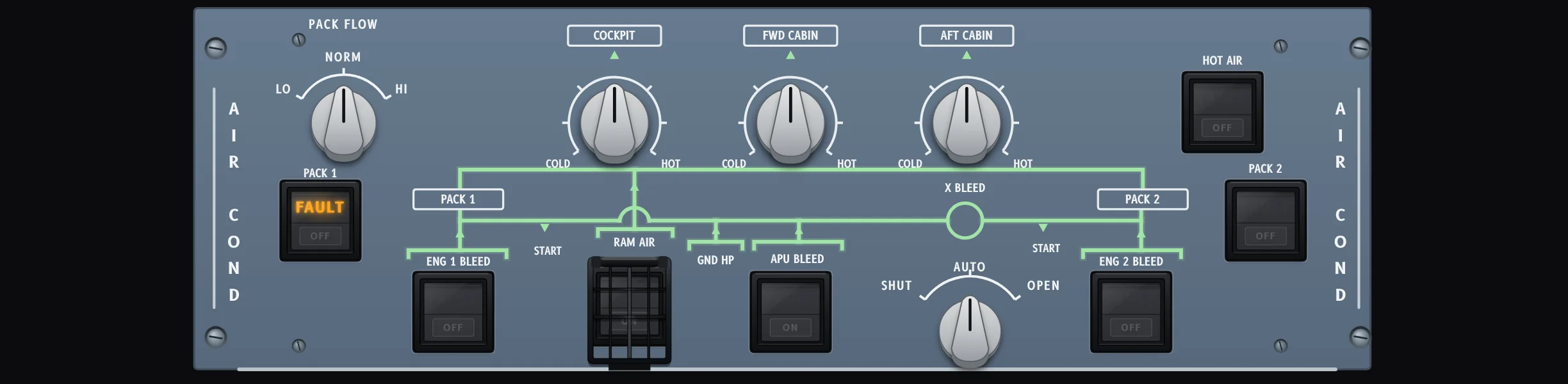
The E/WD shows the caution in amber with PACK 1 OFF and, under WHEN PACK OVHT OUT, PACK 1 ON. FAULT lights in PACK 1. On the BLEED page pack 1's compressor outlet figure is amber, and its valve is crossline amber: closed, against a pushbutton still at ON.
Here the drawing closes pack 1's valve as the overheat comes, in flight. The FCOM lists a compressor outlet overheat among the cases in which the valve does not open, and gives its automatic closure for a pack overheat on the ground only. Pack 2 goes to high flow by itself, as the PACK FLOW selector's rule for single pack operation gives; the procedure states high flow on the remaining pack once pack 1 is off.
Sources FCOM PRO-ABN-AIR AIR / FCOM DSC-21-10-50 CONTROLS ON OVERHEAD PANEL / FCOM DSC-21-10-50 ECAM BLEED PAGE / FCOM DSC-21-10-20 PACK FLOW CONTROL VALVE
What does switching pack 1 off change?
PACK OFF closes the pack flow control valve. In the drawing the valve is already shut, so the press changes what the valve is told, not where it is: the valve and its pushbutton agree again.
In the drawing the FAULT light does not go out with it. The procedure's remark says it goes off when the overheat disappears, and the PACK pushbutton gives the compressor outlet overheat as a FAULT case of its own.
Sources FCOM DSC-21-10-50 CONTROLS ON OVERHEAD PANEL / FCOM DSC-21-10-50 ECAM BLEED PAGE / FCOM PRO-ABN-AIR AIR
Switch pack 1 off, then back on
Pack 1 has overheated, its valve is shut and pack 2 is at high flow. Predict first, then press, and watch the PACK 1 pushbutton and pack 1's valve on the BLEED page.
-
Predict Pack 1's valve is already shut. You switch PACK 1 off. What does its FAULT light do?
Try it Switch PACK 1 off.
The pushbutton is at OFF. Pack 1's valve, now closed as commanded, turns from amber to green crossline on the BLEED page. FAULT stays lit: the procedure says it goes off when the overheat disappears.
Sources FCOM DSC-21-10-50 CONTROLS ON OVERHEAD PANEL / FCOM DSC-21-10-50 ECAM BLEED PAGE / FCOM PRO-ABN-AIR AIR
-
Predict The overheat is still there. What happens if pack 1 goes back on now?
Try it Switch PACK 1 back on.
With the pushbutton ON the valve opens except in the cases the FCOM lists, and a compressor outlet overheat is one of them. The valve stays shut, crossline amber again. In the procedure, PACK 1 ON sits under WHEN PACK OVHT OUT.
Sources FCOM DSC-21-10-50 CONTROLS ON OVERHEAD PANEL / FCOM DSC-21-10-50 ECAM BLEED PAGE / FCOM PRO-ABN-AIR AIR
Why does pack 1 wait before it goes back on?
The procedure has two parts: PACK 1 OFF now, then PACK 1 ON under the condition WHEN PACK OVHT OUT. The FCOM marks a precondition with a black dot and prints it in large letters when it appears on the ECAM, as this one does.
The FCOM gives no further reason for the order. It does say what each control does: OFF closes the valve, ON lets it open except in the cases the PACK pushbutton lists, a compressor outlet overheat among them, and FAULT goes off when the overheat disappears.
The FCOM classes a level 2 caution as one the crew should be aware of without any immediate action, yet to be considered without delay, time and situation permitting, so that the affected system does not degrade further.
On the BLEED page the compressor outlet figure is green again once it is no longer above 260 °C.
Sources FCOM PRO-ABN-AIR AIR / FCOM PRO-ABN-ABN-00 INTRODUCTION / FCOM DSC-21-10-50 CONTROLS ON OVERHEAD PANEL / FCOM DSC-31-10 WARNING/CAUTION CLASSIFICATION / FCOM DSC-21-10-50 ECAM BLEED PAGE
What is lost while pack 1 is off?
One pack. Pack 2 carries on alone: in single pack operation the PACK FLOW selection is irrelevant, and HI, 120 %, is selected automatically. Pack 1's flow figure on the BLEED page stays amber while its flow control valve is closed.
STATUS lists PACK 1 under INOP SYS, with a footnote: if the pack is not recovered. The line WHEN PACK OVHT OUT, PACK 1 ON is on its left side.
Sources FCOM DSC-21-10-50 CONTROLS ON OVERHEAD PANEL / FCOM PRO-ABN-AIR AIR / FCOM DSC-21-10-50 ECAM BLEED PAGE
Pack 2 alone
How is it different from AIR PACK 1 FAULT?
AIR PACK 1 FAULT is about the valve, not the temperature: it triggers when pack 1's flow control valve disagrees with its commanded position, or the pack valve is closed. Its procedure is the same first line, PACK OFF, with no line to bring the pack back.
The FAULT light is the same light, with a different remark. It comes on for a valve position that disagrees with the selected position, a compressor outlet overheat or a pack outlet overheat. For the overheat, the procedure's remark has it go off when the overheat disappears; the AIR PACK 1 FAULT procedure has no remark on the light.
Sources FCOM PRO-ABN-AIR AIR PACK 1(2) FAULT / FCOM PRO-ABN-AIR AIR / FCOM DSC-21-10-50 CONTROLS ON OVERHEAD PANEL
What is lost afterwards?
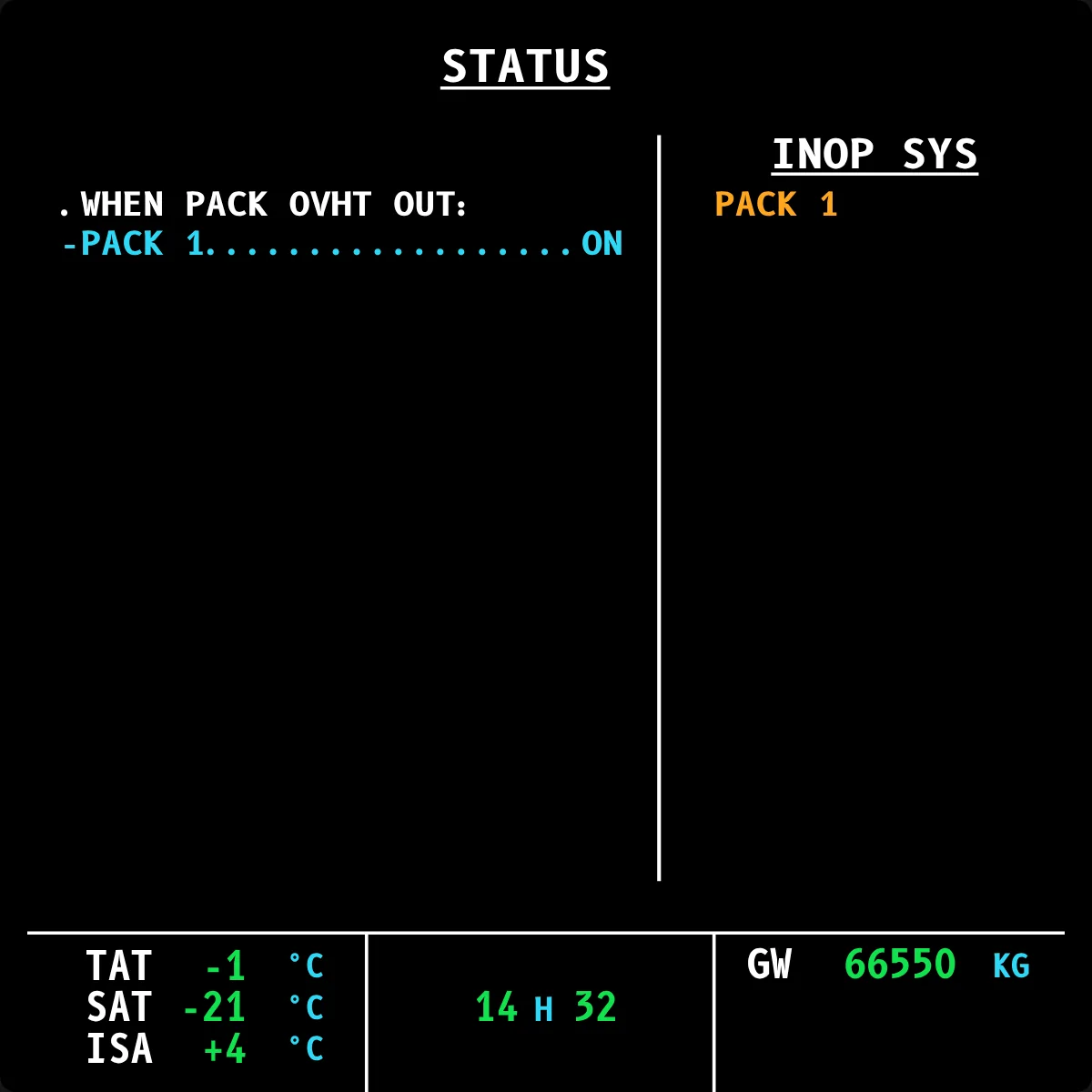
STATUS is the aircraft's operational summary. For this caution the FCOM prints one STATUS for all aircraft: WHEN PACK OVHT OUT and PACK 1 ON on the left, and PACK 1 under INOP SYS with its footnote, if pack not recovered. The STATUS above shows those lines.
Sources FCOM DSC-31-20 STATUS PAGE / FCOM PRO-ABN-AIR AIR
A319ceo, A320ceo, A320neo, A321neo: what differs?
| A319ceo, A320ceo | A320neo, A321neo | |
|---|---|---|
| The caution, its procedure and STATUS | The same in every version | The same in every version |
| PACK pushbutton with a compressor outlet overheat | FAULT lights, and the valve does not open: the same in both versions of the panel description, each given to a list of aircraft | The same: both versions of the panel description agree |
Sources FCOM PRO-ABN-AIR AIR PACK 1(2) OVHT / FCOM PRO-ABN-AIR AIR / FCOM DSC-21-10-50 CONTROLS ON OVERHEAD PANEL

Work AIR PACK 1 OVHT as a crew
Read and do each line against the FCOM, with the E/WD, the SD page and the overhead following your hands, the PF and PM calls, and a debrief that says what you missed.
Work this failure in the ECAM TrainerGo further
Written in our own words from the FCOM and the FCTM; each part names the units it rests on. The E/WD, the STATUS and the live aircraft are the platform's own ECAM and systems model, the same the ECAM Trainer and the flight deck run. This page explains the procedure; it is not the procedure. Aircraft differ by type, engine and options: your aircraft's FCOM, your QRH and your operator's procedures always come first. How we write and check these pages.
Every ECAM procedure, line by line, against the FCOM.
The ECAM Trainer works 108 scenarios with the E/WD, the SD page and the overhead following your hands. Start free today, or open everything with A320 Knowledge+.
For study and revision only. Always follow your operator's approved documentation and procedures. A320 Knowledge is independent and not affiliated with Airbus.
Related
- AIR BLEED LEAKA red warning with one line.
- AIR PACK 1+2 FAULTAn amber caution that takes both packs.
- AIR PACK 1 FAULTAn amber caution with one line.
- AIR X BLEED FAULTAn amber caution with a one-line procedure and a condition that matters in icing.
- A320 air conditioning and pressurisationThe system guide, with the live aircraft
- Every ECAM procedureThe alerts the ECAM Trainer works, grouped by system