
AIR PACK 1 FAULT
An amber caution with one line. Here is what the pack flow control valve has done to set it off, what the aircraft does with the other pack, what the one switch changes, and why STATUS talks about controllers, with the live aircraft at the moment the caution comes on.
Written and checked by current A320 pilotschecked against the FCOM on Our editorial policy
What AIR PACK 1 FAULT means
AIR PACK 1 FAULT is an amber caution about pack 1's flow control valve: its position disagrees with the commanded position, or the pack valve is closed. The procedure is one line, PACK 1 OFF. Pack 2 then runs alone, and high flow is selected on it automatically.
STATUS lists PACK 1 and COND CTL 1 as inoperative. Its conditions, printed in small letters, add lines only for a failed air conditioning system controller: CKPT AT FIXED TEMP if ACSC 1 failed, CAB AT FIXED TEMP if ACSC 2 failed.
Sources FCOM PRO-ABN-AIR AIR PACK 1(2) FAULT / FCOM PRO-ABN-AIR AIR / FCOM DSC-21-10-50 CONTROLS ON OVERHEAD PANEL / FCOM PRO-ABN-ABN-00 INTRODUCTION
At a glance
- Level
- Amber caution, level 2: single chime, MASTER CAUT and the relevant system page on the SD
- Sets it off
- Pack 1's flow control valve disagrees with its commanded position, or the pack valve is closed
- Lights
- FAULT in the PACK 1 pushbutton; on the BLEED page the valve in amber while it disagrees with its control position, and pack 1's flow in amber while the valve is closed
- Procedure
- One line: PACK 1 OFF
- What follows
- Pack 2 runs alone, with HI flow selected automatically
- STATUS
- PACK 1 and COND CTL 1 under INOP SYS; CKPT AT FIXED TEMP if ACSC 1 failed, CAB AT FIXED TEMP if ACSC 2 failed
Sources FCOM DSC-31-10 WARNING/CAUTION CLASSIFICATION / FCOM DSC-31-20 SYSTEM PAGES / FCOM PRO-ABN-AIR AIR PACK 1(2) FAULT / FCOM DSC-21-10-50 CONTROLS ON OVERHEAD PANEL / FCOM DSC-21-10-50 ECAM BLEED PAGE / FCOM PRO-ABN-AIR AIR
What sets the caution off?
Each pack's air comes in through its pack flow control valve, pneumatically operated and electrically controlled. It regulates the flow on signals from the pack controllers or the air conditioning system controller (ACSC), and with no air pressure a spring keeps it closed.
The caution triggers in two cases: the position of the valve disagrees with the commanded position, or the pack valve is closed. FAULT lights amber in the PACK 1 pushbutton when the valve's position disagrees with the selected position.
The STATUS for this caution also has conditions for a failed controller (ACSC). Each controller has two lanes: one lane failing has no effect, as the other takes over. With both lanes failed, the related pack is lost, and the hot air pressure-regulating valve and its trim air valves close.
Sources FCOM DSC-21-10-10 GENERAL / FCOM DSC-21-10-20 AIR CONDITIONING PACK / FCOM DSC-21-10-20 PACK FLOW CONTROL VALVE / FCOM PRO-ABN-AIR AIR PACK 1(2) FAULT / FCOM DSC-21-10-50 CONTROLS ON OVERHEAD PANEL / FCOM PRO-ABN-AIR AIR / FCOM DSC-21-10-40 GENERAL / FCOM DSC-21-10-40
Two ways to the caution
What does the crew see and hear?
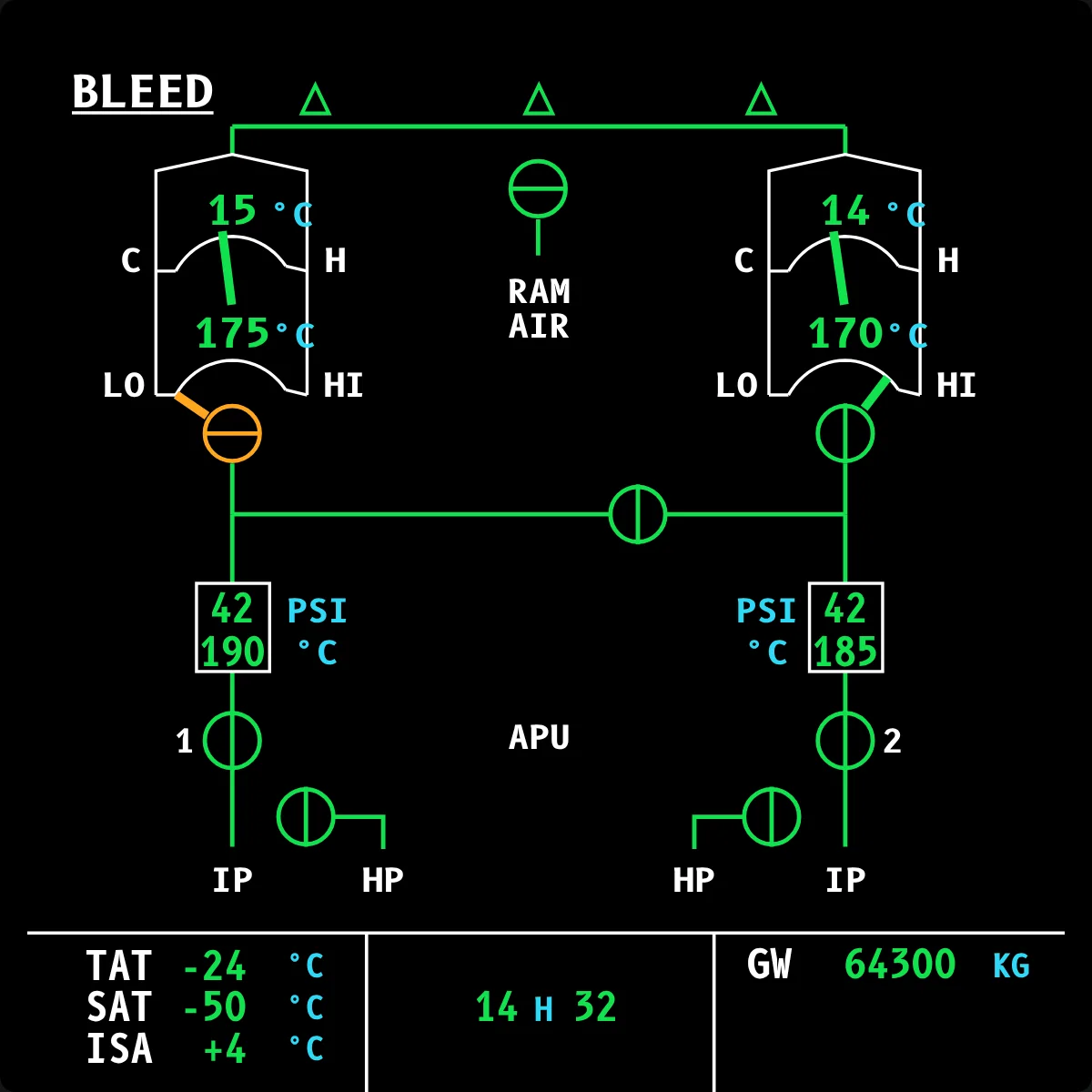
A level 2 caution: a single chime, the MASTER CAUT light steady amber, the caution in amber on the E/WD, and the SD normally calls up the relevant system page. The pack flows and flow control valves are on the BLEED page.
On the BLEED page a valve drawn crossline in amber is fully closed and disagrees with its control position, and a pack's flow figure turns amber when its flow control valve is closed.
Sources FCOM DSC-31-10 WARNING/CAUTION CLASSIFICATION / FCOM DSC-31-20 SYSTEM PAGES / FCOM DSC-21-10-50 ECAM BLEED PAGE
The moment the caution comes on
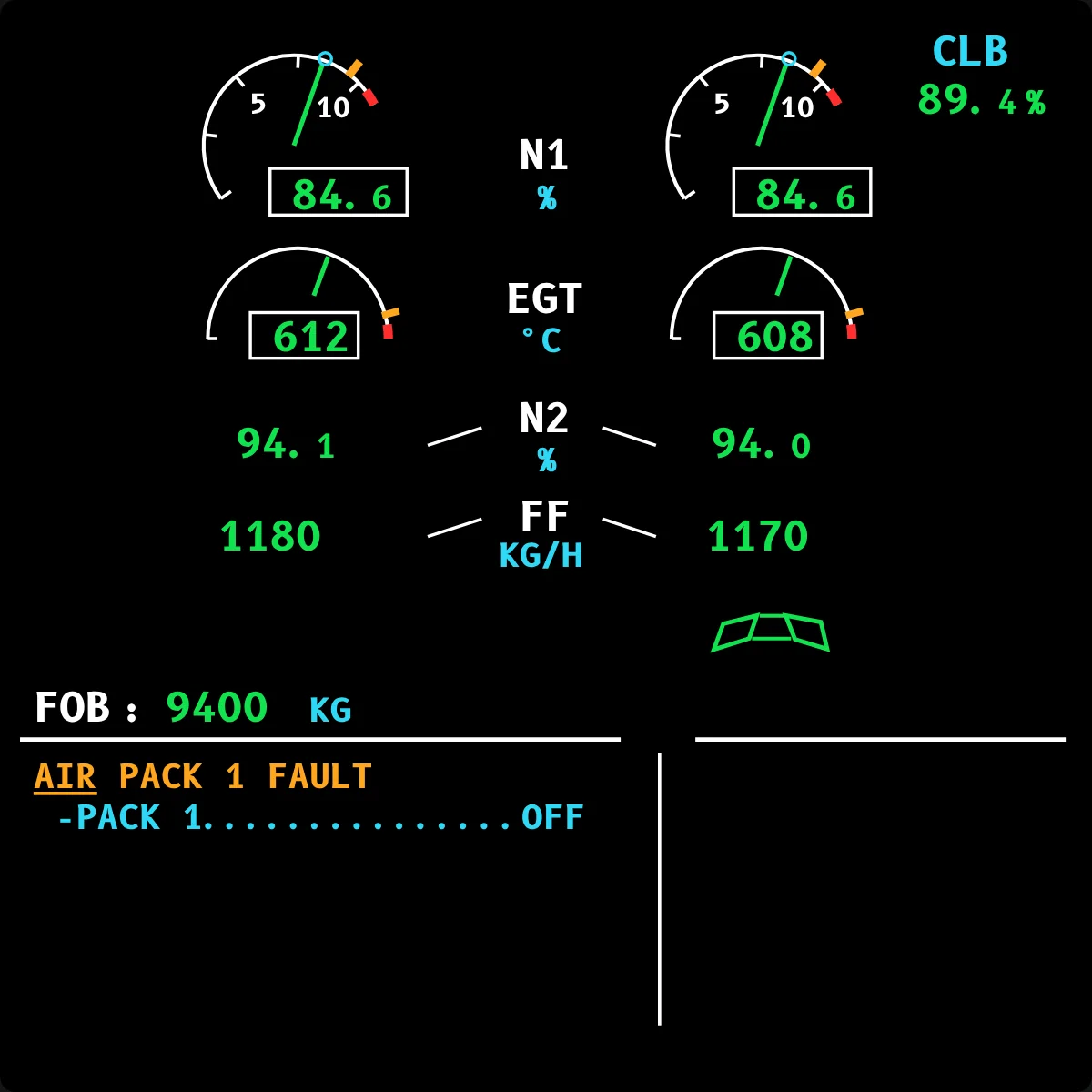
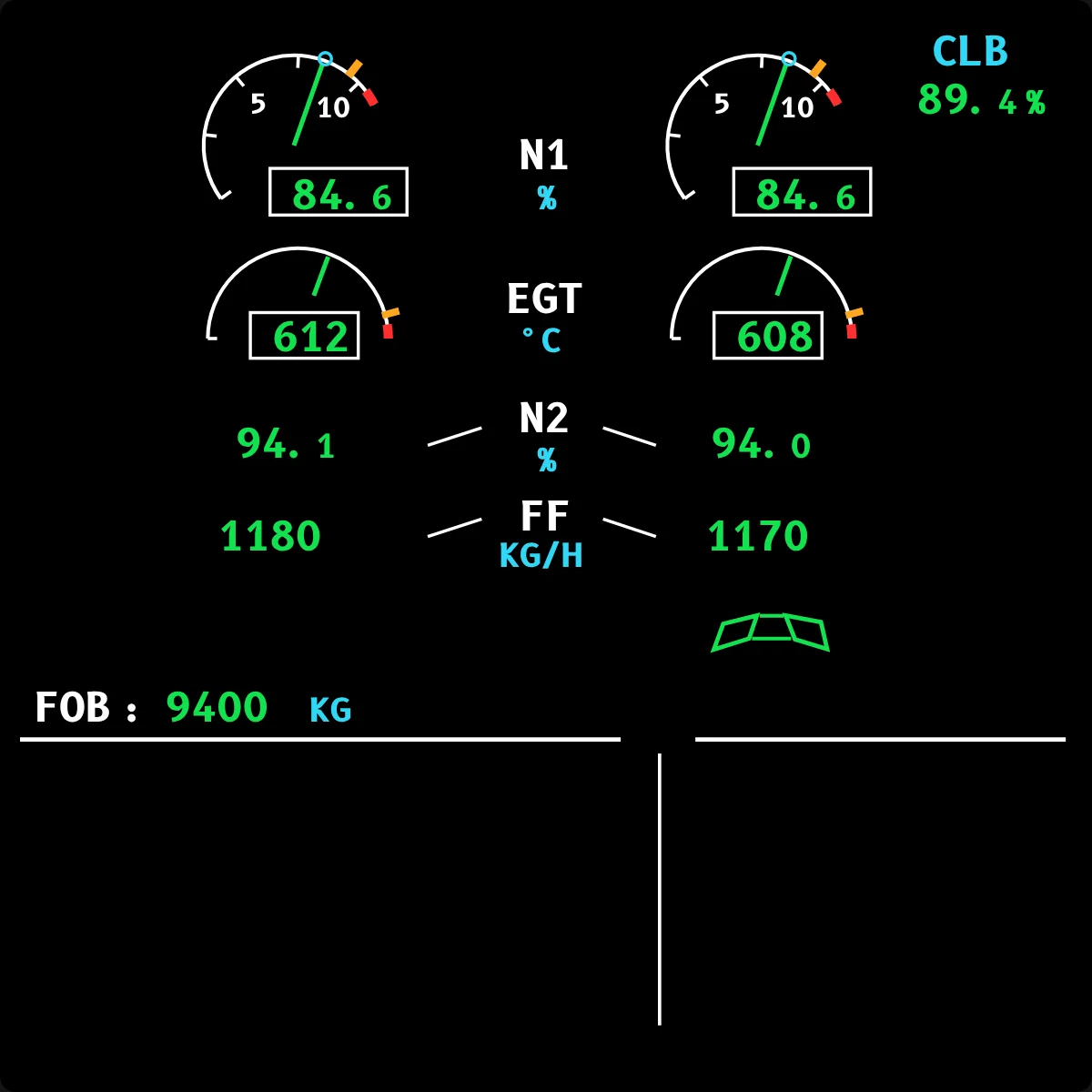
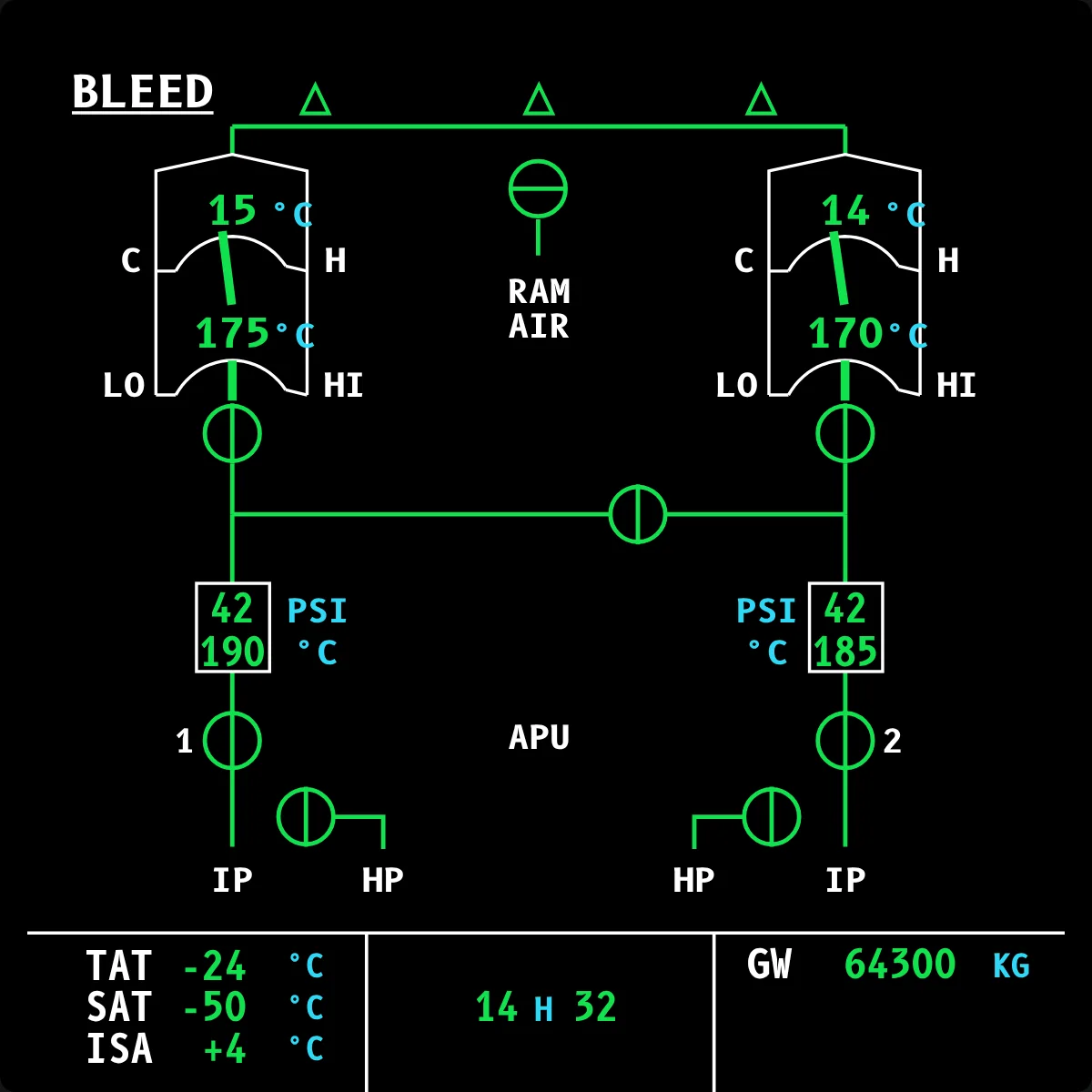
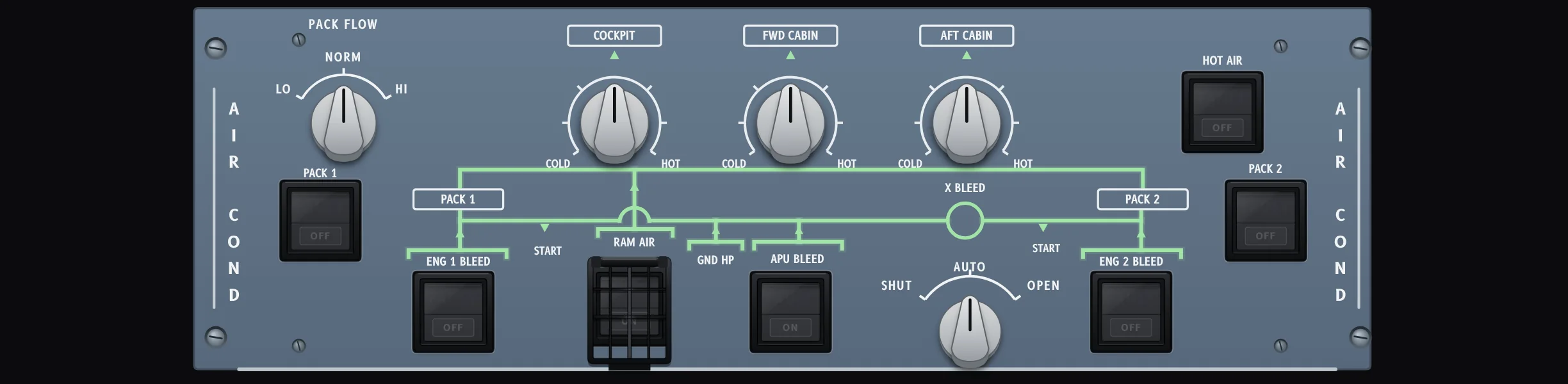
In the cruise, both packs running at NORM flow. Press the button to fail pack 1's flow control valve, then look at the E/WD, the BLEED page, the AIR COND panel and the schematic.
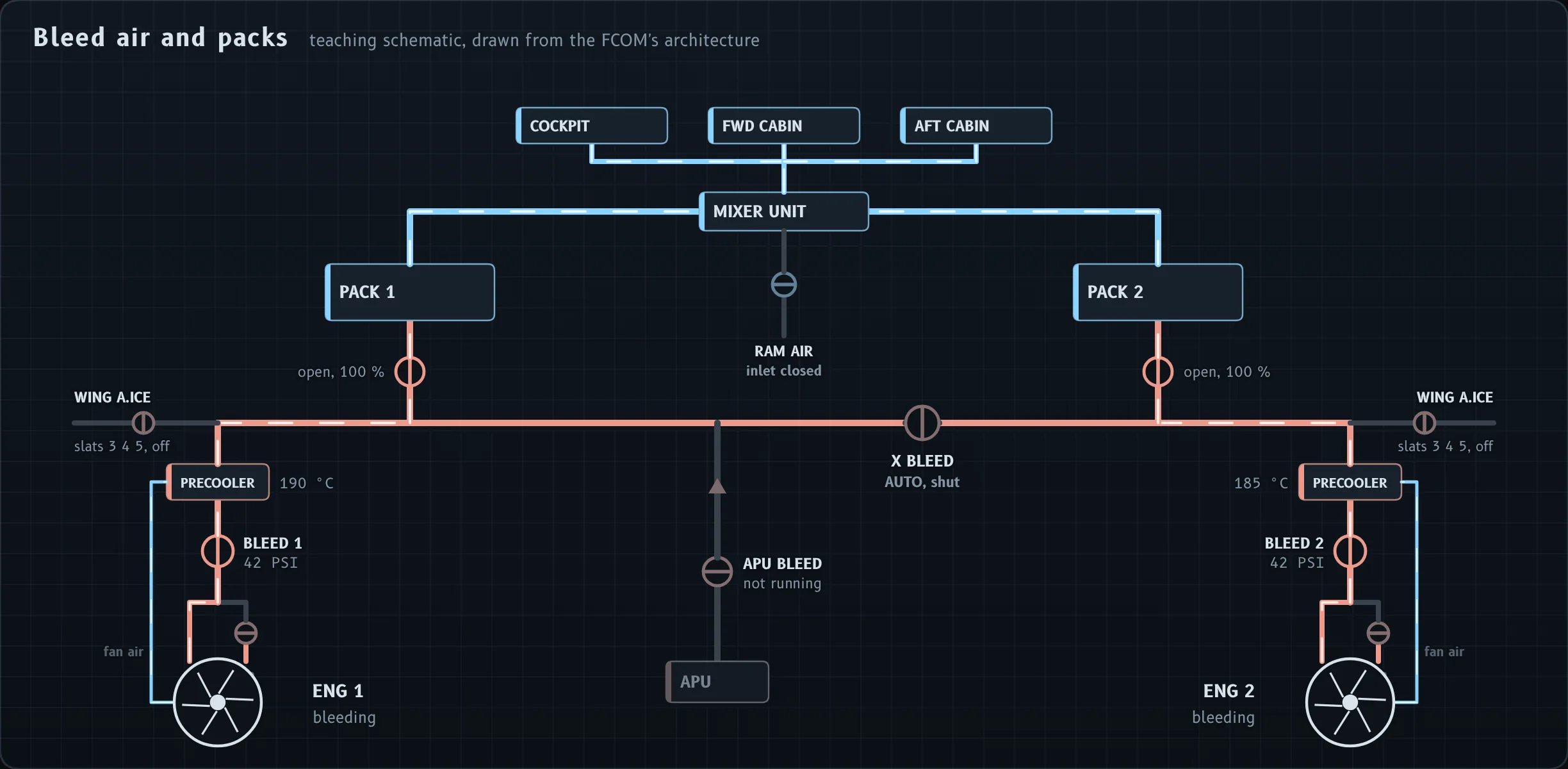
The alert Fail pack 1's flow control valve
The E/WD shows the caution in amber with its one line, PACK 1 OFF. FAULT lights in PACK 1. On the BLEED page pack 1's valve is crossline amber, closed against the pushbutton's ON, and its flow is amber.
Here the valve itself has failed shut. Pack 2 is alone and goes to high flow by itself, as the PACK FLOW selector's rule for single pack operation gives.
Sources FCOM PRO-ABN-AIR AIR / FCOM DSC-21-10-50 CONTROLS ON OVERHEAD PANEL / FCOM DSC-21-10-50 ECAM BLEED PAGE
What does PACK 1 OFF change?
OFF closes the pack flow control valve. With the valve already shut, the press brings the selection into line with it.
The FAULT light covers a valve whose position disagrees with the selected position; with OFF selected and the valve closed, the two agree. The drawing puts the light out and also clears the caution. The FCOM says neither: its procedure for this caution has no remark on the light, where the overheat's says it goes off when the overheat disappears, and one of its triggers, the pack valve closed, still holds with the pack off.
Sources FCOM DSC-21-10-50 CONTROLS ON OVERHEAD PANEL / FCOM PRO-ABN-AIR AIR PACK 1(2) FAULT / FCOM PRO-ABN-AIR AIR
Switch pack 1 off, then back on
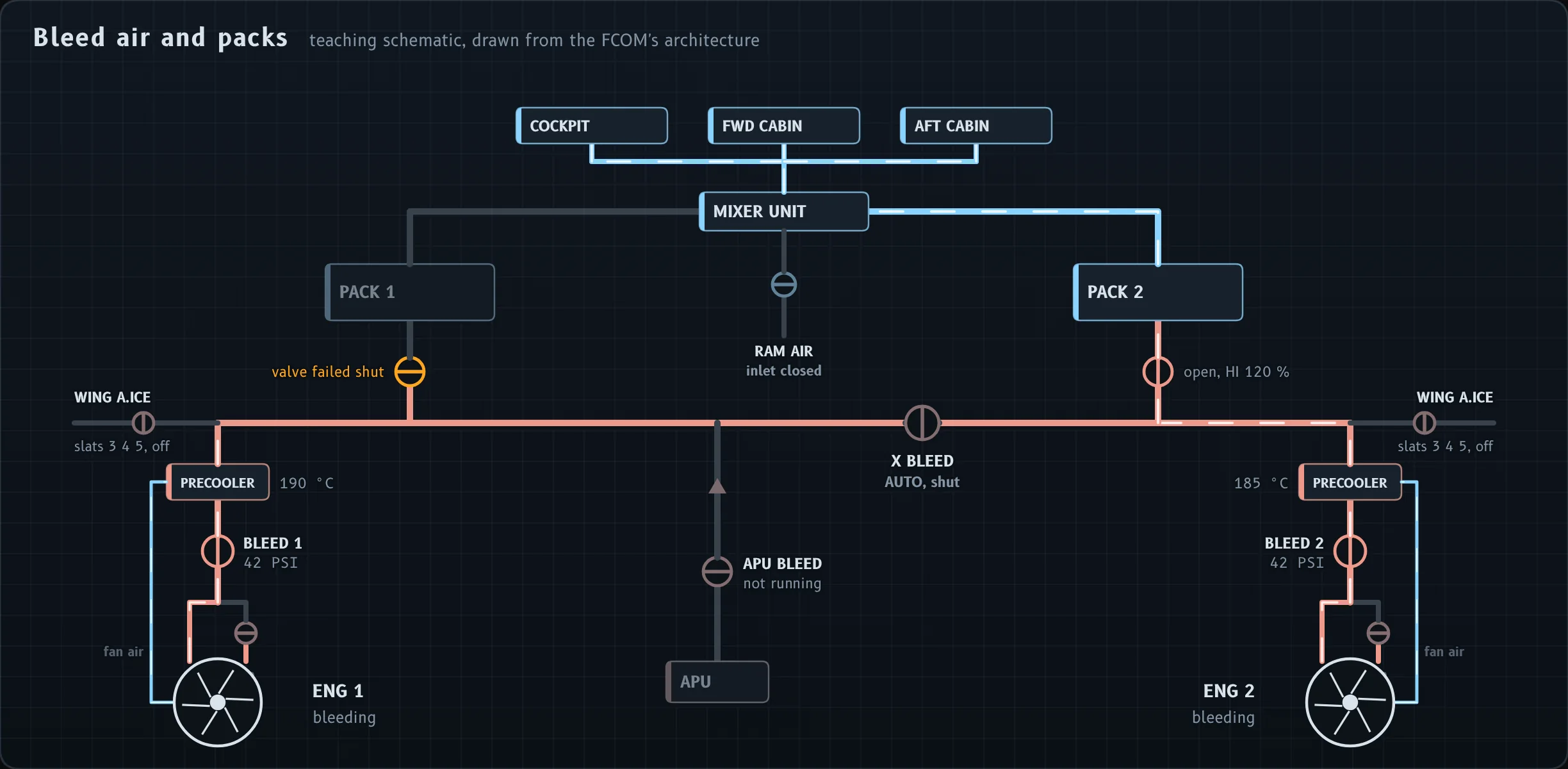
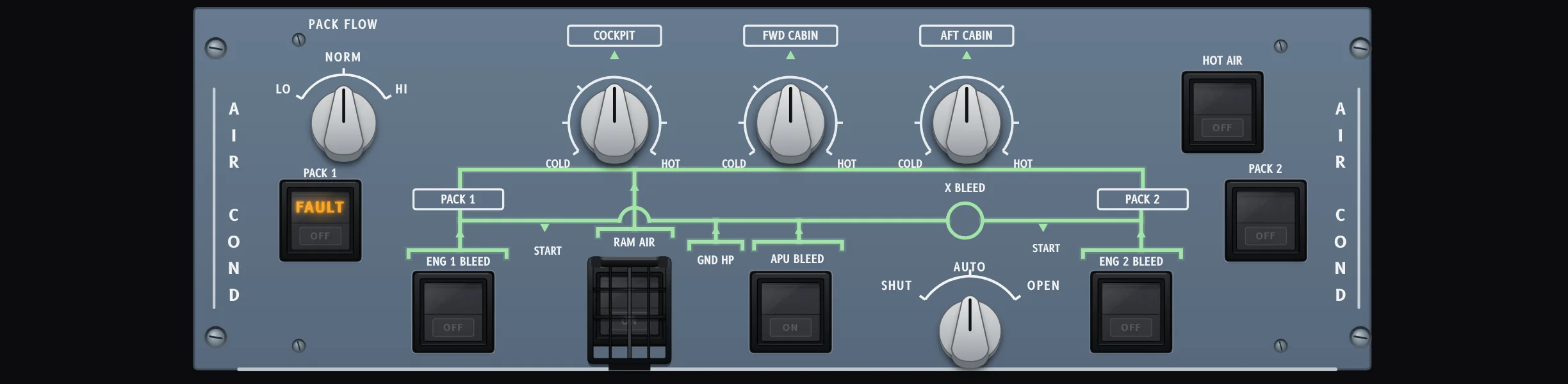
Pack 1's flow control valve has failed shut with PACK 1 at ON, and pack 2 is at high flow. Predict first, then press, and watch the PACK 1 pushbutton and pack 1's valve on the BLEED page.
-
Predict Pack 1's valve has failed shut with the pushbutton at ON. You switch PACK 1 off. What does its FAULT light do in the drawing?
Try it Switch PACK 1 off.
The pushbutton is at OFF, the valve turns green crossline on the BLEED page, closed as commanded, and FAULT goes out in the drawing. Compare AIR PACK 1 OVHT, where the procedure says FAULT goes off when the overheat disappears.
Sources FCOM DSC-21-10-50 CONTROLS ON OVERHEAD PANEL / FCOM DSC-21-10-50 ECAM BLEED PAGE / FCOM PRO-ABN-AIR AIR
-
Predict What happens if pack 1 is switched back on?
Try it Switch PACK 1 back on.
In the drawing the failed valve does not open: it is crossline amber again, against the selection, and FAULT is back. The procedure has no line that switches the pack back on.
Sources FCOM DSC-21-10-50 CONTROLS ON OVERHEAD PANEL / FCOM DSC-21-10-50 ECAM BLEED PAGE / FCOM PRO-ABN-AIR AIR
Why is one switch all the ECAM asks?
The procedure is PACK 1 OFF and nothing else. The FCOM classes a level 2 caution as one the crew should be aware of without any immediate action, yet to be considered without delay, time and situation permitting, so that the affected system does not degrade further.
Unlike the overheat, this caution has no condition that brings the pack back: the FCOM prints no WHEN line under it. The FCOM gives no reason for the single line.
The procedure has no line for pack 2: in single pack operation the PACK FLOW selection is irrelevant, and HI, 120 %, is selected automatically.
Sources FCOM PRO-ABN-AIR AIR / FCOM DSC-31-10 WARNING/CAUTION CLASSIFICATION / FCOM DSC-21-10-50 CONTROLS ON OVERHEAD PANEL
Why does STATUS talk about controllers?
INOP SYS lists PACK 1 and COND CTL 1. Two conditions add lines on the left: if ACSC 1 failed, CKPT AT FIXED TEMP; if ACSC 2 failed, CAB AT FIXED TEMP. They are printed in small letters, which the FCOM uses for a precondition the ECAM does not display.
The FCOM's description gives each controller its zones: ACSC 1 regulates the cockpit temperature and controls the cockpit trim air valve and the hot air valve; ACSC 2 regulates the two cabin zones and controls the cabin trim air valves.
FWD CRG HEAT, marked as optional equipment, is listed under INOP SYS too, with a footnote: if ACSC 1 failed.
Sources FCOM PRO-ABN-AIR AIR / FCOM PRO-ABN-ABN-00 INTRODUCTION / FCOM DSC-21-10-20 HOT-AIR PRESSURE-REGULATING VALVE / FCOM DSC-21-10-20 TRIM AIR VALVES / FCOM DSC-21-10-30 TEMPERATURE REGULATION
What each controller looks after
What is lost afterwards?
STATUS is the aircraft's operational summary. The FCOM prints one STATUS for this caution, for all aircraft. On the left, in green, under two conditions in small letters: if ACSC 1 failed, CKPT AT FIXED TEMP; if ACSC 2 failed, CAB AT FIXED TEMP. Under INOP SYS: PACK 1(2), COND CTL 1(2) with no condition of its own, and FWD CRG HEAT where fitted, with the footnote if ACSC 1 failed.
No STATUS picture is drawn here: the ECAM Trainer's picture is not used. It fails the valve, not a controller, and draws PACK 1 alone under INOP SYS, without the COND CTL line the FCOM prints.
Sources FCOM DSC-31-20 STATUS PAGE / FCOM PRO-ABN-AIR AIR / FCOM PRO-ABN-ABN-00 INTRODUCTION
A319ceo, A320ceo, A320neo, A321neo: what differs?
| A319ceo, A320ceo | A320neo, A321neo | |
|---|---|---|
| The caution, its procedure and STATUS | The same in every version | The same in every version |
| PACK pushbutton FAULT light | On for a valve against its selection or an overheat: the same in both versions of the panel description, each given to a list of aircraft | The same: both versions of the panel description agree |
| Air conditioning system controllers | Each regulates its pack's temperature and flow (A319ceo and A320ceo description) | The same in the A320neo and A321neo description |
Sources FCOM PRO-ABN-AIR AIR PACK 1(2) FAULT / FCOM PRO-ABN-AIR AIR / FCOM DSC-21-10-50 CONTROLS ON OVERHEAD PANEL / FCOM DSC-21-10-30 AIR CONDITIONING SYSTEM CONTROLLERS

Work AIR PACK 1 FAULT as a crew
Read and do each line against the FCOM, with the E/WD, the SD page and the overhead following your hands, the PF and PM calls, and a debrief that says what you missed.
Work this failure in the ECAM TrainerGo further
Written in our own words from the FCOM and the FCTM; each part names the units it rests on. The E/WD, the STATUS and the live aircraft are the platform's own ECAM and systems model, the same the ECAM Trainer and the flight deck run. This page explains the procedure; it is not the procedure. Aircraft differ by type, engine and options: your aircraft's FCOM, your QRH and your operator's procedures always come first. How we write and check these pages.
Every ECAM procedure, line by line, against the FCOM.
The ECAM Trainer works 108 scenarios with the E/WD, the SD page and the overhead following your hands. Start free today, or open everything with A320 Knowledge+.
For study and revision only. Always follow your operator's approved documentation and procedures. A320 Knowledge is independent and not affiliated with Airbus.
Related
- AIR BLEED LEAKA red warning with one line.
- AIR PACK 1+2 FAULTAn amber caution that takes both packs.
- AIR PACK 1 OVHTAn amber caution with a line that waits.
- AIR X BLEED FAULTAn amber caution with a one-line procedure and a condition that matters in icing.
- A320 air conditioning and pressurisationThe system guide, with the live aircraft
- Every ECAM procedureThe alerts the ECAM Trainer works, grouped by system