
ELEC IDG 1 OIL LO PR
An amber caution whose one line cannot be undone in flight. Here is what the drive's low oil pressure means, what the guarded IDG pushbutton does, the conditions the FCOM puts on pressing it, and what the network does without generator 1, with the live aircraft at the moment the caution comes on.
Written and checked by current A320 pilotschecked against the FCOM on Our editorial policy
What ELEC IDG 1 OIL LO PR means
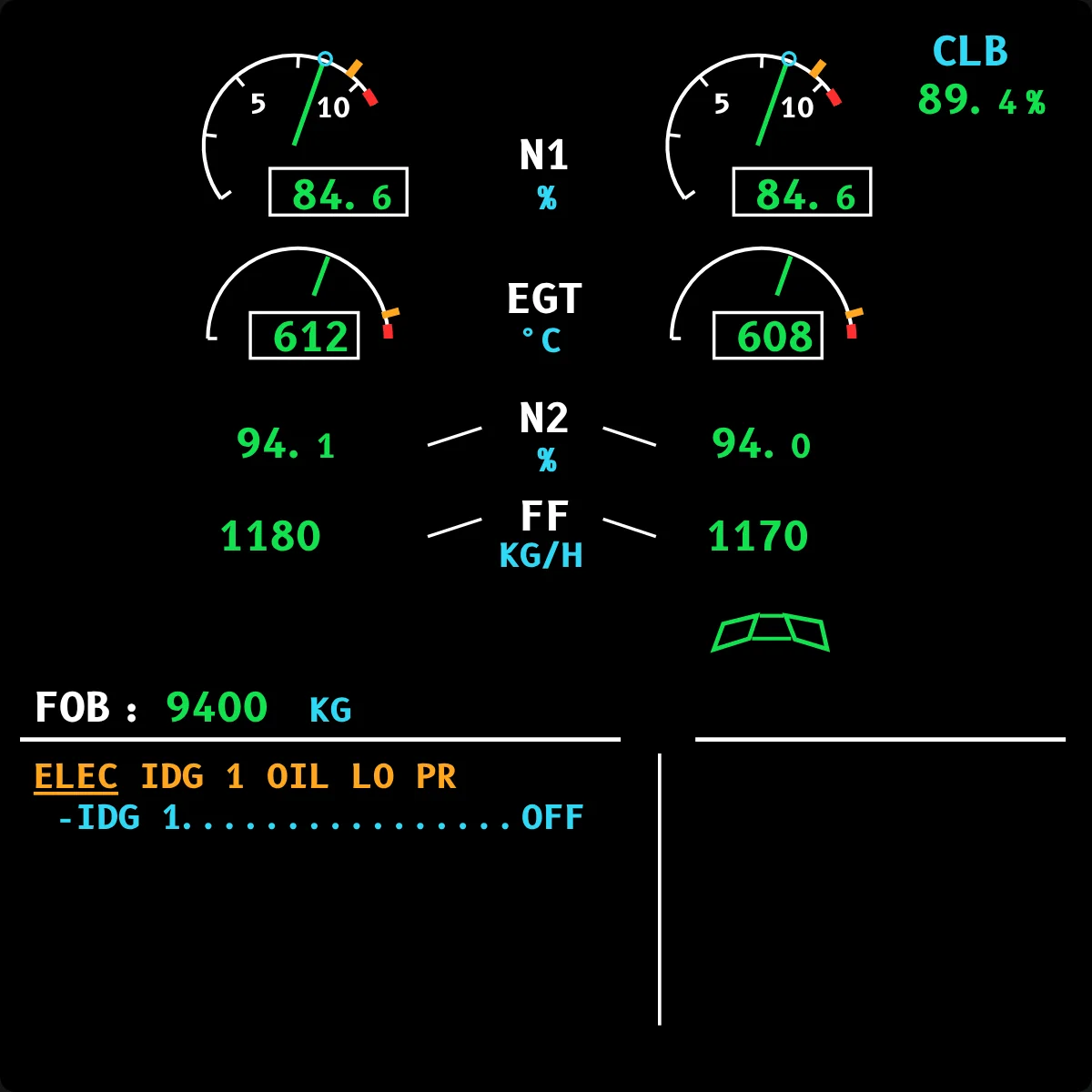
ELEC IDG 1 OIL LO PR is an amber caution: the integrated drive through which engine 1 turns generator 1 has a low oil pressure. The trigger is the drive's oil pressure, not the generator's output. The ECAM's one line is IDG 1 OFF: the crew disconnects the drive from the engine with its guarded pushbutton.
That press is for the rest of the flight: only maintenance personnel can reconnect the IDG. Generator 1 goes with it, the APU GEN or GEN 2 takes over by itself, and STATUS lists GEN 1 and CAT 3 DUAL as inoperative.
Sources FCOM PRO-ABN-ELEC ELEC IDG 1(2) OIL LO PR/OVHT / FCOM PRO-ABN-ELEC ELEC / FCOM DSC-24-10-20 AC GENERATORS / FCOM DSC-24-20 OVERHEAD PANEL / FCOM DSC-24-10-30-30 FAILURE OF ONE ENGINE GENERATOR / FCOM PRO-ABN-ELEC ABNORMAL AND EMERGENCY PROCEDURES
At a glance
- Level
- Amber caution; the FCOM's alert unit does not give its level
- Sets it off
- Low oil pressure in IDG 1, the drive between engine 1 and its generator
- Lights
- FAULT, amber, in the guarded IDG 1 pushbutton on the ELEC panel; IDG and LO PR in amber at IDG 1 on the ELEC page
- Procedure
- IDG 1 OFF: the pushbutton pressed until the GEN FAULT light comes on, never for more than 3 s
- For good
- Once disconnected, only maintenance personnel can reconnect the IDG
- STATUS
- CAT 3 SINGLE ONLY; GEN 1 and CAT 3 DUAL inoperative, and MAIN GALLEY only if the APU GEN is not online
Sources FCOM PRO-ABN-ELEC ELEC IDG 1(2) OIL LO PR/OVHT / FCOM DSC-31-10 WARNING/CAUTION CLASSIFICATION / FCOM DSC-24-10-20 AC GENERATORS / FCOM DSC-24-20 OVERHEAD PANEL / FCOM DSC-24-20 ECAM ELEC PAGE / FCOM PRO-ABN-ELEC ELEC / FCOM PRO-ABN-ELEC ABNORMAL AND EMERGENCY PROCEDURES / FCOM PRO-ABN-ELEC CAT 3 DUAL
What sets the caution off?
Each main engine drives its AC generator through an integrated drive, the IDG. The caution comes on when IDG 1's oil pressure is low. The FCOM prints it under one heading with its twin, ELEC IDG 1 OIL OVHT, which comes on when the IDG's outlet oil temperature rises above 180 °C.
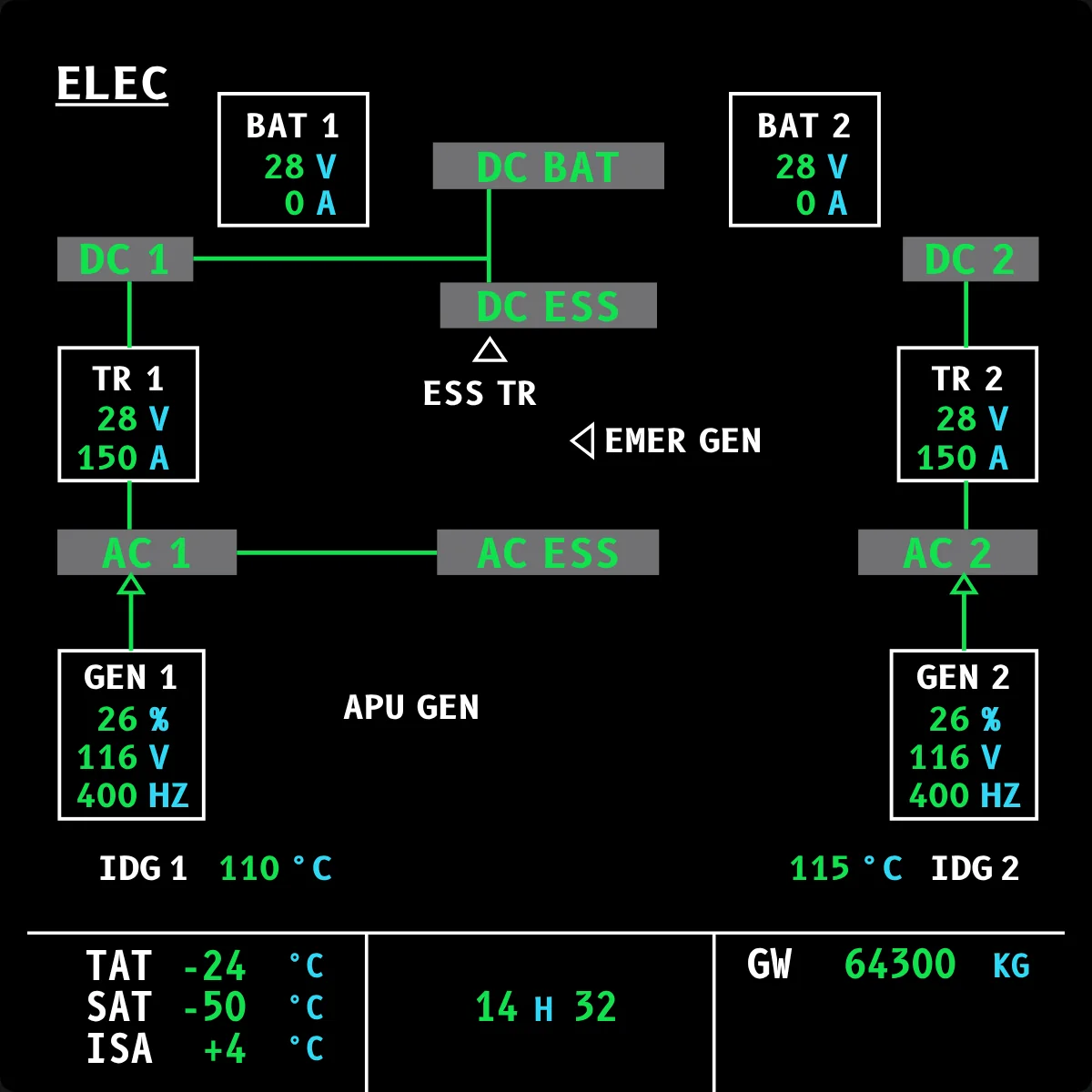
A low oil pressure also lights FAULT in the IDG 1 pushbutton, as an overheat above 180 °C does; for a low pressure the light is inhibited at low engine speed, with N2 below 14 %. On the ELEC page the IDG legend at IDG 1 turns amber for a low oil pressure, an overheat or a disconnection, and LO PR shows in amber when the low pressure is detected with the engine running.
The FWC does not show the caution in every flight phase. The FCOM's graphic inhibits it before the first engine is started, from 80 kt on the takeoff roll to 1 500 ft, from 800 ft to 80 kt after touchdown, and for 5 min after the second engine is shut down.
Sources FCOM DSC-24-10-20 AC GENERATORS / FCOM PRO-ABN-ELEC ELEC IDG 1(2) OIL LO PR/OVHT / FCOM DSC-24-20 OVERHEAD PANEL / FCOM DSC-24-20 ECAM ELEC PAGE / FCOM DSC-31-15 FLIGHT PHASES
From the drive's oil to the caution
What does the crew see and hear?
An amber caution on the E/WD, with its one line. The FCOM's alert unit does not state its level: a level 2 caution comes with a single chime and MASTER CAUT, a level 1 caution with neither and generally without procedure. For a caution, the SD calls up the relevant system page by itself, except in some cases, as the FCOM's table notes.
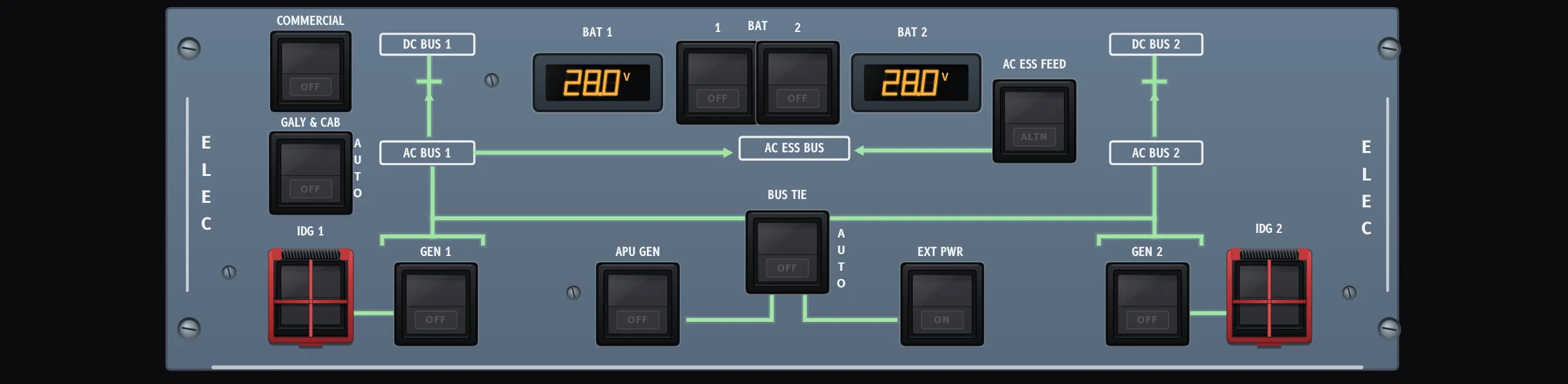
On the overhead ELEC panel, FAULT lights amber in the IDG 1 pushbutton, the guarded one. On the ELEC page, the IDG legend at IDG 1 is amber, with LO PR in amber below it.
Sources FCOM PRO-ABN-ELEC ELEC IDG 1(2) OIL LO PR/OVHT / FCOM PRO-ABN-ELEC ELEC / FCOM DSC-31-10 WARNING/CAUTION CLASSIFICATION / FCOM DSC-31-20 SYSTEM PAGES / FCOM DSC-24-20 OVERHEAD PANEL / FCOM DSC-24-20 ECAM ELEC PAGE
The moment the caution comes on
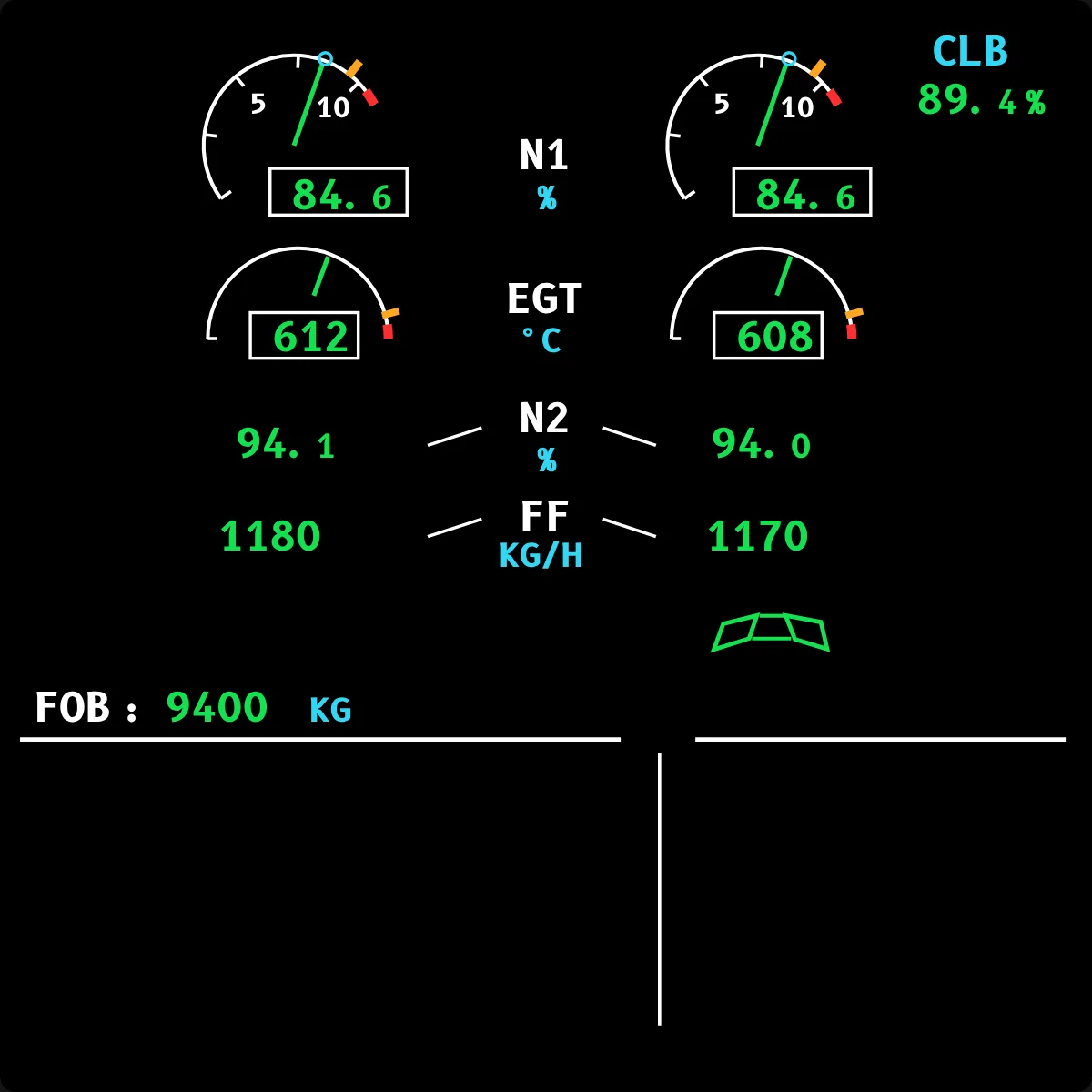
The cruise, both engine generators on line, the APU not running. Press the button to drop IDG 1's oil pressure, then look at the E/WD, the ELEC page, the ELEC panel and the schematic.
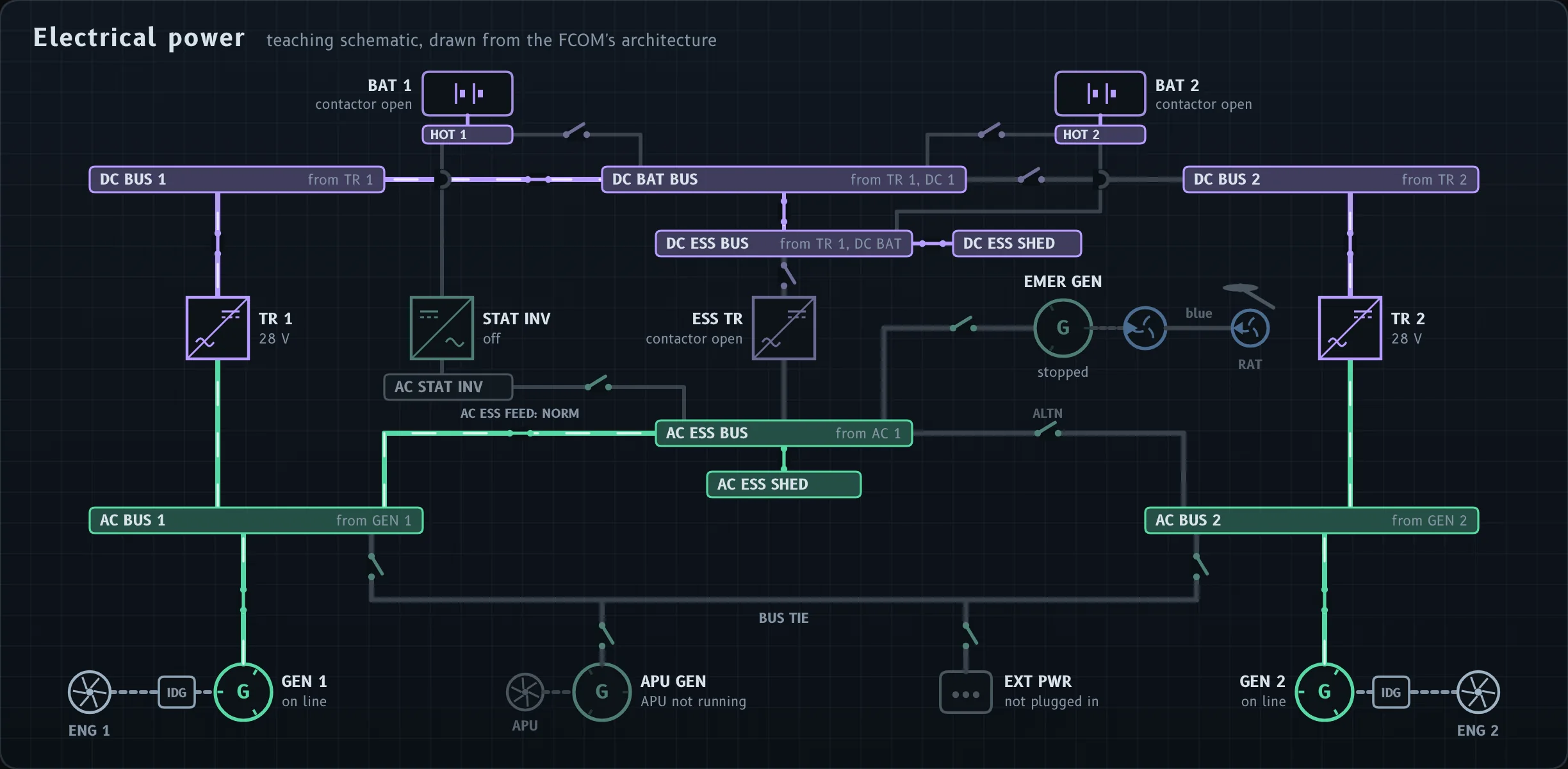
The alert Drop IDG 1 oil pressure
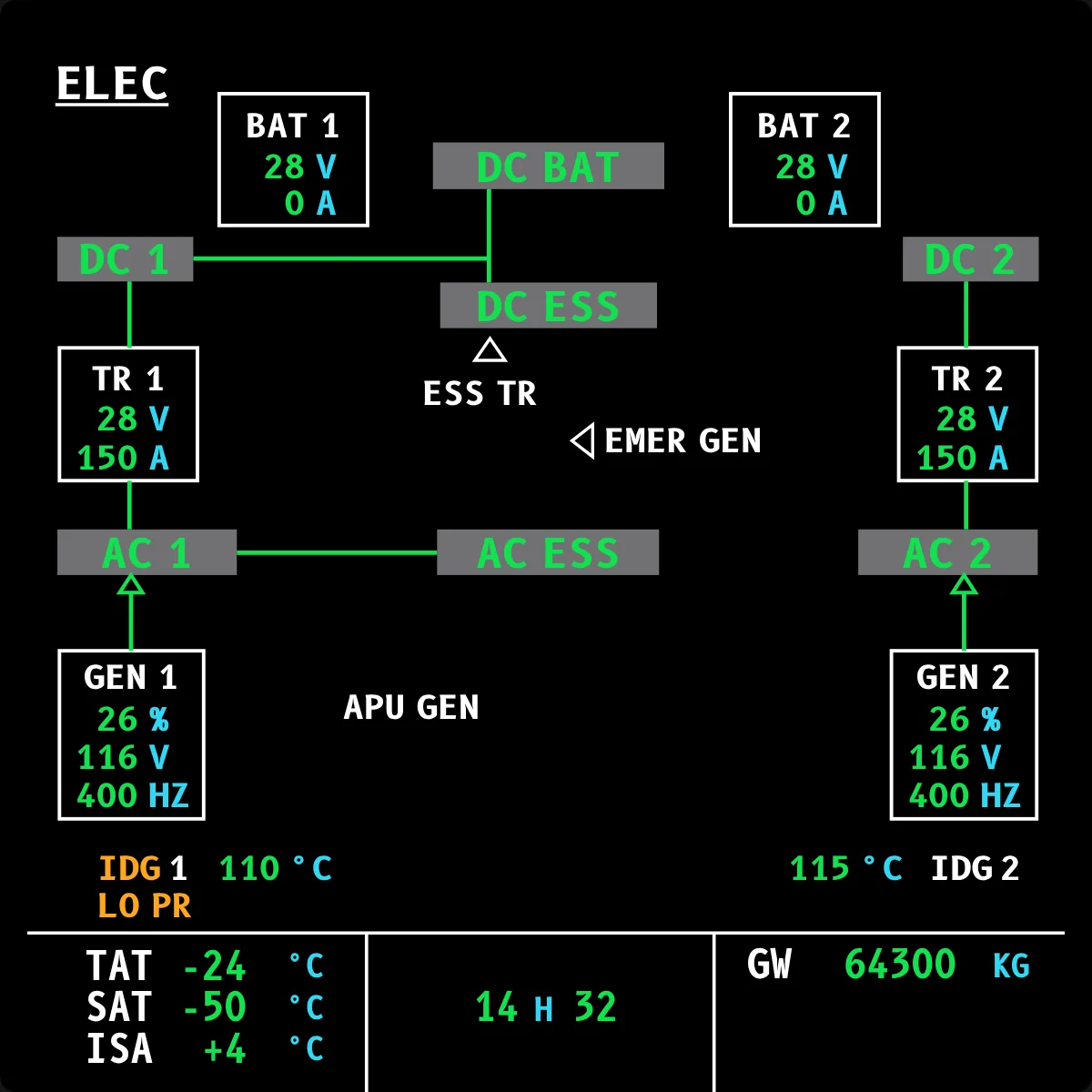
The E/WD shows ELEC IDG 1 OIL LO PR in amber with its one line, IDG 1 OFF. FAULT lights in the IDG 1 pushbutton, and the ELEC page draws IDG 1 in amber with LO PR.
On this live aircraft GEN 1 stays on line and still supplies AC BUS 1: the caution is about the drive, and nothing has been disconnected yet. Working the line, with the crosscheck before a guarded control, is what the ECAM Trainer does with you.
Sources FCOM PRO-ABN-ELEC ELEC / FCOM DSC-24-20 OVERHEAD PANEL / FCOM DSC-24-20 ECAM ELEC PAGE / FCOM PRO-ABN-ELEC ELEC IDG 1(2) OIL LO PR/OVHT / FCOM DSC-24-10-30-20 IN FLIGHT / FCTM AOP-30-20 GENERAL
What does the IDG pushbutton do?
Pressing the IDG 1 pushbutton disconnects the IDG from its driveshaft. The switch is guarded and normally spring-loaded out, and the FCOM adds that "only maintenance personnel can reconnect it."
Disconnected from its driveshaft, the IDG no longer turns generator 1. The procedure has the crew press until the GEN FAULT light comes on, and the IDG's own FAULT light goes off once the IDG is disconnected.
Sources FCOM DSC-24-20 OVERHEAD PANEL / FCOM PRO-ABN-ELEC ELEC
Disconnect IDG 1
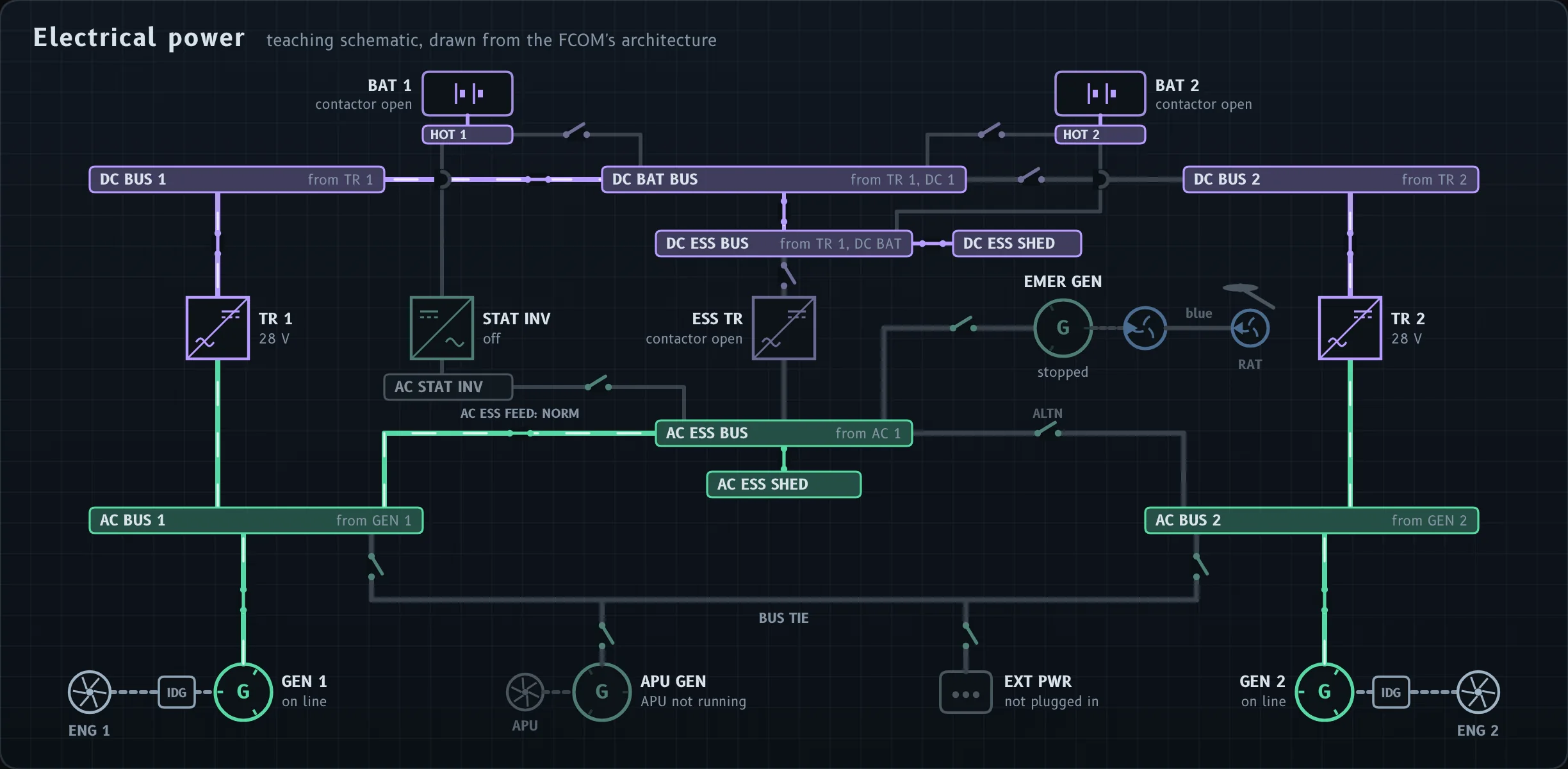
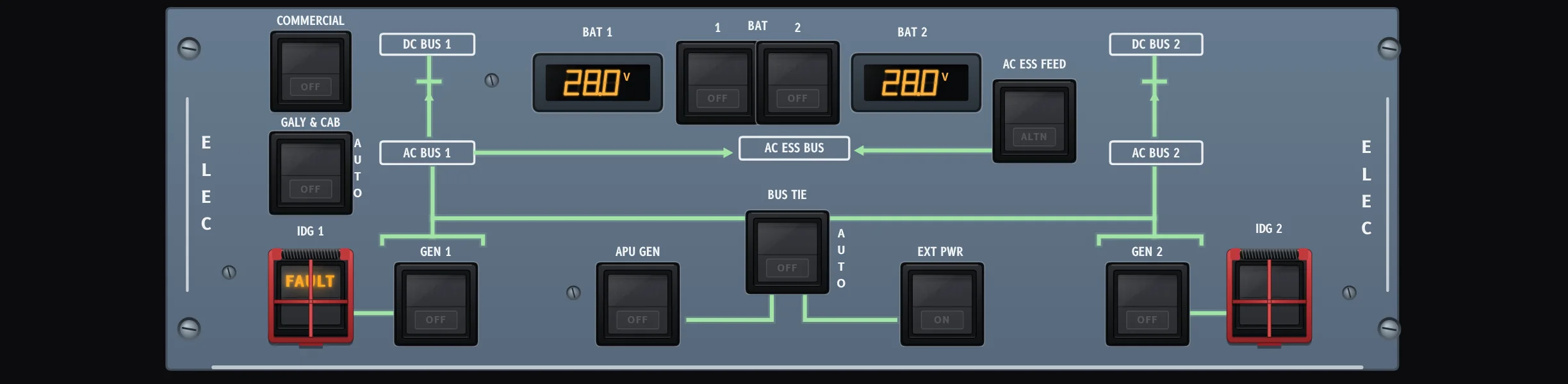
IDG 1's oil pressure is low and GEN 1 is still on line, the APU not running. Predict first, then lift the guard, press IDG 1 and watch the schematic.
-
Predict Once IDG 1 is disconnected, what supplies AC BUS 1?
Try it Lift the guard and press IDG 1.
GEN 1 drops off line and, with the APU not running, GEN 2 takes over AC BUS 1 through the bus tie: the system replaces the lost generator by itself. With one generator operating in flight, GALLEY SHED shows on the ELEC page.
On the panel the IDG 1 FAULT light goes out and GEN 1's FAULT light comes on, as the procedure expects. This drawing does not hold the disconnection: pressed again, IDG 1 reconnects here. The FCOM says only maintenance personnel can reconnect the IDG, so on the aircraft GEN 1 stays lost.
Sources FCOM DSC-24-10-30-30 FAILURE OF ONE ENGINE GENERATOR / FCOM DSC-24-20 OVERHEAD PANEL / FCOM DSC-24-20 ECAM ELEC PAGE / FCOM PRO-ABN-ELEC ELEC
Why does the IDG pushbutton call for such care?
The press cannot be taken back in flight. Once the drive is disconnected, only maintenance personnel can reconnect it, so generator 1 is gone for the flight. The pushbutton is guarded, and in flight the FCTM has the PF and PM crosscheck before any action on a guarded control, "in order to prevent any inadvertent action by the flight crew with irreversible effects".
The FCOM puts conditions on the press, each with its reason. Disconnect the IDG only when the engine is running or windmilling: "If not, the IDG will be damaged when starting the engine." With the engine running, disconnect at or above idle, to prevent damage to the disconnect mechanism.
The press itself is short: hold the pushbutton until the GEN FAULT light comes on, but not for more than 3 s, to avoid damage to the disengage solenoid. Then the IDG FAULT light goes off.
The procedure gives the action, not a reason for it: these units do not say what a low oil pressure would do to a drive left connected. The same one line, IDG OFF, serves both alerts under the heading, OIL LO PR and OIL OVHT.
Sources FCOM DSC-24-20 OVERHEAD PANEL / FCTM AOP-30-20 GENERAL / FCOM PRO-ABN-ELEC ELEC / FCOM PRO-ABN-ELEC ELEC IDG 1(2) OIL LO PR/OVHT
What does the aircraft lose with the drive?
Generator 1, for the rest of the flight. The system replaces it by itself, with the APU GEN if available, otherwise with GEN 2, which can supply the entire network except the DC BUS Entertainment, where fitted. With GEN 2 alone, part of the galley load and the DC BUS Entertainment are shed.
The FCOM's STATUS note: if available, the APU may be started and the APU GEN used. MAIN GALLEY is listed as inoperative only if the APU GEN is not online.
In the ECAM Trainer the caution then gives way to ELEC IDG 1 DISCONNECTED. The FCOM does not say whether OIL LO PR stays on the E/WD after the disconnection, and its flight phase graphic for ELEC IDG 1 DISCONNECTED inhibits that alert in the cruise.
Sources FCOM DSC-24-10-30-30 FAILURE OF ONE ENGINE GENERATOR / FCOM DSC-24-10-30-10 GENERAL / FCOM DSC-24-20 OVERHEAD PANEL / FCOM PRO-ABN-ELEC ABNORMAL AND EMERGENCY PROCEDURES / FCOM PRO-ABN-ELEC CAT 3 DUAL / FCOM PRO-ABN-ELEC ELEC IDG 1(2) DISCONNECTED / FCOM PRO-ABN-ELEC ELEC
After the disconnection
What is lost afterwards?
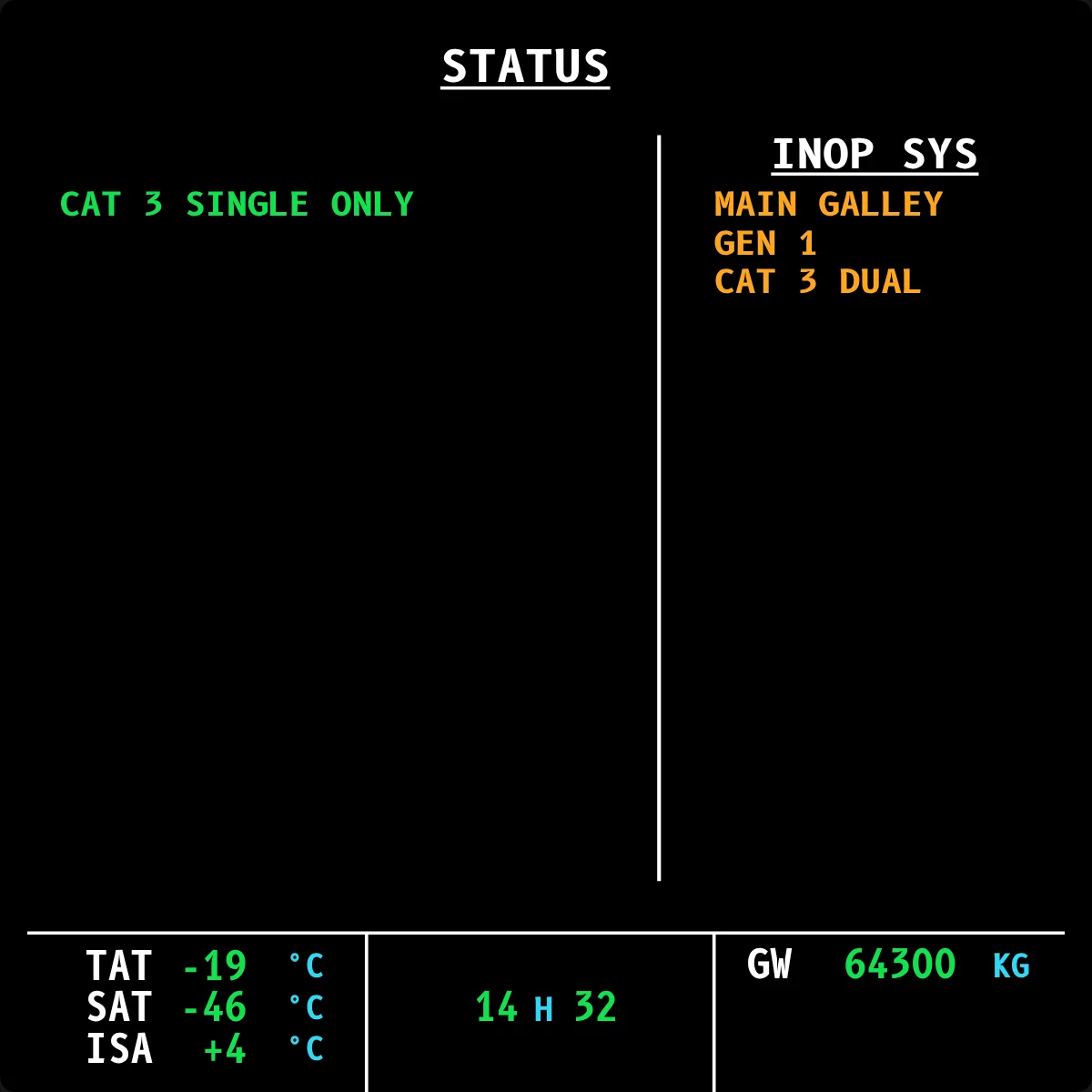
STATUS is the aircraft's operational summary. After this caution it shows CAT 3 SINGLE ONLY, and under INOP SYS, in amber: MAIN GALLEY, GEN 1 and CAT 3 DUAL. A footnote limits MAIN GALLEY: only if the APU GEN is not online.
The STATUS above shows CAT 3 SINGLE ONLY and the three INOP SYS lines, as the FCOM prints them in both versions; one version says more only in that footnote.
Sources FCOM PRO-ABN-ELEC ABNORMAL AND EMERGENCY PROCEDURES / FCOM PRO-ABN-ELEC CAT 3 DUAL / FCOM DSC-31-20 STATUS PAGE
A319ceo, A320ceo, A320neo, A321neo: what differs?
| A319ceo, A320ceo | A320neo, A321neo | |
|---|---|---|
| The caution and its procedure | The same in every version | The same in every version |
| STATUS | Not given by type: two versions, each CAT 3 SINGLE ONLY; INOP SYS: MAIN GALLEY (only if APU GEN is not online), GEN 1, CAT 3 DUAL; in one, the MAIN GALLEY footnote adds that all the galleys are then shed | Not given by type: two versions, each CAT 3 SINGLE ONLY; INOP SYS: MAIN GALLEY (only if APU GEN is not online), GEN 1, CAT 3 DUAL; in one, the MAIN GALLEY footnote adds that all the galleys are then shed |
The FCOM prints the STATUS in two versions, each for its own aircraft. The lines are the same; only one version's footnote to MAIN GALLEY says more.
Sources FCOM PRO-ABN-ELEC ELEC IDG 1(2) OIL LO PR/OVHT / FCOM PRO-ABN-ELEC ELEC / FCOM PRO-ABN-ELEC ABNORMAL AND EMERGENCY PROCEDURES / FCOM PRO-ABN-ELEC CAT 3 DUAL

Work ELEC IDG 1 OIL LO PR as a crew
Read and do each line against the FCOM, with the E/WD, the SD page and the overhead following your hands, the PF and PM calls, and a debrief that says what you missed.
Work this failure in the ECAM TrainerGo further
Written in our own words from the FCOM and the FCTM; each part names the units it rests on. The E/WD, the STATUS and the live aircraft are the platform's own ECAM and systems model, the same the ECAM Trainer and the flight deck run. This page explains the procedure; it is not the procedure. Aircraft differ by type, engine and options: your aircraft's FCOM, your QRH and your operator's procedures always come first. How we write and check these pages.
Every ECAM procedure, line by line, against the FCOM.
The ECAM Trainer works 108 scenarios with the E/WD, the SD page and the overhead following your hands. Start free today, or open everything with A320 Knowledge+.
For study and revision only. Always follow your operator's approved documentation and procedures. A320 Knowledge is independent and not affiliated with Airbus.
Related
- ELEC AC ESS BUS FAULTTwo blue lines and one pushbutton.
- ELEC AC ESS BUS SHEDAn amber caution about part of a bus.
- ELEC AC BUS 1 FAULTOne bus lost, and two more cautions follow it.
- ELEC AC BUS 2 FAULTOne amber caution, and no essential bus caution with it: AC BUS 2 does not normally supply the AC ESS BUS.
- A320 electrical systemThe system guide, with the live aircraft
- Every ECAM procedureThe alerts the ECAM Trainer works, grouped by system