
ELEC AC ESS BUS SHED
An amber caution about part of a bus. The AC SHED ESS bus hangs below the AC ESS BUS, and the caution comes on when it has no supply. Here is what the bus is, the one line the ECAM asks for, what STATUS leaves, and when the aircraft sheds this bus by itself, with the live aircraft at the moment the caution comes on.
Written and checked by current A320 pilotschecked against the FCOM on Our editorial policy
What ELEC AC ESS BUS SHED means
ELEC AC ESS BUS SHED is an amber caution: the AC SHED ESS busbar is not supplied. In the FCOM's diagram that bus hangs below the AC ESS BUS, and it is one of the two buses the system sheds by itself when the emergency network falls back on the batteries and the static inverter.
The ECAM asks for one action, ATC/XPDR to SYS 2. STATUS lists CAPT AOA and ATC 1 or ATC/XPDR 1 as inoperative, and the FCOM's longer list of other systems lost includes the captain's ND, MCDU 1, DME 1, the CAPT AOA heat and the APU fuel pump.
Sources FCOM PRO-ABN-ELEC ELEC AC ESS BUS SHED / FCOM DSC-24-10-10 GENERAL / FCOM DSC-24-10-30-30 EMERGENCY GENERATION AFTER LOSS OF ALL MAIN GENERATORS / FCOM PRO-ABN-ELEC ELEC / FCOM PRO-ABN-ELEC CAPT ND
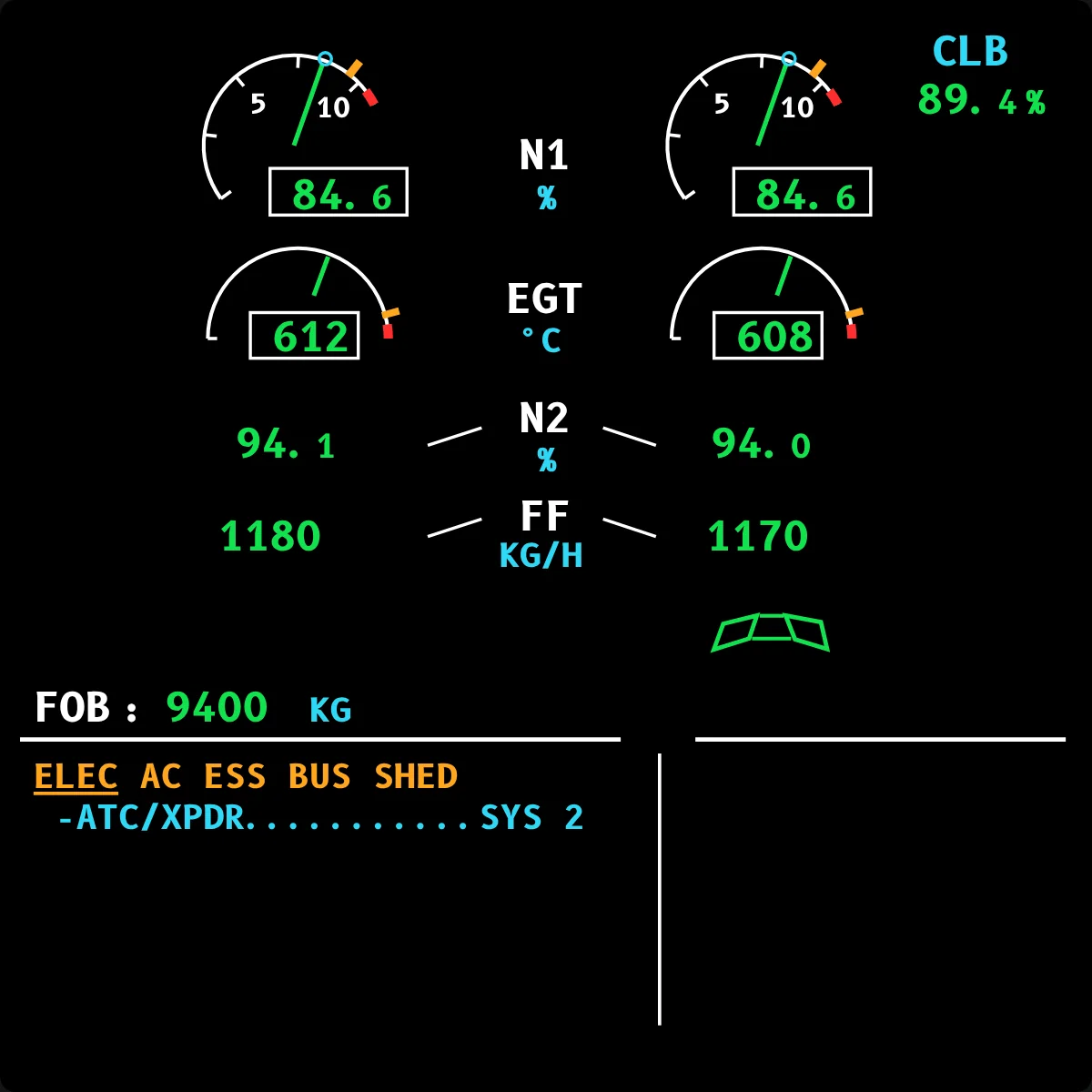
At a glance
- Level
- Amber caution, level 2: single chime, MASTER CAUT and the ELEC page on the SD
- Sets it off
- The AC SHED ESS busbar is not supplied
- The ECAM asks
- One line: ATC/XPDR to SYS 2
- Inhibited
- In flight phases 4 and 8: from 80 kt to lift-off, and from touchdown to 80 kt
- STATUS
- INOP SYS: CAPT AOA, and ATC 1 or ATC/XPDR 1
Sources FCOM PRO-ABN-ELEC ELEC AC ESS BUS SHED / FCOM DSC-31-10 WARNING/CAUTION CLASSIFICATION / FCOM DSC-31-20 SYSTEM PAGES / FCOM PRO-ABN-ELEC ELEC / FCOM PRO-ABN-ABN-00 INTRODUCTION / FCOM DSC-31-15 FLIGHT PHASES / FCOM PRO-ABN-ELEC CAPT ND
What is the AC SHED ESS bus?
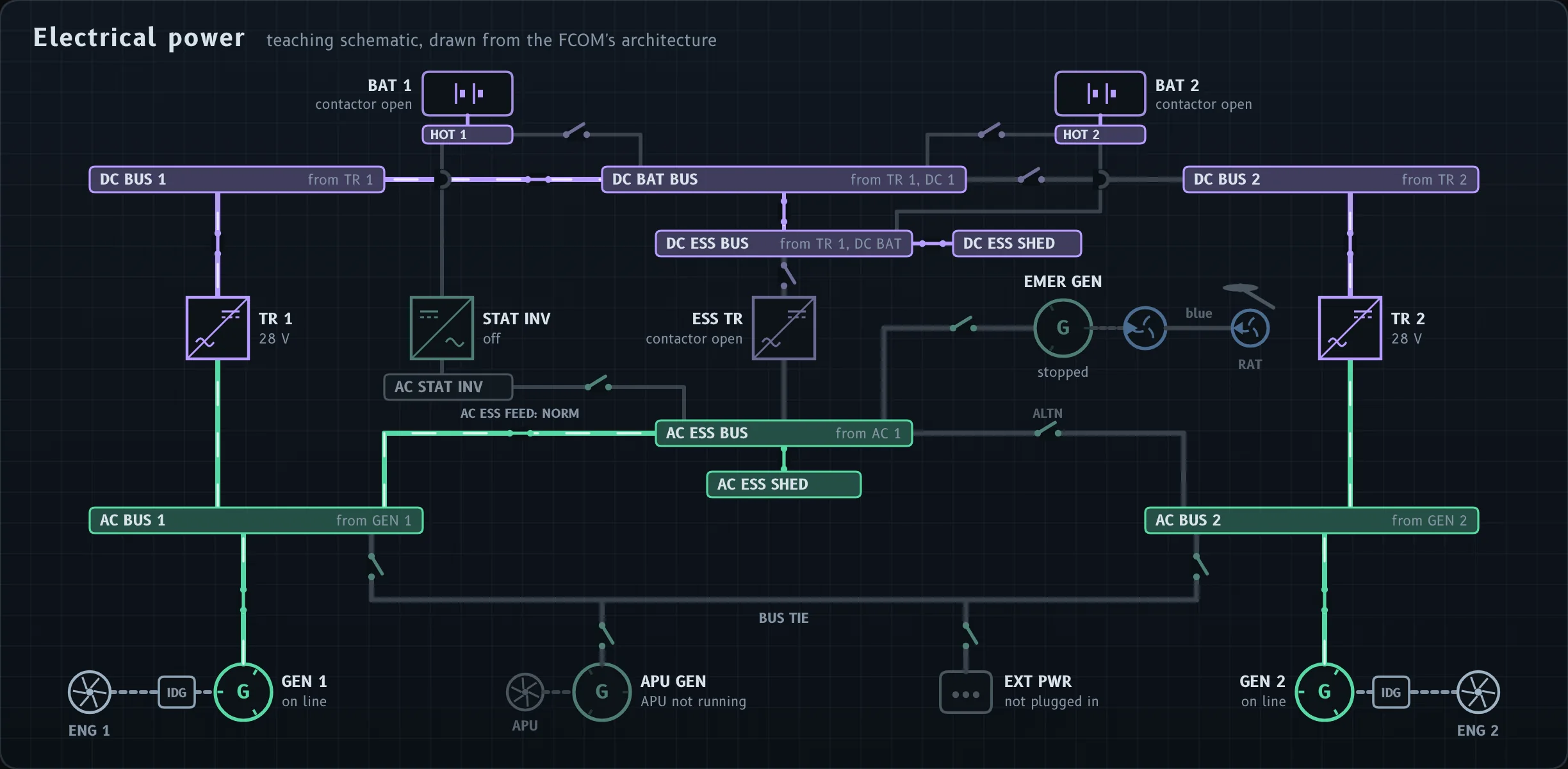
The essential network has two buses that can be shed. In the FCOM's diagram the AC ESS SHED bus hangs below the AC ESS BUS, and the DC ESS SHED bus below the DC ESS BUS. In normal flight AC BUS 1 supplies the AC ESS BUS through a contactor, and the distribution table traces the AC SHED ESS bus to GEN 1 with it.
The table keeps it supplied in the emergency configuration while the emergency generator runs: the AC ESS BUS and the AC SHED ESS bus both on the emergency generator. In the 8 s or so before that generator is available, the table gives the AC ESS BUS to the static inverter on battery 1 and the AC SHED ESS bus nothing.
If the RAT stalls, or on the ground below 100 kt, the emergency generator has nothing to drive it: the emergency network transfers by itself to the batteries and the static inverter, and the system sheds the AC SHED ESS and DC SHED ESS buses. On the ELEC page, SHED appears when the AC or DC SHED ESS bus is shed.
Sources FCOM DSC-24-10-10 GENERAL / FCOM DSC-24-10-30-20 IN FLIGHT / FCOM DSC-24-10-30-30 EMERGENCY GENERATION AFTER LOSS OF ALL MAIN GENERATORS / FCOM DSC-24-10-30-40 DISTRIBUTION TABLE / FCOM DSC-24-20 ECAM ELEC PAGE
The AC essential bus and its shed part
What sets the caution off?
The FCOM's trigger is one line: the caution comes on when the AC SHED ESS busbar is not supplied. It names no cause. A note under its STATUS says the alert may be caused by a failure in a sub bus, in which case only a part of the systems listed may be lost.
The FCOM's flight phase graphic marks the caution as inhibited in phases 4 and 8: on the takeoff roll from 80 kt to lift-off, and on the landing roll from touchdown to 80 kt. The FWC inhibits some warnings and cautions in certain flight phases to avoid alerting the crew unnecessarily at times of high workload, such as takeoff and landing.
Sources FCOM PRO-ABN-ELEC ELEC AC ESS BUS SHED / FCOM PRO-ABN-ELEC ELEC / FCOM PRO-ABN-ELEC CAPT ND / FCOM PRO-ABN-ABN-00 INTRODUCTION / FCOM DSC-31-15 FLIGHT PHASES
What does the crew see and hear?
A level 2 caution: a single chime, MASTER CAUT steady amber, the caution in amber on the E/WD, and the ELEC page called up on the SD. In the FCOM's terms the crew should be aware of the failure, but no immediate action is needed.
Under the title the FCOM prints a single action in blue, ATC/XPDR to SYS 2, with no explanation under it.
Sources FCOM DSC-31-10 WARNING/CAUTION CLASSIFICATION / FCOM DSC-31-20 SYSTEM PAGES / FCOM PRO-ABN-ELEC ELEC
The moment the caution comes on
The cruise at FL350, both engine generators on line, the APU not running. In the ECAM Trainer's scenario the shed bus fails on its own, with the AC ESS BUS still supplied. Before you press, decide what you expect to see under AC ESS on the ELEC page.
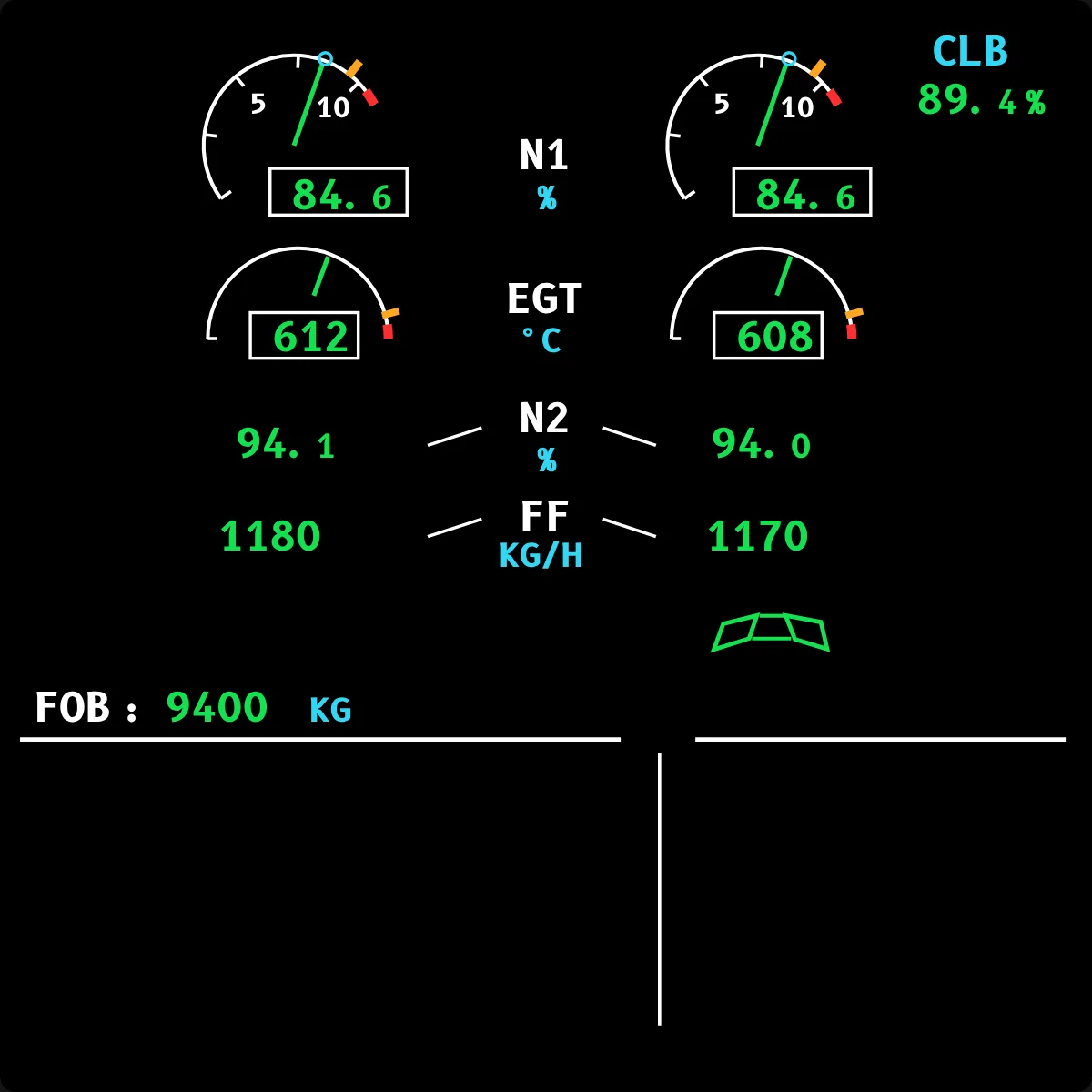
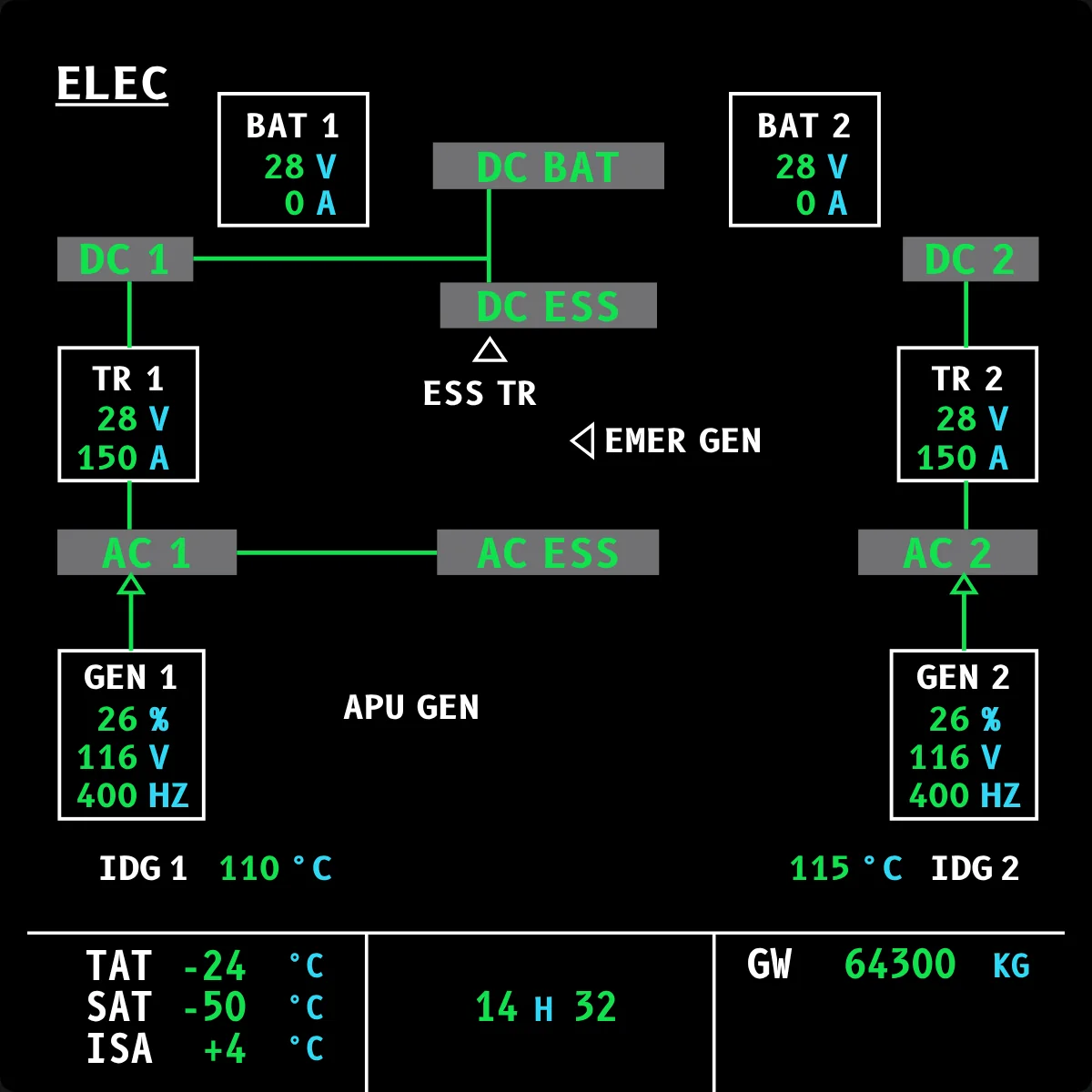
The alert Fail the AC SHED ESS bus
This E/WD shows ELEC AC ESS BUS SHED in amber, the colour of a caution, with its one line under it: ATC/XPDR to SYS 2. This ELEC page draws SHED in amber under AC ESS. The FCOM gives that legend for an AC or DC SHED ESS bus that is shed; it does not say what the page shows when the bus is lost on its own.
On the schematic the AC ESS BUS stays on AC BUS 1; only the shed bus below it has no supply, and the DC side is as it was. Working the caution as a crew is what the ECAM Trainer does with you.
Sources FCOM PRO-ABN-ELEC ELEC AC ESS BUS SHED / FCOM PRO-ABN-ELEC ELEC / FCOM DSC-31-10 WARNING/CAUTION CLASSIFICATION / FCOM DSC-24-20 ECAM ELEC PAGE / FCOM DSC-24-10-30-20 IN FLIGHT / FCOM DSC-24-10-30-40 DISTRIBUTION TABLE
What does the ECAM ask the crew to do?
One line: ATC/XPDR to SYS 2. The FCOM gives no reason for it. Separately, STATUS lists ATC 1 or ATC/XPDR 1 among the inoperative systems the ECAM shows.
ELEC AC ESS BUS FAULT, the whole AC ESS busbar without a supply, carries the same line. There it comes after AC ESS FEED to ALTN, with which AC BUS 2 supplies the AC ESS BUS.
Sources FCOM PRO-ABN-ELEC ELEC / FCOM PRO-ABN-ELEC CAPT ND / FCOM PRO-ABN-ELEC ELEC AC ESS BUS FAULT
Does the bus survive the loss of both generators?
If AC BUS 1 and AC BUS 2 are both lost above 100 kt, the RAT extends by itself and powers the blue system, which drives the emergency generator through a hydraulic motor. The generator supplies the AC ESS BUS, and the DC ESS BUS through the ESS TR; the distribution table keeps the AC SHED ESS bus on it too.
Sources FCOM DSC-24-10-30-30 EMERGENCY GENERATION AFTER LOSS OF ALL MAIN GENERATORS / FCOM DSC-24-10-30-40 DISTRIBUTION TABLE
Lose both generators
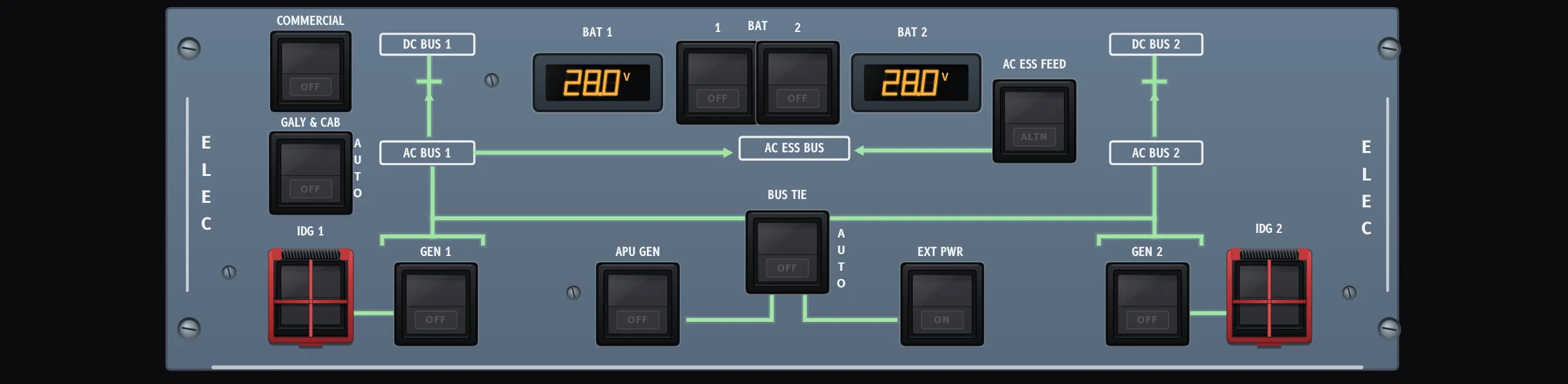
A healthy aircraft in the cruise, the APU not running, the emergency generator ready. Predict first, then switch both generators off on the ELEC panel and watch the essential buses.
-
Predict Both generators go off line and the emergency generator takes over. Does the AC SHED ESS bus keep its supply?
Try it Switch GEN 1 and GEN 2 off.
On the schematic the emergency generator now feeds the AC ESS BUS and the AC SHED ESS bus below it, the row the FCOM's distribution table gives for the emergency configuration with the emergency generator running.
The drawing couples the generator at once. On the aircraft the RAT's extension and the generator's coupling take about 8 s, with the batteries powering the emergency network meanwhile.
Sources FCOM DSC-24-10-30-40 DISTRIBUTION TABLE / FCOM DSC-24-10-30-30 EMERGENCY GENERATION AFTER LOSS OF ALL MAIN GENERATORS
When does the aircraft shed it by itself?
When only the batteries are left. With AC BUS 1 and AC BUS 2 not powered and the emergency generator not supplying, battery 1 supplies the AC STAT INV BUS and, above 50 kt, the AC ESS BUS through the static inverter, and battery 2 supplies the DC ESS BUS. The system sheds the AC SHED ESS and DC SHED ESS buses.
The FCTM puts a speed on it in the emergency electrical configuration: below 125 kt the RAT stalls, the network goes to the batteries, and the AC SHED ESS and DC SHED ESS buses are shed.
The FCOM gives one more case, with the normal AC buses still supplied: while the EMER GEN TEST pushbutton is held, the emergency generator takes the AC ESS BUS and the DC ESS BUS, and the two shed buses are not powered.
Sources FCOM DSC-24-20 OVERHEAD PANEL / FCOM DSC-24-10-20 AC GENERATORS / FCOM DSC-24-10-30-30 EMERGENCY GENERATION AFTER LOSS OF ALL MAIN GENERATORS / FCTM PR-AEP-ELEC TECHNICAL BACKGROUND / FCOM DSC-24-20 OVERHEAD PANEL (CONT'D)
The same, without the emergency generator
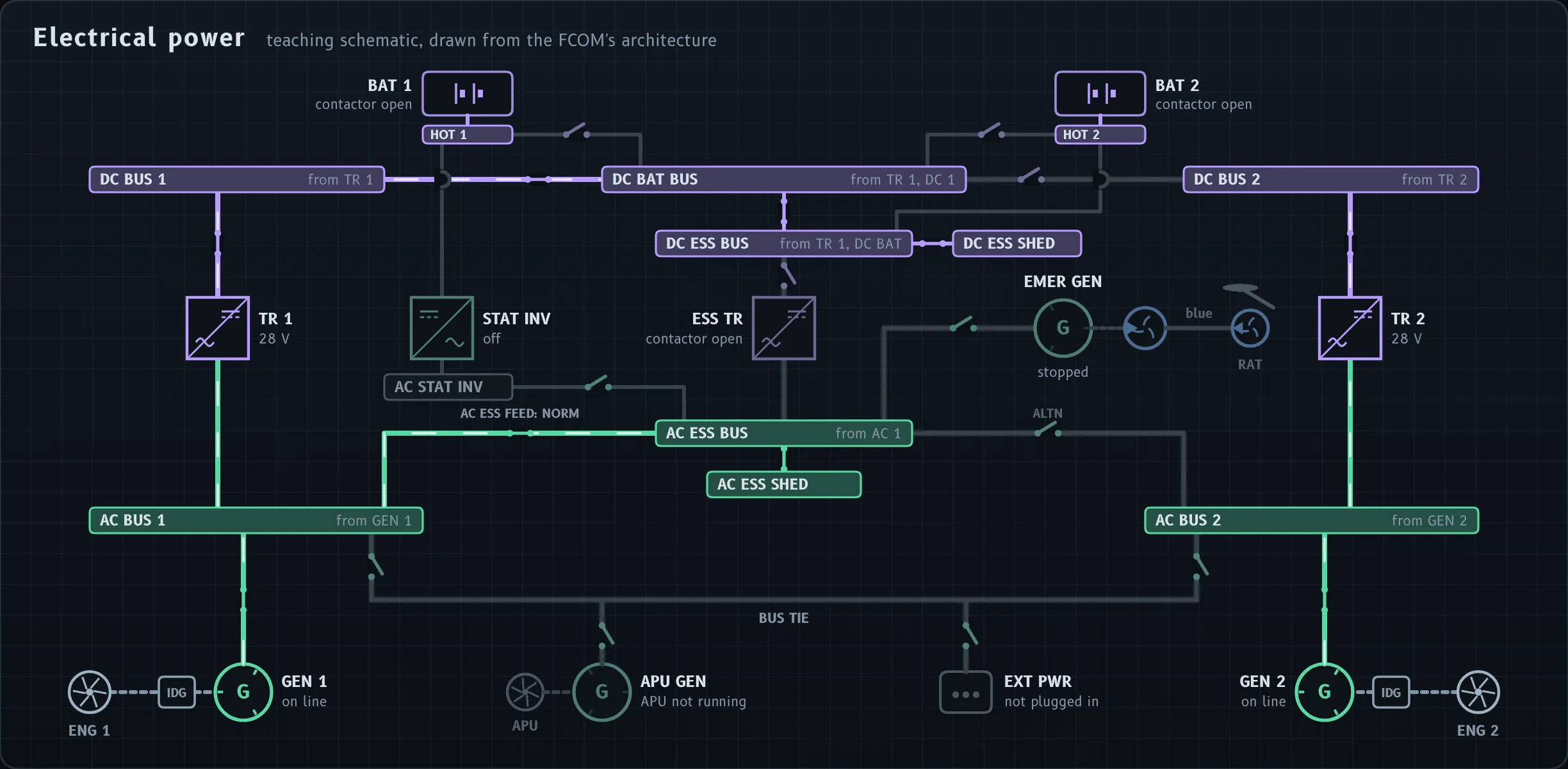
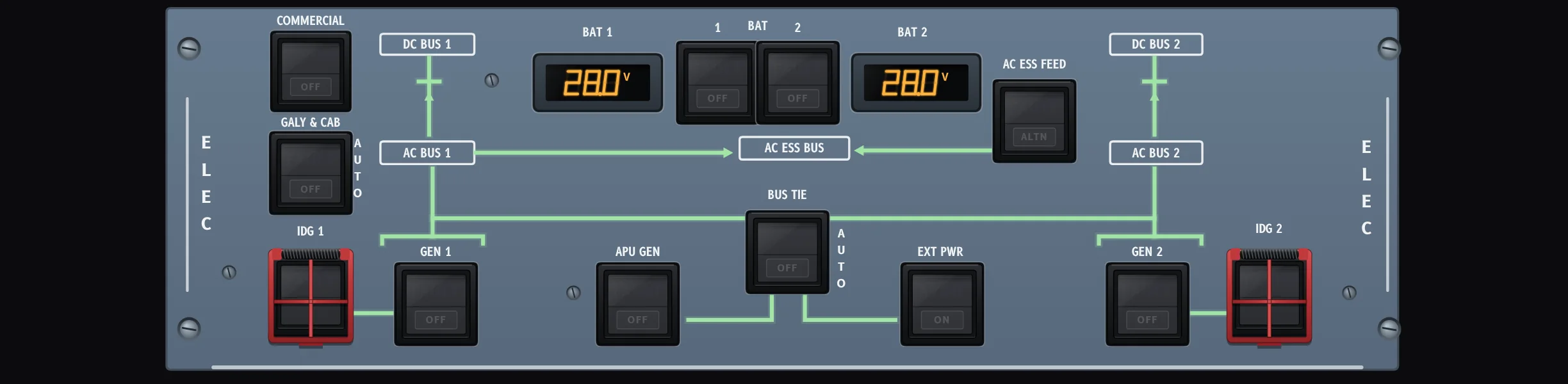
The same cruise, but the emergency generator has failed, so it cannot take over. Predict first, then switch both generators off.
-
Predict With no generator and no emergency generator, what happens to the AC SHED ESS bus once both generators are off?
Try it Switch GEN 1 and GEN 2 off.
On the schematic the static inverter takes the AC ESS BUS from battery 1, and the AC SHED ESS bus has no supply. Battery 2 holds the DC ESS BUS, and the DC SHED ESS bus is shed as well.
This is the configuration ELEC ESS BUSES ON BAT announces: the DC ESS and AC ESS busbars supplied by the batteries, the AC ESS BUS through the static inverter. Here the shed bus goes by design, not through a failure of its own.
Sources FCOM DSC-24-10-30-30 EMERGENCY GENERATION AFTER LOSS OF ALL MAIN GENERATORS / FCOM DSC-24-20 OVERHEAD PANEL / FCOM DSC-24-10-20 AC GENERATORS / FCOM PRO-ABN-ELEC ELEC ESS BUSES ON BAT / FCOM PRO-ABN-ELEC ELEC
What goes with the shed bus?
STATUS shows two systems under INOP SYS: CAPT AOA, and ATC 1 or ATC/XPDR 1, as the FCOM prints the line.
The FCOM lists more under Other INOP SYS, the systems that, in the FCOM's words for another STATUS, are not displayed on the ECAM: MCDU 1, the CVR, the passenger oxygen masks (auto and manual), DME 1, the CAPT AOA heat, the APU fuel pump and the CAPT ND. One version adds HF 1.
The same note applies: a failure in a sub bus may bring the alert, and then only part of these systems may be lost. The live blocks on this page draw the buses, not these systems.
Sources FCOM PRO-ABN-ELEC ELEC / FCOM PRO-ABN-ELEC CAPT ND
What is lost afterwards?
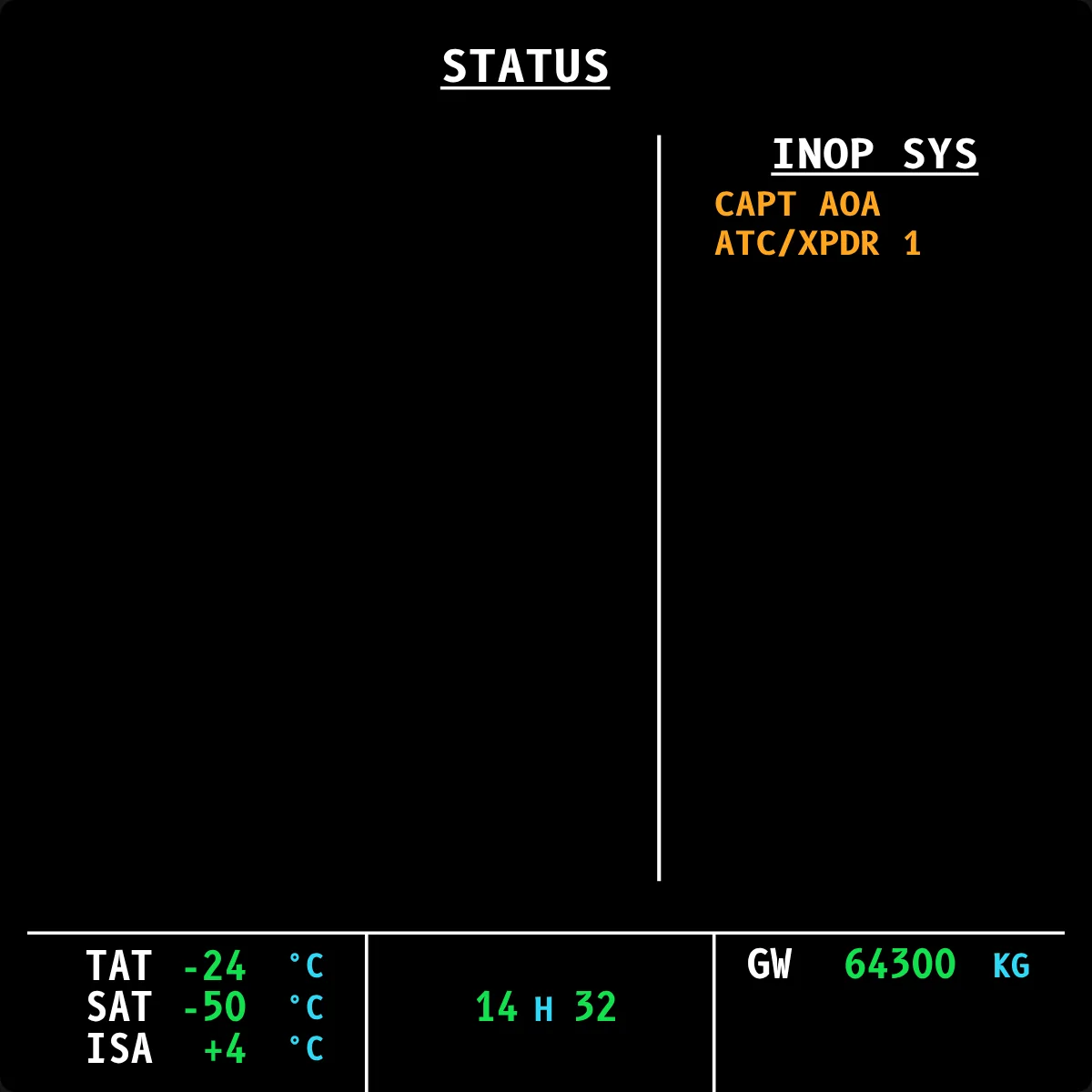
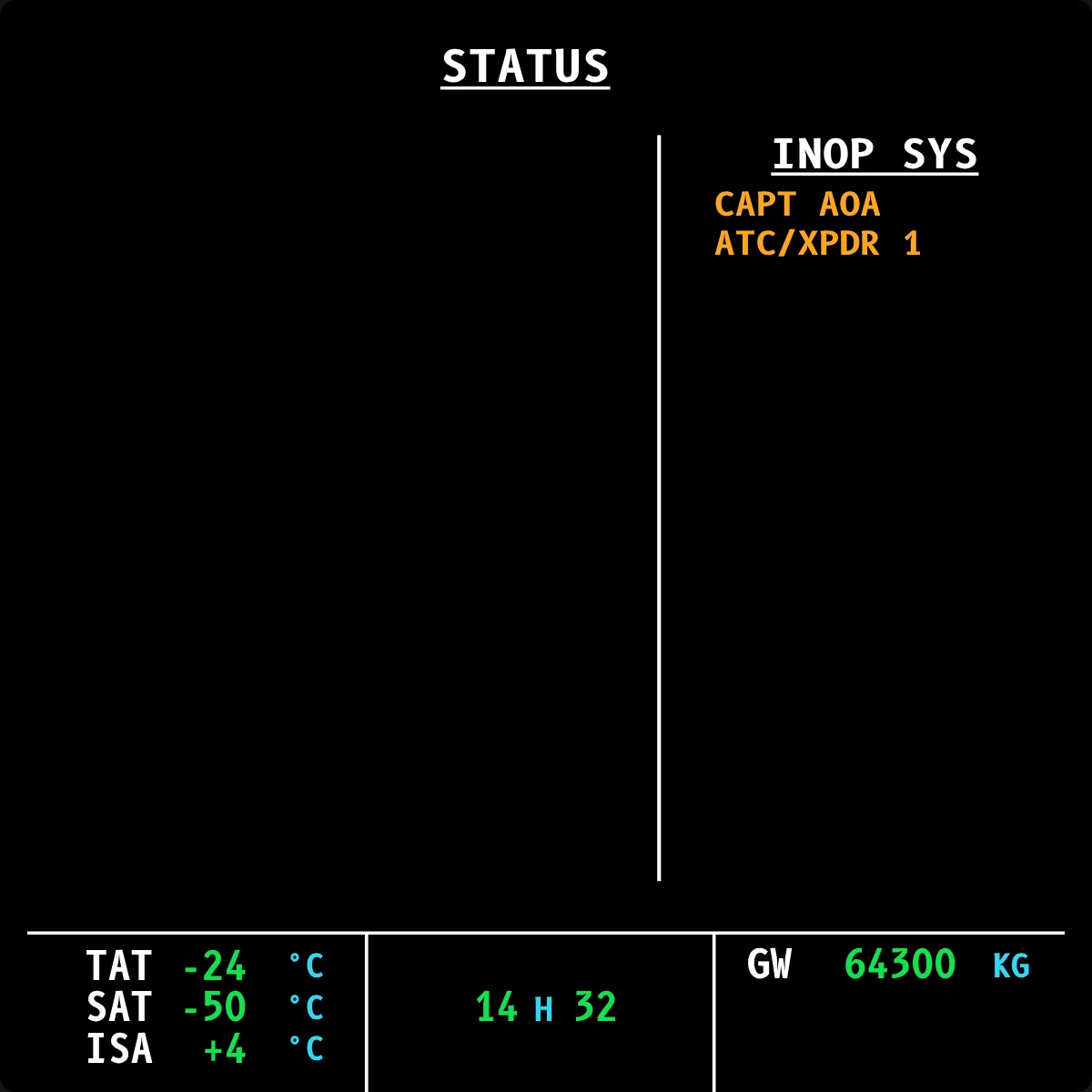
STATUS is the aircraft's operational summary. After ELEC AC ESS BUS SHED it has no limitation, procedure or information line: only INOP SYS, in amber, with CAPT AOA and ATC 1 or ATC/XPDR 1. This ECAM draws the second line as ATC/XPDR 1.
The FCOM prints two versions. Their INOP SYS lines are the same, so the two pictures show the same page; the versions differ only in HF 1 among the other inoperative systems. As the page is not empty, it appears by itself when the crew clears the last alert, and again when the crew selects CONF 1 for approach.
Which version applies depends on your aircraft: check your own FCOM.
Sources FCOM DSC-31-20 STATUS PAGE / FCOM PRO-ABN-ELEC ELEC / FCOM PRO-ABN-ELEC CAPT ND
A319ceo, A320ceo, A320neo, A321neo: what differs?
| A319ceo, A320ceo | A320neo, A321neo | |
|---|---|---|
| The caution, its trigger and its one line | The same in every version | The same in every version |
| STATUS: INOP SYS | CAPT AOA, and ATC 1 or ATC/XPDR 1 | CAPT AOA, and ATC 1 or ATC/XPDR 1 |
| Other INOP SYS: HF 1 | Not given by type: listed in one version, not in the other | Not given by type: listed in one version, not in the other |
The FCOM prints two STATUS versions. The two drawings show the same page, as both versions print the same INOP SYS. The electrical system units cited on this page are given to all aircraft.
Sources FCOM PRO-ABN-ELEC ELEC AC ESS BUS SHED / FCOM PRO-ABN-ELEC ELEC / FCOM PRO-ABN-ELEC CAPT ND / FCOM DSC-24-10-10 GENERAL / FCOM DSC-24-10-30-40 DISTRIBUTION TABLE

Work ELEC AC ESS BUS SHED as a crew
Read and do each line against the FCOM, with the E/WD, the SD page and the overhead following your hands, the PF and PM calls, and a debrief that says what you missed.
Work this failure in the ECAM TrainerGo further
Written in our own words from the FCOM and the FCTM; each part names the units it rests on. The E/WD, the STATUS and the live aircraft are the platform's own ECAM and systems model, the same the ECAM Trainer and the flight deck run. This page explains the procedure; it is not the procedure. Aircraft differ by type, engine and options: your aircraft's FCOM, your QRH and your operator's procedures always come first. How we write and check these pages.
Every ECAM procedure, line by line, against the FCOM.
The ECAM Trainer works 108 scenarios with the E/WD, the SD page and the overhead following your hands. Start free today, or open everything with A320 Knowledge+.
For study and revision only. Always follow your operator's approved documentation and procedures. A320 Knowledge is independent and not affiliated with Airbus.
Related
- ELEC AC ESS BUS FAULTTwo blue lines and one pushbutton.
- ELEC AC BUS 1 FAULTOne bus lost, and two more cautions follow it.
- ELEC AC BUS 2 FAULTOne amber caution, and no essential bus caution with it: AC BUS 2 does not normally supply the AC ESS BUS.
- ELEC BAT 1 FAULTAn amber caution with nothing to press: the battery's charging current has increased at an abnormal rate, and its charge limiter opens the battery's contactor automatically.
- A320 electrical systemThe system guide, with the live aircraft
- Every ECAM procedureThe alerts the ECAM Trainer works, grouped by system