
ELEC BAT 1 FAULT
An amber caution with nothing to press: the battery's charging current has increased at an abnormal rate, and its charge limiter opens the battery's contactor automatically. Here is what it watches, what an open contactor leaves, and what STATUS says about the APU, with the live aircraft at the moment the caution comes on.
Written and checked by current A320 pilotschecked against the FCOM on Our editorial policy
What ELEC BAT 1 FAULT means
ELEC BAT 1 FAULT is an amber caution: the charging current of battery 1 is increasing at an abnormal rate. The battery charge limiter, which monitors the charging and controls the battery's contactor, has already opened that contactor by itself.
The procedure is crew awareness, with nothing to press. The battery stays connected to its hot bus, which is permanent, but no longer to the DC BAT BUS. STATUS adds APU BAT START NOT AVAIL and lists BAT 1 as inoperative.
Sources FCOM PRO-ABN-ELEC ELEC BAT 1(2) FAULT / FCOM PRO-ABN-ELEC ELEC / FCOM DSC-24-10-20 DC GENERATION / FCOM DSC-24-20 OVERHEAD PANEL
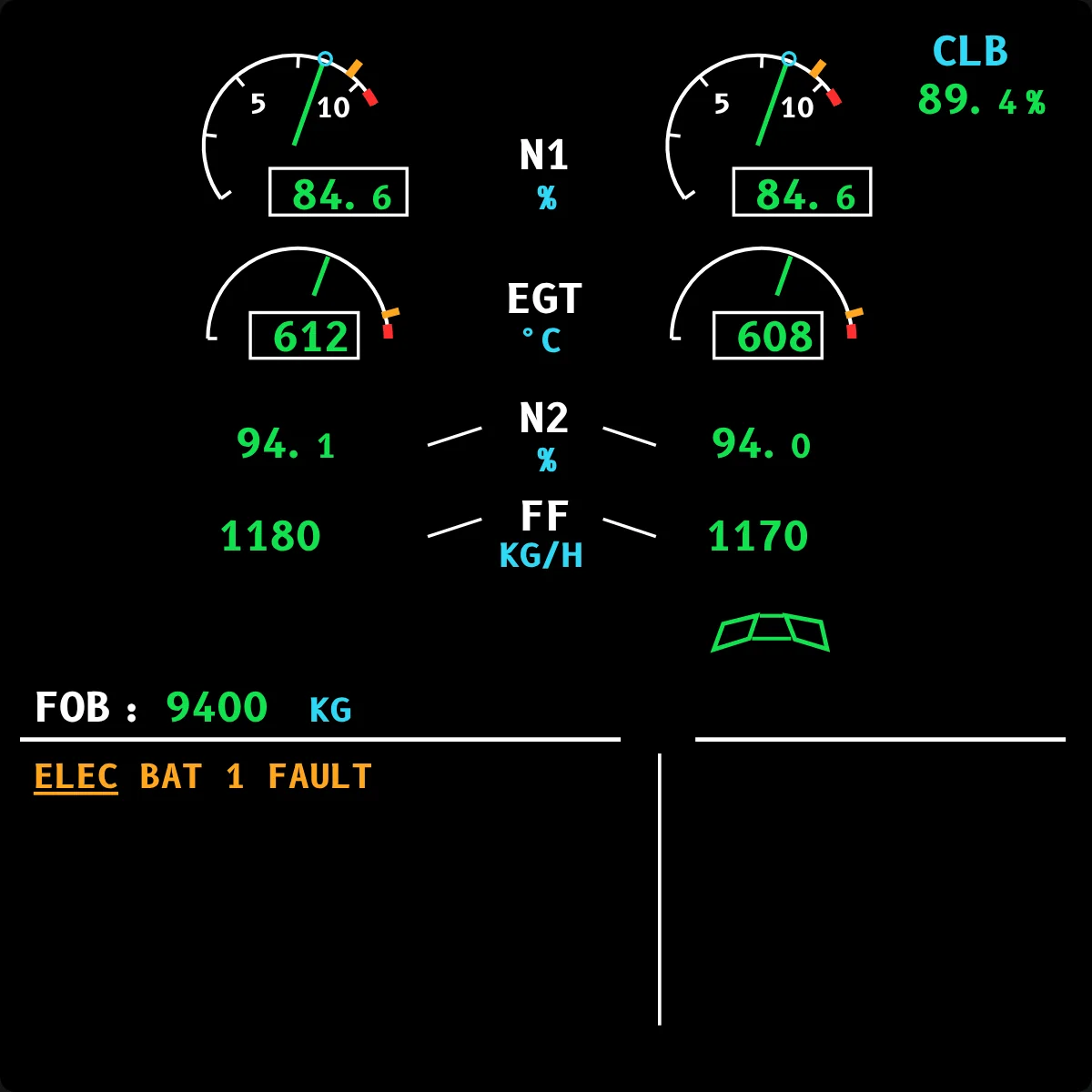
At a glance
- Level
- Amber caution, level 2: single chime, MASTER CAUT steady amber
- Sets it off
- The charging current of battery 1 increasing at an abnormal rate
- By itself
- The battery charge limiter opens the battery contactor automatically
- Lights
- BAT 1 FAULT, amber, on the ELEC panel; the BAT 1 legend on the ELEC page
- Procedure
- Crew awareness: the E/WD shows the title alone
- STATUS
- APU BAT START NOT AVAIL, and BAT 1 inoperative
Sources FCOM DSC-31-10 WARNING/CAUTION CLASSIFICATION / FCOM PRO-ABN-ELEC ELEC BAT 1(2) FAULT / FCOM PRO-ABN-ELEC ELEC / FCOM DSC-24-20 OVERHEAD PANEL / FCOM DSC-24-20 ECAM ELEC PAGE
What sets the caution off?
The caution triggers when the charging current increases at an abnormal rate. Each battery has its own battery charge limiter, the BCL, which monitors its charging and controls its contactor to the DC BAT BUS.
In normal configuration the batteries are disconnected most of the time. The BCL connects a battery for an APU start (for 3 min at most with the emergency generator running), when its voltage is below 26.5 V, to charge it until the current falls below 4 A, at once on the ground and after 30 min in flight, and when AC BUS 1 and 2 are lost below 100 kt with the emergency generator not supplying. The caution is about that charging current.
The FCOM's description of the FAULT light puts it in its own terms: the charge limiter is in fault, with an ECAM alert when the charging current is outside limits, and the battery contactor opens.
Sources FCOM PRO-ABN-ELEC ELEC BAT 1(2) FAULT / FCOM DSC-24-10-20 DC GENERATION / FCOM DSC-24-20 OVERHEAD PANEL
What the charge limiter controls
What does the crew see and hear?
An amber caution of level 2: the single chime, MASTER CAUT steady amber, the caution message in amber on the E/WD, and normally the system page on the SD. The FCOM's level 2 is a failure the crew should be aware of without any immediate action, to be considered without delay when time and situation permit.
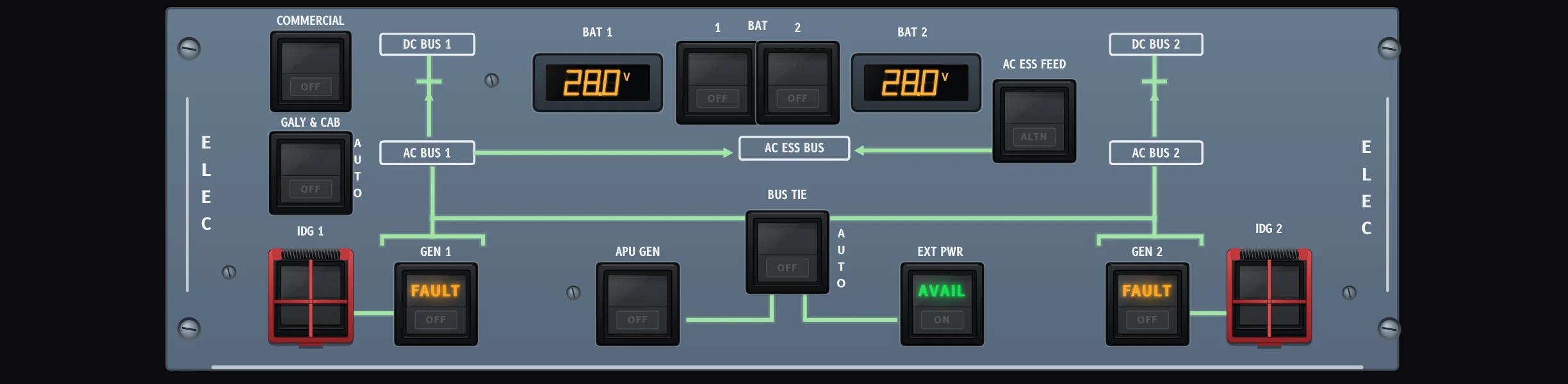
On the ELEC panel the BAT 1 pushbutton shows FAULT in amber, and on the ELEC page the BAT 1 legend is displayed amber, as it is in case of a BAT FAULT alert.
Sources FCOM DSC-31-10 WARNING/CAUTION CLASSIFICATION / FCOM DSC-24-20 OVERHEAD PANEL / FCOM DSC-24-20 ECAM ELEC PAGE
The moment the caution comes on
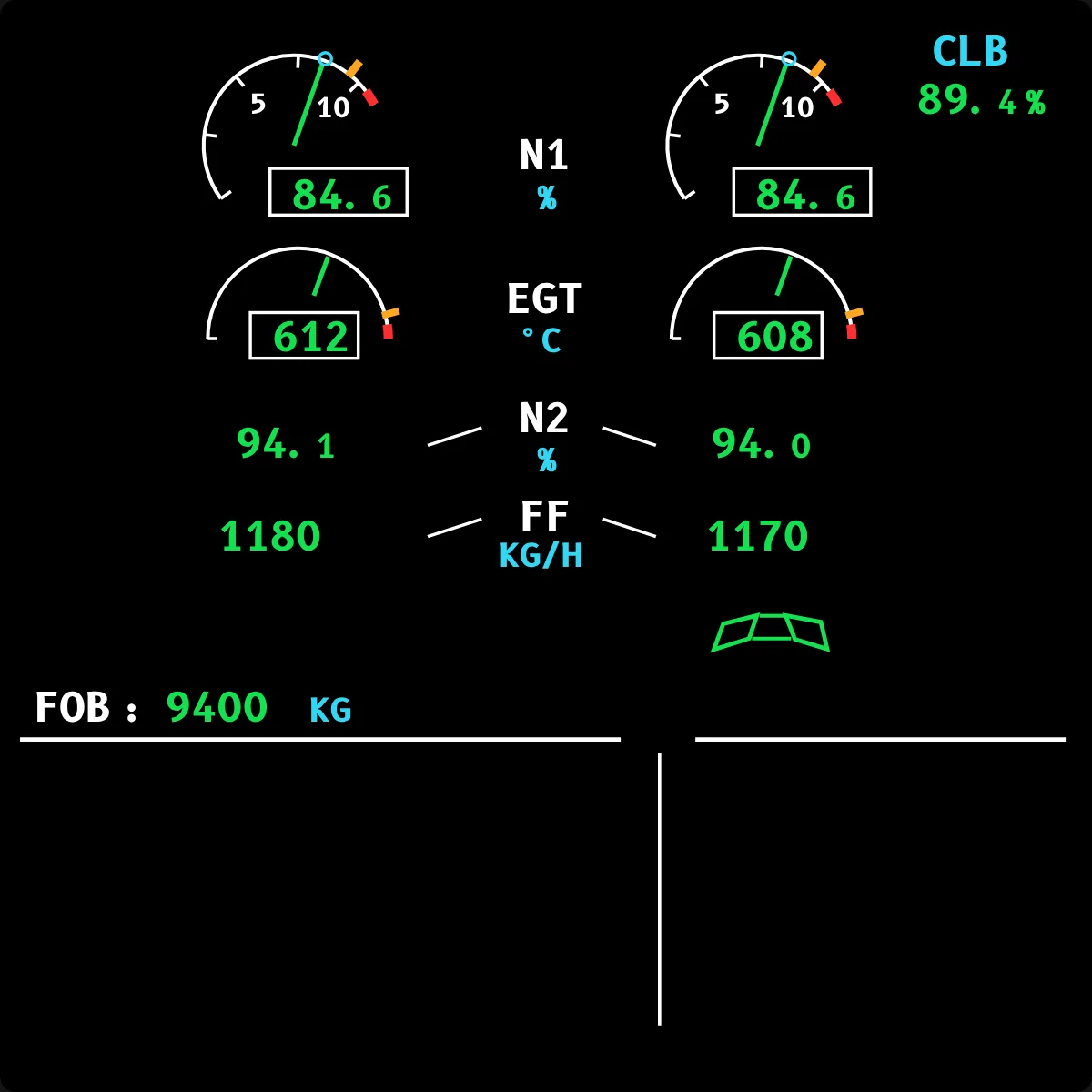
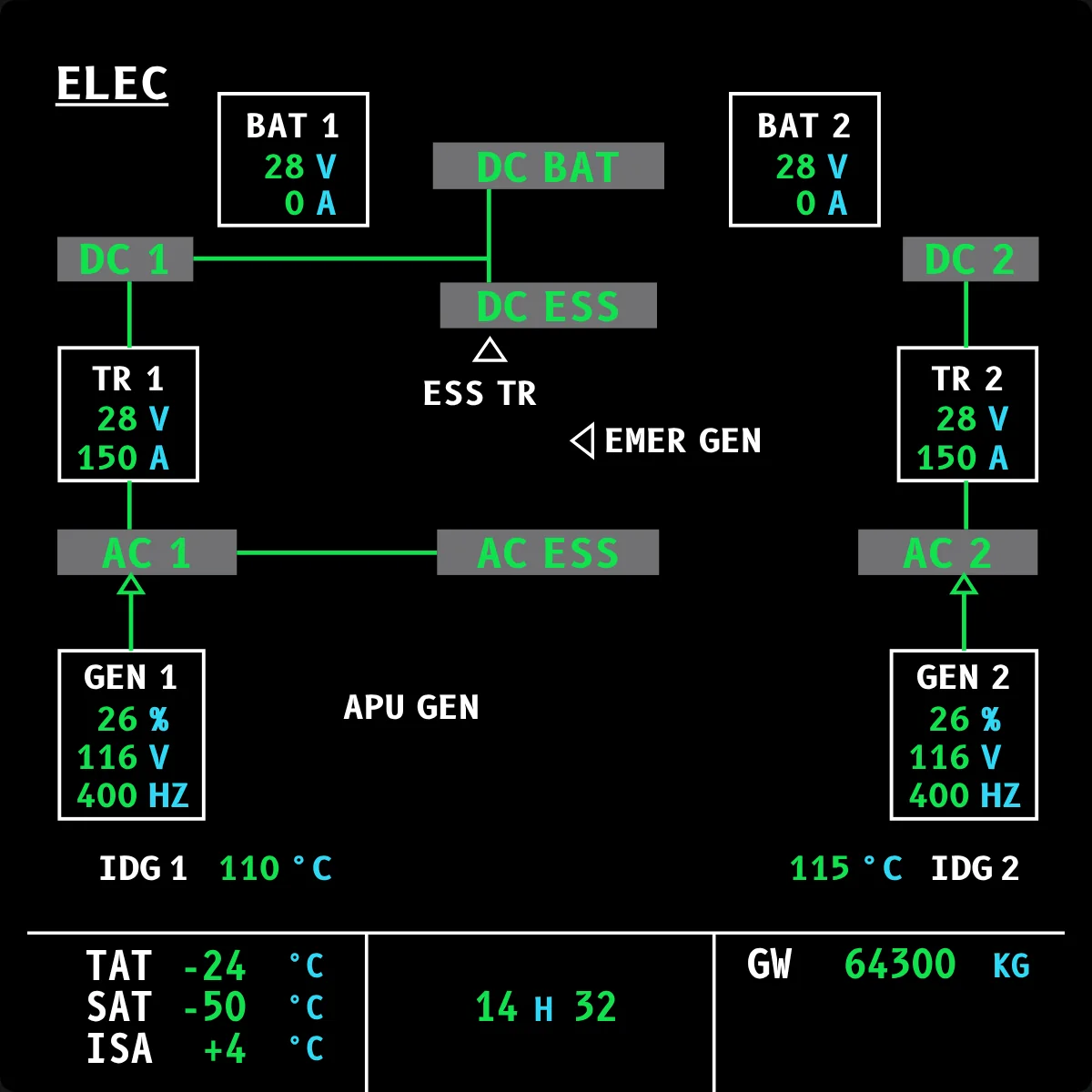
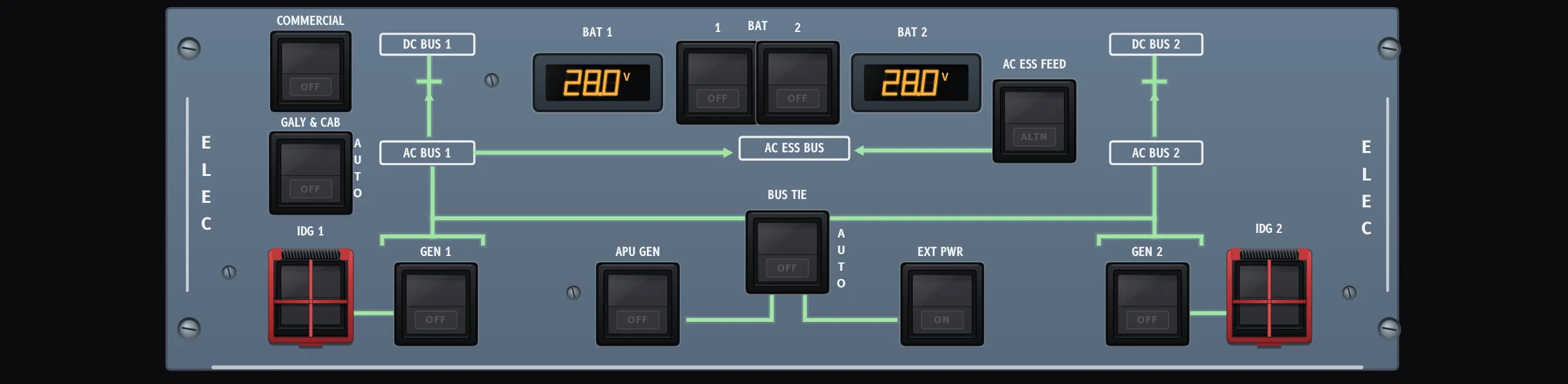
The cruise, both engine generators on line. Press the button to fail battery 1's charge, then look at the E/WD, the ELEC page and the ELEC panel.
The alert Fail battery 1's charge
The E/WD shows ELEC BAT 1 FAULT in amber with no line under it: crew awareness. The ELEC page shows the BAT 1 legend in amber, and the ELEC panel the amber FAULT light on BAT 1.
Battery 1's contactor is drawn open before the press and after it: this live aircraft starts with both batteries disconnected, as they are most of the time in normal configuration, and the failure does not move it. The FCOM says that with this caution the battery contactor is opened automatically by the battery charge limiter. The DC BAT BUS stays on TR 1.
Sources FCOM PRO-ABN-ELEC ELEC / FCOM DSC-24-20 ECAM ELEC PAGE / FCOM DSC-24-20 OVERHEAD PANEL / FCOM DSC-24-10-30-20 IN FLIGHT / FCOM PRO-ABN-ELEC ELEC BAT 1(2) FAULT
What does an open contactor leave?
Both batteries are permanently connected to the two hot buses, so HOT BUS 1 stays on battery 1 whatever its contactor does. What the open contactor takes away is battery 1's link to the DC BAT BUS, the link through which it is charged and through which the batteries are connected for an APU start.
The BAT pushbutton shows the same picture from the other side. At OFF the charge limiter is not operating and the battery line contactor is open, the DC BAT BUS remains supplied and the hot buses remain supplied.
Sources FCOM DSC-24-10-20 DC GENERATION / FCOM DSC-24-20 OVERHEAD PANEL
Open a battery contactor
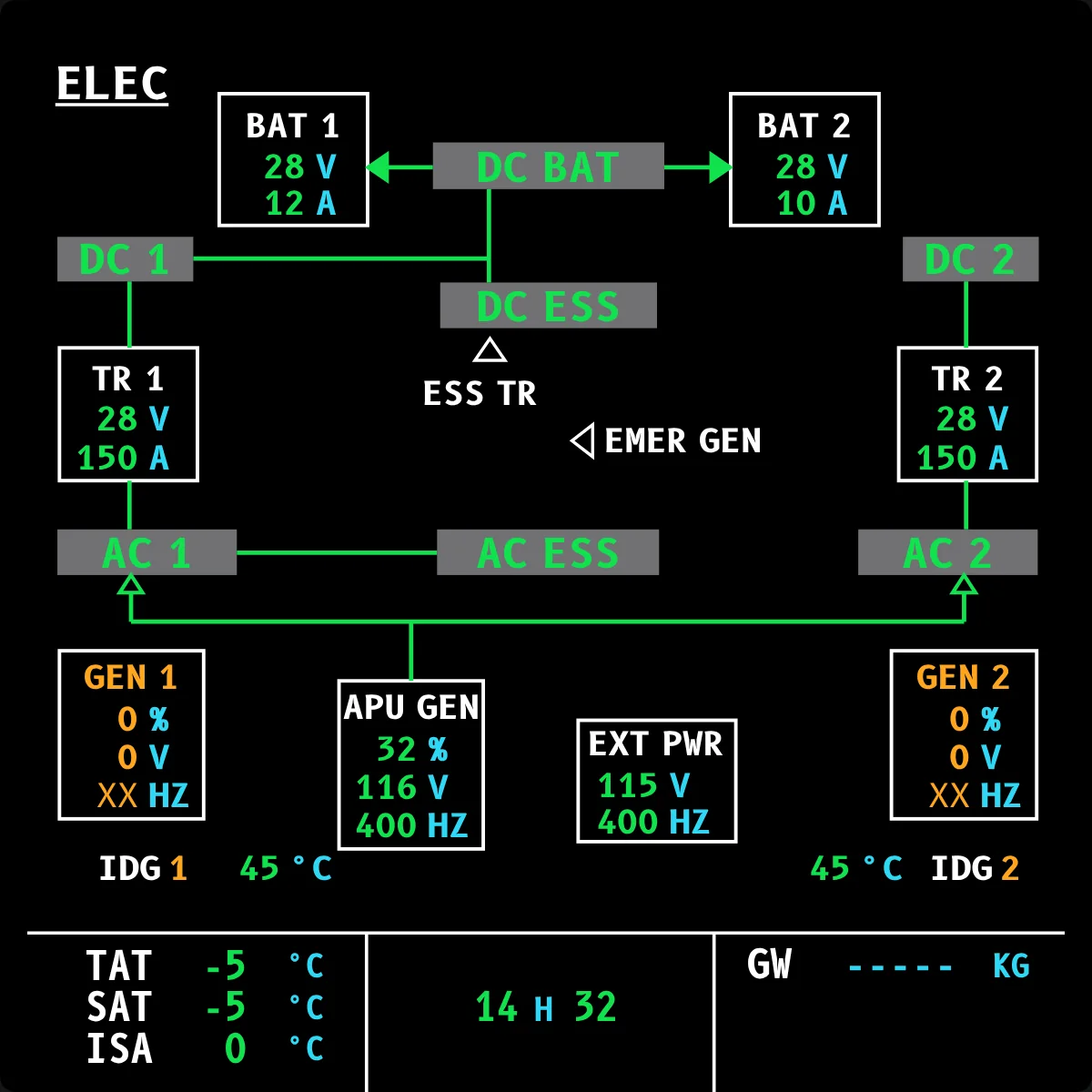
On the ground, the APU generator supplying the network and both batteries charging, their contactors closed. The procedure of the caution asks for nothing; to see what an open contactor leaves, switch BAT 1 off, which opens it as the charge limiter does. Predict first.
-
Predict Battery 1's contactor opens. Is HOT BUS 1 still supplied?
Try it Switch BAT 1 off.
The ELEC page no longer joins BAT 1 to the DC BAT BUS: its contactor is open, while battery 2 goes on charging. HOT BUS 1 is still on battery 1, and the DC BAT BUS is still supplied, here by TR 1.
This is not the caution's procedure. With no failure detected, the pushbutton at OFF brings ELEC BAT 1 OFF, an alert of its own; with BAT 1 FAULT the charge limiter has already done the opening.
Sources FCOM DSC-24-20 ECAM ELEC PAGE / FCOM DSC-24-10-20 DC GENERATION / FCOM DSC-24-20 OVERHEAD PANEL / FCOM DSC-24-10-30-20 IN FLIGHT / FCOM PRO-ABN-ELEC ELEC BAT 1(2) OFF / FCOM PRO-ABN-ELEC ELEC
What does STATUS say about the APU?
STATUS gives one line of information: APU BAT START NOT AVAIL. The procedure gives no reason for it. Elsewhere the FCOM says that the APU may obtain power for starting from the aircraft's batteries, from the normal electrical system or from ground service, and that the batteries are connected to the DC BAT BUS for an APU start, with the MASTER SW at ON and N below 95 %.
The same STATUS line appears with ELEC BAT 1(2) OFF, ELEC BCL 1(2) FAULT and ELEC DC BAT BUS FAULT.
Sources FCOM PRO-ABN-ELEC ELEC / FCOM DSC-49-10-10 GENERAL / FCOM DSC-24-20 OVERHEAD PANEL
What does battery 1 do in an emergency?
When AC BUS 1 and 2 are not energised and the emergency generator is not supplying, battery 1 supplies the AC STAT INV BUS and, above 50 kt, the AC ESS BUS, through the static inverter, and battery 2 the DC ESS BUS. The batteries also power the emergency network for the 8 s or so while the RAT extends and the emergency generator couples.
The FCOM's BAT FAULT procedure does not say how a faulty battery 1 would change those cases. It gives the caution, the open contactor, crew awareness, and STATUS.
Sources FCOM DSC-24-20 OVERHEAD PANEL / FCOM DSC-24-10-20 AC GENERATORS / FCOM DSC-24-10-30-30 EMERGENCY GENERATION AFTER LOSS OF ALL MAIN GENERATORS / FCOM PRO-ABN-ELEC ELEC BAT 1(2) FAULT / FCOM PRO-ABN-ELEC ELEC
What is lost afterwards?
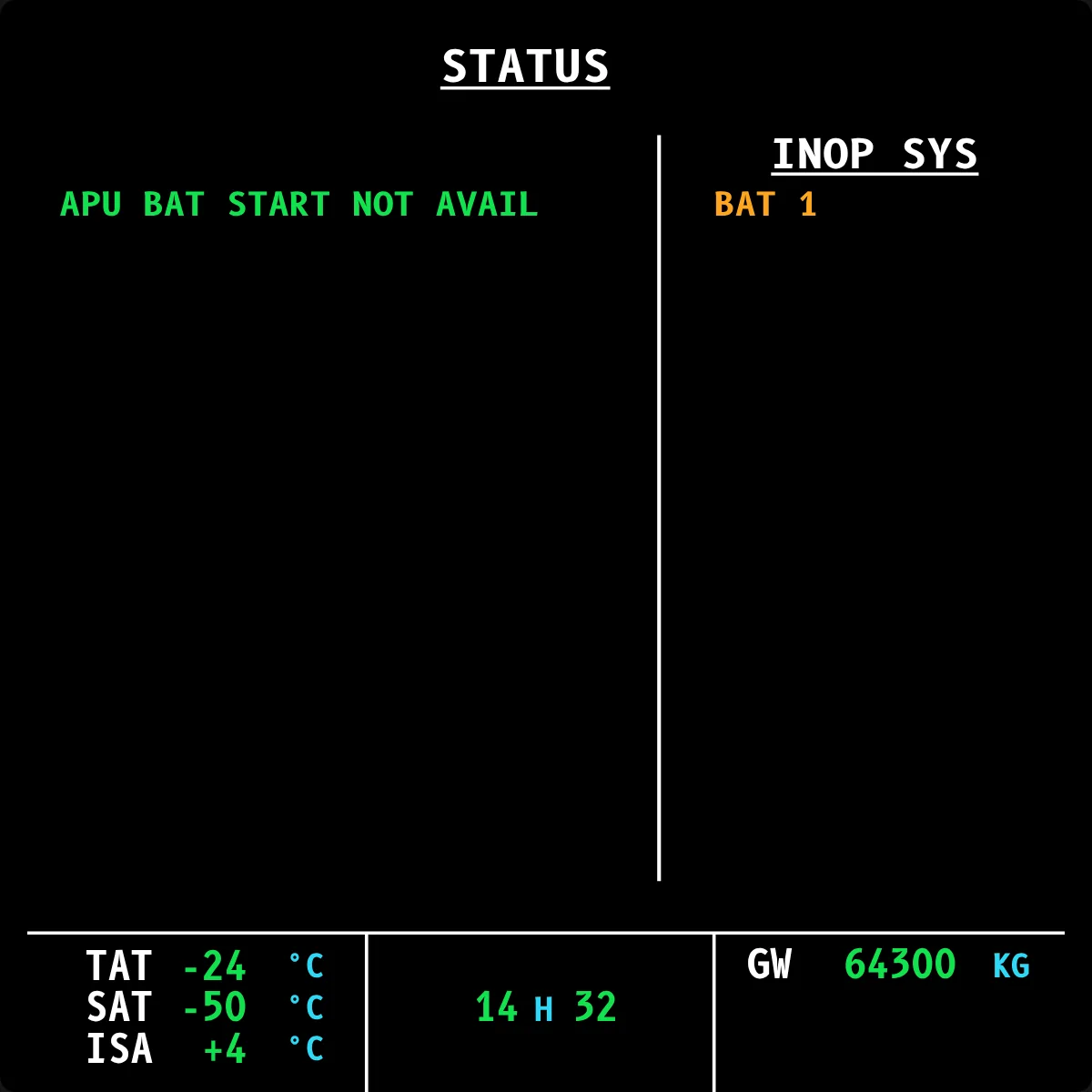
STATUS is the operational summary. Here it holds one line of information in green, APU BAT START NOT AVAIL, and under INOP SYS, in amber, BAT 1.
The FCOM prints the procedure and its STATUS for both batteries at once, as BAT 1(2): with battery 2 the lines are the same.
Sources FCOM DSC-31-20 STATUS PAGE / FCOM PRO-ABN-ELEC ELEC / FCOM PRO-ABN-ELEC ELEC BAT 1(2) FAULT
A319ceo, A320ceo, A320neo, A321neo: what differs?
| A319ceo, A320ceo | A320neo, A321neo | |
|---|---|---|
| The caution, its procedure and its STATUS | The same in every version | The same in every version |
| The batteries and their charge limiters | The same on all four types | The same on all four types |
The FCOM gives one version of the alert, the procedure and STATUS, applicable to all aircraft.
Sources FCOM PRO-ABN-ELEC ELEC BAT 1(2) FAULT / FCOM PRO-ABN-ELEC ELEC / FCOM DSC-24-10-20 DC GENERATION / FCOM DSC-24-20 OVERHEAD PANEL

Work ELEC BAT 1 FAULT as a crew
Read and do each line against the FCOM, with the E/WD, the SD page and the overhead following your hands, the PF and PM calls, and a debrief that says what you missed.
Work this failure in the ECAM TrainerGo further
Written in our own words from the FCOM and the FCTM; each part names the units it rests on. The E/WD, the STATUS and the live aircraft are the platform's own ECAM and systems model, the same the ECAM Trainer and the flight deck run. This page explains the procedure; it is not the procedure. Aircraft differ by type, engine and options: your aircraft's FCOM, your QRH and your operator's procedures always come first. How we write and check these pages.
Every ECAM procedure, line by line, against the FCOM.
The ECAM Trainer works 108 scenarios with the E/WD, the SD page and the overhead following your hands. Start free today, or open everything with A320 Knowledge+.
For study and revision only. Always follow your operator's approved documentation and procedures. A320 Knowledge is independent and not affiliated with Airbus.
Related
- ELEC AC ESS BUS FAULTTwo blue lines and one pushbutton.
- ELEC AC ESS BUS SHEDAn amber caution about part of a bus.
- ELEC AC BUS 1 FAULTOne bus lost, and two more cautions follow it.
- ELEC AC BUS 2 FAULTOne amber caution, and no essential bus caution with it: AC BUS 2 does not normally supply the AC ESS BUS.
- A320 electrical systemThe system guide, with the live aircraft
- Every ECAM procedureThe alerts the ECAM Trainer works, grouped by system