
BRAKES HOT
An amber caution for a brake above 300 °C. Here is how the aircraft watches the brake temperatures, what the crew sees, what the procedure does on the ground and in flight, the takeoff limit and its reason, and the speed STATUS keeps while the gear is down.
Written and checked by current A320 pilotschecked against the FCOM on Our editorial policy
What BRAKES HOT means
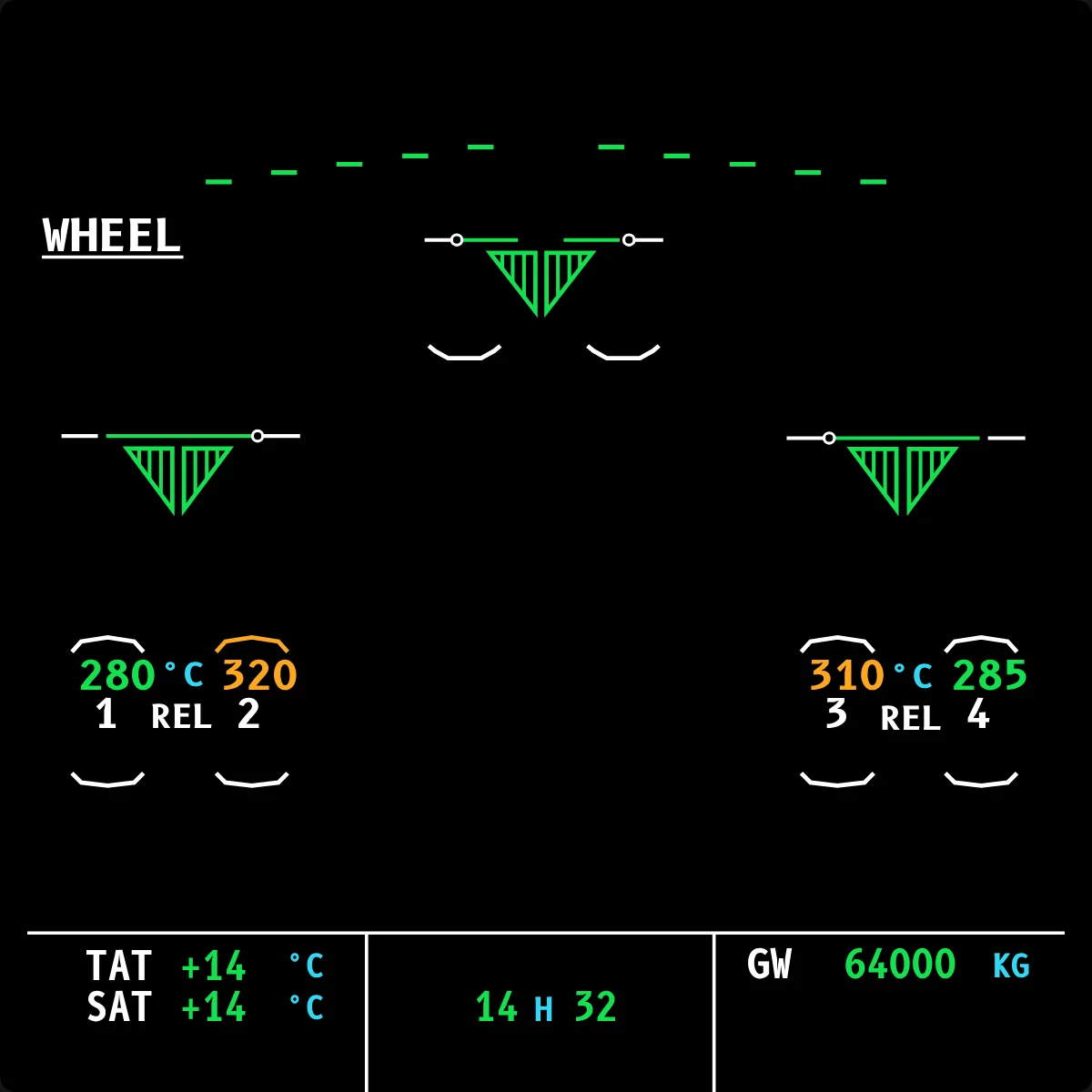
BRAKES HOT is an amber caution: one brake's temperature is above 300 °C. It goes when the hottest brake is back below 290 °C. The BSCU monitors the brake temperatures, and the WHEEL page shows each one, with an arc over the hottest that turns amber above 300 °C.
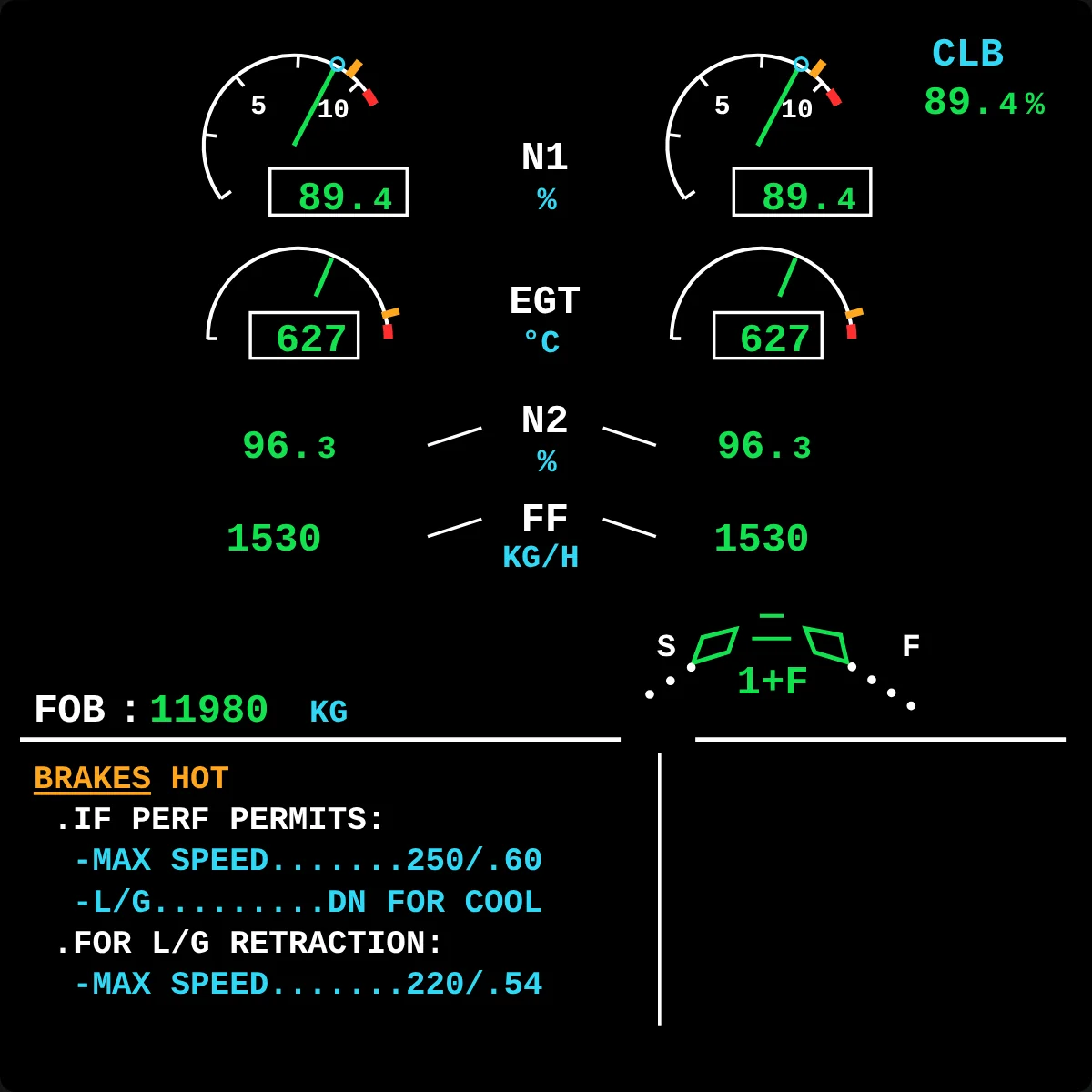
On the ground the procedure prefers chocks to the parking brake, has the brake fans switched on where fitted and delays the takeoff until the brakes cool. In flight, if performance permits, the speed is kept at or below 250 kt or M 0.60 and the gear goes down to cool the brakes. STATUS keeps MAX SPEED 280/.67 while the gear is extended.
Sources FCOM PRO-ABN-BRAKES BRAKES HOT / FCOM DSC-32-30-10 GENERAL / FCOM DSC-32-30-20 WHEEL SD PAGE / FCOM PRO-ABN-BRAKES BRAKES / FCOM PRO-ABN-BRAKES
At a glance
- Level
- Amber caution, level 2: single chime, MASTER CAUT steady amber, the WHEEL page on the SD
- Sets it off
- One brake above 300 °C; it goes when the hottest brake is below 290 °C
- Lights
- HOT in amber in the BRK FAN pushbutton, where fitted; the hottest brake's arc amber on the WHEEL page
- On the ground
- Chocks rather than the parking brake, the brake fans on where fitted, the takeoff delayed for cooling
- In flight
- If performance permits: MAX SPEED 250/.60 and the gear down for cooling
- STATUS
- MAX SPEED 280/.67 while the gear is extended
Sources FCOM DSC-31-10 WARNING/CAUTION CLASSIFICATION / FCOM DSC-31-30 ATTENTION GETTERS / FCOM DSC-31-20 SYSTEM PAGES / FCOM PRO-ABN-BRAKES BRAKES HOT / FCOM DSC-32-30-20 / FCOM DSC-32-30-20 WHEEL SD PAGE / FCOM PRO-ABN-BRAKES BRAKES / FCOM PRO-ABN-BRAKES
How does the aircraft watch the brake temperatures?
The main wheels have carbon multidisc brakes. Among its secondary functions, the BSCU, the computer that controls normal braking and the anti-skid, monitors the brake temperatures.
The WHEEL page gives each main wheel's brake temperature, normally in green. A green arc appears over the hottest wheel when one brake temperature exceeds 100 °C. The arc turns amber, and an ECAM caution appears, when that brake's temperature exceeds 300 °C.
The caution is BRAKES HOT. It triggers when one brake temperature is above 300 °C, and disappears when the highest brake temperature is below 290 °C.
The main gear wheels are also fitted with fusible plugs, which protect against tyre burst in the event of overheat. The main gear wheels may also have brake cooling fans, which permit a high speed cooling of the brakes; the FCOM marks them as an option.
Sources FCOM DSC-32-30-10 GENERAL / FCOM DSC-32-30-20 WHEEL SD PAGE / FCOM PRO-ABN-BRAKES BRAKES HOT
The temperatures that matter
What does the crew see and hear?
A level 2 caution: a single chime, the MASTER CAUT light steady amber, BRAKES HOT in amber on the E/WD and the WHEEL page on the SD, with the hottest brake's arc in amber.
Where the brake fans are fitted, the HOT light in the BRK FAN pushbutton comes on amber when the brakes get too hot, with the caution on the ECAM.
The FCOM prints the procedure in two parts, on the ground and in flight, each under a black square. Black squares mark parts of a procedure of which only one applies, and the ECAM does not display the squares themselves. The E/WD picture above, drawn in the climb, shows the in-flight part.
The FCOM's graphic inhibits the caution from 80 kt on the takeoff roll to lift-off, and from touchdown until 5 minutes after the second engine is shut down. Most warnings and cautions are inhibited in the critical phases because most system failures will not affect the aircraft's ability to continue a takeoff or landing.
Sources FCOM DSC-31-10 WARNING/CAUTION CLASSIFICATION / FCOM DSC-31-30 ATTENTION GETTERS / FCOM DSC-31-20 SYSTEM PAGES / FCOM DSC-32-30-20 WHEEL SD PAGE / FCOM DSC-32-30-20 / FCOM PRO-ABN-BRAKES BRAKES / FCOM PRO-ABN-ABN-00 INTRODUCTION / FCOM PRO-ABN-BRAKES BRAKES HOT / FCOM DSC-31-10 PRIORITY RULES
Hot brakes on the WHEEL page and BRK FAN
On the ground with the engines running, the brakes at 280, 320, 310 and 285 °C, the brake fans off. This block shows the indications only, not the alert: BRAKES HOT itself is in the E/WD picture at the top of the page, and the drawing does not model the brakes cooling.
On the WHEEL page the arc over brake 2, the hottest, is amber. The drawing also turns the figures above 300 °C amber, where the FCOM gives the temperature normally in green and the change of colour to the arc. On the panel below, HOT is lit amber in the BRK FAN pushbutton beside the AUTO/BRK pushbuttons and the gear lever; the drawing has the brake fans fitted, which the FCOM marks as an option.
On the aircraft, the FCOM's graphic inhibits the caution itself from 80 kt on the takeoff roll to lift-off, and from touchdown until 5 minutes after the second engine is shut down: on the ground with the engines running, it comes on before the takeoff roll reaches 80 kt, not after landing.

What does the procedure do on the ground?
PARK BRK: PREFER CHOCKS. If BRAKES HOT is still on when the aircraft is parked, the FCOM says the crew should not set the parking brake ON; it gives no reason.
BRK FAN ON, where the fans are fitted. They run when the left main gear is down and locked, and the BRK FAN memo appears in green while the pushbutton is ON. Before selecting them at the gate, the crew first warns the ground personnel, to avoid blowing carbon brake dust on them.
The FCTM adds that the fans blow dust during their first seconds of operation only, that selecting them before the aircraft reaches the gate keeps the dust off the ground personnel, and that delaying their selection limits the oxidation of any transient hot spots on the brake disks.
DELAY T.O. FOR COOL: the takeoff waits until the brake temperature is below 300 °C with the brake fans off, or below 150 °C with them on.
Sources FCOM PRO-ABN-BRAKES BRAKES / FCOM DSC-32-30-20 / FCOM DSC-32-30-20 Y ALTN BRK Y ALTN BRK / FCTM PR-NP-SOP-270 USE OF BRAKE FANS
Why is there a brake temperature limit for takeoff?
The FCOM's limitations give the maximum brake temperature for takeoff, with the brake fans off, as 300 °C.
The FCTM gives the reason: if a hydraulic leak puts fluid on the brake units, the fluid must not ignite in the wheel well once the gear is retracted.
Heat also shortens the life of carbon brakes. The FCTM names the repetitive high temperature of the brakes, particularly above 400 °C, as the main cause of carbon disk oxidation, which may degrade the brakes rapidly and may rupture a disk; it therefore prefers autobrake LO when performance permits.
Sources FCOM LIM-LG BRAKE TEMPERATURE / FCTM PR-NP-SOP-100 / FCTM PR-NP-SOP-160 BRAKES OXIDATION
Why does the gear go down in flight?
In flight the E/WD gives one condition, IF PERF PERMITS, with two lines under it: MAX SPEED 250/.60, then L/G DN FOR COOL. The FCOM's reason: if performance permits, the gear should be extended, or kept extended if it already is, to improve brake cooling.
A second condition, FOR L/G RETRACTION, gives MAX SPEED 220/.54: the crew reduces speed to retract the gear once the brake temperature is within limits.
These are the FCOM's landing gear speed limits: 250 kt or M 0.60 to extend the gear, 280 kt or M 0.67 with it extended, and 220 kt or M 0.54 to retract it.
Sources FCOM PRO-ABN-BRAKES BRAKES / FCOM LIM-AG-SPD MAXIMUM SPEEDS WITH THE LANDING GEAR EXTENDED
What does STATUS keep?
STATUS gives one line, MAX SPEED 280/.67, in blue, the colour of limitations. The FCOM explains it: as long as the gear is extended, limit the speed to 280 kt or M 0.67, and reduce to 220 kt to retract it once the brake temperature is within limits. No system is listed as inoperative.
Sources FCOM PRO-ABN-BRAKES / FCOM DSC-31-20 STATUS PAGE
What is lost afterwards?
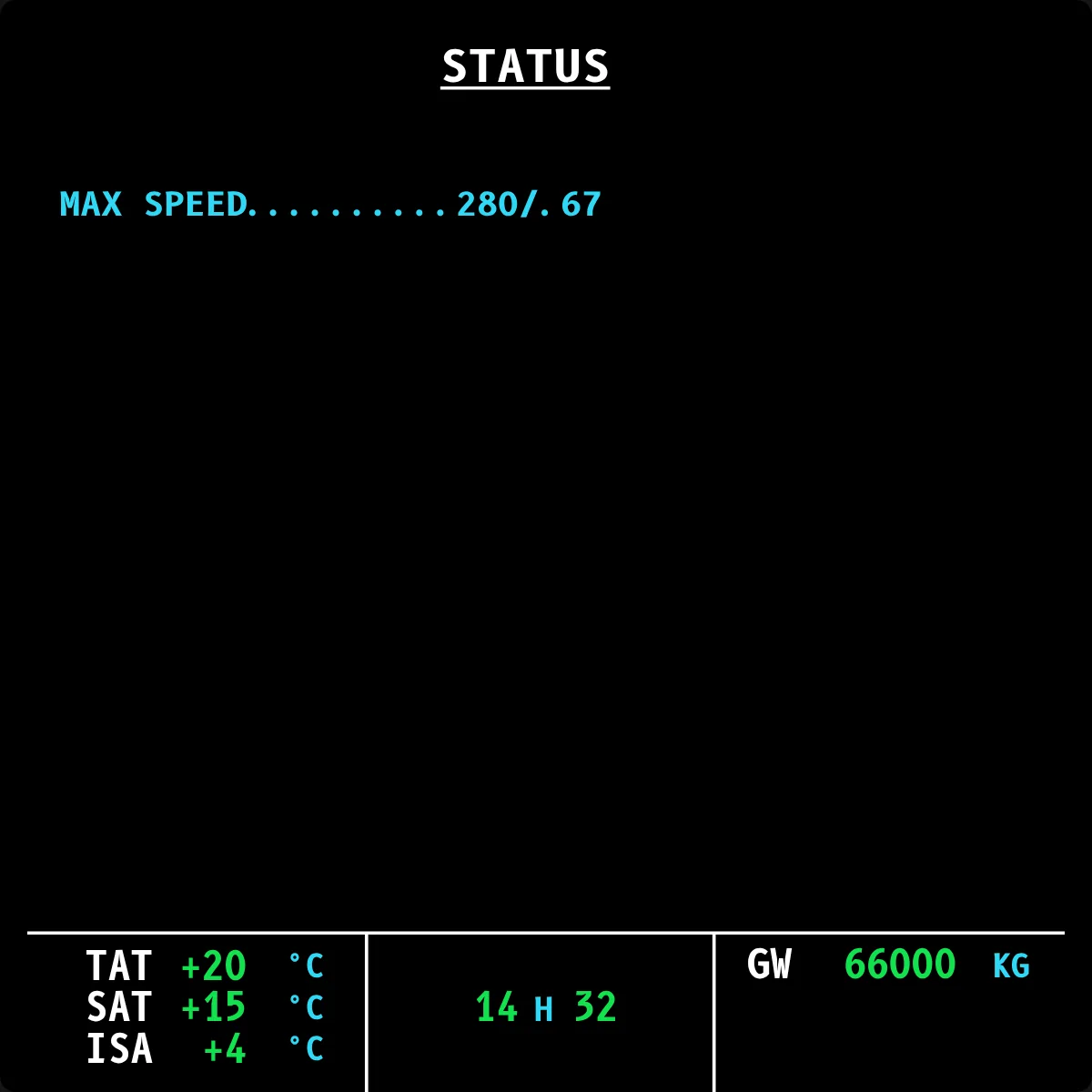
STATUS is the aircraft's operational summary: limitations in blue. After this caution it reads MAX SPEED 280/.67, with nothing under INOP SYS.
The FCOM prints one procedure and one STATUS for this caution, for all aircraft; the ECAM Trainer draws that one STATUS.
Sources FCOM DSC-31-20 STATUS PAGE / FCOM PRO-ABN-BRAKES / FCOM PRO-ABN-BRAKES BRAKES HOT / FCOM PRO-ABN-BRAKES BRAKES
A319ceo, A320ceo, A320neo, A321neo: what differs?
| A319ceo, A320ceo | A320neo, A321neo | |
|---|---|---|
| The caution, its procedure and STATUS | The same in every version | The same in every version |
| The brake temperatures on the WHEEL page, BRK FAN where fitted, and the takeoff limit | The same on all four types | The same on all four types |
Sources FCOM PRO-ABN-BRAKES BRAKES HOT / FCOM PRO-ABN-BRAKES BRAKES / FCOM PRO-ABN-BRAKES / FCOM DSC-32-30-20 / FCOM DSC-32-30-20 WHEEL SD PAGE / FCOM LIM-LG BRAKE TEMPERATURE

Work BRAKES HOT as a crew
Read and do each line against the FCOM, with the E/WD, the SD page and the overhead following your hands, the PF and PM calls, and a debrief that says what you missed.
Work this failure in the ECAM TrainerGo further
Written in our own words from the FCOM and the FCTM; each part names the units it rests on. The E/WD, the STATUS and the live aircraft are the platform's own ECAM and systems model, the same the ECAM Trainer and the flight deck run. This page explains the procedure; it is not the procedure. Aircraft differ by type, engine and options: your aircraft's FCOM, your QRH and your operator's procedures always come first. How we write and check these pages.
Every ECAM procedure, line by line, against the FCOM.
The ECAM Trainer works 108 scenarios with the E/WD, the SD page and the overhead following your hands. Start free today, or open everything with A320 Knowledge+.
For study and revision only. Always follow your operator's approved documentation and procedures. A320 Knowledge is independent and not affiliated with Airbus.
Related
- BRAKES AUTO BRK FAULTAn amber caution for an autobrake that has failed after being armed.
- BRAKES NORM BRK FAULTAn amber caution for the loss of normal braking.
- A320 landing gear and brakesThe system guide, with the live aircraft
- Every ECAM procedureThe alerts the ECAM Trainer works, grouped by system