
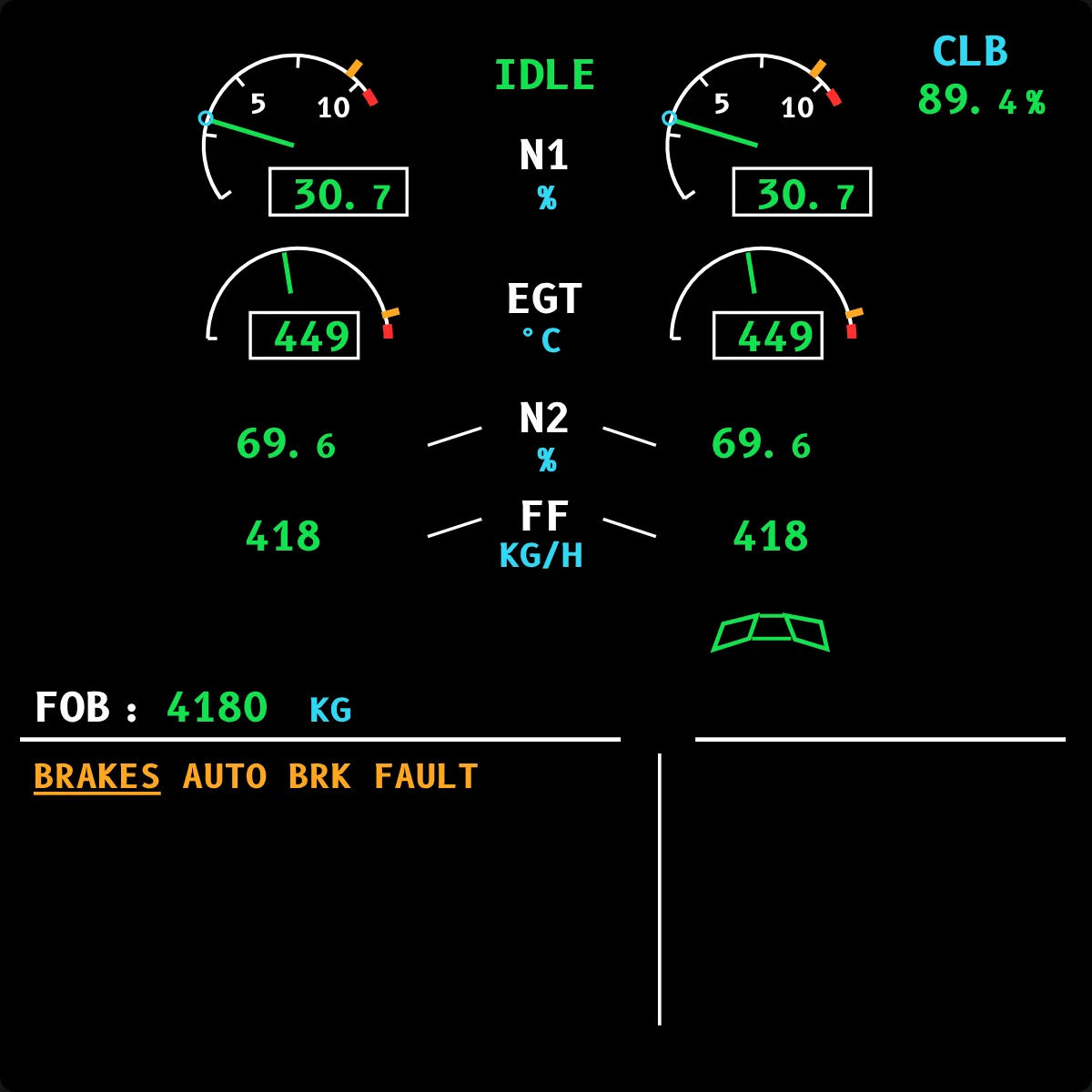
BRAKES AUTO BRK FAULT
An amber caution for an autobrake that has failed after being armed. Here is what the autobrake does, how it arms, brakes and lets go, what the WHEEL page shows and what is left for the landing, with the live aircraft at the moment the caution comes on.
Written and checked by current A320 pilotschecked against the FCOM on Our editorial policy
What BRAKES AUTO BRK FAULT means
BRAKES AUTO BRK FAULT is an amber caution: the autobrake has failed after being armed. The autobrake shortens the braking distance in an aborted takeoff and, on landing, sets and holds the deceleration rate the crew selected. Normal braking is not lost with it: the WHEEL page shows NORM BRK in green when the autobrake has failed and normal braking is still available.
The E/WD shows the title and no line under it: the FCOM's procedure is crew awareness. STATUS reads CAT 3 SINGLE ONLY and lists CAT 3 DUAL and AUTO BRK as inoperative.
Sources FCOM PRO-ABN-BRAKES BRAKES AUTO BRK FAULT / FCOM PRO-ABN-BRAKES BRAKES / FCOM DSC-32-30-10 AUTO BRAKE / FCOM DSC-32-30-20 WHEEL SD PAGE
At a glance
- Level
- Amber caution, level 2: single chime, MASTER CAUT steady amber, the WHEEL page on the SD
- Sets it off
- The autobrake has failed, after being armed
- Procedure
- No action line: the title alone on the E/WD, for crew awareness
- What stays
- Normal braking on green through the pedals, with the anti-skid; NORM BRK green on the WHEEL page, and not under INOP SYS
- STATUS
- CAT 3 SINGLE ONLY; CAT 3 DUAL and AUTO BRK inoperative
Sources FCOM DSC-31-10 WARNING/CAUTION CLASSIFICATION / FCOM DSC-31-30 ATTENTION GETTERS / FCOM DSC-31-20 SYSTEM PAGES / FCOM PRO-ABN-BRAKES BRAKES AUTO BRK FAULT / FCOM DSC-32-30-10 / FCOM DSC-32-30-20 WHEEL SD PAGE / FCOM PRO-ABN-BRAKES BRAKES
What does the autobrake do?
The autobrake has two purposes: to reduce the braking distance in an aborted takeoff, and to establish and keep a selected deceleration rate during landing, which improves passenger comfort and reduces crew workload. Braking commands come either from the pedals or from the autobrake.
On the AUTO/BRK panel, three spring-loaded pushbuttons, LO, MED and MAX, arm a deceleration rate. MAX is normally selected for takeoff: in an aborted takeoff, maximum pressure goes to the brakes as soon as the system generates the ground spoiler deployment order. MED or LO is normally selected for landing: 2 s after the ground spoilers deploy, MED builds pressure progressively for 3 m/s², LO for 2 m/s².
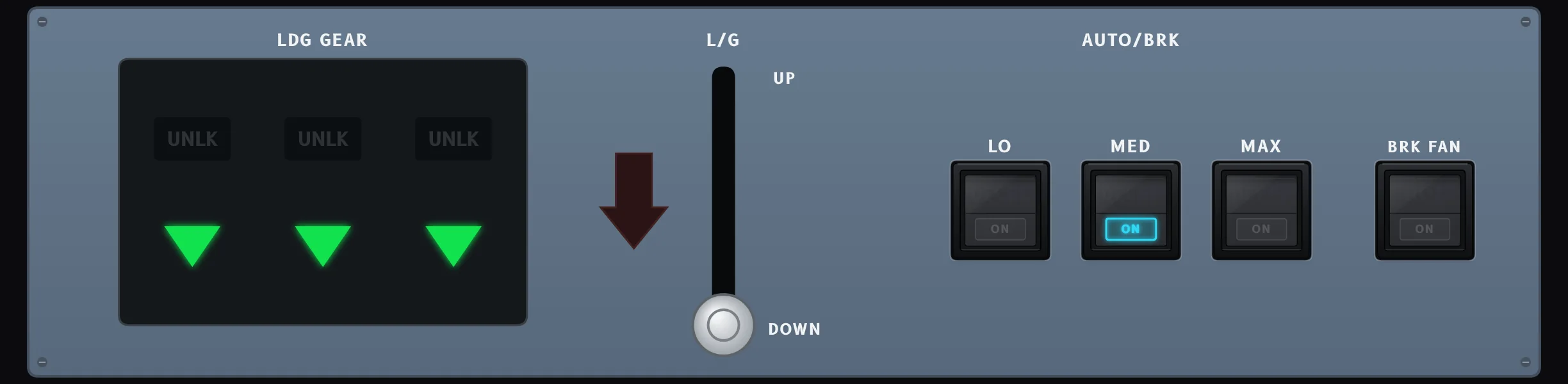
ON comes on blue in the pushbutton to show positive arming. DECEL comes on green when the actual deceleration is 80 % of the selected rate. On a slippery runway the anti-skid may keep the rate from being reached, and DECEL stays out; the FCOM notes that this does not mean the autobrake is not working.
The FCTM puts it the other way round too: DECEL might come on with LO selected on a dry runway while the reversers alone give the rate. The light shows that the deceleration rate is reached, not that the autobrake is braking.
Sources FCOM DSC-32-30-10 AUTO BRAKE / FCOM DSC-32-30-10 GENERAL / FCOM DSC-32-30-20 AUTO BRK PANEL / FCTM PR-NP-SOP-250 DECELERATION
When does it arm, brake and let go?
The crew arms it with LO, MED or MAX provided all the arming conditions are met: green pressure available, the anti-skid electrically powered, no failure in the braking system, and at least one ADIRU available. It may be armed with the parking brake on; MAX cannot be armed in flight.
Automatic braking starts when the command for ground spoiler extension is detected, for LO and MED, and for MAX when that command is detected with the wheel speed above 40 kt. So in an acceleration stop that starts to decelerate below 72 kt of wheel speed, the ground spoilers do not extend and the autobrake does not brake. At least two SECs must be operative for it to activate.
It stops braking when it is disarmed, or when the ground spoilers retract, in which case it stays armed. It disarms when the crew presses the pushbutton, when one or more arming conditions is lost, after takeoff or a touch and go, or when the crew deflects at least one brake pedal far enough while it is braking.
The FCOM prints the arming and activation in two versions, each for some aircraft, with the same conditions; one of them adds that the armed mode shows in blue on the FMA and the active mode in green.
Sources FCOM DSC-32-30-10
Armed, braking, disarmed
What does the crew see and hear?
A level 2 caution: a single chime, the MASTER CAUT light steady amber, BRAKES AUTO BRK FAULT in amber on the E/WD and the WHEEL page on the SD. No line follows the title: the FCOM's procedure is crew awareness.
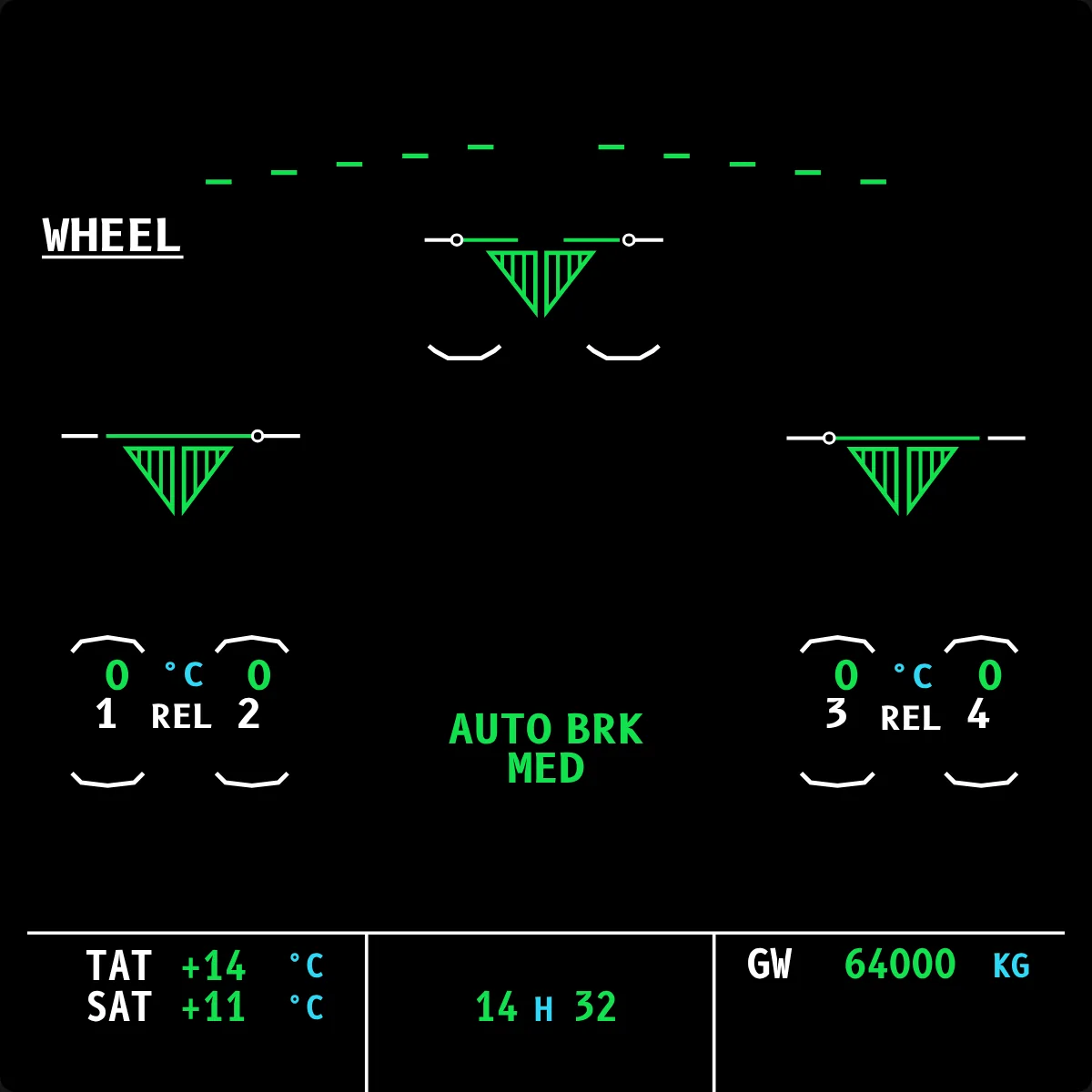
On the WHEEL page, AUTO BRK appears in amber, with the ECAM caution, to show a system failure, and the selected rate, LO, MED or MAX, in green under it. NORM BRK and ALTN BRK appear in green when the autobrake has failed and those modes are still available, and ANTI SKID in green while the anti-skid is available.
The FCOM gives a memo for it too: AUTO BRK OFF appears in green if the autobrake has failed.
The FCOM's graphic inhibits the caution from the first engine at takeoff power to 1 500 ft. Most warnings and cautions are inhibited in the critical phases because most system failures will not affect the aircraft's ability to continue a takeoff or landing.
Sources FCOM DSC-31-10 WARNING/CAUTION CLASSIFICATION / FCOM DSC-31-30 ATTENTION GETTERS / FCOM DSC-31-20 SYSTEM PAGES / FCOM PRO-ABN-BRAKES BRAKES AUTO BRK FAULT / FCOM DSC-32-30-20 WHEEL SD PAGE / FCOM DSC-32-30-20 / FCOM DSC-31-10 PRIORITY RULES
The moment the caution comes on
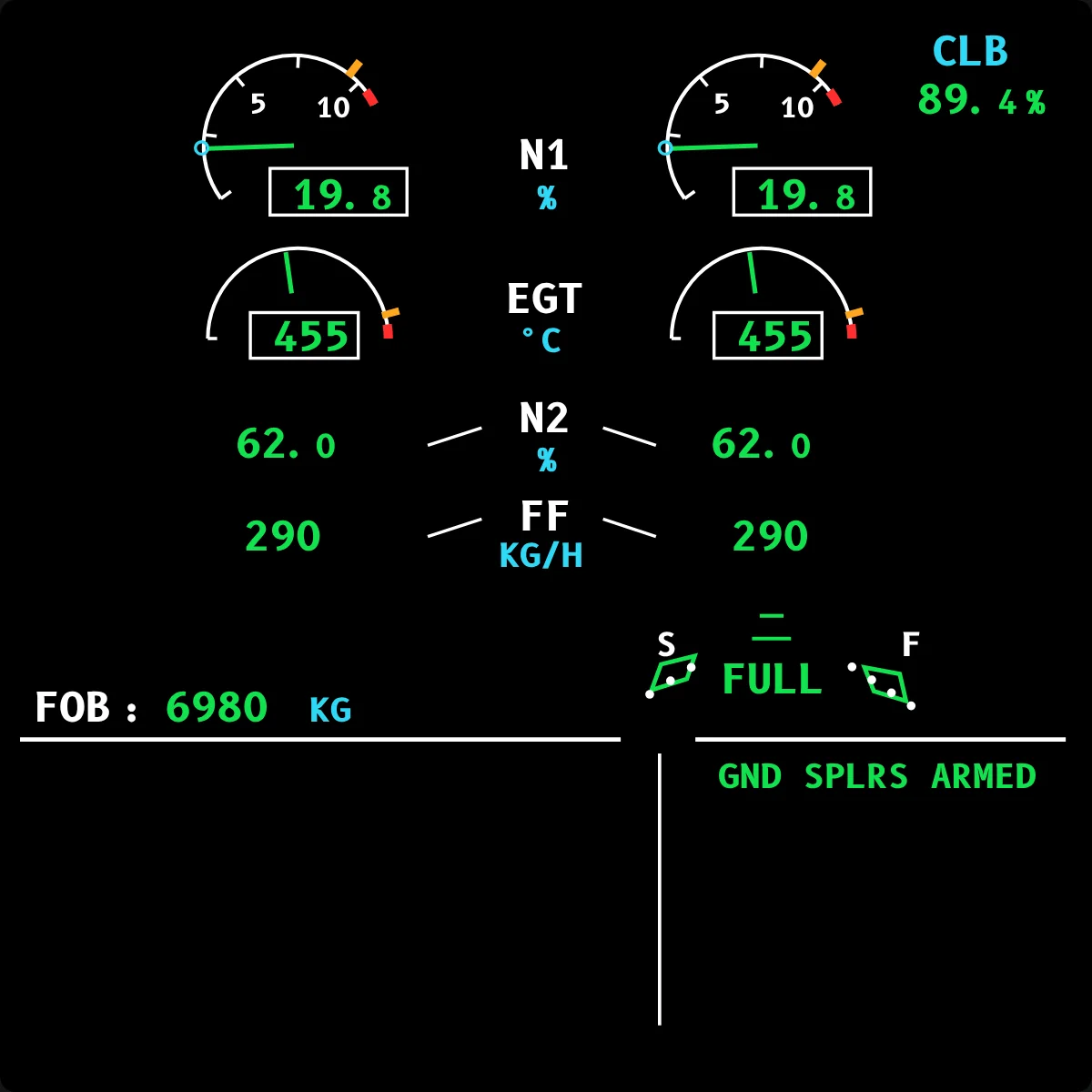
On the approach at 2 000 ft, gear down, MED armed: ON blue in the MED pushbutton on the panel below, AUTO BRK and MED in green on the WHEEL page. Press the button to fail the autobrake.
The alert Fail the autobrake
BRAKES AUTO BRK FAULT comes up in amber with no line under it. On the WHEEL page, AUTO BRK turns amber with MED still green under it; ANTI SKID, NORM BRK with its G, and ALTN BRK with its Y and ACCU PRESS appear in green.
The drawing keeps ON lit in the MED pushbutton and shows no AUTO BRK OFF memo. The FCOM's disarming conditions include the loss of an arming condition, and no failure in the braking system is one of them; it gives AUTO BRK OFF as the memo of a failed autobrake.
Sources FCOM PRO-ABN-BRAKES BRAKES AUTO BRK FAULT / FCOM DSC-32-30-20 WHEEL SD PAGE / FCOM DSC-32-30-10 / FCOM DSC-32-30-20
How is the landing braked without it?
Normal braking stays: with green pressure and the A/SKID & N/W STRG switch ON, braking is electrically controlled through the BSCU from the pedals, with the anti-skid operative. Without the autobrake, full braking performance comes only with the pedals at full deflection.
The FCTM's advice for pedal braking: do not ride the brakes, but apply them when required and modulate the pressure without releasing, which minimises brake wear. On very short runways it says pedal braking is to be envisaged, since the pilot may apply full pedal braking with no delay after touchdown.
STATUS has no landing distance line for this caution, where BRAKES NORM BRK FAULT has LDG DIST PROC APPLY.
Sources FCOM DSC-32-30-10 / FCOM DSC-32-30-10 ANTI-SKID SYSTEM / FCTM PR-NP-SOP-250 DECELERATION / FCOM PRO-ABN-BRAKES BRAKES
Lose the green system instead
The same approach at 2 000 ft with MED armed. This time take away green, one of the autobrake's arming conditions, and read the WHEEL page.
The alert Lose the green system
A hydraulic caution, not the autobrake's. On the WHEEL page NORM BRK and its G turn amber, and ALTN BRK, its Y and ACCU PRESS are green: alternate braking with anti-skid.
The drawing keeps AUTO BRK and MED in green. On the aircraft, green pressure is an arming condition, alternate braking with anti-skid has the autobrake inoperative, and this caution's STATUS lists AUTO BRK under INOP SYS, one version adding: when both engines are running.
Sources FCOM DSC-32-30-20 WHEEL SD PAGE / FCOM DSC-32-30-10 / FCOM PRO-ABN-HYD HYD / FCOM PRO-ABN-HYD ABNORMAL AND EMERGENCY PROCEDURES
What does STATUS keep?
CAT 3 SINGLE ONLY in green, as information, with CAT 3 DUAL and AUTO BRK in amber under INOP SYS. Nothing else: no limitation and no procedure line.
The procedure gives no reason for the loss of CAT 3 DUAL. Each FMGC computes the landing category from the systems and functions available. CAT 3 DUAL is fail-operational: after a failure below alert height, the remaining automatic system completes the approach, flare and landing. CAT 3 SINGLE is fail-passive: the landing is not completed automatically after a failure, and the pilot takes control.
Sources FCOM PRO-ABN-BRAKES BRAKES / FCOM DSC-31-20 STATUS PAGE / FCOM PRO-NOR-SRP-01-70 LANDING CATEGORIES
What is lost afterwards?
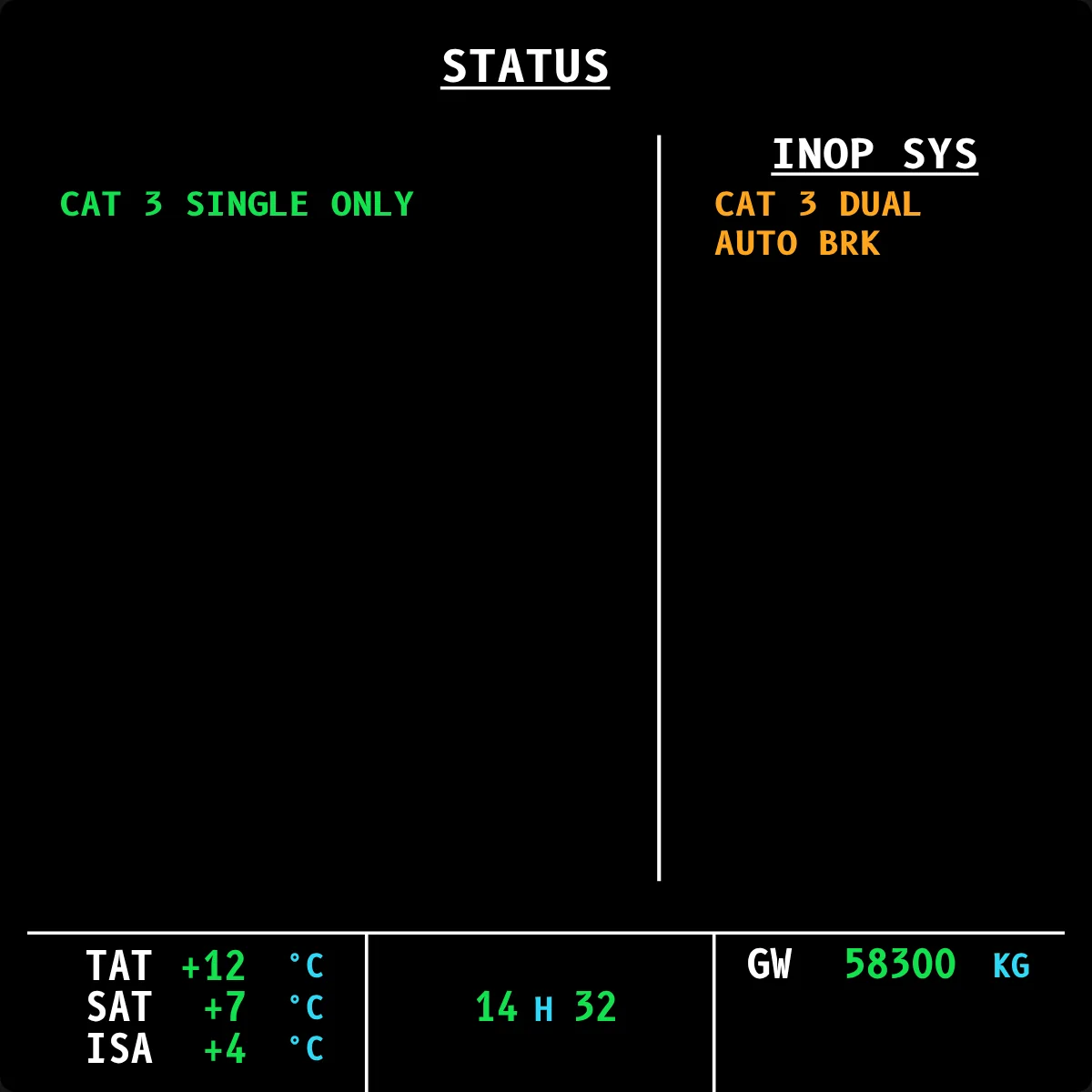
STATUS is the aircraft's operational summary: information in green, inoperative systems in amber. After this caution it reads CAT 3 SINGLE ONLY, with CAT 3 DUAL and AUTO BRK under INOP SYS.
The FCOM prints one procedure and one STATUS for this caution, for all aircraft; the ECAM Trainer draws that one STATUS.
Sources FCOM DSC-31-20 STATUS PAGE / FCOM PRO-ABN-BRAKES BRAKES / FCOM PRO-ABN-BRAKES BRAKES AUTO BRK FAULT
A319ceo, A320ceo, A320neo, A321neo: what differs?
| A319ceo, A320ceo | A320neo, A321neo | |
|---|---|---|
| The caution, its procedure and STATUS | The same in every version | The same in every version |
| The AUTO/BRK panel, the disarming and the WHEEL page | The same on all four types | The same on all four types |
Sources FCOM PRO-ABN-BRAKES BRAKES AUTO BRK FAULT / FCOM PRO-ABN-BRAKES BRAKES / FCOM DSC-32-30-10 AUTO BRAKE / FCOM DSC-32-30-10 / FCOM DSC-32-30-20 AUTO BRK PANEL / FCOM DSC-32-30-20 WHEEL SD PAGE

Work BRAKES AUTO BRK FAULT as a crew
Read and do each line against the FCOM, with the E/WD, the SD page and the overhead following your hands, the PF and PM calls, and a debrief that says what you missed.
Work this failure in the ECAM TrainerGo further
Written in our own words from the FCOM and the FCTM; each part names the units it rests on. The E/WD, the STATUS and the live aircraft are the platform's own ECAM and systems model, the same the ECAM Trainer and the flight deck run. This page explains the procedure; it is not the procedure. Aircraft differ by type, engine and options: your aircraft's FCOM, your QRH and your operator's procedures always come first. How we write and check these pages.
Every ECAM procedure, line by line, against the FCOM.
The ECAM Trainer works 108 scenarios with the E/WD, the SD page and the overhead following your hands. Start free today, or open everything with A320 Knowledge+.
For study and revision only. Always follow your operator's approved documentation and procedures. A320 Knowledge is independent and not affiliated with Airbus.