
L/G GEAR NOT DOWNLOCKED
A red warning for a gear that has not locked down with the lever down. Here is what detects it, how the green system and the two LGCIUs extend the gear, what the indications tell the crew, what the recycle does, what the gravity extension is as a design and what STATUS keeps, with the live aircraft.
Written and checked by current A320 pilotschecked against the FCOM on Our editorial policy
What L/G GEAR NOT DOWNLOCKED means
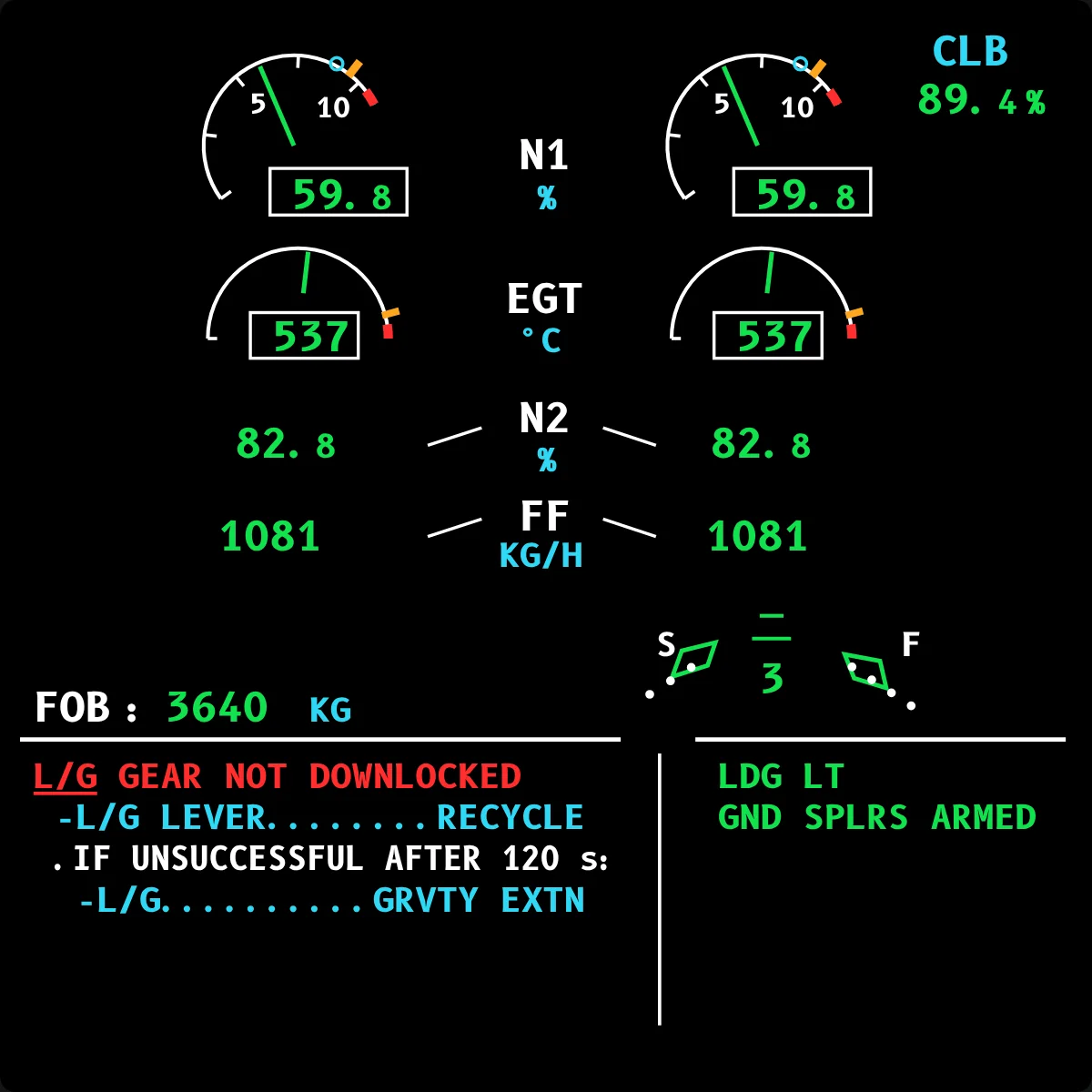
L/G GEAR NOT DOWNLOCKED is a red warning: one gear is not downlocked although the gear is selected down, and the landing gear sequence is not completed after 30 s. The LGCIUs read the downlocks through proximity detectors; the LDG GEAR panel shows UNLK in red, and the WHEEL page a red triangle for a gear in transit.
The E/WD has the crew recycle the gear lever first; the active LGCIU changes with the recycle. If unsuccessful after 120 s, the line is L/G GRVTY EXTN, the QRH's gravity extension. STATUS keeps CAT 3 SINGLE ONLY.
Sources FCOM PRO-ABN-LG L/G GEAR NOT DOWNLOCKED / FCOM PRO-ABN-LG L/G / FCOM DSC-32-10-20 / FCOM DSC-32-10-40 LANDING GEAR INDICATOR PANEL / FCOM DSC-32-10-40 WHEEL SD PAGE
At a glance
- Level
- Red warning, level 3: continuous repetitive chime and MASTER WARN flashing red
- Sets it off
- One gear not downlocked with the gear selected down, the sequence not completed after 30 s
- Lights
- UNLK in red on the LDG GEAR panel, a red triangle for a gear in transit on the WHEEL page
- Procedure
- L/G LEVER RECYCLE; if unsuccessful after 120 s, L/G GRVTY EXTN
- STATUS
- L/G GRVTY EXTN and CAT 3 SINGLE ONLY; CAT 3 DUAL inoperative
Sources FCOM DSC-31-10 WARNING/CAUTION CLASSIFICATION / FCOM DSC-31-10 AUDIO INDICATORS / FCOM DSC-31-30 ATTENTION GETTERS / FCOM PRO-ABN-LG L/G GEAR NOT DOWNLOCKED / FCOM PRO-ABN-LG L/G / FCOM DSC-32-10-40 LANDING GEAR INDICATOR PANEL / FCOM DSC-32-10-40 WHEEL SD PAGE
What sets it off?
The warning triggers when one gear is not downlocked and the gear is selected down. The FCOM adds that it appears if the landing gear sequence is not completed after 30 s.
Proximity detectors tell the two LGCIUs whether each gear is locked down or up, each shock absorber compressed or extended and the doors open or closed. With DOWN selected, the downlock outputs give the WHEEL page and the LDG GEAR panel their gear down indications, or in transit indications for a gear not downlocked.
The FCOM's flight phase chart inhibits the warning from takeoff power to 1 500 ft, and from touchdown to 80 kt. On the approach it is active below 800 ft as well.
Sources FCOM PRO-ABN-LG L/G GEAR NOT DOWNLOCKED / FCOM PRO-ABN-LG L/G / FCOM DSC-32-10-20 / FCOM DSC-32-10-30 PROXIMITY DETECTORS ON DOWNLOCKS / FCOM DSC-31-15 FLIGHT PHASES
What raises the warning
What does the crew see and hear?
A level 3 warning: the continuous repetitive chime, the MASTER WARN light flashing red and the title in red on the E/WD, with the WHEEL page on the SD.
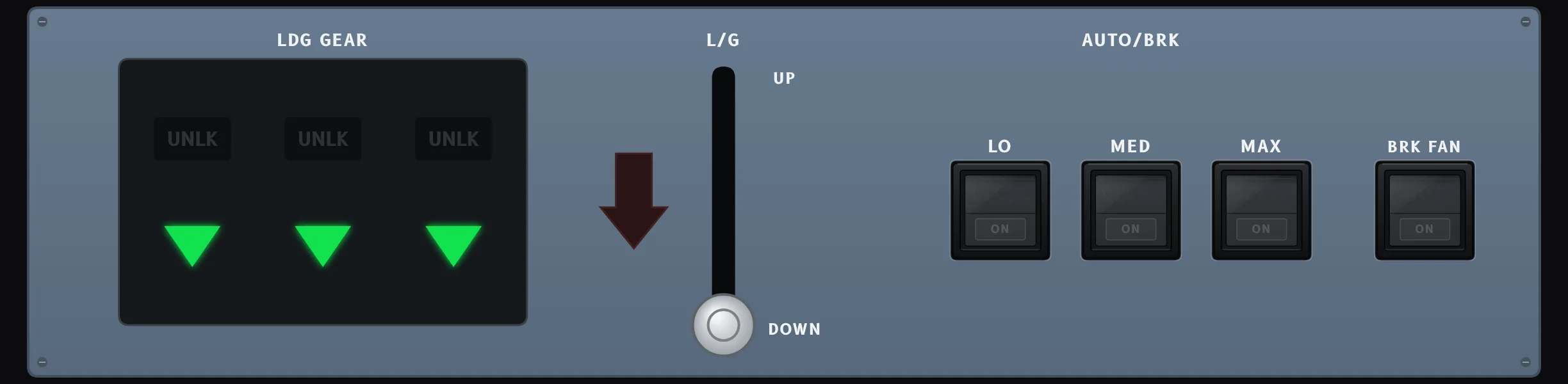
On the LDG GEAR panel, connected to LGCIU 1, a green triangle comes on for a gear locked down and UNLK in red for a gear not locked in the selected position. On the WHEEL page each gear has two triangles: green when one LGCIU detects it downlocked, red when one detects it in transit.
The E/WD at the alert: L/G LEVER RECYCLE in blue, then the condition IF UNSUCCESSFUL AFTER 120 s, with L/G GRVTY EXTN under it in blue.
The warning is not raised live on this page: the E/WD picture beside the answer is the ECAM Trainer's at the alert. The block below shows how the two LGCIUs share the WHEEL page.
Sources FCOM DSC-31-10 WARNING/CAUTION CLASSIFICATION / FCOM DSC-31-10 AUDIO INDICATORS / FCOM DSC-31-30 ATTENTION GETTERS / FCOM DSC-31-20 SYSTEM PAGES / FCOM DSC-32-10-40 LANDING GEAR INDICATOR PANEL / FCOM DSC-32-10-40 WHEEL SD PAGE / FCOM PRO-ABN-LG L/G
Two triangles a gear, and one LGCIU lost
On the approach with the gear down and locked: three green triangles on the LDG GEAR panel below and two for each gear on the WHEEL page. Press the button to lose one LGCIU and see what is left to confirm the gear.
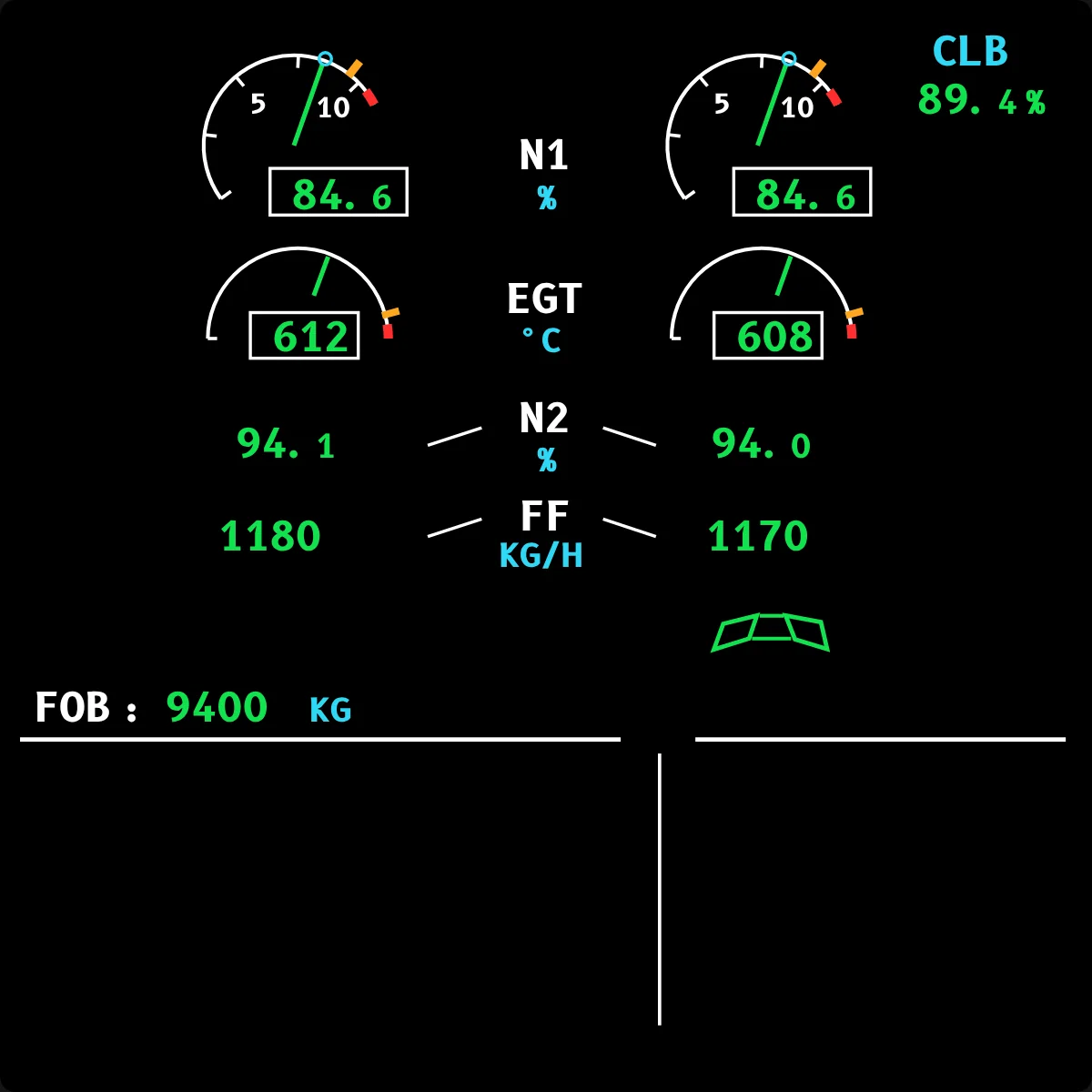
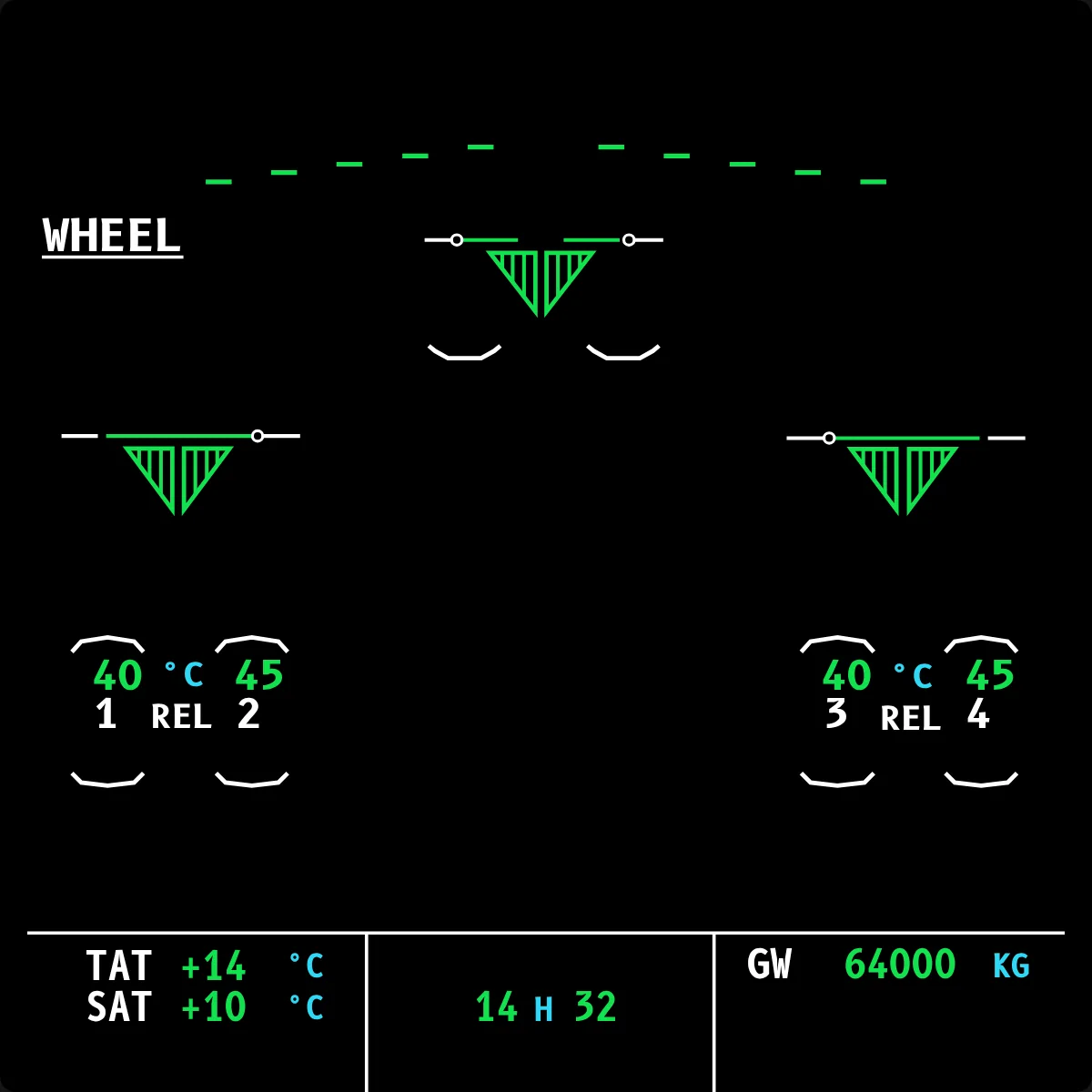
The alert Fail LGCIU 1
A different caution, L/G LGCIU 1 FAULT. On the WHEEL page an amber cross takes the right triangle's place on each gear, and one green triangle is left on each.
That is enough: only one green triangle on each gear is sufficient to confirm that the gear is downlocked. The LDG GEAR panel, on LGCIU 1, keeps its green triangles in the drawing.
Sources FCOM PRO-ABN-LG L/G LGCIU 1(2) FAULT / FCOM DSC-32-10-40 WHEEL SD PAGE / FCOM DSC-32-10-40 LANDING GEAR INDICATOR PANEL
What extends the gear, and what if green is lost?
The gear and doors are electrically controlled and hydraulically operated. The lever sends electrical signals to both LGCIUs, which control the green hydraulic supply to the gear through selector valves. Selected UP or DOWN below 260 kt, all the doors open, each gear moves to the selected position, then the doors close.
The green system actuates all gear and doors. Above 260 kt a safety valve automatically cuts off the hydraulic supply to the landing gear system; below 260 kt the supply remains cut off as long as the gear lever is up. With the gear extended, the gear system stays pressurised if green pressure is available.
Sources FCOM DSC-32-10-10 GENERAL / FCOM DSC-32-10-40 LANDING GEAR SELECTOR LEVER / FCOM DSC-32-10-10 LANDING GEARS AND DOORS OPERATION
The gear's green supply
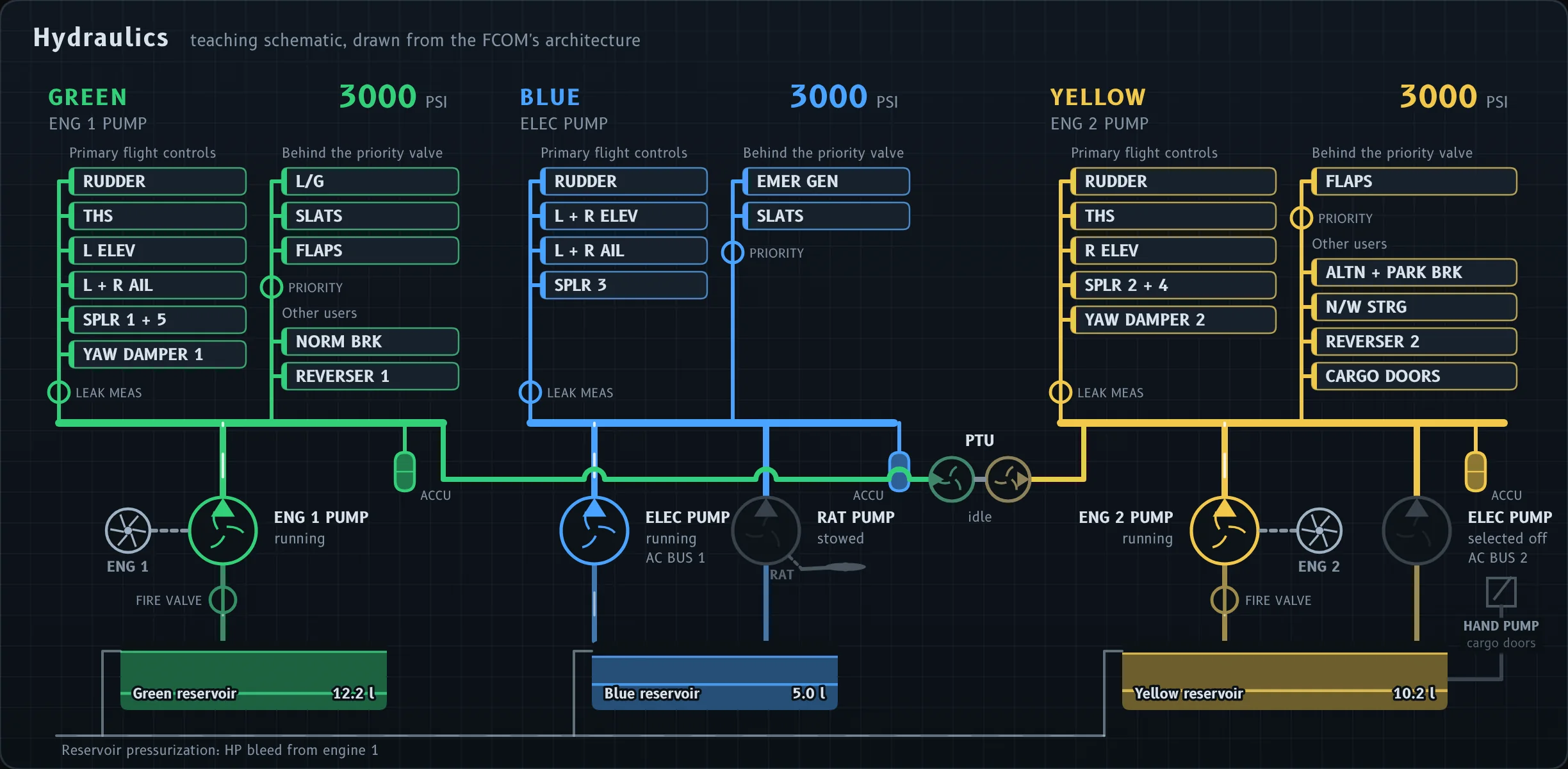
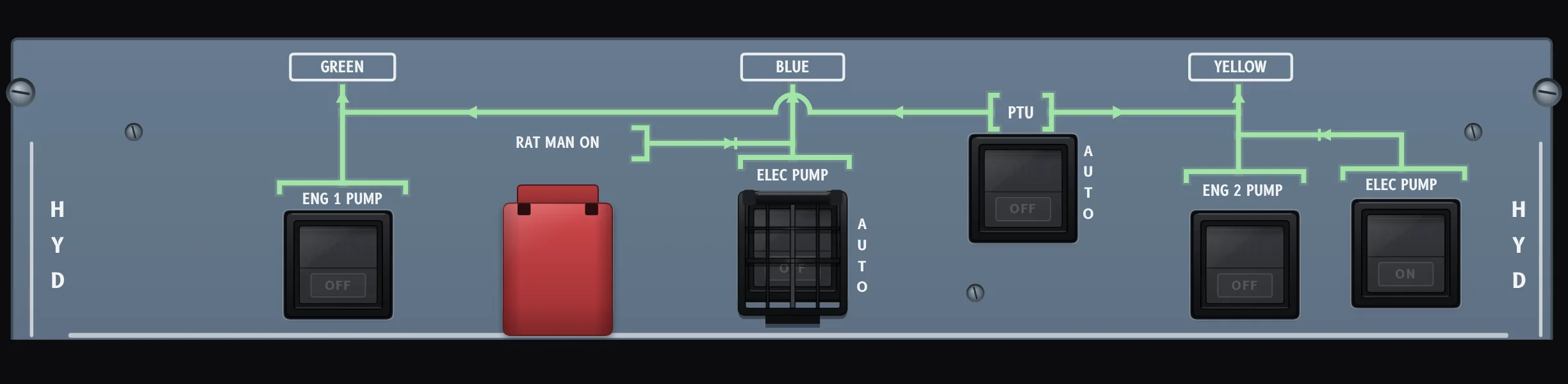
On the approach at 150 kt with the gear down, both engines running. The HYD schematic shows L/G among green's users, behind the priority valve; the HYD panel is below.
-
Predict You switch the green engine pump off. Does the gear keep its green supply?
Try it Switch ENG 1 PUMP off.
The schematic shows green supplied by the PTU, from yellow, and L/G still among its users.
The drawing marks the cut by speed only. The FCOM adds the lever: below 260 kt, the supply stays cut as long as the lever is up.
Sources FCOM DSC-29-10-20 POWER TRANSFER UNIT (PTU) / FCOM DSC-32-10-10 LANDING GEARS AND DOORS OPERATION
-
Predict Now you switch the PTU off as well. What happens to green and the gear's supply?
Try it Switch the PTU off.
Green has no pressure, and the schematic shows its users lost, L/G among them.
The drawing stops there. The FCOM's design answer is the crank: it isolates the gear hydraulics from green, unlocks the doors and gears, and lets gravity drop the gear into the extended position.
Sources FCOM DSC-32-10-10 LANDING GEARS AND DOORS OPERATION / FCOM DSC-32-10-10 GENERAL / FCOM DSC-32-10-10
What does the recycle do?
The first line is L/G LEVER RECYCLE. The FCOM's note describes it: the lever up, a wait for the gear to uplock and the doors to close while the crew monitors the WHEEL page, then the lever down.
The note adds: "The active LGCIU changes when the landing gear is recycled." One LGCIU controls a complete gear cycle, then switches over automatically to the other at the end of the retraction; it also switches over in case of failure.
The FCOM asks the crew to move the lever in one continuous movement, with no stop between the two positions.
Sources FCOM PRO-ABN-LG L/G / FCOM DSC-32-10-10 LANDING GEARS AND DOORS OPERATION / FCOM DSC-32-10-40 LANDING GEAR SELECTOR LEVER
What is the gravity extension?
If unsuccessful after 120 s, the line L/G GRVTY EXTN refers the crew to the QRH's L/G GRAVITY EXTENSION, which extends the gear mechanically when the normal system fails to extend it hydraulically.
As a design, the crank is on the centre pedestal. When it is operated, a cut-off valve shuts off hydraulic pressure to the gear system and depressurises it; the gear doors and gears are unlocked, locking springs help the main gear lock, aerodynamic forces help the nose gear lock, and the gear doors remain open.
Sources FCOM PRO-ABN-LG L/G / FCOM DSC-32-10-10 / FCOM DSC-32-10-10 GENERAL / FCOM DSC-32-10-40 LANDING GEAR GRAVITY EXTENSION
What does STATUS keep?
STATUS repeats L/G GRVTY EXTN in blue among its procedures, gives CAT 3 SINGLE ONLY in green and lists CAT 3 DUAL under INOP SYS in amber.
CAT 3 DUAL is a fail-operational automatic landing system; CAT 3 SINGLE is fail-passive, and the pilot takes control after a failure. The FCOM's procedure gives no reason for the downgrade.
If the gravity extension does not work either, STATUS refers the crew to another QRH procedure, Landing with Abnormal L/G, the one the FCTM gives for a gear that is not downlocked.
Sources FCOM PRO-ABN-LG L/G / FCOM DSC-31-20 STATUS PAGE / FCOM PRO-NOR-SRP-01-70 LANDING CATEGORIES / FCTM PR-AEP-LG LANDING WITH ABNORMAL L/G
What is lost afterwards?
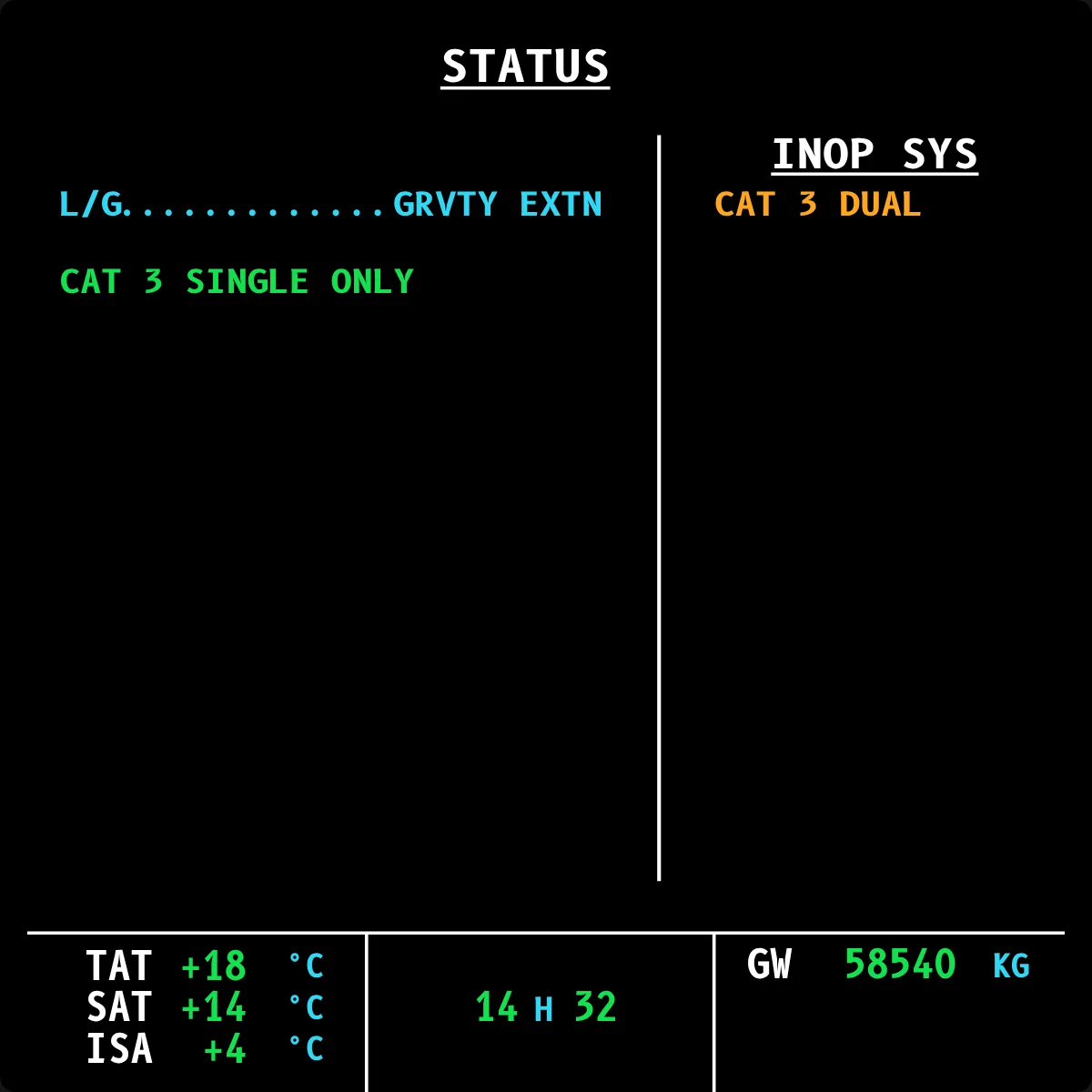
STATUS is the aircraft's operational summary: procedures in blue, information in green, inoperative systems in amber. After this warning it reads L/G GRVTY EXTN, CAT 3 SINGLE ONLY and, under INOP SYS, CAT 3 DUAL.
The FCOM prints one procedure and one STATUS for this warning, for all aircraft; the ECAM Trainer draws that one STATUS.
Sources FCOM DSC-31-20 STATUS PAGE / FCOM PRO-ABN-LG L/G
A319ceo, A320ceo, A320neo, A321neo: what differs?
| A319ceo, A320ceo | A320neo, A321neo | |
|---|---|---|
| The warning, its procedure and STATUS | The same in every version | The same in every version |
| The gear, its lever, indications and gravity extension | The same on all four types | The same on all four types |
Sources FCOM PRO-ABN-LG L/G GEAR NOT DOWNLOCKED / FCOM PRO-ABN-LG L/G / FCOM DSC-32-10-10 LANDING GEARS AND DOORS OPERATION / FCOM DSC-32-10-40 LANDING GEAR INDICATOR PANEL / FCOM DSC-32-10-40 LANDING GEAR SELECTOR LEVER / FCOM DSC-32-10-40 LANDING GEAR GRAVITY EXTENSION / FCOM DSC-32-10-40 WHEEL SD PAGE

Work L/G GEAR NOT DOWNLOCKED as a crew
Read and do each line against the FCOM, with the E/WD, the SD page and the overhead following your hands, the PF and PM calls, and a debrief that says what you missed.
Work this failure in the ECAM TrainerGo further
Written in our own words from the FCOM and the FCTM; each part names the units it rests on. The E/WD, the STATUS and the live aircraft are the platform's own ECAM and systems model, the same the ECAM Trainer and the flight deck run. This page explains the procedure; it is not the procedure. Aircraft differ by type, engine and options: your aircraft's FCOM, your QRH and your operator's procedures always come first. How we write and check these pages.
Every ECAM procedure, line by line, against the FCOM.
The ECAM Trainer works 108 scenarios with the E/WD, the SD page and the overhead following your hands. Start free today, or open everything with A320 Knowledge+.
For study and revision only. Always follow your operator's approved documentation and procedures. A320 Knowledge is independent and not affiliated with Airbus.
Related
- L/G DOORS NOT CLOSEDAn amber caution for a landing gear door that has not locked up.
- L/G LGCIU 1+2 FAULTAn amber caution for the loss of both computers that sequence the landing gear.
- L/G LGCIU 1 FAULTAn amber caution for one of the two computers that sequence the landing gear.
- L/G GEAR NOT UPLOCKEDAn amber caution for a gear that has not locked up after the lever went up.
- A320 landing gear and brakesThe system guide, with the live aircraft
- Every ECAM procedureThe alerts the ECAM Trainer works, grouped by system