
VENT BLOWER FAULT
An amber caution about the air that cools the avionics. Here is what the blower does, what sets the caution off, what one pushbutton at OVRD changes, and what the DC ESS branch asks, with the live aircraft at the moment the caution comes on.
Written and checked by current A320 pilotschecked against the FCOM on Our editorial policy
What VENT BLOWER FAULT means
VENT BLOWER FAULT is an amber caution about the avionics ventilation: the blowing pressure is low, or there is a duct overheat. FAULT comes on in the BLOWER pushbutton, and the CAB PRESS page shows VENT and BLOWER in amber.
The procedure has two branches. With no DC ESS BUS fault, the crew sets BLOWER to OVRD: the system goes to its closed circuit, air from the air conditioning is added to the ventilation air, and the blower fan stops. With a DC ESS BUS fault, the procedure reads amber LAND ASAP. STATUS lists VENT BLOWER inoperative.
Sources FCOM PRO-ABN-VENT VENT BLOWER FAULT / FCOM DSC-21-30-60 OVERHEAD PANEL / FCOM DSC-21-30-60 ECAM CAB PRESS PAGE / FCOM PRO-ABN-VENT VENT / FCOM PRO-ABN-VENT LAND ASAP
At a glance
- Level
- Amber caution, level 2: single chime, MASTER CAUT and, except in some cases, the relevant system page on the SD
- Sets it off
- Low blowing pressure, or a duct overheat
- Lights
- FAULT in the BLOWER pushbutton; on the CAB PRESS page VENT and BLOWER in amber
- Procedure
- With no DC ESS BUS fault, BLOWER to OVRD; with a DC ESS BUS fault, amber LAND ASAP
- BLOWER at OVRD
- Closed circuit, air from the air conditioning added, and the blower fan stops
- STATUS
- VENT BLOWER under INOP SYS
Sources FCOM DSC-31-10 WARNING/CAUTION CLASSIFICATION / FCOM DSC-31-20 SYSTEM PAGES / FCOM PRO-ABN-VENT VENT BLOWER FAULT / FCOM DSC-21-30-60 OVERHEAD PANEL / FCOM DSC-21-30-60 ECAM CAB PRESS PAGE / FCOM PRO-ABN-VENT VENT / FCOM PRO-ABN-VENT LAND ASAP
What does the blower do, and what sets the caution off?
The avionics ventilation is fully automatic. It cools the electrical and electronic equipment in the avionics compartment and on the flight deck, the instrument and circuit breaker panels among them, and part of its air is drawn from the cockpit through the panels.
Two electric fans, the blower and the extract fan, circulate the air around the avionics equipment continuously when the aircraft is electrically supplied. The avionics equipment ventilation controller (AEVC) controls the fans and valves of the system; with EXTRACT at OVRD, the extract fan is controlled directly from the pushbutton instead.
The caution triggers when the blowing pressure is low or there is a duct overheat. The BLOWER pushbutton's FAULT light gives the same two causes, and two more that light both BLOWER and EXTRACT: a failure of the computer power supply, and the smoke warning.
On the ground with the engines stopped, a low blowing pressure or a duct overheat also sounds the external horn.
Sources FCOM DSC-21-30-20 GENERAL / FCOM DSC-21-30-20 MAIN COMPONENTS / FCOM DSC-21-30-20 ABNORMAL OPERATION / FCOM PRO-ABN-VENT VENT BLOWER FAULT / FCOM DSC-21-30-60 OVERHEAD PANEL
Two causes, one caution
What does the crew see and hear?
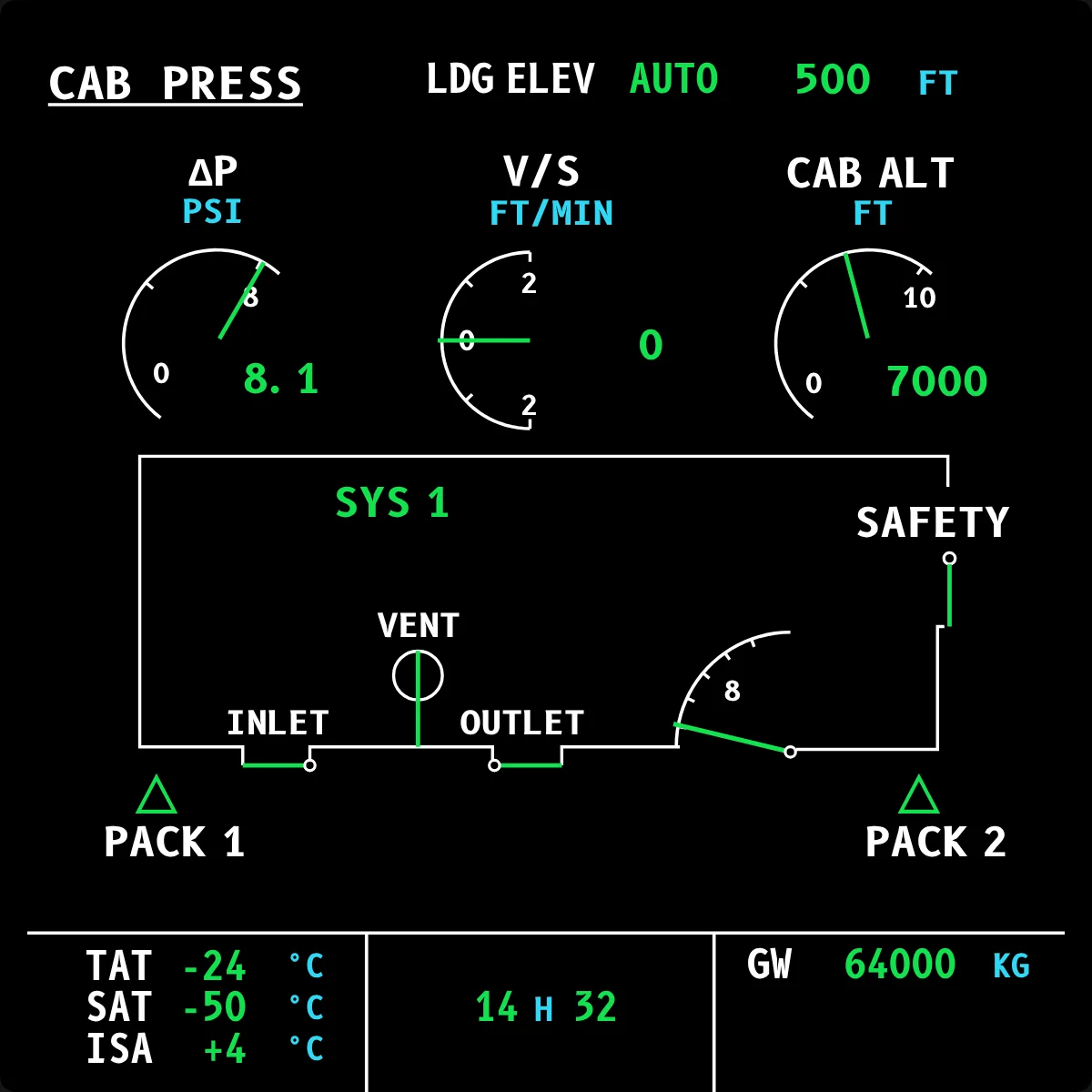
A level 2 caution: a single chime, the MASTER CAUT light steady amber, the caution in amber on the E/WD, and the SD normally calls up the relevant system page. The avionics ventilation is shown on the CAB PRESS page: VENT, normally white, turns amber with a BLOWER FAULT, and BLOWER appears in amber.
The procedure comes in two parts behind black squares, which in the FCOM mark parts of a procedure among which only one is applicable. The ECAM does not display the squares themselves.
Sources FCOM DSC-31-10 WARNING/CAUTION CLASSIFICATION / FCOM DSC-31-20 SYSTEM PAGES / FCOM DSC-21-30-60 ECAM CAB PRESS PAGE / FCOM PRO-ABN-VENT VENT / FCOM PRO-ABN-ABN-00 INTRODUCTION
The moment the caution comes on
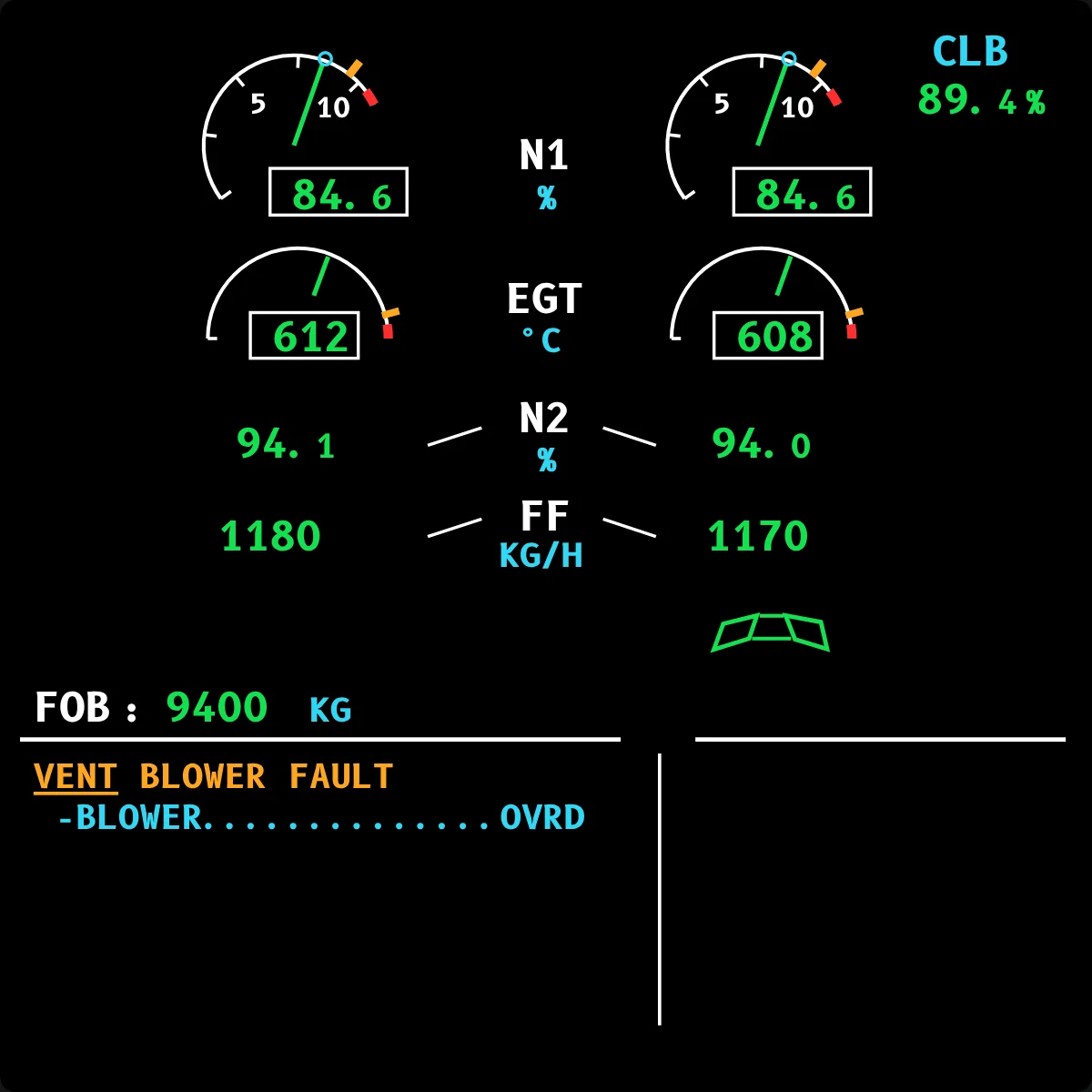
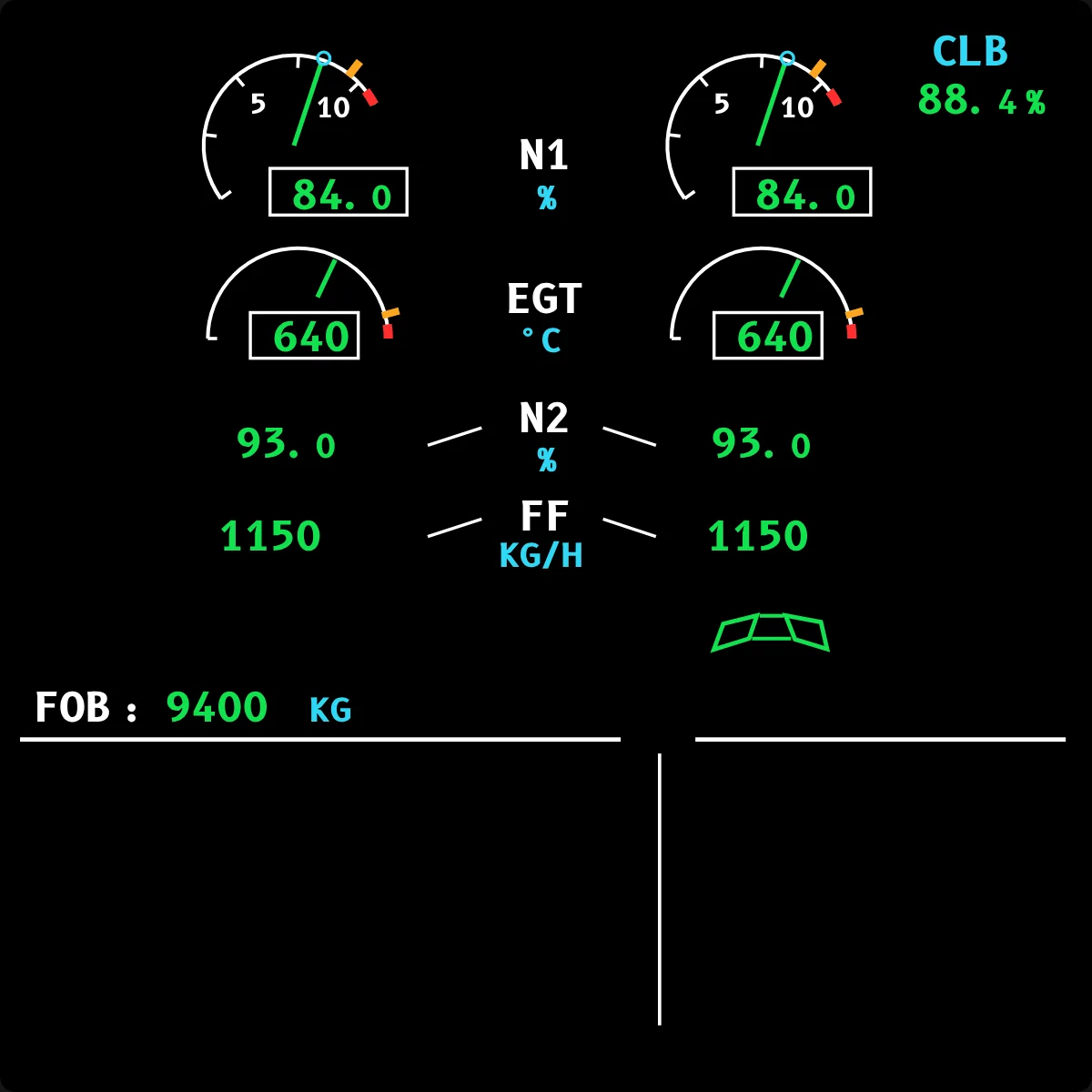
In the cruise, the electrical network in its normal configuration, BLOWER and EXTRACT at AUTO. Press the button to fail the blower, then look at the E/WD, the CAB PRESS page and the VENTILATION panel.
The alert Fail the blower
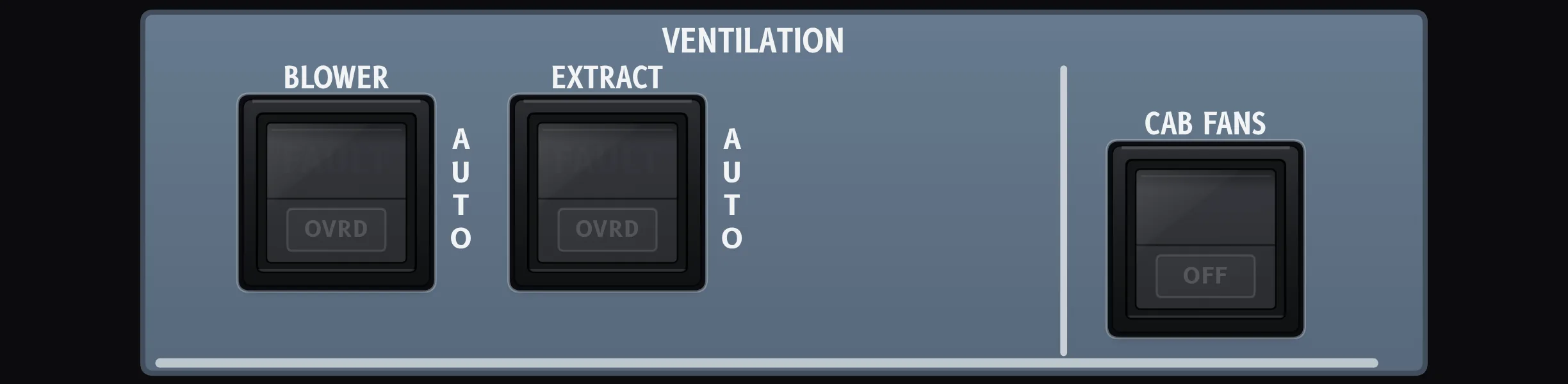
The E/WD shows the caution and one line, BLOWER OVRD, the branch for DC ESS supplied. FAULT lights in BLOWER. On the CAB PRESS page VENT turns amber and BLOWER appears in amber beside it.
The drawing shows the skin INLET and OUTLET valves closed, as before the failure: it follows the overhead panel description, which gives the closed circuit in flight with both pushbuttons at AUTO. It draws no fan, so it cannot show the blower stopping.
Sources FCOM PRO-ABN-VENT VENT / FCOM DSC-21-30-60 OVERHEAD PANEL / FCOM DSC-21-30-60 ECAM CAB PRESS PAGE
What does BLOWER at OVRD change?
Three things, as the FCOM gives them: the system goes to its closed circuit configuration, air from the air conditioning system is added to the ventilation air, and the blower fan stops. The extract fan continues to run.
With both pushbuttons at AUTO, the overhead panel description gives the closed circuit in flight. The FCOM's description of the configurations adds an intermediate one, partially open, in flight with the skin temperature above the in-flight threshold, 35 °C rising or 32 °C falling. The FCOM does not say how the two descriptions fit together. At OVRD the panel description puts the system in its closed circuit, with the air from the air conditioning added and the blower stopped.
Both pushbuttons at OVRD is another configuration: air flows from the air conditioning system and then overboard, the extract fan still running. That is what the FCOM describes for smoke in the avionics ventilation; this procedure asks for BLOWER alone.
The FCOM does not say whether the FAULT light goes out once BLOWER is at OVRD.
Sources FCOM DSC-21-30-60 OVERHEAD PANEL / FCOM DSC-21-30-20 ABNORMAL OPERATION / FCOM PRO-ABN-VENT VENT / FCOM DSC-21-30-20 NORMAL OPERATION, CLOSE-CIRCUIT CONFIGURATION / FCOM DSC-21-30-20 NORMAL OPERATION, INTERMEDIATE CONFIGURATION / FCOM DSC-21-30-20
AUTO, one OVRD, both OVRD
What does the DC ESS branch change?
The procedure is printed in two parts, each behind a black square: If NO DC ESS BUS FAULT, BLOWER to OVRD with the FCOM's remark on the closed circuit; If DC ESS BUS FAULT, amber LAND ASAP and no ventilation action.
The FCOM gives no reason for that split, and says nothing of what the blower has to do with the DC ESS bus. ELEC DC ESS BUS FAULT is an alert of its own, triggered when the DC ESS busbar is not supplied.
For amber LAND ASAP the FCTM says to "consider landing at the nearest suitable airport". Red LAND ASAP is the one for a time critical situation.
Otherwise the FCOM classes a level 2 caution as one the crew should be aware of without any immediate action, yet to be considered without delay, time and situation permitting, so that the affected system does not degrade further.
Sources FCOM PRO-ABN-VENT VENT / FCOM PRO-ABN-ABN-00 INTRODUCTION / FCOM PRO-ABN-ELEC ELEC DC ESS BUS FAULT / FCTM AOP-30-10 LAND ASAP DEFINITION / FCOM DSC-31-10 WARNING/CAUTION CLASSIFICATION
Where else does BLOWER OVRD come from?
From the electrical procedures, among others. ELEC DC BUS 1 FAULT and ELEC DC BUS 1+2 FAULT both set BLOWER and EXTRACT to OVRD, and their STATUS lists AVNCS VENT inoperative. ELEC EMER CONFIG has a line BLOWER + EXTRACT to OVRD. ELEC AC BUS 1 FAULT asks for BLOWER alone, and its STATUS lists VENT BLOWER.
The FCOM lists a failure of the computer power supply among the causes of a FAULT light in both pushbuttons. It does not say which bus supplies the controller.
Sources FCOM PRO-ABN-ELEC ELEC EMER CONFIG / FCOM PRO-ABN-ELEC ELEC / FCOM PRO-ABN-ELEC / FCOM DSC-21-30-60 OVERHEAD PANEL
Compare: DC BUS 1 and 2 lost
The same aircraft, healthy again. This time both main DC busbars are lost. Press it and compare the VENTILATION panel and the CAB PRESS page with the blower's own caution.
The alert Lose DC BUS 1 and 2
The E/WD shows ELEC DC BUS 1+2 FAULT with BLOWER OVRD and EXTRACT OVRD as its first lines. The drawing lights FAULT in both BLOWER and EXTRACT and turns VENT amber on the CAB PRESS page, while BLOWER and EXTRACT do not appear there in amber. That is the drawing's own reading: it takes AVNCS VENT on this failure's STATUS as the controller lost with DC BUS 1.
The FCOM gives the two lines and lists AVNCS VENT among the inoperative systems on this failure's STATUS. It does not say whether the BLOWER and EXTRACT FAULT lights come on with it.
Sources FCOM PRO-ABN-ELEC ELEC / FCOM DSC-21-30-60 ECAM CAB PRESS PAGE / FCOM PRO-ABN-ELEC / FCOM DSC-21-30-60 OVERHEAD PANEL
How is it different from VENT EXTRACT FAULT?
VENT EXTRACT FAULT watches the other fan: it triggers when the extract pressure is low. Its procedure is EXTRACT to OVRD, with the same remark on the closed circuit and no DC ESS branch, and its STATUS lists VENT EXTRACT.
The two OVRD selections do not do the same to the fans. BLOWER at OVRD stops the blower fan and the extract fan runs on; EXTRACT at OVRD controls the extract fan directly from the pushbutton, and both fans continue to run.
Sources FCOM PRO-ABN-VENT VENT EXTRACT FAULT / FCOM PRO-ABN-VENT VENT / FCOM PRO-ABN-VENT / FCOM DSC-21-30-20 ABNORMAL OPERATION / FCOM DSC-21-30-60 OVERHEAD PANEL
What is lost afterwards?
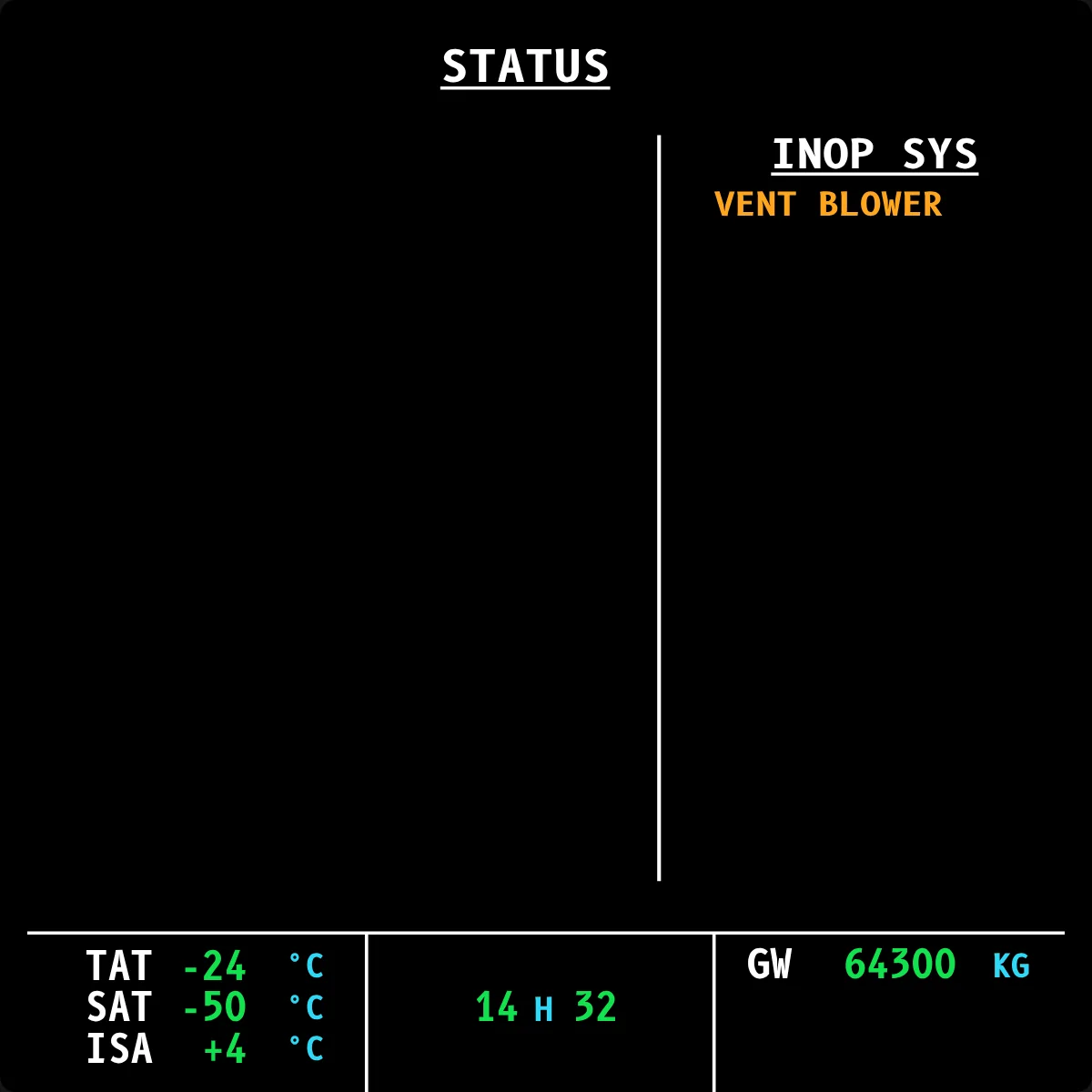
STATUS is the aircraft's operational summary. The FCOM prints one STATUS for this caution, for all aircraft, after both branches of the procedure: VENT BLOWER under INOP SYS. The STATUS above shows it.
Sources FCOM DSC-31-20 STATUS PAGE / FCOM PRO-ABN-VENT LAND ASAP
A319ceo, A320ceo, A320neo, A321neo: what differs?
| A319ceo, A320ceo | A320neo, A321neo | |
|---|---|---|
| The caution, its procedure and STATUS | The same in every version | The same in every version |
| BLOWER pushbutton: FAULT causes and OVRD | The same on all four types | The same on all four types |
| CAB PRESS page: VENT and BLOWER in amber | The same in both versions of the page description | The same in both versions of the page description |
Sources FCOM PRO-ABN-VENT VENT BLOWER FAULT / FCOM PRO-ABN-VENT VENT / FCOM PRO-ABN-VENT LAND ASAP / FCOM DSC-21-30-60 OVERHEAD PANEL / FCOM DSC-21-30-60 ECAM CAB PRESS PAGE

Work VENT BLOWER FAULT as a crew
Read and do each line against the FCOM, with the E/WD, the SD page and the overhead following your hands, the PF and PM calls, and a debrief that says what you missed.
Work this failure in the ECAM TrainerGo further
Written in our own words from the FCOM and the FCTM; each part names the units it rests on. The E/WD, the STATUS and the live aircraft are the platform's own ECAM and systems model, the same the ECAM Trainer and the flight deck run. This page explains the procedure; it is not the procedure. Aircraft differ by type, engine and options: your aircraft's FCOM, your QRH and your operator's procedures always come first. How we write and check these pages.
Every ECAM procedure, line by line, against the FCOM.
The ECAM Trainer works 108 scenarios with the E/WD, the SD page and the overhead following your hands. Start free today, or open everything with A320 Knowledge+.
For study and revision only. Always follow your operator's approved documentation and procedures. A320 Knowledge is independent and not affiliated with Airbus.