EIS DMC 1 FAULT
An amber caution for the display computer behind the captain's screens and the ECAM. Here is what the three DMCs drive, what the crew sees when DMC 1 fails, what the EIS DMC selector does and what is lost, with the live aircraft at the moment the caution comes on.
Written and checked by current A320 pilotschecked against the FCOM on Our editorial policy
What EIS DMC 1 FAULT means
EIS DMC 1 FAULT is an amber caution: display management computer 1 has failed. In normal operation DMC 1 drives the captain's PFD and ND and the two ECAM display units, DMC 2 the first officer's PFD and ND, and DMC 3 waits on standby.
When DMC 1 fails, the DUs it drives display INVALID DATA and DMC 2 automatically drives the ECAM. The E/WD has one line, EIS DMC SWITCH to CAPT 3: DMC 3 replaces DMC 1. STATUS lists DMC 1 as inoperative.
Sources FCOM PRO-ABN-EIS EIS DMC 1(2)(3) FAULT / FCOM DSC-31-05-50 RECONFIGURING THE DISPLAY MANAGEMENT COMPUTER (DMC) / FCOM DSC-31-30 SWITCHING PANEL / FCOM PRO-ABN-EIS / FCOM PRO-ABN-EIS EIS
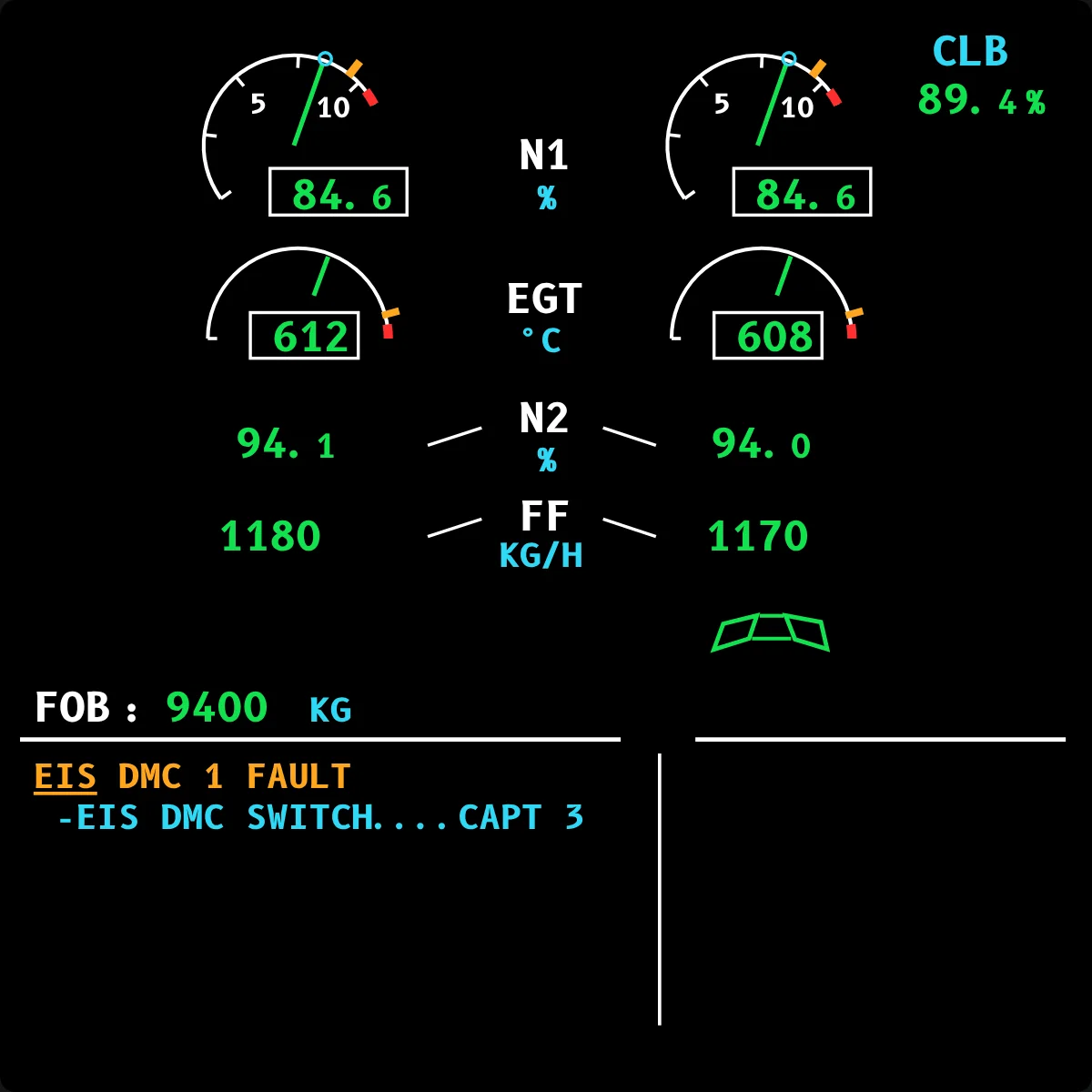
At a glance
- Level
- Amber caution, level 2: single chime and MASTER CAUT steady amber
- Sets it off
- DMC 1 failed (the same alert covers DMC 2 and DMC 3)
- Displays
- Each DU of the failed DMC displays INVALID DATA; DMC 2 drives the ECAM automatically
- Procedure
- One line: EIS DMC SWITCH to CAPT 3, so that DMC 3 replaces DMC 1
- STATUS
- DMC 1 under INOP SYS, nothing else
Sources FCOM DSC-31-10 WARNING/CAUTION CLASSIFICATION / FCOM DSC-31-30 ATTENTION GETTERS / FCOM PRO-ABN-EIS EIS DMC 1(2)(3) FAULT / FCOM DSC-31-30 SWITCHING PANEL / FCOM DSC-31-05-50 RECONFIGURING THE DISPLAY MANAGEMENT COMPUTER (DMC) / FCOM PRO-ABN-EIS / FCOM PRO-ABN-EIS EIS
Which displays does each DMC drive?
The instrument panels have six identical display units, full colour liquid crystal displays: a PFD and an ND for each pilot, and the two ECAM displays, the E/WD above and the SD below.
Three identical DMCs obtain data from the sensors and computers and send it to the display units, which generate the images. Each DMC has a single channel and can supply one PFD, one ND and both ECAM display units at the same time.
In normal operation DMC 1 drives the captain's PFD, the captain's ND and the ECAM DUs; DMC 2 drives the first officer's PFD and ND; DMC 3 is on standby, ready to drive any DU.
The DMCs also receive some of the signals the two SDACs generate, and use them to generate the system pages and the engine parameters.
Sources FCOM DSC-31-05-30 DISPLAY UNIT (DU) / FCOM DSC-31-05-20 COCKPIT ARRANGEMENT / FCOM DSC-31-05-30 DISPLAY MANAGEMENT COMPUTER (DMC) / FCOM DSC-31-05-50 RECONFIGURING THE DISPLAY MANAGEMENT COMPUTER (DMC) / FCOM DSC-31-05-30 SYSTEM DATA ACQUISITION CONCENTRATOR (SDAC)
Three DMCs, and who drives what
What does the crew see and hear?
A level 2 caution: a single chime, the MASTER CAUT light steady amber and the caution in amber on the E/WD, with one blue line, EIS DMC SWITCH to CAPT 3.
On the displays, each DU of the failed DMC displays INVALID DATA, and DMC 2 automatically drives the ECAM.
The FCOM's flight phase chart inhibits the caution from takeoff power until 15 s after liftoff, and from 800 ft down to 80 kt after touchdown.
Sources FCOM DSC-31-10 WARNING/CAUTION CLASSIFICATION / FCOM DSC-31-30 ATTENTION GETTERS / FCOM PRO-ABN-EIS / FCOM DSC-31-30 SWITCHING PANEL / FCOM DSC-31-05-50 RECONFIGURING THE DISPLAY MANAGEMENT COMPUTER (DMC) / FCOM PRO-ABN-EIS EIS DMC 1(2)(3) FAULT / FCOM DSC-31-15 FLIGHT PHASES
The moment the caution comes on
In the cruise, nothing failed. Below the E/WD, the SWITCHING panel with the ECAM control panel under it, EIS DMC at NORM. Press the button to fail DMC 1, then read the E/WD.
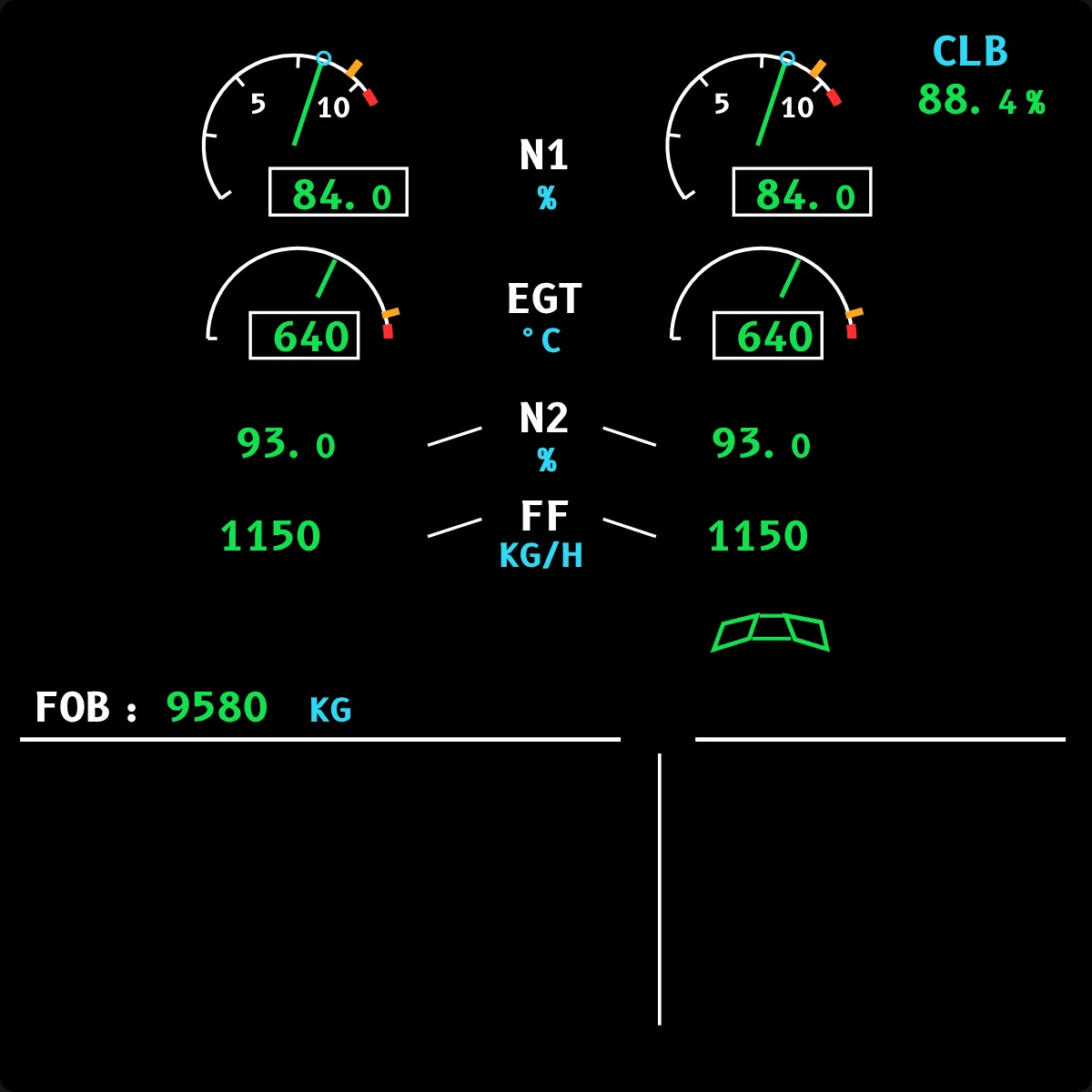

The alert Fail DMC 1
EIS DMC 1 FAULT comes up in amber with one blue line, EIS DMC SWITCH to CAPT 3. The EIS DMC selector is still at NORM, where DMC 1 supplies the captain's PFD, the captain's ND and the ECAM's DUs.
No PFD or ND is drawn here. On the aircraft, each DU of the failed DMC displays INVALID DATA, and DMC 2 drives the ECAM by itself. Working the line is what the ECAM Trainer does with you.
Sources FCOM PRO-ABN-EIS / FCOM DSC-31-30 SWITCHING PANEL / FCOM DSC-31-05-50 RECONFIGURING THE DISPLAY MANAGEMENT COMPUTER (DMC)
What does the EIS DMC selector do?
The EIS DMC selector is near the centre of the SWITCHING panel, on the pedestal just above the ECAM control panel. It lets the crew replace the captain's or the first officer's DMC, DMC 1 or DMC 2, by DMC 3.
At NORM, DMC 1 supplies the captain's PFD, the captain's ND and the ECAM's DUs, and DMC 2 the first officer's PFD and ND. At CAPT 3, DMC 3 replaces DMC 1; at F/O 3, DMC 3 replaces DMC 2.
With DMC 1 or 2 failed, the crew selects the DMC 3 source by hand; the switch from DMC 1 to DMC 2 for the ECAM is the automatic part. If DMC 3 fails with CAPT 3 selected, DMC 2 automatically drives the ECAM.
With the selector away from NORM, SWITCHING PNL appears in green among the memos on the E/WD. A memo is information: it recalls the normal or automatic selection of functions temporarily used, and it is neither a warning nor a caution.
Sources FCOM DSC-31-05-40 EIS DMC SWITCHING SELECTOR / FCOM DSC-31-30 SWITCHING PANEL / FCOM DSC-31-05-50 RECONFIGURING THE DISPLAY MANAGEMENT COMPUTER (DMC) / FCOM DSC-31-30 MEMO DISPLAY / FCOM DSC-31-10 WARNING/CAUTION CLASSIFICATION
EIS DMC at CAPT 3
What if it is DMC 2, or DMC 3?
The FCOM prints one procedure for the three computers, each case under its own condition. DMC 1: EIS DMC SWITCH to CAPT 3. DMC 2: EIS DMC SWITCH to F/O 3, DMC 3 replacing DMC 2. DMC 3: crew awareness, with no line to action.
DMC 3 drives nothing in normal operation: it is the standby. DMC 2 is the first officer's computer; the ECAM goes to it automatically when DMC 1 fails, or DMC 3 with CAPT 3 selected.
A related caution watches the links rather than the computers: EIS DMC/FWC COM FAULT triggers when at least one FWC detects the loss of both the DMC 1/3 and the DMC 2/3 buses.
Sources FCOM PRO-ABN-EIS EIS DMC 1(2)(3) FAULT / FCOM PRO-ABN-EIS / FCOM DSC-31-05-50 RECONFIGURING THE DISPLAY MANAGEMENT COMPUTER (DMC) / FCOM PRO-ABN-EIS EIS DMC/FWC COM FAULT
How is a failed DMC told apart from a failed screen?
The FCOM ties each message to its own case. A failed DMC makes each of its DUs display INVALID DATA. A failed DU may show something else: a blank screen with an amber F, a distorted display, or a blank screen with INVALID DISPLAY UNIT in amber.
With INVALID DATA on the DUs of DMC 1 or DMC 2, the crew selects the DMC 3 source by hand. A failed DU has a display unit procedure of its own in the FCOM, not this caution's.
The ECAM caution names the computer. EIS DMC 1 FAULT tells the crew which DMC has gone, and so which way the selector goes.
Sources FCOM DSC-31-30 SWITCHING PANEL / FCOM DSC-31-05-60 FAILURE OF A DU / FCOM DSC-31-05-50 RECONFIGURING THE DISPLAY MANAGEMENT COMPUTER (DMC) / FCOM PRO-ABN-EIS / FCOM PRO-ABN-EIS EIS DMC 1(2)(3) FAULT
What does the aircraft lose with DMC 1?
STATUS lists DMC 1 under INOP SYS, in amber, and nothing else: no limitation, no approach procedure and no information line.
With CAPT 3 selected, DMC 3 replaces DMC 1, so the standby DMC, the one ready to drive any DU, is now in use on the captain's side. The FCOM's STATUS lists no further consequence.
Sources FCOM PRO-ABN-EIS EIS / FCOM DSC-31-20 STATUS PAGE / FCOM DSC-31-05-50 RECONFIGURING THE DISPLAY MANAGEMENT COMPUTER (DMC) / FCOM DSC-31-30 SWITCHING PANEL / FCOM PRO-ABN-EIS
What is lost afterwards?
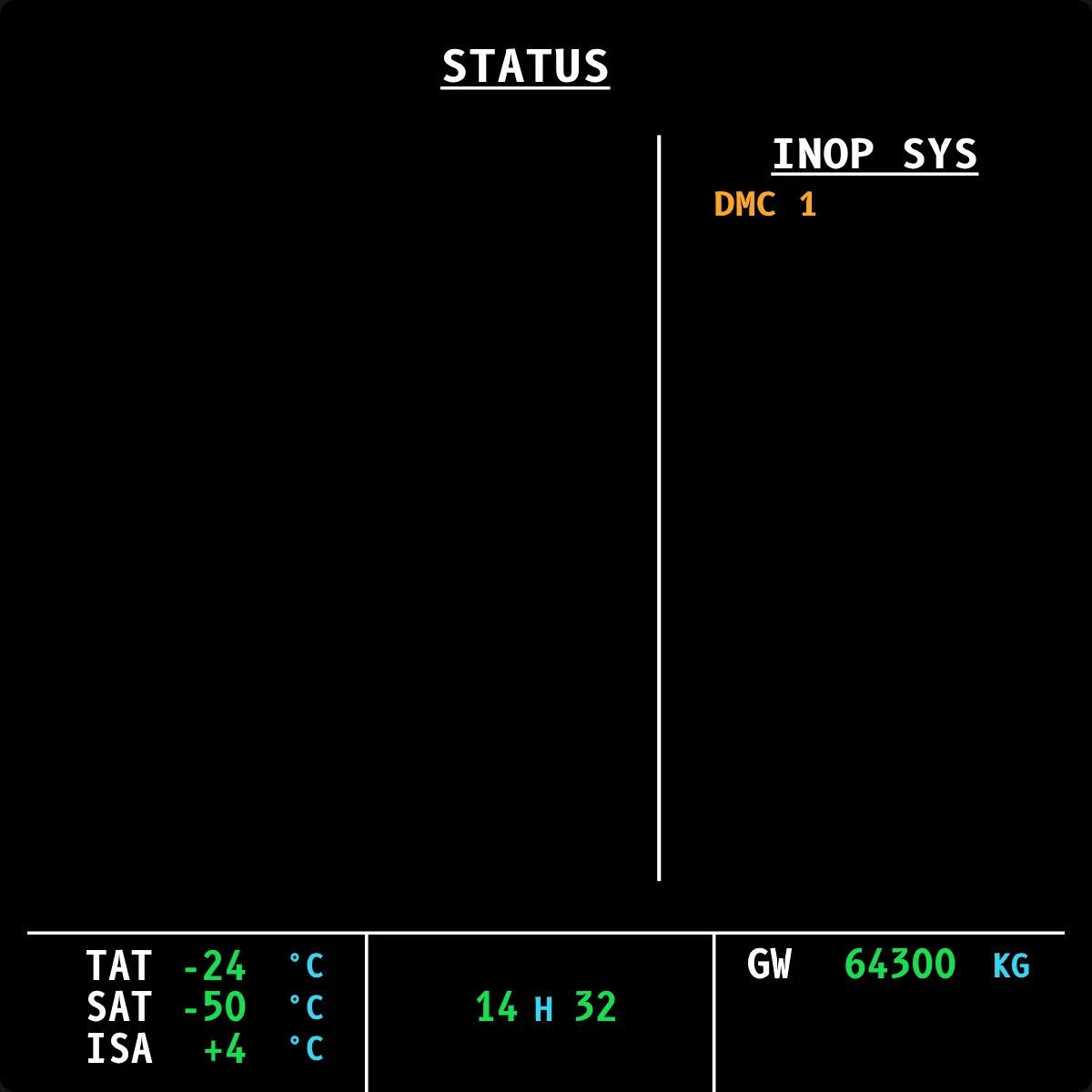
STATUS is the aircraft's operational summary. After this caution it lists only DMC 1, in amber, under INOP SYS.
The FCOM prints one procedure and one STATUS for this caution, for all aircraft; the ECAM Trainer draws that one STATUS.
Sources FCOM DSC-31-20 STATUS PAGE / FCOM PRO-ABN-EIS EIS / FCOM PRO-ABN-EIS EIS DMC 1(2)(3) FAULT / FCOM PRO-ABN-EIS
A319ceo, A320ceo, A320neo, A321neo: what differs?
| A319ceo, A320ceo | A320neo, A321neo | |
|---|---|---|
| The caution, its line and STATUS | The same in every version | The same in every version |
| The three DMCs and the EIS DMC selector | The same on all four types | The same on all four types |
Sources FCOM PRO-ABN-EIS EIS DMC 1(2)(3) FAULT / FCOM PRO-ABN-EIS / FCOM PRO-ABN-EIS EIS / FCOM DSC-31-05-30 DISPLAY MANAGEMENT COMPUTER (DMC) / FCOM DSC-31-05-50 RECONFIGURING THE DISPLAY MANAGEMENT COMPUTER (DMC) / FCOM DSC-31-30 SWITCHING PANEL

Work EIS DMC 1 FAULT as a crew
Read and do each line against the FCOM, with the E/WD, the SD page and the overhead following your hands, the PF and PM calls, and a debrief that says what you missed.
Work this failure in the ECAM TrainerGo further
Written in our own words from the FCOM and the FCTM; each part names the units it rests on. The E/WD, the STATUS and the live aircraft are the platform's own ECAM and systems model, the same the ECAM Trainer and the flight deck run. This page explains the procedure; it is not the procedure. Aircraft differ by type, engine and options: your aircraft's FCOM, your QRH and your operator's procedures always come first. How we write and check these pages.
Every ECAM procedure, line by line, against the FCOM.
The ECAM Trainer works 108 scenarios with the E/WD, the SD page and the overhead following your hands. Start free today, or open everything with A320 Knowledge+.
For study and revision only. Always follow your operator's approved documentation and procedures. A320 Knowledge is independent and not affiliated with Airbus.