
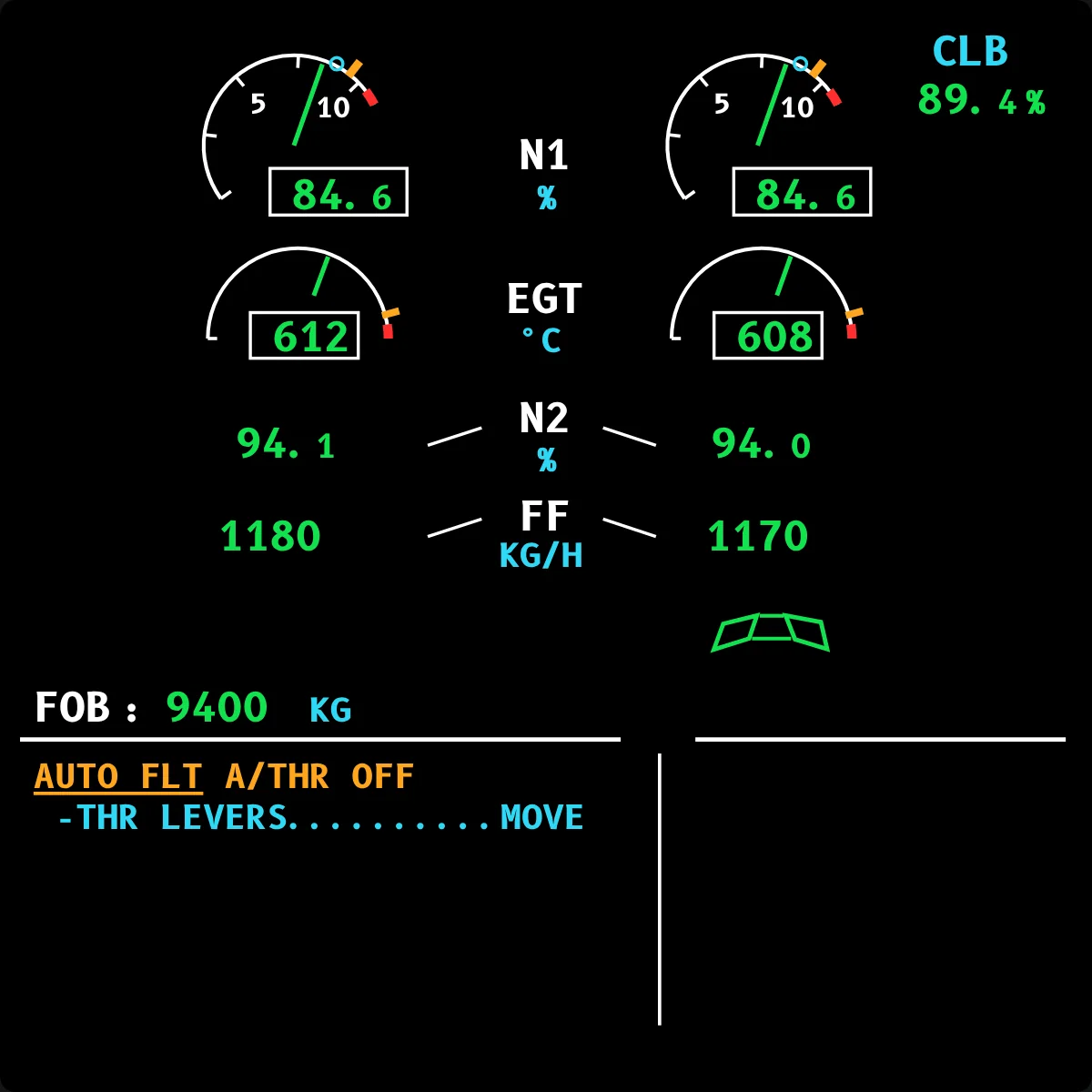
AUTO FLT A/THR OFF
An amber caution for an involuntary autothrust disconnection: with the levers in the CL detent the thrust locks where it was, and the levers must come out of the detent. Here is what sets it off, what the crew sees, what the thrust lock does and what STATUS means, with the live aircraft at the moment the caution comes on.
Written and checked by current A320 pilotschecked against the FCOM on Our editorial policy
What AUTO FLT A/THR OFF means
AUTO FLT A/THR OFF is an amber caution for an involuntary autothrust disconnection: a failure, the loss of an arming condition, or the A/THR pushbutton on the FCU. A standard disconnection, by the instinctive disconnect pushbutton or both levers to idle above 50 ft RA, gives instead a temporary amber A/THR OFF message, a single chime and MASTER CAUT for 3 s at most.
After a failure or the FCU pushbutton, with the thrust levers in the CL detent the thrust locks at the level it had, and THR LK flashes on the FMA. The ECAM's one line is THR LEVERS MOVE: moving them out of the detent ends the lock and gives manual thrust. Not moved within 5 s, ENG THRUST LOCKED follows. STATUS reads CAT 2 ONLY.
Sources FCOM PRO-ABN-AUTO_FLT AUTO FLT A/THR OFF / FCOM DSC-22_30-90 A/THR DISCONNECTION / FCOM DSC-22_30-90 A/THR DISCONNECTION CAUTION / FCTM AS-FG-10-2 TO SET AUTOTHRUST TO OFF / FCOM DSC-22_30-90 THRUST LOCK FUNCTION / FCOM PRO-ABN-AUTO_FLT AUTO FLT
At a glance
- Level
- Amber caution, level 2: single chime and MASTER CAUT
- Sets it off
- An involuntary autothrust disconnection; the FCTM counts the FCU's A/THR pushbutton as one
- Thrust
- After a failure or the FCU's A/THR pushbutton, with the levers in the CL detent, or MCT with one engine out, the thrust locks at its level before the disconnection, and THR LK flashes amber on the FMA
- Procedure
- THR LEVERS MOVE; not moved within 5 s, ENG THRUST LOCKED is displayed
- STATUS
- CAT 2 ONLY; A/THR and CAT 3 inoperative
Sources FCOM DSC-31-10 WARNING/CAUTION CLASSIFICATION / FCOM DSC-31-30 ATTENTION GETTERS / FCOM DSC-22_30-90 A/THR DISCONNECTION CAUTION / FCOM PRO-ABN-AUTO_FLT AUTO FLT A/THR OFF / FCTM AS-FG-10-2 TO SET AUTOTHRUST TO OFF / FCOM DSC-22_30-90 THRUST LOCK FUNCTION / FCOM DSC-22_30-100 / FCOM PRO-ABN-AUTO_FLT AUTO FLT
What sets it off?
The autothrust is a function of the FMGS: two independent commands, one per FMGC, each able to control both engines. When it is disconnected, it is neither armed nor active.
The FCOM sorts disconnections in two. Standard: the crew pushes the instinctive disconnect pushbutton on the thrust levers, or sets both levers to the IDLE detent. Non-standard: the crew pushes the A/THR pushbutton on the FCU while the autothrust is active or armed, or the system loses one of its arming conditions.
The caution triggers only for an involuntary disconnection. For a voluntary one, an amber A/THR OFF message is displayed at the lower right of the E/WD instead. The FCTM counts the use of the A/THR pushbutton as an involuntary off command, as a failure would be, and lists the AUTO FLT A/THR OFF alert among what it triggers.
The arming conditions are numerous; the FCOM lists the most important: one FMGC, one FAC, two ADIRS, two FADECs, one FCU channel and one LGCIU operative, and the autothrust not manually disabled by holding the instinctive disconnect pushbutton for more than 15 s. The FCOM gives no single cause for this caution.
Sources FCOM DSC-22_30-90 GENERAL / FCOM DSC-22_30-90 A/THR DISCONNECTION / FCOM PRO-ABN-AUTO_FLT AUTO FLT A/THR OFF / FCTM AS-FG-10-2 TO SET AUTOTHRUST TO OFF / FCOM DSC-22_30-90 A/THR ARMING CONDITIONS
Two ways to lose the autothrust
What does the crew see and hear?
For a disconnection by other means than the instinctive pushbutton or both levers to idle above 50 ft RA, the FCOM's table gives a single chime, the MASTER CAUT light on, the ECAM caution AUTO FLT A/THR OFF with THR LEVERS MOVE in blue, and ENG THRUST LOCKED flashing; the CLR pushbutton lights, and there is a STATUS.
The standard disconnection, by the instinctive pushbutton or both levers to idle above 50 ft RA, is lighter: the A/THR OFF message for 9 s at most, MASTER CAUT for 3 s at most, a single chime, and no STATUS.
On the FCU, the A/THR pushbutton is lit green while the autothrust is armed or active. On the FMA, A/THR in white in the fifth column means active and in blue means armed; THR LK flashing means the thrust is locked after a disconnection.
Sources FCOM DSC-22_30-90 A/THR DISCONNECTION CAUTION / FCOM DSC-22_10-40-20 AP-A/THR CONTROL AREA / FCOM DSC-22_30-90 GENERAL / FCOM DSC-22_30-100
The moment the caution comes on
In the cruise at FL350, both thrust levers in the CL detent. Press the button to lose the autothrust, then look at the E/WD and the thrust levers.
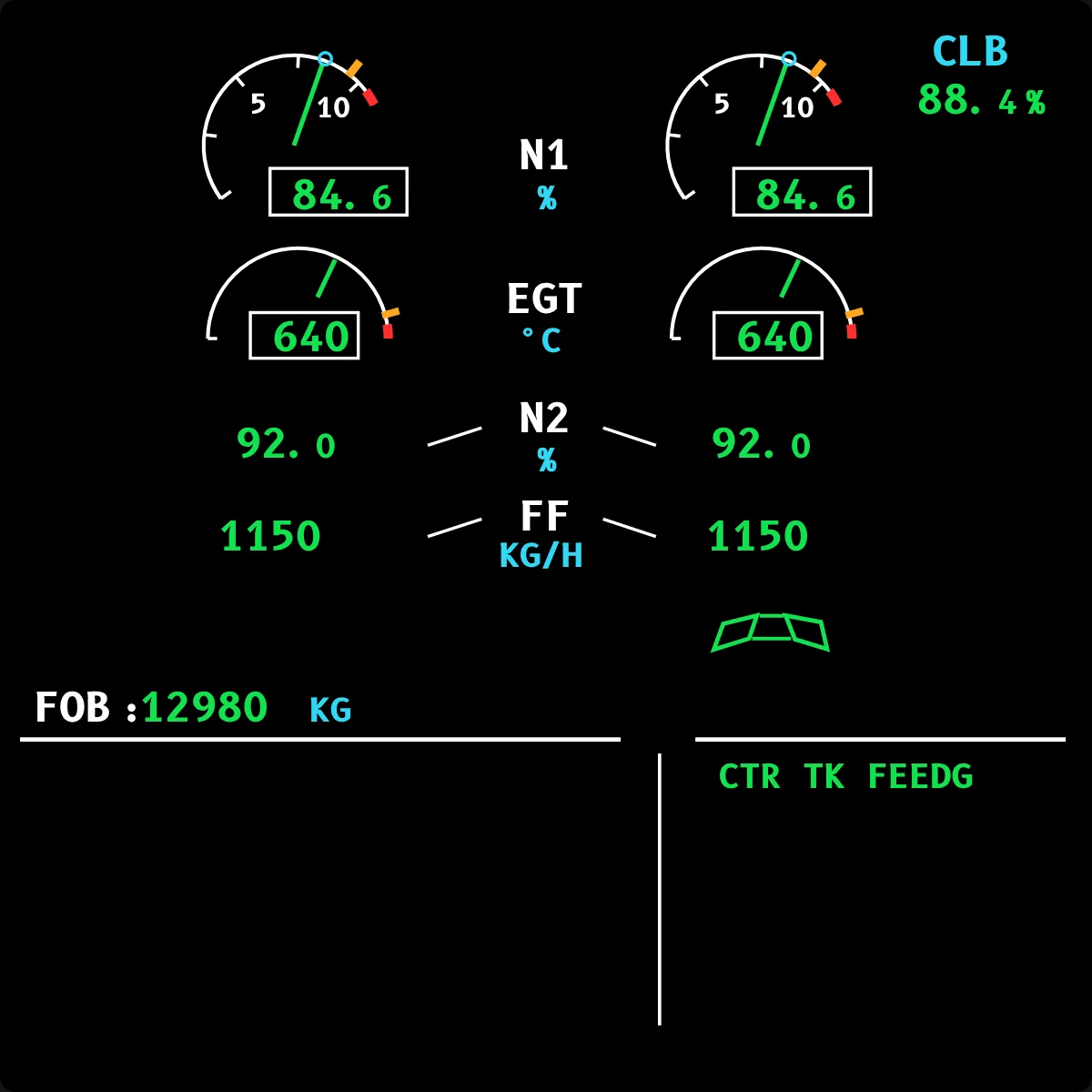

The alert Lose the autothrust
The E/WD shows AUTO FLT A/THR OFF in amber with one line, THR LEVERS MOVE, in blue. The levers stay where they were, in the CL detent.
No FMA is drawn here. On the aircraft, with the levers in CL, the thrust lock holds the thrust at its level before the disconnection and THR LK flashes amber on the FMA. Working the line is what the ECAM Trainer does with you.
Sources FCOM PRO-ABN-AUTO_FLT AUTO FLT / FCOM DSC-22_30-90 A/THR DISCONNECTION CAUTION / FCOM DSC-22_30-90 THRUST LOCK FUNCTION / FCOM DSC-22_30-100
What does the thrust do, and why move the levers?
The thrust lock function activates when the levers are in the CL detent, or the MCT detent with one engine out, and the crew pushes the A/THR pushbutton on the FCU or the autothrust disconnects after a failure. The thrust is locked at its level before the disconnection.
While it is active, THR LK flashes amber on the FMA, ENG THRUST LOCKED flashes on the ECAM every 5 s, THR LEVERS MOVE is displayed, and a single chime sounds with the MASTER CAUT light flashing every 5 s.
The thrust lock's own description says what moving the levers does: out of CL or MCT, the thrust lock is suppressed, the crew has manual control with the levers, and all its warnings cease. The procedure's comment: if the levers are not moved within 5 s, ENG THRUST LOCKED is displayed.
Out of the detent and with the autothrust disconnected, the levers control the thrust directly: each lever position corresponds to a given thrust. The ECAM line gives no target position for them.
Sources FCOM DSC-22_30-90 THRUST LOCK FUNCTION / FCOM PRO-ABN-AUTO_FLT AUTO FLT / FCOM PRO-ABN-ENG ENG THRUST LOCKED / FCOM DSC-22_30-90 THRUST LEVERS
How is a deliberate disconnection different?
The FCTM's recommended technique for setting the autothrust off with the instinctive disconnect pushbutton: bring the levers back to about the current thrust, then press it. Pressed with the levers in the CL detent, the thrust increases to maximum climb: an unwanted thrust increase, which may destabilise the approach.
The other standard way is both levers to IDLE, which the FCTM says is usually used in the descent, with the autothrust in THR IDLE, or at landing, when thrust reduction is needed and the levers go to the idle stop.
The A/THR pushbutton on the FCU is not for routine use: the FCTM says it should not be used unless the instinctive disconnect pushbuttons are inoperative, and it locks the thrust as long as the levers stay in CL or MCT.
One caution about the instinctive pushbutton itself: held for more than 15 s, it disconnects the autothrust for the rest of the flight. All its functions, alpha floor included, are lost, and come back only at the next FMGC power-up on the ground.
Sources FCTM AS-FG-10-2 TO SET AUTOTHRUST TO OFF / FCOM DSC-22_30-90 A/THR DISCONNECTION
What does STATUS mean?
STATUS reads CAT 2 ONLY in green, with the A/THR and CAT 3 under INOP SYS in amber. Each FMGC computes the landing category from the systems and functions available, shows it on the FMA as soon as the APPR pushbutton is pushed to arm the ILS approach modes, and a triple click sounds when it downgrades.
CAT 3 DUAL is a fail-operational automatic landing system and CAT 3 SINGLE a fail-passive one; with CAT 3 inoperative, neither is available. The FCOM gives no reason why the autothrust lost removes CAT 3.
With the autothrust disconnected, the crew controls the thrust manually with the levers.
Sources FCOM PRO-ABN-AUTO_FLT AUTO FLT / FCOM DSC-31-20 STATUS PAGE / FCOM PRO-NOR-SRP-01-70 LANDING CATEGORIES / FCOM DSC-22_30-80-30-10 LANDING CAPABILITIES / FCOM DSC-22_30-90 GENERAL / FCOM DSC-22_30-90 THRUST LEVERS
What is lost afterwards?
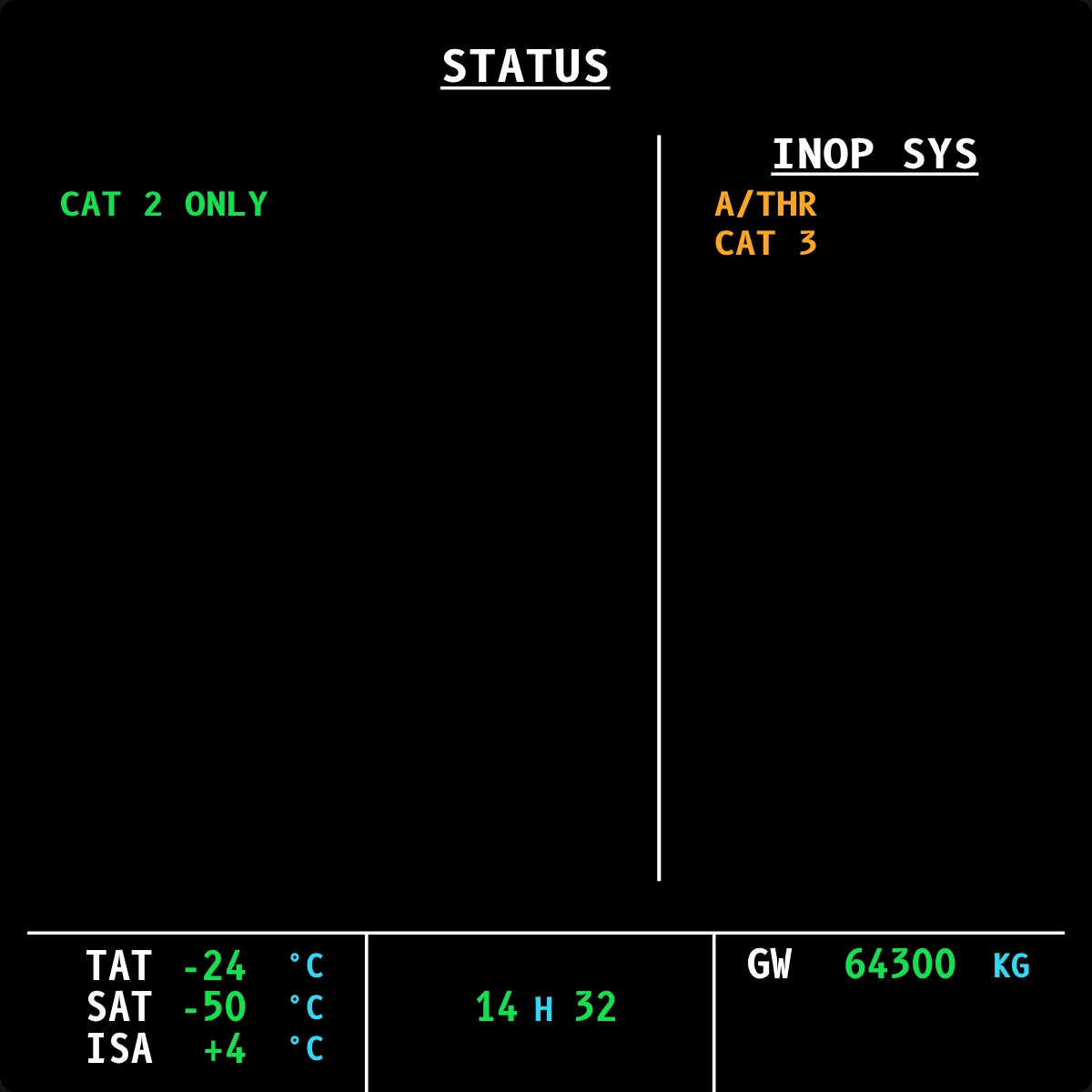
STATUS is the aircraft's operational summary. After this caution it reads CAT 2 ONLY in green, as information, with A/THR and CAT 3 under INOP SYS in amber.
The FCOM prints one STATUS for this caution, for all aircraft, and the same procedure. A standard disconnection brings no STATUS.
Sources FCOM DSC-31-20 STATUS PAGE / FCOM PRO-ABN-AUTO_FLT AUTO FLT / FCOM PRO-ABN-AUTO_FLT AUTO FLT A/THR OFF / FCOM DSC-22_30-90 A/THR DISCONNECTION CAUTION
A319ceo, A320ceo, A320neo, A321neo: what differs?
| A319ceo, A320ceo | A320neo, A321neo | |
|---|---|---|
| The caution, its procedure and STATUS | The same in every version | The same in every version |
| Thrust lock and the disconnection caution table | The same on all four types | The same on all four types |
Sources FCOM PRO-ABN-AUTO_FLT AUTO FLT A/THR OFF / FCOM PRO-ABN-AUTO_FLT AUTO FLT / FCOM DSC-22_30-90 THRUST LOCK FUNCTION / FCOM DSC-22_30-90 A/THR DISCONNECTION CAUTION

Work AUTO FLT A/THR OFF as a crew
Read and do each line against the FCOM, with the E/WD, the SD page and the overhead following your hands, the PF and PM calls, and a debrief that says what you missed.
Work this failure in the ECAM TrainerGo further
Written in our own words from the FCOM and the FCTM; each part names the units it rests on. The E/WD, the STATUS and the live aircraft are the platform's own ECAM and systems model, the same the ECAM Trainer and the flight deck run. This page explains the procedure; it is not the procedure. Aircraft differ by type, engine and options: your aircraft's FCOM, your QRH and your operator's procedures always come first. How we write and check these pages.
Every ECAM procedure, line by line, against the FCOM.
The ECAM Trainer works 108 scenarios with the E/WD, the SD page and the overhead following your hands. Start free today, or open everything with A320 Knowledge+.
For study and revision only. Always follow your operator's approved documentation and procedures. A320 Knowledge is independent and not affiliated with Airbus.
Related
- AUTO FLT FAC 1+2 FAULTAn amber caution for the loss of both flight augmentation computers: the rudder travel limit, the rudder trim, the yaw damper and the characteristic speeds on the PFD all go.
- AUTO FLT FAC 1 FAULTAn amber caution for one of the two flight augmentation computers, the FACs behind the yaw damper, the rudder trim, the rudder travel limit and the speeds on the PFD.
- A320 auto flight and FMSThe system guide, with the live aircraft
- Every ECAM procedureThe alerts the ECAM Trainer works, grouped by system